
Meeting Notes Best Practices for Coaches That Drive Action

Coachful
You're about to open the next coaching call, and the previous session's notes are still a page of fragments. You remember a useful conversation about delegation. What you can't find is whether the client agreed to draft a script, speak to a direct report, or just consider the idea.
That uncertainty costs session time. Meeting notes best practices should help you recover the agreement, check what happened, and choose the next move, without exposing sensitive details or making the client feel monitored.
The Six Fields Every Coaching Note Needs
A coaching note needs six fields, each answering a question the client or the next coach will ask. Use a consistent layout rather than inventing a new document after every conversation.
Six fields for every coaching session note
| Field | What to record | Example entry |
|---|---|---|
| Session header | Client or group, date, session purpose | Maya; 18 March; delegation program; prepare a task handover |
| Decisions | Choices made, one line each | Decision: move the weekly 1:1 to Tuesdays |
| Client commitments | Action, owner, due date | Draft delegation script, owner: client, due Fri 20 Mar |
| Coach commitments | What the coach will provide or check | Send delegation-script worksheet before Maya drafts |
| Open questions | Unresolved items with a named owner | Whether to brief the board, owner: client, review next session |
| Private reflections | Coach-only observations kept out of the shared note | Hesitated on budget; watch for avoidance |
These are illustrative entries for Maya's delegation program, not a requirement to fill every field with content. An empty decisions field is more accurate than an invented agreement.
Give each field a job
The session header identifies the record. Include the program and purpose so a colleague can distinguish a delegation-planning session from a broader leadership review without opening every note.
Decisions capture choices, not subjects. Maya's move to Tuesday check-ins belongs here; add a short rationale if it matters, such as aligning the conversation with the team's planning cycle.
Keep client commitments and coach commitments separate. Maya needs to see what she owns, but also whether she's waiting for your worksheet or feedback before she can proceed. Otherwise, you can accidentally label a dependency you created as client inaction.
Open questions preserve uncertainty openly. Whether Maya should brief the board remains unresolved until she chooses an approach; naming her as the owner means someone will bring the question back.
Private reflections support your preparation, not the client's task list. The budget observation is a tentative interpretation, so keep it restricted and distinguish what you noticed from what you inferred.
Borrow the discipline of formal minutes
Parliamentary guidance on meeting minutes describes the record as what was done rather than what was said, with minutes reviewed at the next meeting and becoming official after adoption. Coaching doesn't need parliamentary formality, but it benefits from that distinction and a chance to correct the record.
You may worry that concise notes won't prove you listened. Listening shows up in an accurate decision, a relevant rationale, and a commitment the client recognizes, not in a transcript of every concern.
Aim for a record a substitute coach could read cold in two minutes. They should understand the outcome, the reason it matters, and the next action without reconstructing the conversation.
Editing test: Could someone act on this line without hearing the conversation? If not, cut it, clarify it, or move it to private reflections.
How to Capture Notes During a Live Session
Prepare the document before you need it. Searching for a file while a client describes a difficult conversation divides your attention at precisely the wrong moment.
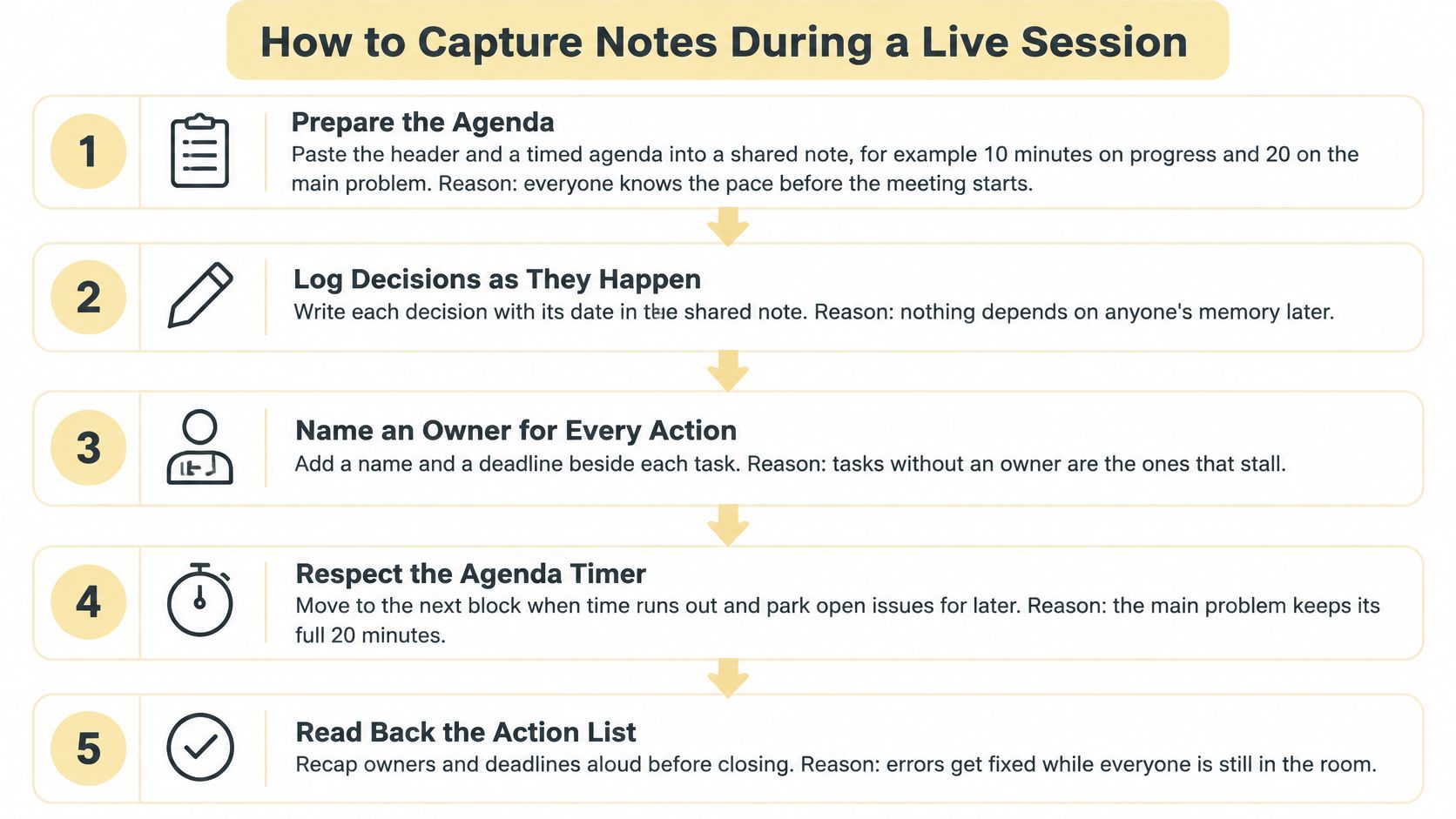
Use this process as a visible part of the session, not a separate administrative task.
Prepare the header and timed agenda. Paste them into a shared note before the call; an illustrative agenda could allow 10 minutes for progress, 20 for the leadership problem, 15 for options, and 5 for commitments. Meeting-practice guidance hosted by NIH supports agendas that state the purpose, connect tasks to the goal, and estimate the time needed.
Put the most consequential decision early. If Maya needs to choose which responsibility to delegate, don't spend the opening block polishing last session's update until that choice gets squeezed out. Agree on what deserves the protected time.
Capture agreements as they happen, not dialogue. Replace a topic summary such as client discussed difficulty networking with the action the client actually chooses and its owner. If no choice has been made, leave the entry under open questions rather than manufacturing progress.
Tag entries confirmed, proposed, or deferred. A suggestion you offer isn't automatically a client commitment, and a possibility Maya mentions isn't a decision. These labels let you explore options without creating an accidental assignment.
Read back the action list in the final five minutes. Say each decision, owner, and date aloud, then let the client correct the wording. Ask whether the action reflects their choice and whether the deadline is workable, rather than asking for a quick yes.
Lock the agreed version before the call ends. Preserve a clear record of what both people confirmed, while allowing later corrections through comments or a dated revision. Locking should prevent silent changes, not prevent the client from challenging an error.
Keep a visual reminder beside your working note.
Protect rapport without trusting memory
Will typing make you seem distracted? It can, especially if the client can't tell whether you're recording a commitment or answering another message.
Share only the commitment lines on screen and explain what you're writing. If a screen interrupts the conversation, jot brief cues on paper, read the agreement back aloud, and type the summary immediately afterward.
Collaborative-workspace research identifies jointly writing and saving the meeting memo as a useful practice because participants can expose and correct misunderstandings together. That's the value of visible notes: the client can interrupt an inaccurate interpretation while you're still discussing it.
For preparation that supports this workflow, use a consistent pre-call session-prep note. A finished action summary might contain three to five decision and commitment lines, each with an owner, and nothing else needed to act.
Write Commitments You Can Check Next Session
Work on delegation sounds reasonable when the client is energized. At the next session, neither of you knows whether reading an article, thinking about a colleague, or drafting an assignment counts as completion.
A checkable commitment gives you something to inspect without turning the session into an interrogation. Start with a verb, name one owner, agree a date, and state what done looks like.
Vague notes rewritten as checkable commitments
| Vague note | Checkable commitment | What makes it checkable |
|---|---|---|
| Work on delegation | Draft the delegation script by Friday, owner: client | Verb, owner and date |
| Talk to the team about priorities | Hold a 15-minute priority check with two direct reports by 28 March, owner: client | Named audience, length and date |
| Think about pricing | Choose between two price points and state the reason next session, owner: client | Decision and review point |
| Client discussed difficulty networking | Decision: contact three former colleagues; owner: client; review responses next session | Topic becomes an action |
These illustrative rewrites change what you can review. The delegation entry produces a draft; the priority check defines the conversation; the pricing entry asks for a choice and rationale; the networking entry replaces a topic with behavior.
Make completion visible, not elaborate
The useful change isn't just adding detail. It's replacing an aspiration with an observable result the client is willing to own.
For the delegation script, agree whether a saved rough draft is enough. Don't expect a polished document without saying so if the client agreed only to get an opening paragraph onto the page.
Workplace-meeting guidance from psychological-science researchers recommends communicating minutes and action items immediately after meetings, with decisions, next steps, and designated responsibilities. The commitment line should survive that handoff intact rather than becoming buried inside your narrative summary.
Write the smallest useful action the client can genuinely commit to, not the most impressive action you can persuade them to accept.
When enthusiasm doesn't become action
A client can agree warmly and still do nothing. That doesn't automatically mean resistance: the action may be too large, the prerequisite unclear, or the agreement more yours than theirs.
Use the commitment as a neutral prompt:
- Review the attempt. Ask what happened when the client tried to start, not just whether they finished.
- Locate the barrier. Separate lack of time from unclear scope, competing priorities, or reluctance about the task itself.
- Choose the response. Continue, revise, or stop the action explicitly instead of copying it forward unchanged.
The note should help you understand behavior, not prove that the client failed. When Maya hasn't drafted the script because she still can't choose a task to delegate, the useful next move is task selection, not another reminder to write.
Share Notes Within 48 Hours and Store Them Safely
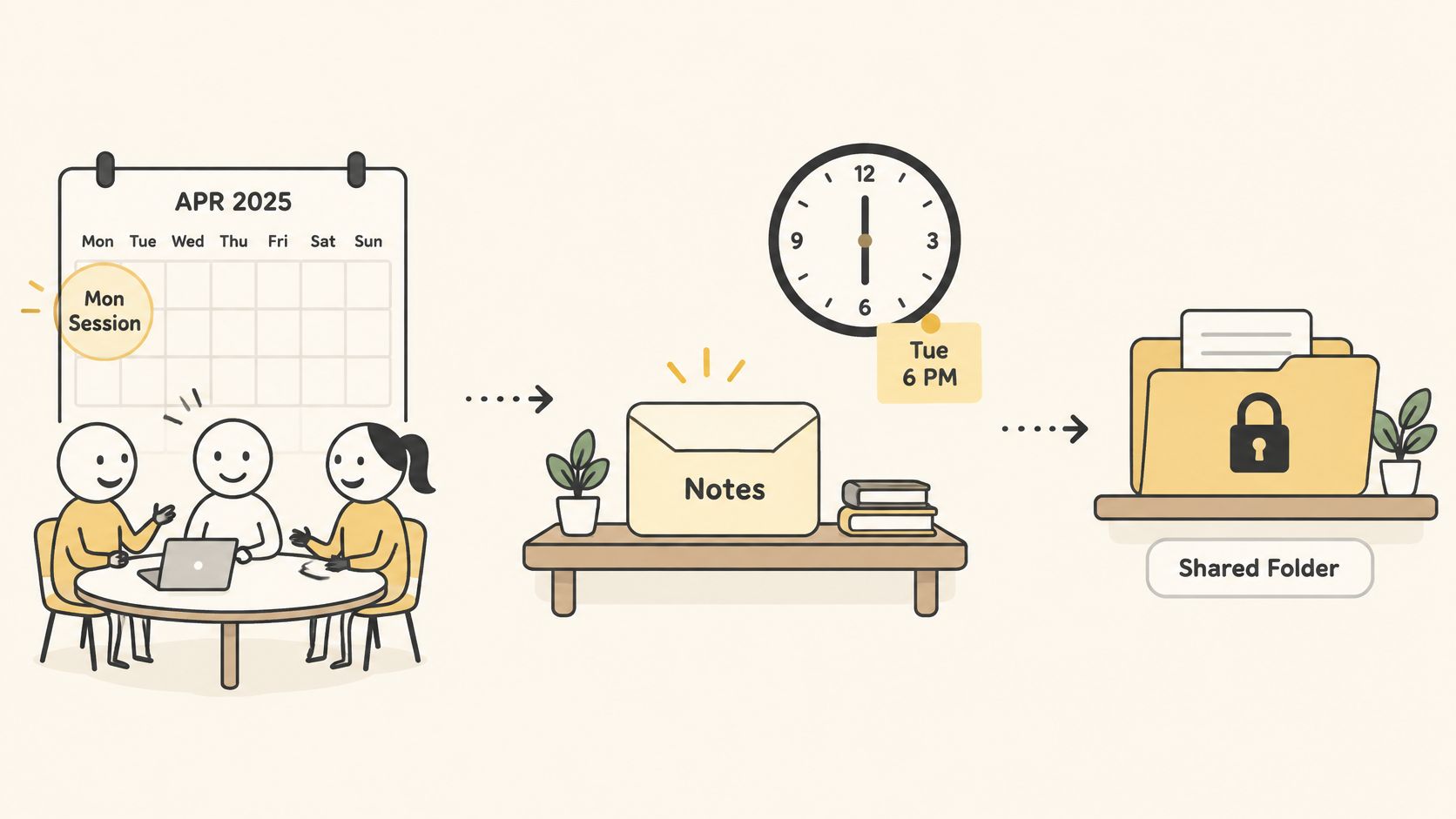
Set a delivery target of 24–48 hours after each session. For a Monday session, Tuesday evening is the latest target. Treat this as a working practice, not an official standard. A prompt handoff keeps the shared record useful, while time to review it helps prevent shorthand or an automated draft from becoming the client's record.
The handoff should connect the summary to a controlled place where the client can find it.
Make the summary easy to scan
Same-day delivery works when you have checked the content. Sending unverified shorthand quickly can create confusion that takes time to correct. Use labeled blocks so the client can locate the agreements and the next steps without rereading an essay:
- Decisions. Record the choices made and any rationale needed to understand them.
- Client commitments. State what the client will do and by when.
- Coach commitments. Note resources, checks, or introductions you agreed to provide.
- Open questions. Identify what remains unresolved and who will follow it up.
Invite the client to correct your interpretation. If an authorized substitute coach or cohort colleague needs to continue the work, share only the context required to understand the agreement. The aim is a usable handoff, not a complete account of everything discussed.
Store the record once and control access
Finalize the note after the session and keep it in a searchable workspace with controlled permissions. Use a consistent filename with the client identifier, session date, and purpose. That makes a record easier to retrieve than a file named “follow-up.”
Keep private reflections separate from the client-facing summary, in a restricted location. Otherwise, they may be included in an export. A secure workspace link is easier to manage than attachments left in inboxes after access should end. Review practical guidance on managing client confidentiality in coaching when setting up your process.
Before pasting sensitive material into an AI chat tool for cleanup, check how uploaded content is handled. Review the privacy terms for AI chats for information about retention and access, then consider your own professional obligations. A tool's policy does not replace that check.
Use this video alongside a review of your notes-sharing workflow.
Make deletion predictable
Set a retention period and a clear deletion point. For example, a policy might keep active-client notes for the engagement plus 12 months, then delete them automatically, if that schedule fits your contractual and professional obligations.
Include the schedule in the engagement agreement and explain it during the first session. Clients should know how long their records remain available before they need to ask for an old note.
If a client requests earlier deletion, confirm the request in writing, remove records you can delete, and retain only what your professional obligations require. Explain any necessary exception rather than promising complete deletion when you cannot provide it.
Track Follow-Through Instead of Note Length
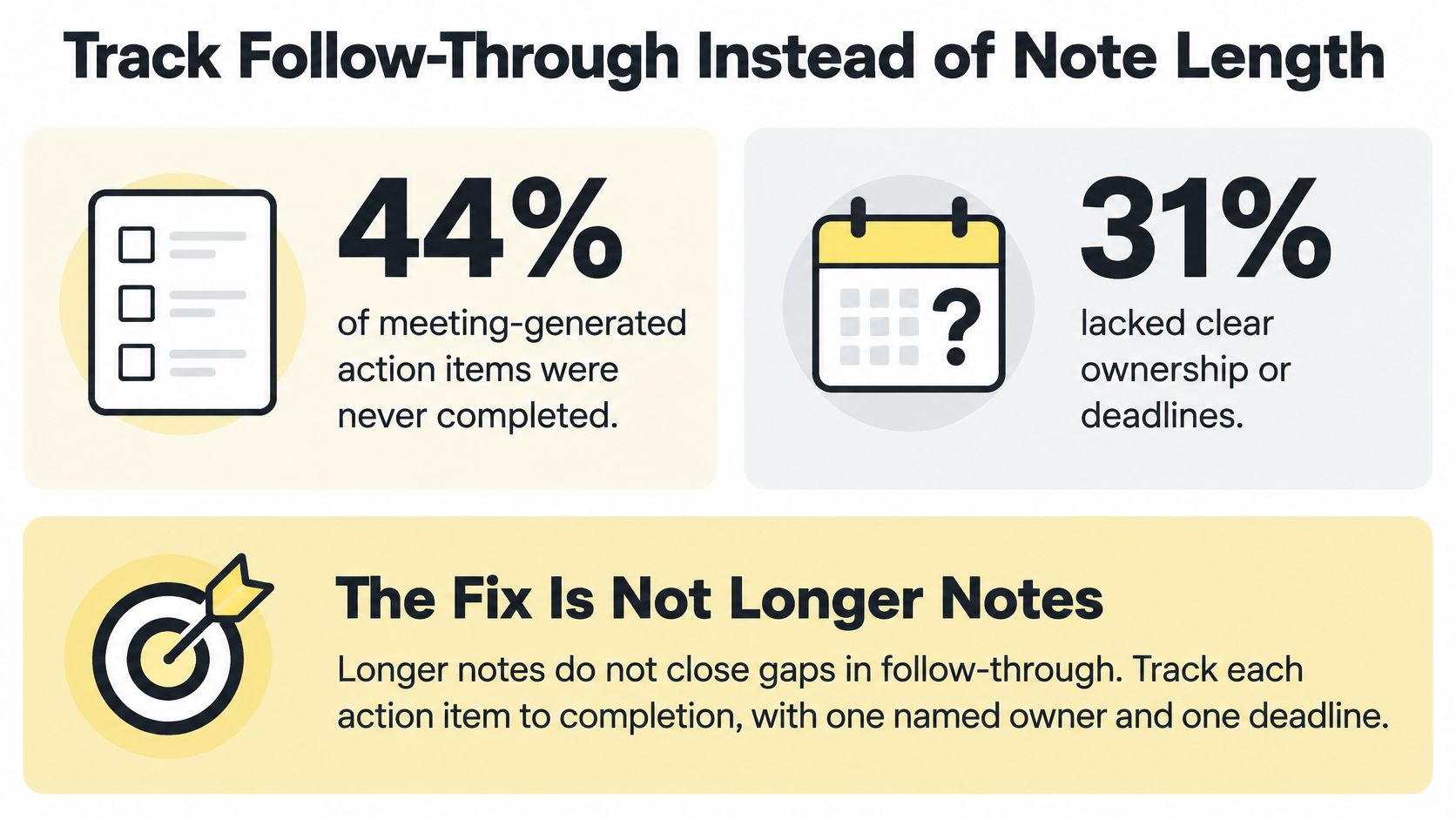
A detailed record can still leave every client commitment untouched. Treat session notes as an execution system: their value shows up in whether agreed actions get completed, reviewed, or deliberately revised.
The CIPD productive-meetings evidence review reports that 44% of meeting-generated action items were never completed, while 31% lacked clear ownership or deadlines. These are workplace-meeting findings, not a coaching-specific benchmark. The figures describe separate findings, not proof that unclear ownership caused incomplete actions.
Give each action a review loop
For every action, record an owner, what “done” looks like, a due date, its current status, and when you will review it. Set the review point before the next session when that gives the client time to ask for support while it can still help.
For Maya, an outcome-oriented entry could look like this:
| Tracking field | Illustrative entry |
|---|---|
| Client commitment | Draft the delegation script |
| Observable evidence | Saved draft ready for review |
| Barrier | Unclear which task to delegate |
| Support needed | A list of three candidate tasks |
| Status and next check-in | Blocked; client messages coach after selecting the task |
This makes the next step concrete. Rather than discovering an untouched action at the next call, you and Maya have agreed how she will flag the blocker and what support could help. For a broader workflow, connect the fields to your client accountability system design. When an action changes, keep the original commitment visible so the reason for the change or delay remains clear.
Measure behavior without creating a scorecard for the client
Track the percentage of commitments completed by their agreed dates. Count commitments due during the review period in the denominator. Record cancellations and renegotiated dates separately; neither counts as completed.
You can also note follow-up meetings that were unnecessary because the work was already done. Count only identifiable meetings you would otherwise have scheduled, not hypothetical time savings.
Review the conditions for action, not the client's character.
Use the metric to start a conversation, not grade the client. Ask what got in the way, then decide together whether to continue, revise, or stop the action. A pattern of missed commitments may call for smaller tasks or a different review question. It does not justify more surveillance or a longer record of what the client should have done.
Using AI Note-Takers Without Losing Client Trust
An AI transcript isn't automatically a reliable record. Fluent wording can make a mistaken commitment look authoritative, especially when neither person reviews the summary carefully.
Consent comes before convenience. Ask permission before recording, explain who can access the output and how long it stays available, and offer manual notes as a no-recording alternative without penalty.
Check the consequential errors
A reported evaluation discussed in Fordham's analysis of AI note-taker privacy and risk found key-data accuracy of roughly 85%–96%, but lower action-item accuracy of 62%–87%. These are results from one reported evaluation, not accuracy guarantees for the tool you use.
Where AI meeting notes go wrong and how to check them
| Risk | Where it shows up | Human check |
|---|---|---|
| Accents and technical terms | Misheard client phrases and industry jargon | Read key terms back to the client |
| Speaker attribution | Coach and client statements swapped | Confirm who committed to what |
| Sarcasm and emotion | Flat or wrong sentiment in the summary | Add emotional context by hand |
| Key data | Names, dates, and quantities can appear plausible despite errors | Spot-check numbers, names and dates |
| Action items | Suggestions become assignments, or owners and deadlines change | Verify every commitment before sending |
| Sensitive disclosures | Health, money or family details captured verbatim | Keep out or delete unless the coaching purpose needs them |
For example, Maya might sarcastically suggest taking over everyone's work herself. An automated summary could turn that frustration into a plan, or attribute your proposed approach to her as a chosen commitment.
Read the action list against the actual agreement. Correcting grammar isn't enough when the summary changes who accepted responsibility.
Retain less and distinguish interpretation
Capture only what supports the coaching purpose rather than keeping a full transcript by default. A useful summary may need the effect of a personal circumstance on the agreed action without preserving the disclosure itself.
Keep factual session notes separate from interpretive observations. If you add emotional context, label it as your observation and check whether it belongs in the shared record at all.
Before using a tool, establish boundaries:
- Access. Identify whether the client, sponsor, administrators, or external processors can retrieve the recording.
- Secondary use. Clarify whether transcripts could enter HR, complaint, or disciplinary processes.
- Deletion. Apply a defined schedule to recordings, transcripts, summaries, and exported copies.
Doesn't a transcript protect you if the client disputes what was said? Only a sufficiently accurate, appropriately obtained record can help clarify a disagreement.
An unverified transcript can create the dispute it was supposed to settle. The consequential error may be a single invented commitment or a sensitive disclosure presented without context, not a page of obviously incorrect speech.
Pick Your Template and Set the Review Date
Choose the six-field template and use it for your next five sessions rather than redesigning it after every call. Treat that as a practical trial, with a review date two weeks out.
At that review, calculate the share of due commitments completed by their agreed date. Compare it with your available baseline and note any follow-up meetings that weren't needed; if you don't have a baseline, use the trial to establish one.
Change one thing at a time
Adjust the commitment wording, send window, or review question, rather than changing all of them together. Otherwise, you won't know which change helped.
Use Google Docs for a simple shared record, or Coachful to capture session notes, connect them to goals and milestones, and configure the recurring fields while keeping private reflections separate from client-visible summaries.
Protect time for the review instead of fitting it between calls. SyncThemCalendars' guide to plan focus blocks in Google Calendar offers a practical way to reserve that space.
Your next-session rule: Write the decision and the owner before the client leaves the call.
Coachful brings session notes, goals, milestones, and progress tracking into a coaching workspace. Visit Coachful to set up a repeatable notes workflow and keep agreed actions connected to the work clients do between sessions.


