Google Forms for Coaching Intake: 7 Setup Checks

Nour
Founder, Coachful
Can I use Google Forms for coaching intake without locking clients out or exposing their answers? Yes, for a modest, low-sensitivity questionnaire, provided you configure respondent access, email collection, response summaries and collaborator permissions deliberately. The biggest mistake is treating a form that opens for you as a form that works safely for a client.
Start with a short form, keep View results summary off for private intake, test the published responder link outside your own account, and decide who reviews each submission. A completed form is not a booked session, a signed coaching agreement or permission to add someone to your newsletter.
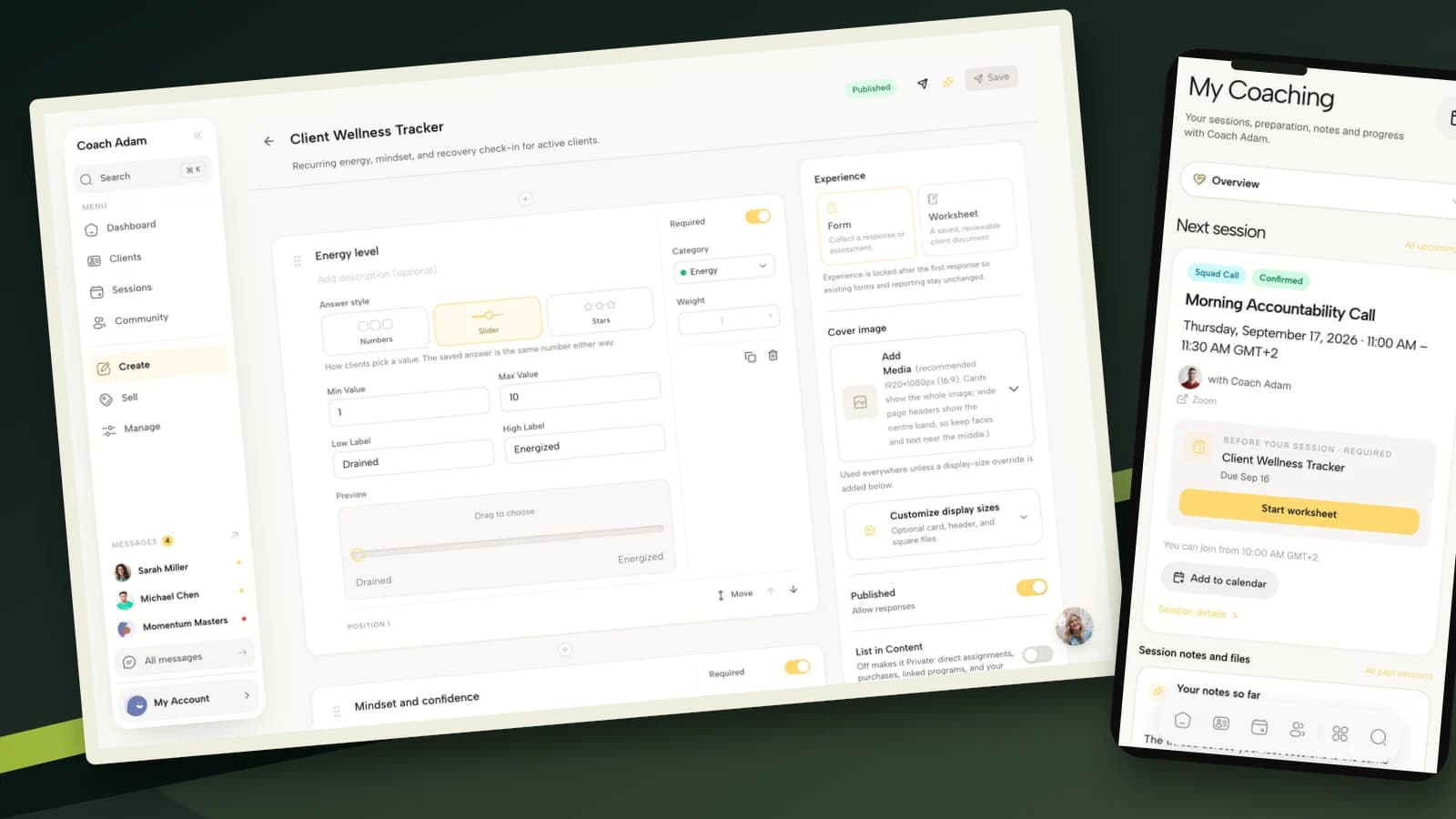
This guide walks through seven Google Forms setup decisions for a coach running a practice. Google settings are based on its current help documentation. The Coachful screenshots show an alternative native coaching workflow, not Google Forms screens, an integration or an automatic import.
1. Decide whether this is a prospect form or a client intake
Before opening a blank form, write one sentence: “After reading this response, I will decide or prepare ______.” That sentence is your inclusion test. If an answer will not change your next action, you probably do not need to collect it here.
A prospect form helps you decide whether a discovery conversation is appropriate. A client intake prepares you to work with someone who has already agreed to coaching. Mixing them produces the familiar awkwardness of asking a stranger for a life history before they even know whether you have availability.
For a prospect form, start with name, reply email, the issue they want coaching on and the practical next step they are seeking. For an enrolled client, you can add the agreed goal, relevant context, accessibility preferences and what would make the first session useful. Keep personal detail proportionate to the actual work.
A copyable opening description
Use this form to help me prepare for our first coaching conversation. Please describe the situation in general terms and avoid including medical records, passwords, account numbers or confidential information about other people. I will review your answers before our agreed appointment. For scheduling changes, use the booking instructions in your confirmation.
Adapt that description to what you genuinely do. Do not promise a review deadline or confidentiality arrangement your practice cannot honor. Link to your applicable privacy information and identify how the person can contact you with questions.
Build the form from a blank form through Google's basic Forms workflow. Use plain question labels, make genuinely essential fields required, and avoid turning an optional reflection into a compulsory personal disclosure.

The real Coachful builder above is a useful comparison point: question design and delivery context are different jobs. You can write good questions in Google Forms. If you choose a native coaching form instead, verify how it is assigned and where the completed answers appear, rather than assuming the builder handles every handoff.
2. Choose email collection and sign-in requirements separately
“Collect email addresses” sounds like a single administrative choice. In practice, you are deciding which address you receive and what account steps the respondent encounters. Those choices affect whether an external client can finish the form.
Google documents two email-collection options under Settings → Responses:
- Verified: collects the respondent's Google Account email after they confirm it. That may be their personal address rather than the work address you use for coaching.
- Responder input: asks the person to enter an email address. This lets them provide their preferred reply address, but it can contain mistakes and is not verified identity.
For a simple external inquiry, responder-entered email is often the more practical starting point. That does not guarantee a sign-in-free experience. Other settings, organizational restrictions and the question types you use can change access. Test the whole form, not just this dropdown.
Also examine Limit to 1 response. Google says respondents must sign in to a Google Account when this is enabled. Use it only when preventing repeated submissions matters more than that additional step. Do not switch it on merely because it sounds tidy.

Consider a hypothetical executive client who receives your link at work but is signed into a personal Google Account. Verified collection could capture an address you do not recognize. Your review process should identify the correct coaching participant without quietly sending sensitive follow-up to the wrong inbox.
Ask for the email they want you to use if that differs from the collected address, and reconcile discrepancies before sending private material. An email match is useful administration, not proof of identity or authorization to share coaching information.
3. Keep private intake answers out of respondent summaries
This is the setting worth checking before you send a single link: Settings → Presentation → View results summary. Leave it off for a private coaching intake.
Google explicitly warns that response summaries can show full-text answers or charts and are visible to anyone who can respond to the form. A summary feature that is useful for an anonymous event poll can be entirely wrong for a questionnaire containing a client's goals, workplace situation or personal difficulties.
Do not enable it because you want respondents to see that their submission worked. A confirmation message handles that job without displaying other responses. Nor should you assume that removing names makes free-text answers anonymous. A job title, a family circumstance or a specific incident can identify someone.

Check response receipts separately. Google lets you choose whether respondents receive a copy of their answers when email collection is enabled. That can be useful, but it also puts the response content into an inbox the person may share or access through an employer. Explain the arrangement and consider the sensitivity of the questions before enabling automatic copies.
A disabled results summary is not a security certification. It is one control within your broader decisions about account access, information collection, storage, retention and disclosure. If your work involves regulated or particularly sensitive information, get advice about the exact account, contractual terms and controls required. “It is a Google Form” is not a compliance assessment.
4. Audit the form and linked spreadsheet as separate access points
A form can be carefully configured for respondents while its answers remain visible to a former assistant through a spreadsheet. Review collaborators, not only the public link.
In Google Forms, responses can be linked to Google Sheets. Google's documentation says a form collaborator may also have access to that linked spreadsheet, and removing a collaborator requires removing them from the form and spreadsheet separately. Do not assume one removal revokes both.
Use a small access register for your practice:
- Form: who can edit it, view responses or change its settings?
- Linked Sheet: who can open it, and what sharing arrangement applies?
- Exports: where do downloaded CSV files go, and who can access those copies?
- Offboarding: who checks these locations when a team member leaves?
Separate tasks from privileges. Someone helping you correct question wording does not necessarily need ongoing access to client answers. If possible, give them an empty working copy containing fictional responses instead of the live intake.

The Coachful directory illustrates another boundary: a coaching participant belongs to a specific practice relationship. Having access to a list of people does not establish permission to read every answer about them. Whatever system you use, give colleagues only the access needed for their role and do not share private reflections with a sponsor merely because the sponsor pays.
Define a retention approach before responses accumulate. Include the form, linked spreadsheet and exports in that decision. Avoid keeping an old CSV indefinitely just because it is sitting in a downloads folder. Your obligations depend on your location, agreements and the nature of your work, so this is operational guidance rather than legal advice.
5. Give every submission an owner and a next action
Google Forms can notify you about new responses. In Responses, open the more-options menu and choose Get email notifications for new responses, as described in Google's response-management guide. Then test that the notification reaches the person responsible for reviewing the form.
A notification is not a review process. Decide who checks responses, how they recognize a duplicate and what happens when the person has not booked a call. For a solo practice, that might simply mean checking new responses at a defined point in your working day and recording the action taken.
A minimal review log needs four things: submission reference, review owner, next action and action status. Keep the log administrative. You do not need to duplicate the person's entire reflection into another spreadsheet merely to remember that you owe them a scheduling message.

The Coachful Intakes screen shows actual booked calls and their status. It makes the distinction concrete: a Google Forms submission is not an entry in this booking list. Do not tell a respondent “you are booked” unless an appointment has actually been confirmed.
A confirmation message that does not overpromise
Thank you. Your form has been submitted. This submission does not book a session. If you already have a confirmed appointment, keep that time. If you are making an initial inquiry, I will contact you using the reply address you provided within [your real response window].
Replace the bracketed wording before using it. If you do not offer a consistent response window, remove that promise and explain your actual process. A useful confirmation answers “what happens now?” rather than presenting a cheerful dead end.
6. Keep intake, agreements and session preparation distinct
The form should collect the information needed for its stated purpose. It should not quietly become your contract, mailing-list signup and recurring progress tracker at the same time.
Use your proper agreement process for scope, payment, cancellation, confidentiality and the boundaries of coaching. A general checkbox saying “I agree” does not by itself establish that you have completed an appropriate contracting process. Likewise, providing an address for coaching correspondence is not automatically permission for unrelated marketing.
Once the person becomes a client, choose what carries forward. Their preferred name and first-session goal may be useful. An early inquiry about an abandoned problem may no longer be relevant. Confirm important details rather than treating every original answer as a permanent fact.

The real Coachful coaching-flow library illustrates how onboarding can be treated as a sequence, rather than one oversized form. It is an alternative delivery surface, not evidence that Google Forms responses automatically populate Coachful. No such connection is assumed here.
Also distinguish the one-time intake from recurring session preparation. A client may answer background questions once, then reflect on progress and priorities before a later call. Sending the entire intake repeatedly wastes their effort and can leave you reading old context as if it described this week.

In the Coachful demo, the next session and a not-started worksheet are visible together. That is the kind of handoff worth testing if standalone forms become awkward: can the client find the right preparation beside the right appointment, and can you review it before the call?
Keep Google Forms if your review process is reliable and the separate link is not causing problems. Consider a native workflow when matching responses to clients and sessions repeatedly becomes a manual task. Do not migrate simply because a more elaborate system exists.
7. Publish the responder link, then run the client-side test
According to Google's publishing instructions, a form must be published before responders can access it. Publishing and choosing the right responder audience are part of setup, not proof that every intended client can open it.
Use the responder link supplied through Preview, Published or Share. Do not send your editor URL. Then open the link in a separate browser context where you are not signed into the form owner's account.
Run this acceptance test with fictional information:
- Open: can an intended external client reach the form without an unexpected permission request?
- Identify: does email collection behave as expected, including work versus personal addresses?
- Complete: can the person understand required fields and submit on a phone?
- Confirm: does the confirmation explain the next step without claiming a booking?
- Protect: is there no respondent link exposing other people's answer summaries?
- Review: can the correct coach find the response and take the promised action?
- Retain: do you know where the form, Sheet and any exported test data are stored?

The mobile Coachful view above reinforces the testing standard, not a claim about Google rendering. Inspect the actual client path on the device they are likely to use. An editor that looks comfortable on your large monitor says little about a long paragraph field on their phone.
Repeat the test after material changes to required fields, sharing settings or collaborators. Remove fictional test records through your normal data-handling process so they are not mistaken for new inquiries.
Frequently asked questions
Can clients complete a Google Form without a Google Account?
It depends on the full configuration. Do not require one response per person unless you want the Google sign-in requirement that comes with it. Check verified email collection and any organizational restrictions, then test the published link outside your account. Responder-entered email alone does not guarantee that all other access requirements are absent.
Should I use Google Forms or a coaching platform?
Use Google Forms when a separate, modest questionnaire and a deliberate review routine meet your needs. Compare a coaching platform when you need the form to belong to a client, booking or continuing coaching process. Make the decision on the handoff that currently fails, not on the longest feature list.
Can I use one form for every client and every session?
You can reuse a form where the questions and purpose genuinely stay the same, but distinguish initial intake from recurring prep. Make sure you can identify the right person and relevant session without collecting unnecessary personal details. Review old links when you replace a form so clients do not continue submitting to an unattended version.
Does this setup make a health-coaching form compliant?
No general tutorial can establish that. Compliance depends on the information, jurisdiction, professional obligations, account arrangement and controls. Avoid collecting clinical records by default, and get appropriate advice before using any platform for regulated data. Switching brands alone does not resolve the question.
Test the handoff before moving your practice
Start with one safe, fictional submission. If Google Forms collects the right information, protects the answers and gets them reviewed before the appointment, you have a workable starting point.
If the weak point is getting preparation onto the right client's upcoming session, inspect that exact workflow before changing systems. Try the interactive Coachful demo and compare the real form, intake and client-session surfaces shown here. Choose the process you can run consistently, not the one that merely looks more sophisticated.