How to Manage Client Emails Without ActiveCampaign

Nour
Founder, Coachful
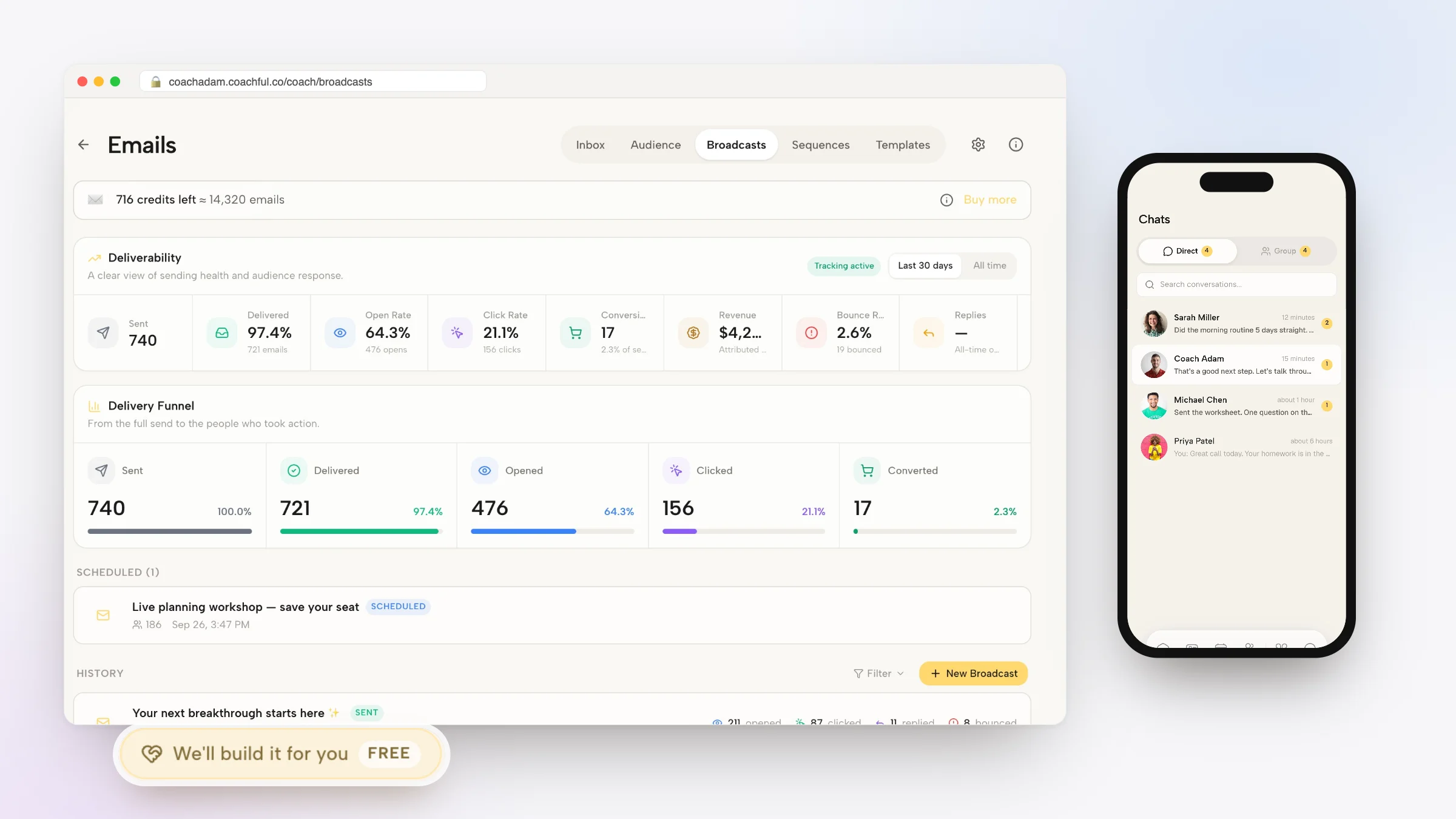
Understanding how to manage client emails without ActiveCampaign empowers leadership coaches and advisory practitioners to maintain high-touch client communication without paying hefty fees for complex marketing automation software. While ActiveCampaign is a powerhouse for enterprise e-commerce funnels and multi-branched tagging matrices, professional coaches need clear, focused email tools that connect directly to client milestones, session reminders, and cohort updates.
Using an enterprise marketing platform for client communications creates disconnected data silos: marketing emails live in ActiveCampaign, session notes live in Google Docs, and client messaging lives in Slack or WhatsApp. Below: an architectural breakdown of native coaching communications, comparing complex marketing automation with integrated practice messaging. To connect email broadcasts with community engagement, explore our guide on hosting masterminds without Skool, review our plans, and explore our coaching features.
ActiveCampaign Enterprise Marketing vs Coachful Native Coaching Email
| Email Workflow Capability | ActiveCampaign Standalone Automation | Coachful Integrated Messaging Hub | Coaching Practice Advantage |
|---|---|---|---|
| Client Cohort Segmentation | Requires intricate custom contact fields, tags, and webhook syncs. | Automatically segments contacts by enrolled program, tier, and status. | Ensures announcements reach the exact intended client cohort instantly. |
| Automated Program Sequences | Complex drag-and-drop builder prone to timing logic glitches. | Linear automated drip sequences tied directly to program curriculum. | Delivers timely reflection exercises synchronized with client progress. |
| Two-Way Client Communication | Emails arrive from generic unmonitored marketing routing addresses. | Replies route directly to coach inbox or in-app private direct chat. | Maintains intimate, conversational accessibility for premium clients. |
| Software Cost and Overhead | Expensive monthly pricing tiers that escalate rapidly as contacts grow. | Included natively within your unified coaching platform subscription. | Saves hundreds of dollars monthly while eliminating complex setup tasks. |
The Hidden Traps of Using Enterprise Email Tools for Coaching Clients
Enterprise email marketing platforms like ActiveCampaign are engineered to blast thousands of promotional messages to cold leads. However, client communications in an executive coaching practice require personal intimacy, relational discretion, and immediate contextual awareness.
When you send client reminders or reflection prompts through an external marketing tool, emails frequently land in promotional tabs or spam folders. Furthermore, when an executive client replies to an automated broadcast, the response often bounces or gets buried in an unattended marketing inbox, creating relational embarrassment.
- Deliverability and Spam Penalties: Marketing email servers are frequently flagged by corporate IT firewalls, preventing your coaching prompts from reaching corporate executives.
- Fragmented Client History: Coaches cannot see which emails a client opened while reviewing their weekly session notes, separating communication from coaching progress.
- Unnecessary Technical Complexity: Managing lead scoring, web tracking scripts, and multi-condition automations wastes valuable hours that should be invested in client transformation.
Strategic Email Workflows for Executive Coaches and Group Programs
High-impact coaching communications fall into three distinct categories: automated curriculum drips, contextual check-in prompts, and broadcast community announcements. Consolidating these workflows into your coaching platform ensures operational elegance.
Instead of wrestling with external API webhooks, program milestones trigger corresponding email dispatches automatically. When a client completes a module, the system dispatches their next reflective exercise without manual intervention.
- Module Completion Prompts: Automatically send supportive follow-up reflections when a client finishes an executive leadership video or downloads a worksheet.
- Accountability Inactivity Alerts: Trigger gentle check-in emails when a client has not logged a habit, completed a check-in, or booked a session for over ten days.
- Broadcast Mastermind Announcements: Send formatted announcements regarding upcoming guest workshops, schedule adjustments, or community challenges to active cohorts.
Worked Email Template: Re-Engaging an Inactive Executive Client
The following email template illustrates how a coach can re-establish developmental momentum with a busy executive whose engagement has slowed down:
Because this communication originates from the coach verified platform domain, it lands cleanly in the executive primary inbox and invites genuine dialogue.
- Removing Guilt and Friction: Frame the communication around supporting their competing priorities rather than chastising missed check-ins or delayed homework.
- Direct One-Click Action: Include a direct link to book their next session or review their shared goals within their private portal.
Step-by-Step Blueprint: Running Coaching Email Inside Coachful
Migrating away from ActiveCampaign simplifies your technology stack and brings your client communications under one unified roof. Follow these implementation steps to establish native email operations.
Within hours, your client communication flows smoothly, backed by reliable deliverability and unified developmental data.
- Step 1: Authenticate Your Custom Domain: Configure SPF, DKIM, and DMARC records for your custom domain inside Coachful settings to ensure top-tier email deliverability.
- Step 2: Set Up Program-Linked Drip Sequences: Create automated email sequences that deliver weekly educational content and reflection prompts synchronized with your coaching curriculum.
- Step 3: Organize Client Audience Segments: Filter contacts dynamically by program enrollment, active coaching status, or historical alumni groups for targeted broadcasting.
- Step 4: Schedule Broadcasts and Review Engagement: Compose rich-text email updates, attach PDF resources, and monitor open and response rates directly within your practice dashboard.
Frequently asked questions about how to manage client emails without ActiveCampaign
Can I send marketing newsletters to prospective leads using Coachful?
Yes. You can manage lead capture forms, nurture prospective clients through automated introductory sequences, and broadcast newsletters to non-client email subscribers.
How does native email handle client unsubscribe requests?
Coachful automatically includes compliant one-click unsubscribe links on broadcast communications, while ensuring essential transactional messages (like session confirmations) still reach active clients.
Can I personalize broadcast emails with client names and custom fields?
Yes. Dynamic merge tags allow you to insert client first names, company titles, and enrolled program names automatically into every email.
Will emails sent from Coachful reflect my personal branding?
All emails reflect your custom domain, custom brand colors, and personal coaching signature, providing a completely white-labeled client experience.
Coaching communication thrives on clarity, personal connection, and direct relevance. By eliminating bloated enterprise marketing tools like ActiveCampaign in favor of an integrated coaching platform, you save time, reduce technical fragility, and keep client relationships at the center of your practice.
Take control of your client communications with Coachful streamlined email hub today.