Leadership Coaching Platform Guide

Coachful
You finish a powerful coaching session with a senior leader, then return to a completely different job. You search for the payment status, check whether the agreement was signed, find the client's intake form, send a reminder for the next session, update a spreadsheet, and wonder whether you remembered to share the promised resource. The coaching was focused. The administration is scattered across calendars, email threads, documents, payment tools, and notes.
That split creates more than inconvenience. It drains attention, increases the risk of missed follow-ups, and makes growth feel like a threat to the quality of your work. A leadership coaching platform should reduce that pressure while protecting the confidentiality and continuity that serious coaching requires.
The Hidden Cost of Fragmented Coaching Tools
You may recognize the private conversation in your head: “I'm good at helping leaders think clearly. Why am I spending my evening reconciling invoices?” Or, “Did I send the rescheduling link, or did I only draft it?” These questions don't signal poor discipline. They signal that your practice has outgrown disconnected tools.
A coach working with several leaders might use a calendar for sessions, a payment processor for invoices, cloud storage for agreements, a spreadsheet for goals, email for follow-ups, and a separate video tool for meetings. Each tool may work perfectly on its own. The problem is the handoff between them. Every handoff asks you to copy information, remember a next step, or trust that a manual reminder won't be forgotten.
That administrative load also changes the emotional quality of your work. You arrive at a session thinking about an unpaid invoice or an incomplete intake form instead of the leader in front of you. Your client may sense the interruption, even when you hide it well. A platform becomes valuable when it keeps operational work moving without making you carry every transition in your head.
Practical rule: If a client journey depends on your memory, it isn't a reliable process yet.
A modern leadership coaching platform is a shared operational workspace, not a prettier calendar. It should connect onboarding, scheduling, payments, communication, notes, programs, milestones, and progress tracking so that one completed action triggers the next appropriate action. Coachful, for example, brings these workflows into one environment, while other platforms may specialize in enterprise learning, coach matching, or content delivery. The right choice depends on your practice model, but the principle is consistent: centralize the work that currently fragments your attention.
This is the same operational discipline founders apply when they assess best growth tools for startups. They don't adopt software because a dashboard looks impressive. They remove bottlenecks that keep capable people from doing higher-value work. For a coach, that higher-value work is reflection, challenge, listening, and relationship building.
The shift is psychological as much as technical. You aren't surrendering your personal touch to automation. You're removing repetitive tasks so you can be more present where human judgment matters.
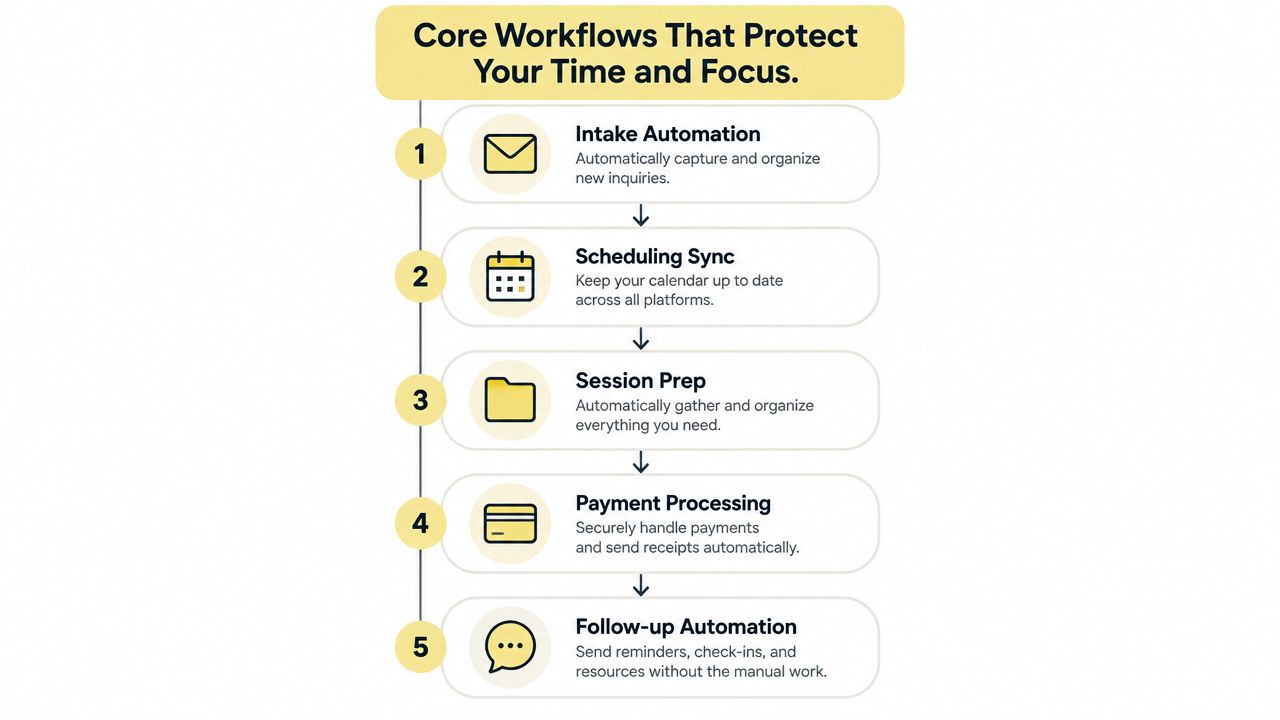
Core Workflows That Protect Your Time and Focus
The strongest platform setup follows the client journey rather than the software menu. Start with the moment a prospect becomes a client, then map every step through renewal. If the system can't carry information from one stage to the next, you'll recreate the same administrative burden inside a new interface.
Start with a continuous client journey
Intake and agreement. A new client should receive the relevant agreement, confidentiality terms, intake questions, and program information in one branded flow. The client shouldn't have to ask, “Which document do I sign first?” You shouldn't have to check three systems to confirm whether the engagement can begin.
Scheduling and preparation. Once the agreement is complete, the platform should present the correct booking options, collect session details, and surface the client's goals before the meeting. A leader arriving for a first session with an unfinished intake form creates avoidable friction. A good workflow makes preparation feel natural rather than bureaucratic.
Payments and renewals. Payment status should sit beside engagement status. When an invoice is overdue or a package is approaching its final session, the system should support a clear, timely action. You can then discuss the client's next step from a position of professional clarity, not financial embarrassment.
Follow-up and progress. After a session, the client may need a reflection prompt, resource, assignment, or next booking. The platform should connect those actions to milestones and progress records. For a cohort, assignments, community touchpoints, and curriculum should live alongside the broader program rather than in a separate collection of links.
Independent benchmarking sources report that automating core workflows can reclaim about 2–3 hours per week in administrative time, while automated touchpoints can raise session attendance by roughly 25–35% and reduce administrative tasks by about 40–60%. These figures are reported in coaching platform workflow benchmarking, and they point to an important design lesson: connected automation matters more than isolated reminders.
Make automation invisible to the client
Your client shouldn't feel processed by a machine. They should experience a calm, predictable sequence. A payment confirmation can open the portal, the portal can request the agreement, and the completed agreement can release the intake form and booking link.
That answers the objection, “Will this feel too administrative?” The answer is yes, if you expose the machinery. It won't, if the system handles the machinery while your messages remain warm, specific, and written in your voice.
For a practical walkthrough of how video, scheduling, and coaching workflows can fit together, use the following resource.
Matching Platform Capabilities to Your Buyer Profile
A solo executive coach, a corporate L&D department, and a coaching academy aren't buying the same product. Treating them as one buyer creates two predictable mistakes: the independent coach pays for infrastructure they'll never use, while the enterprise team overlooks controls that protect sensitive records.
The solo practitioner usually needs speed and clarity. Your priorities are branded onboarding, flexible scheduling, secure payment collection, client messaging, notes, progress tracking, and automated renewal prompts. You may also need group programs, but you probably don't need complex identity provisioning or a large HR systems integration team.
A corporate L&D buyer has a different fear. They aren't mainly asking whether the client portal looks polished. They're asking who can access coaching records, how users enter and leave the system, whether raw notes are separated from aggregate reporting, and what happens when an AI feature processes customer data.
Platform Requirements by Buyer Type
| Buyer Profile | Primary Focus | Must-Have Features |
|---|---|---|
| Solo practitioner | Reduce admin while preserving a personal client experience | Branded onboarding, scheduling, payments, notes, reminders, renewals, progress tracking, flexible templates |
| Corporate L&D department | Governance, adoption, reporting, and secure scale | SSO, SCIM, granular permissions, data separation, security certifications, HRIS and workflow integrations, API access, AI data controls |
| Coaching academy | Consistent delivery across coaches, programs, and cohorts | Shared curricula, coach roles, cohort management, assignments, client portals, milestone tracking, reporting, resource management |
Enterprise buyers should require SSO and SCIM for lifecycle management, granular permissions and data separation for confidential coaching records, privacy and security certifications, HRIS and workflow integrations, API access, and explicit controls for how AI systems use customer data. These requirements are detailed in enterprise leadership coaching platform evaluation criteria.
Choose for the business you actually run
Ask yourself what breaks first when demand increases. If the answer is “I can't keep up with onboarding,” prioritize trigger-based workflows. If it's “I can't give a sponsor a credible progress view,” prioritize structured reporting and privacy-safe aggregation. If it's “Every coach delivers the program differently,” prioritize templates, roles, curriculum, and quality controls.
An academy may need a common program structure without forcing every coach to use identical language. An L&D team may need aggregate insight without exposing private coaching notes. A solo coach may need the opposite balance, personal control with enough automation to prevent late-night administration.
Don't buy an enterprise control panel to solve a reminder problem. Don't sell enterprise coaching without asking hard questions about access, exports, auditability, and data separation. The right platform fits the risk profile and operating model of your practice.
Navigating Data Privacy and AI Ethics in Coaching
Automation doesn't make coaching impersonal. Poor data handling does.
Leadership coaching conversations can include performance concerns, workplace conflict, career uncertainty, health-related context, and candid reflections about power. A casual workflow that copies notes into a consumer AI tool or stores them in an uncontrolled folder can expose information your client believed was confidential.
The updated ICF Code of Ethics, effective April 2025, explicitly requires coaches to meet their obligations through any technology systems they use, including AI. Independent guidance also warns that pasting session notes into consumer AI tools can place confidential content on third-party servers. The practical implication is direct: you remain responsible for the technology choices surrounding your coaching relationship.
Treat consent as part of the workflow
A platform should help you record what the client agreed to, what data the system stores, who can access it, and whether AI features are enabled. Consent shouldn't exist only as a paragraph buried in a PDF that nobody can locate later.
Use separate permissions for:
- Private coaching notes, visible only to the authorized coach.
- Client-facing reflections and resources, deliberately shared with the client.
- Aggregated program insights, stripped of unnecessary personal detail.
- Administrative records, such as agreements, payments, and attendance.
- AI-assisted outputs, with clear boundaries around what enters the system.
Role-based permissions and client-level data isolation protect both the client and the coach. They also make supervision, handovers, and audits easier because the platform can show who accessed what and when.
Client trust is not a soft feature. It is an operational requirement.
Your AI policy should be plain enough to explain in a coaching agreement. State whether AI creates summaries, whether a human reviews those summaries, whether client consent is required, and whether raw conversation data is retained. If you can't answer those questions, don't activate the feature yet.
For a practical reference on the obligations surrounding coaching technology, review data protection and compliance for coaching. The aim isn't to eliminate technology. It's to use technology without weakening psychological safety.
Designing an Automated Onboarding Sequence
The most common onboarding failure happens after payment. The client intended to begin, you intended to welcome them, and then several days pass while both sides wait for the next action. You think, “I don't want to chase them.” They think, “Maybe the coach will send the details.”
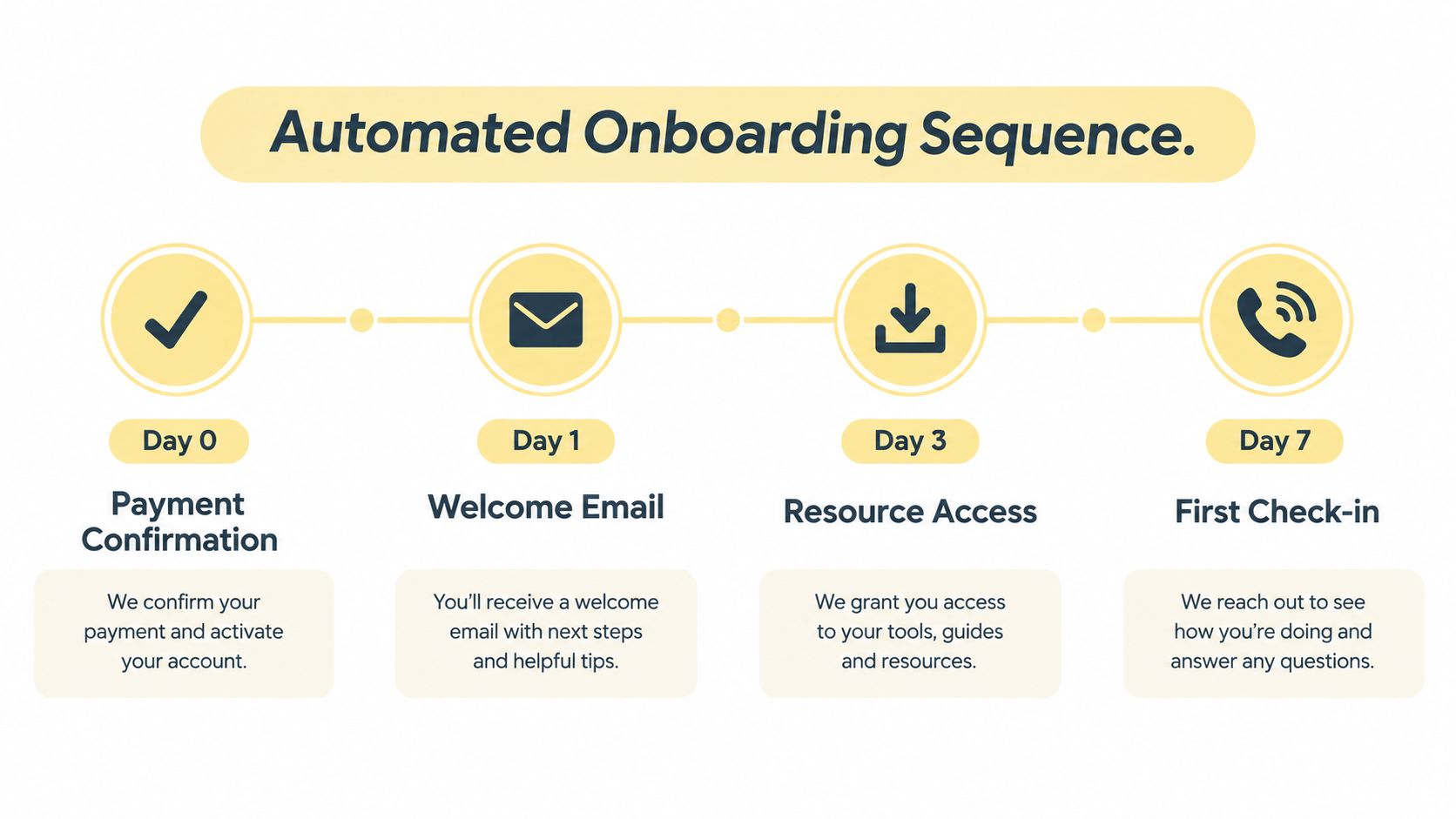
A stateful onboarding sequence removes that ambiguity. It starts with a clear trigger and continues until the client has signed the agreement, completed intake, and booked the first goal-setting session.
Build the sequence around client momentum
A complete automated workflow can begin with a new payment or contract signature. It can then deliver portal access, an e-signature coaching agreement, an intake questionnaire, a goal-setting booking link, and reminders without manual coach involvement. The scheduler link can expire after 72 hours, which creates a clear decision point rather than leaving an open task indefinitely. These workflow elements are outlined in automated coaching client onboarding guidance.
Use this sequence:
- Trigger at payment or signature. Send confirmation, explain what happens next, and provide secure portal access.
- Request the agreement. Present session format, duration, frequency, cancellation policy, confidentiality, and scope in an easy-to-complete flow.
- Collect intake information. Ask for goals, current context, preferred focus areas, and practical engagement details.
- Offer the first booking. Send the goal-setting session link, with a 72-hour expiration so the client has a reason to act.
- Nudge without nagging. Use a Day 0 welcome email, a Day 3 reminder, and a Day 7 check-in if the process remains incomplete.
- Confirm readiness. Once the session is booked, send preparation guidance and make the relevant goals visible to you before the meeting.
The sequence should stop or change state when the client completes each step. Don't send a booking reminder to someone who already booked. Don't send a generic welcome message after the client has attended the first session.
Keep the human voice in the automation
Write the emails as if you're reducing uncertainty for one person. “You'll receive the agreement first, then a short reflection form. Once those are complete, choose the time that works for your goal-setting session” feels far better than “Complete onboarding.”
If a client stalls, the system should alert you only when your judgment is needed. You might intervene when the client has ignored every reminder, when a payment fails, or when an accessibility request requires a personal response. That division of labor preserves warmth while removing repetitive chasing.
You can use Coachful's automated welcome sequence setup guide to structure the sequence around triggers, conditions, and client status.
Proving ROI and Measuring Leadership Outcomes
A platform that reports only sessions booked and messages sent isn't measuring coaching impact. It's measuring activity.
Corporate sponsors want to know whether leaders changed how they communicate, make decisions, delegate, handle conflict, or lead teams. Independent clients may care about confidence and clarity, but they still need evidence that the engagement is moving toward the outcomes they paid for. Your platform should help you define those outcomes before delivery begins and revisit them throughout the engagement.
Replace vanity metrics with useful evidence
Neutral industry commentary argues that mobile apps, network size, and AI matching can distract from the central question: does coaching change leadership behavior, decision quality, or team performance? The same commentary reports that only 18% of coaching businesses use a fully integrated coaching platform, as detailed in coaching platform workflow and measurement analysis.
Use a layered measurement approach:
- Starting point: Record the client's stated challenge and the behavior they want to change.
- Behavioral marker: Define what the new behavior looks like in a real meeting, decision, delegation conversation, or feedback exchange.
- Milestone evidence: Capture reflections, commitments, completed assignments, and observed shifts without exposing unnecessary private detail.
- Stakeholder signal: Where appropriate, gather structured feedback from a sponsor or relevant stakeholder.
- Outcome review: Revisit the original goal and document what changed, what remains unresolved, and what should happen next.
For example, “become a better leader” is too vague to report. “Delegate strategic decisions with clearer ownership and fewer rescue interventions” gives the coaching relationship something observable to examine. Your notes can remain confidential while the client-facing progress record tracks agreed milestones.
Make the report useful to the buyer
A sponsor doesn't need a transcript of a coaching conversation. They need a responsible summary of participation, goal themes, progress patterns, and program-level outcomes. A client needs a more personal view, including commitments, reflections, and next actions. The coach needs enough context to deliver the next session well.
A platform should separate those views. For examples of practical measures that connect engagement with client progress, see client success metrics for coaching. For a complementary perspective on leadership work, Pauline Vuyelwa Muswere-Enagbonma coaching offers context on executive coaching for leaders.
The strongest report often contains less data, not more. It answers the sponsor's actual question, protects the client's confidentiality, and gives you a clear basis for renewal.
Evaluating the Market and Choosing Your Foundation
The market is moving toward digital and hybrid delivery, so your platform decision deserves more thought than a quick comparison of calendars and client portals. The global executive coaching and leadership development market is estimated at USD 112.98 billion in 2026 and projected to reach USD 174.53 billion by 2031, while online learning in that market is expanding at an 11.64% CAGR, according to executive coaching and leadership development market analysis. Those projections reinforce the strategic point: digital delivery is becoming part of the operating foundation, not a temporary convenience.
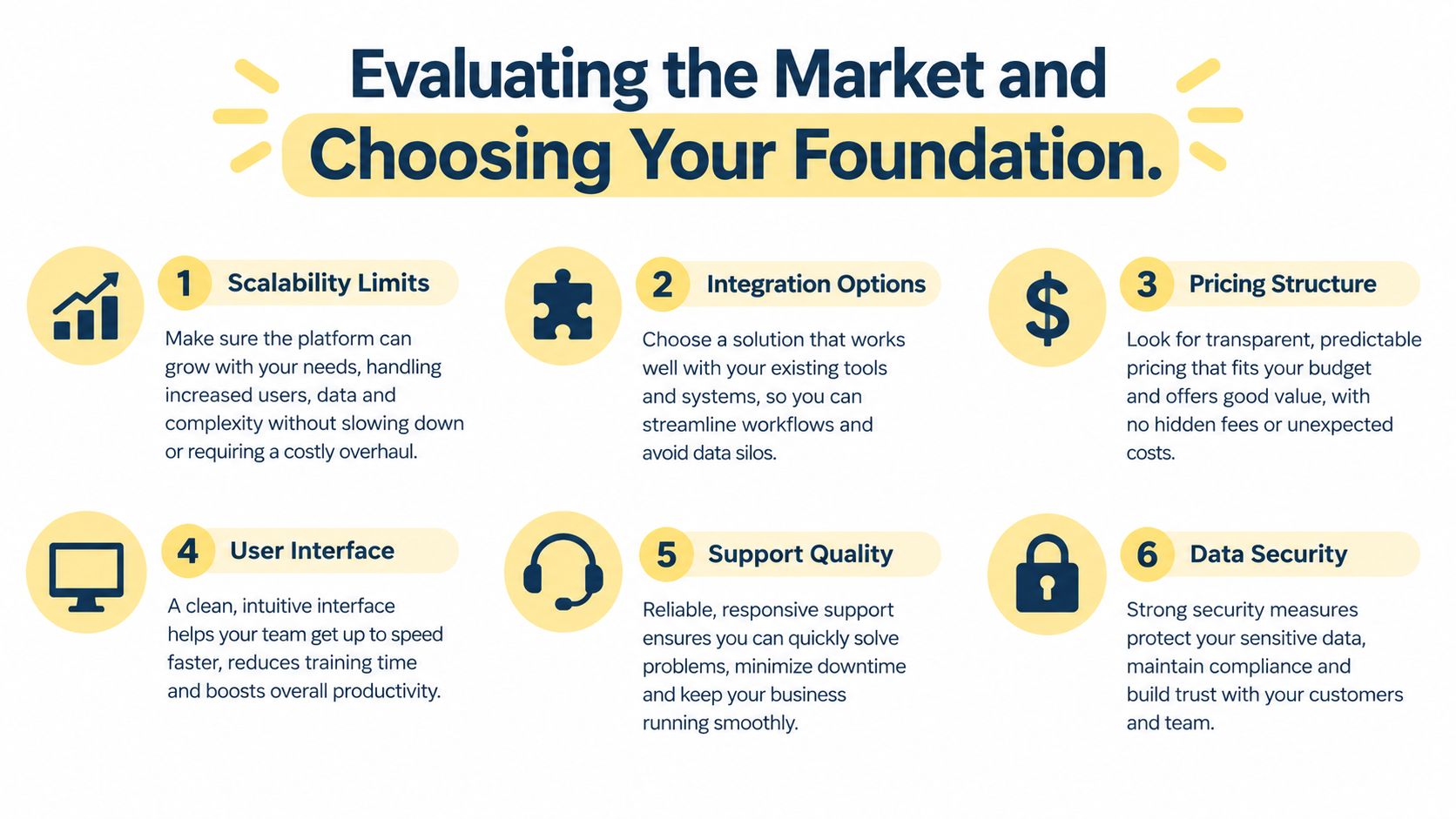
Choose a platform by testing the complete client journey, not by admiring isolated features. Run a sample engagement from payment through renewal. Ask who can see private notes, how permissions change when a coach leaves, whether data can be exported, and how AI features handle customer information.
Use this decision checklist:
- Workflow continuity: Can onboarding, scheduling, payment, session preparation, follow-up, and renewal share one client record?
- Outcome visibility: Can you track goals and milestones without turning private notes into sponsor reports?
- Security controls: Are permissions, data separation, audit trails, and relevant certifications clear?
- Integration depth: Can the platform connect with the HRIS, payment, calendar, video, and communication tools your buyers already use?
- Program flexibility: Can it support one-to-one coaching, cohorts, curricula, assignments, and community touchpoints?
- Adoption quality: Can a busy coach and a busy client use it without training that becomes another administrative burden?
The market is crowded, and comparison habits can mislead you. Even when reviewing systems outside coaching, resources such as compare nonprofit operations platforms can remind you to evaluate workflows, permissions, support, and operational fit instead of collecting features.
Your foundation should make the ethical choice the easy choice. It should reduce manual work, preserve human judgment, and give clients a consistent experience from the first agreement to the final outcome review.
Coachful brings onboarding, scheduling, secure payments, messaging, programs, notes, and progress tracking into one coaching workspace, with automation for reminders and renewals. Visit Coachful to evaluate whether its workflows can reduce your administrative burden while protecting the client trust your leadership practice depends on.