Pinterest Pin Templates for Coaches: 5 Examples to Adapt

Nour
Founder, Coachful
Which Pinterest pin template should a coach start with when the goal is useful website traffic, not another folder of pretty graphics? Choose the template that previews something you have already made: a worksheet, an article, a workshop, a mini-course or an honest comparison. Write the destination promise first, then design the pin around it.
Below are five original Pinterest pin templates for coaches, with editable SVG files, exact copy examples and a destination brief for each. They are illustrative creative starting points, not published campaigns or evidence of clicks, leads or sales. You will need to replace the placeholder practice name, check the wording against your own work and create the promised resource before using them.
The selection rule is deliberately simple: each template has to advertise a different useful next step. If you do not yet have a resource worth visiting, making a more elaborate pin is the wrong job.
Choose the template by the page you can genuinely deliver
- A downloadable worksheet: use the resource-preview template when you can offer a practical exercise and explain how the reader receives it.
- A helpful article: use the direct-answer template when your page answers a specific question without requiring an email address.
- A live workshop: use the event template when dates, format and registration details are settled.
- A self-paced mini-course: use the curriculum template when you can show what the learner actually gets.
- A decision guide: use the comparison template when readers need to choose between two reasonable options.
These examples focus on a coach attracting prospective clients. They are not instructions for coaching a client through a personal problem, and none of the example headlines promises a clinical result. Adapt the subject to the people you are qualified to serve.
1. The worksheet-preview pin
Best for: a coach with one useful downloadable exercise. This example fits a career coach who has made a job-change reflection worksheet, rather than a vague promise to help someone find their purpose.

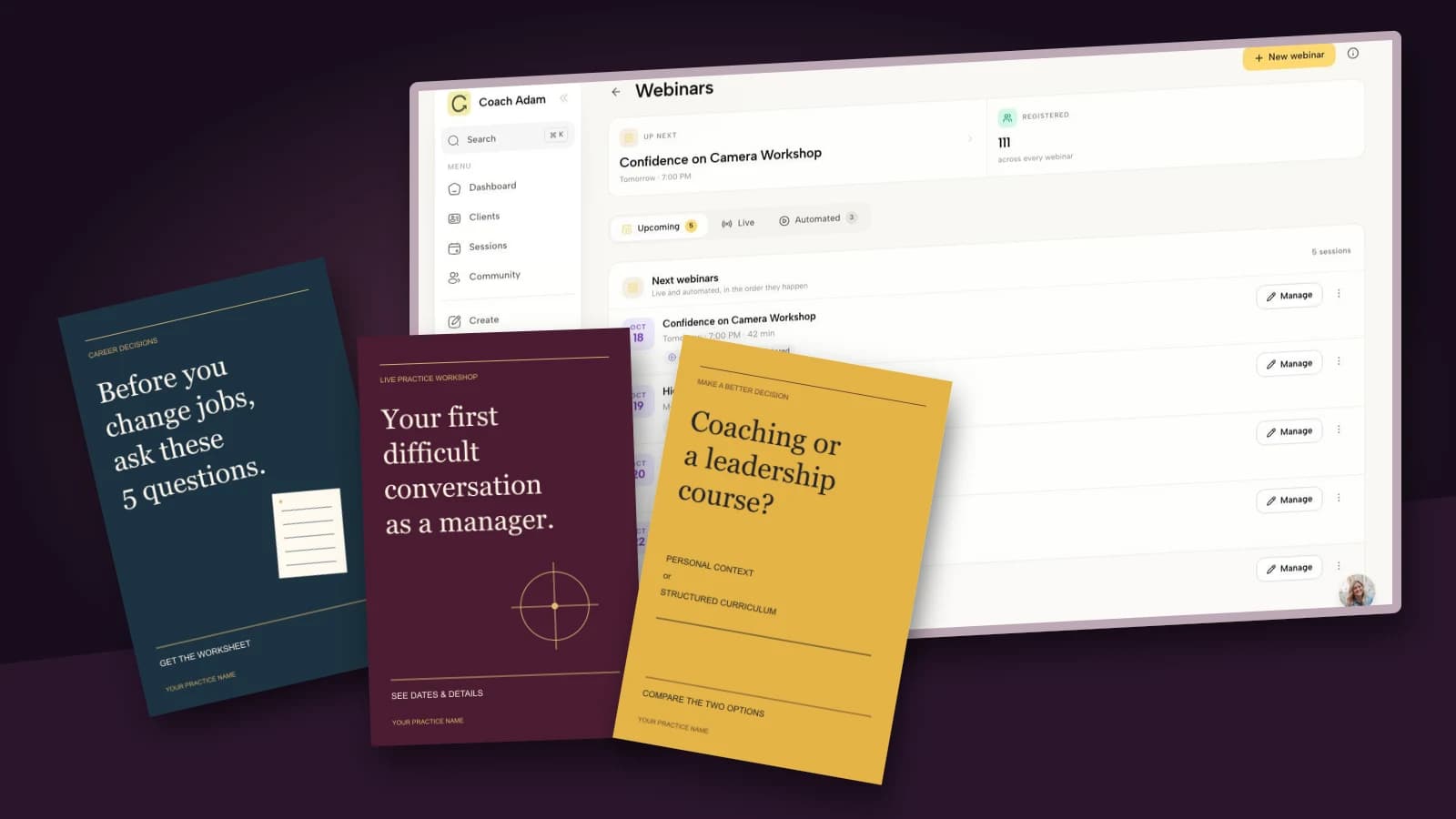
Image headline: “Before you change jobs, ask these 5 questions.”
Image action: “Get the worksheet.”
Pin title: “Career Change Worksheet: 5 Questions Before Changing Jobs.”
Description to adapt: “Considering a job change? Use these five reflection questions to compare what you want, what you need to investigate and one small next step. Visit the page for the worksheet and instructions.”
Alt text to adapt: “Navy career-change worksheet graphic with the headline Before you change jobs, ask these 5 questions, beside a small worksheet illustration.” Describe the actual edited image rather than adding a string of search terms.
Destination brief: repeat the worksheet name near the top of the page, show what it contains and state whether an email address is required. If you collect an address, explain the delivery and any separate marketing choice clearly. A resource request is not a reason to conceal an ongoing newsletter subscription.
The worksheet must actually contain five questions. A decorative page with a quote and a booking button is not the promised resource. Include a short instruction such as: “Answer privately, circle the question you need more evidence for, then choose one conversation or experiment.” Do not require people to submit sensitive career or employer details to download it.
Design adjustment: keep the worksheet preview modest and recognizable. The headline should do the explanatory work; tiny pretend handwriting adds nothing. Replace the practice-name placeholder with your real brand name, and do not imply the fictional worksheet is a validated assessment.
Download the editable worksheet pin template (SVG).
2. The direct-answer article pin
Best for: a coach with a genuinely useful article that a new visitor can read immediately. This is a good choice when your useful first step is education, not permission to send email.

Image headline: “How to say no at work without a long apology.”
Image action: “Read the 3 scripts.”
Pin title: “How to Say No at Work: 3 Scripts to Adapt.”
Description to adapt: “Need to decline an extra task without writing a paragraph of apologies? Read three workplace scripts, with notes on when to use each and how to adapt the wording to your role.”
Alt text to adapt: “Cream and rust typographic pin reading How to say no at work without a long apology, with an invitation to read three scripts.”
Destination brief: put the three scripts on the linked article, not behind a second unexpected signup page. Explain the context in which each script is useful. A new manager declining an optional meeting and an employee responding to a contractual responsibility need different advice.
You can invite an appropriate reader to explore coaching after the useful answer. Do not turn every script into a teaser that ends just before the practical wording. The click has already been earned; now keep the promise.
Design adjustment: the template uses generous space and one typographic emphasis instead of a stock laptop photo. Shorten the headline before shrinking the type. If your version needs seven lines of small print to explain what the article does, the article promise probably needs editing first.
Download the editable article pin template (SVG).
3. The workshop-invitation pin
Best for: a coach who has a specific live learning experience to invite people to. Advertise the task participants will practise, not an extravagant identity change.

Image headline: “Your first difficult conversation as a manager.”
Image action: “See dates & details.”
Pin title: “Difficult Conversations Workshop for New Managers.”
Description to adapt: “A live practice workshop for new managers preparing for a difficult workplace conversation. Check the current date, format, price and participation details on the registration page before booking.”
Alt text to adapt: “Plum workshop invitation with the headline Your first difficult conversation as a manager and a circular crosshair motif.” The motif is a design element, not an assessment score.
Destination brief: show the current date, time zone, duration, delivery format, price, intended audience and what participation involves. Explain whether people will practise aloud, work in pairs or observe. State any recording arrangements and the relevant cancellation terms before payment.
The example intentionally keeps a date off the image. That does not make an expired event evergreen. Review the pin when registration closes: use available Pinterest editing controls to correct or retire it, and make the linked page unambiguous about the event status. Never quietly replace a workshop invitation with an unrelated sales page.

The real Coachful demo screen above shows a webinar-management surface. It illustrates one place a coach can inspect an event workflow, not proof that these example pins are connected to Pinterest or that any registration has occurred. The public page and confirmation still need their own end-to-end test.
Design adjustment: keep the live-workshop label visible. If your event is a recorded lesson instead, change both the label and the destination. Do not use a countdown or “last chance” treatment unless there is a real, current closing point.
Download the editable workshop pin template (SVG).
4. The mini-course preview pin
Best for: a coach with a small, defined learning product. It can introduce someone to your approach, but the pin should describe the curriculum rather than promise the outcome of private coaching.

Image headline: “Plan your first week as a new manager.”
Image action: “Explore the lessons.”
Pin title: “First Week as a New Manager: A Self-Paced Mini-Course.”
Description to adapt: “Explore a self-paced mini-course about planning your first week as a new manager. Review the lesson outline, included exercises, access terms and price to decide whether it fits your situation.”
Alt text to adapt: “Dark green mini-course pin reading Plan your first week as a new manager, with a rising step illustration.”
Destination brief: list the actual lessons, expected participation, delivery format and what is not included. If there is no personal feedback, say so. If the course is still being developed, label it accurately rather than showing an apparently available finished product.

The real Coachful course-library screenshot supports the practical distinction between an idea for a course and a course with actual content and a publishing state. It is not a claim that Coachful makes or posts Pinterest graphics. Check your own learner experience before inviting traffic to it.
A useful curriculum preview for this fictional course might list planning first conversations, identifying responsibilities and deciding what to observe before changing things. Only put those topics on the page if the lessons actually cover them. A confident headline cannot compensate for an empty module list.
Design adjustment: the step motif suggests a sequence without inventing a before-and-after result. Keep it subordinate to the headline. Avoid adding a fake completion certificate, credential badge or testimonial to make an unfinished course seem established.
Download the editable course pin template (SVG).
5. The honest-comparison pin
Best for: a coach who can help a prospective buyer choose between two legitimate ways forward. This template earns its place only if the comparison is genuinely useful to someone who may choose not to hire you.

Image headline: “Coaching or a leadership course?”
Image action: “Compare the two options.”
Pin title: “Leadership Coaching vs a Course: How to Choose.”
Description to adapt: “Compare individual coaching and a leadership course by personal context, curriculum, feedback, cost structure and the support you want. Read when either option, both or neither may be appropriate.”
Alt text to adapt: “Ochre comparison pin asking Coaching or a leadership course, contrasting personal context with structured curriculum.”
Destination brief: define the options fairly. Individual coaching can focus on the buyer's particular decisions; a course can provide a structured curriculum. However, some courses include feedback and some coaching offers include teaching. Compare the actual offers, not exaggerated stereotypes.
Include a concrete “choose a course when…” section and a “choose coaching when…” section. Add the limits: coaching is not a substitute for required technical training, clinical care or legal advice. If you sell both options, disclose that relationship without treating it as proof that every reader needs one of them.
Design adjustment: resist a red-cross-versus-green-tick layout. The two options are not automatically wrong and right. The ochre design uses a visible question because the page's job is to help someone make a decision.
Download the editable comparison pin template (SVG).
How to edit and export the templates
The downloads are editable SVG files with a 1000 × 1500 canvas. Save a copy, then open it in a vector editor that supports SVG, such as Inkscape or Illustrator. Font substitution or import behavior may differ between tools, so check the edited file rather than assuming every layout remains intact. These are not hosted Canva templates.
- Replace the placeholder brand name. Use your own practice name and any necessary identification. Do not leave “YOUR PRACTICE NAME” on the final asset.
- Change the promise to match an existing page. If you change “five questions” to “seven questions,” update the actual resource and every relevant line of copy.
- Check line breaks. Keep the main headline readable at a small preview size. Remove words before squeezing the type into the edges.
- Export a PNG or JPEG for upload. The SVG is an editing source, not an instruction to upload SVG to Pinterest. Check current Pinterest file requirements in the publishing interface.
- Write the title, description, alt text and destination link separately. The words on the image do not replace those fields.
Pinterest's own creative guidance is the place to check current format recommendations and specifications. Its guidance recommends a vertical 2:3 format for standard image creative; these templates use that shape. Format compliance is not a prediction of distribution or conversions.
Check the click before making more designs
Open the destination on a phone as a new visitor. Can you identify the promised resource immediately? Does the primary action use the same language as the pin? Can someone complete it without hunting through a generic homepage?

The real Coachful funnel map above shows connected page steps. Use that kind of visual review to notice an unexpected detour, but also test the actual public pages. A tidy internal map does not prove the links, forms, emails or checkout work for a visitor.
Start with one template and one destination. Record the creative version, destination URL and the action you want someone to complete. If you already use website analytics, a non-sensitive campaign label can help distinguish this link; never put a client's name or personal circumstances in a tracking parameter.
Review outbound clicks separately from completed resource requests, registrations or appropriate inquiries. A save is not an inquiry, and a small number of clicks is not enough to declare a winning design. Change one meaningful element at a time so you know whether you tested the promise, the layout or the destination.
Frequently asked questions
Can I use these templates for my coaching business?
Yes. You may adapt these original templates for your own practice's marketing. Replace the placeholders and fictional offer details. The examples do not give permission to copy another coach's brand, client image, testimonial or proprietary worksheet.
Do I need a different template for every coaching niche?
No. The destination matters more than the niche label. A worksheet-preview layout can work for several specialties, but the promise, language, scope and linked exercise must fit the actual audience. Do not merely replace “career” with “health” and retain an inappropriate claim.
Should every pin link to a discovery call?
No. Send a worksheet pin to the worksheet page and an article pin to the article. A booking invitation can be a relevant later step, but replacing the promised resource with a sales call breaks the agreement you made in the creative.
Does Coachful publish these pins to Pinterest?
No Pinterest publishing connection is claimed here. The graphics are downloadable creative files. The Coachful screens illustrate possible course, event and funnel destination workflows, not an automatic link between the platforms.
Make one promise worth clicking
Choose the template for the resource you can deliver well today. Edit the claim, inspect the mobile export and test the destination. Five honest, useful creative options are more valuable than fifty variations of a promise your page does not keep.
If the unfinished part is the destination rather than the pin, try the interactive Coachful demo to inspect the webinar, course and funnel surfaces shown here. Decide how the visitor's next step will work before spending time on a larger creative batch.