Automation for Coaches: A Time-Saving Guide

Coachful
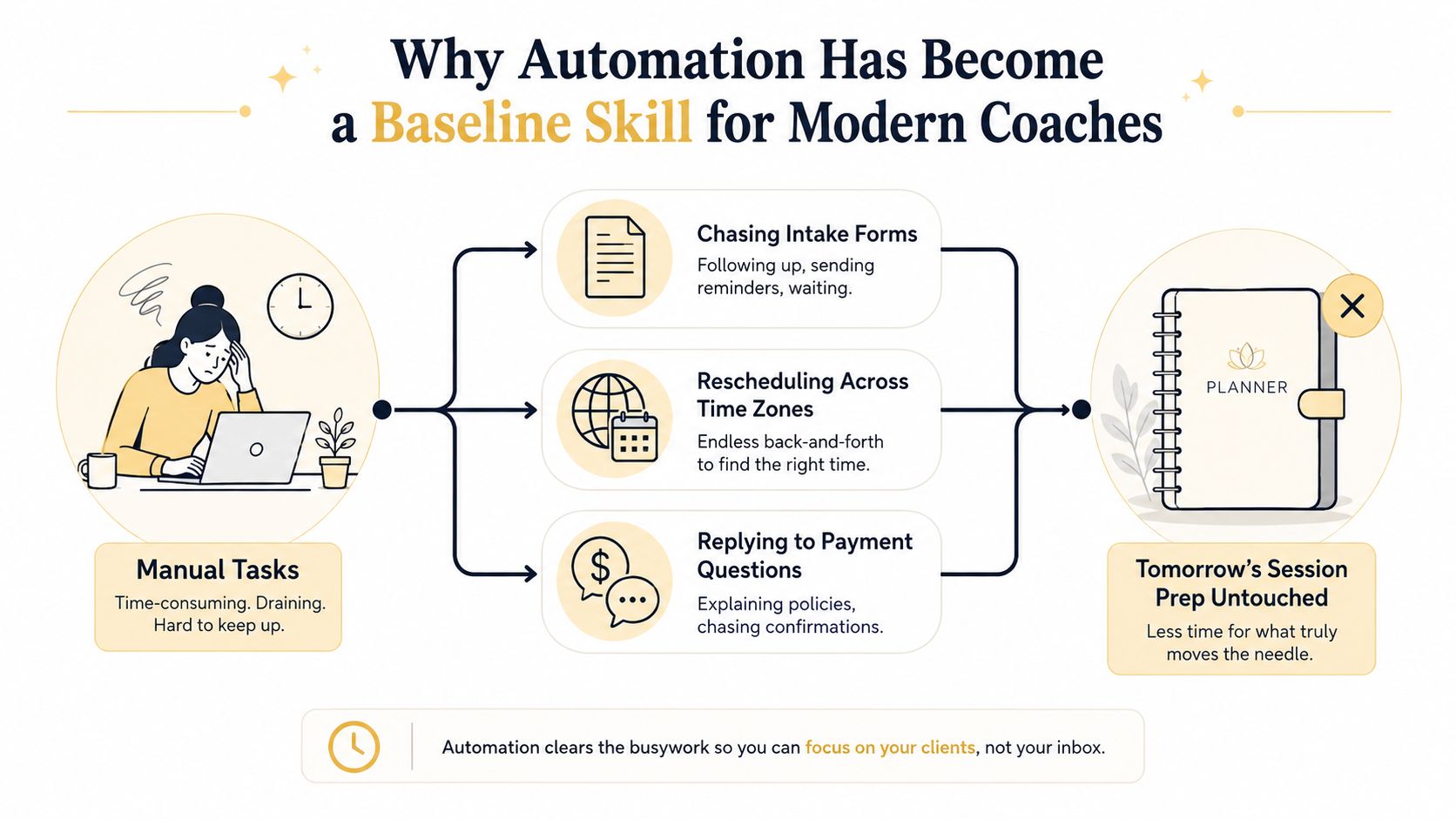
You're a coach, not a full-time administrator. Yet it's 11 p.m., and you're still chasing an intake form, moving a session across time zones, and answering a payment question while tomorrow's preparation sits untouched. The work feels small in isolation, but repeated reminders, scheduling changes, invoices, notes, and follow-ups consume the attention your clients pay for.
Automation for coaches solves that problem when you use it selectively. The point isn't to hand the relationship to a machine. The point is to make predictable work happen reliably, so you can bring more focus to the moments that require judgment, empathy, and presence.
Why Automation Has Become a Baseline Skill for Modern Coaches
Small practices can't afford to treat operations as an afterthought. A client who receives a clear welcome sequence, an easy scheduling path, and timely reminders experiences confidence before the first coaching conversation begins. A client who waits days for a form, payment response, or rescheduling confirmation may interpret the delay as disorganization, even when your coaching itself is excellent.
Automation means connecting rules, triggers, templates, and tasks. A signed agreement can trigger an onboarding email. A booked session can trigger reminders. An incomplete form can create a task for you. It doesn't mean asking software to understand grief, interpret a leadership crisis, or replace the judgment you bring to a difficult conversation.
The financial case is practical. A 2024 scheduling report says no-show reminders can recover up to 29% of missed appointments, while the same source set connects coaching-business automation with a reduction in administrative time from 8 to 12 hours per week to 3 to 5 hours per week. Those reclaimed hours can go toward paid sessions, preparation, or business development rather than inbox maintenance. See the coaching automation findings on scheduling and admin time for the underlying figures.
The baseline is operational consistency
Adoption is no longer limited to technically adventurous coaches. One benchmark reports that 42% of coaches use at least one AI tool, compared with 11% in 2023 and 24% in 2024, a 3.8× increase over two years. The cited uses include messaging, note-taking, scheduling, and follow-up workflows, not just experimental content generation. You can review the AI adoption benchmark for business coaching for that comparison.
You don't need a complicated agentic system to begin. Start with the work you repeat, document the decision rules, and preserve a human checkpoint where the relationship could be affected. A useful overview of automating business processes with AI can help you think beyond isolated apps and toward connected workflows.
This article is a practical playbook, not a software review. The question isn't “What can I automate?” It's “What should happen automatically, what should require my approval, and what should never leave my hands?”
Which Coaching Workflows to Automate First
Start with the back office, not the coaching conversation. Rank each task by two criteria: how often it repeats and how little judgment it requires. If a task happens the same way for more than 80% of clients and contains no emotional nuance, automate it. If it requires reading the room, keep it human.
Tier one is repetitive and rules-based
These workflows usually produce the fastest operational return:
- Intake forms: When a client books, send the form immediately and create a task only if it remains incomplete.
- Session reminders: When a session is booked, send confirmation, calendar details, and reminders without manual chasing.
- Payment confirmations: When payment clears, send a receipt and update the client status.
- Invoice sending: When a program milestone or billing date arrives, issue the invoice automatically.
- No-show follow-ups: When a client misses a session, send a neutral message and alert yourself before any sensitive response.
For example, a reminder flow can handle the ordinary client who confirms attendance while routing a repeated absence to you. That distinction matters. Automation should remove routine chasing, not flatten every client into the same category.
Tier two benefits from thoughtful templates
These tasks contain some variation, but a strong template can carry most of the load:
- Onboarding sequences: After a signed agreement, send program details, forms, calendar access, and preparation guidance. Review exceptions manually.
- Homework nudges: After a due date passes without a submission, send a gentle prompt. A second missed submission should create a coach task.
- Satisfaction check-ins: After a defined milestone, request a brief response and review negative or ambiguous feedback yourself.
- Renewal reminders: Before a program ends, send a summary of progress and an invitation to discuss next steps.
A structured client onboarding workflow is useful because it forces you to decide what the client needs, what your team needs, and where information should live. If you're comparing platforms or workflow patterns, the Exerta automation guide offers broader automation context, though your selection should follow your process rather than the other way around.
| Workflow | Ease of Automation | Est. Hours Saved / Month | Priority |
|---|---|---|---|
| Session reminders | High | Qualitative, recurring savings | Start here |
| Intake and onboarding forms | High | Qualitative, recurring savings | Start here |
| Payment confirmations and invoices | High | Qualitative savings | High |
| No-show follow-ups | High | Qualitative savings | High |
| Homework nudges | Medium | Qualitative savings | Next |
| Satisfaction check-ins | Medium | Qualitative savings | Next |
| Renewal reminders | Medium | Qualitative savings | Next |
| Crisis response and program design | Low | Not suitable for automation | Keep human |
Choose one Tier 1 workflow this week. A working reminder sequence is more valuable than an ambitious system you never finish.
Designing Triggers, Rules, and Human Escape Hatches
Every useful automation has five parts: a trigger, a condition, an action, a delay, and a human escape hatch. Leave out the last one and you haven't designed support. You've designed risk.
The trigger starts the flow. The condition decides which path applies. The action sends a message or creates a task. The delay controls timing. The escape hatch tells the system when to stop and ask you to take over.
Use onboarding as the model
Suppose a client signs a contract for a 12-week group program.
- Trigger: Contract signed.
- Condition: Program equals “12-week group.”
- Action: Send the welcome email, add the program calendar, and assign the intake form.
- Delay: Wait 48 hours before nudging an incomplete form.
- Human escape hatch: If the client replies with confusion, distress, accessibility needs, or missing information, stop the sequence and create a personal follow-up task.
The escape hatch should be visible in your workflow, not hidden in your intentions. Write the escalation instruction directly into the process so another team member, or your future tired self, knows what to do.
Apply the same logic to common moments
For reminders, use a 24-hour-before-session trigger. If the client has missed 2 or more sessions, send the standard reminder and create a prompt for a personal coach note. Don't let the software guess why attendance changed.
For renewals, use a 7-day-before-card-expiry trigger. If the subscription is more than $100 per month, send the payment email and create a personal check-in task rather than relying only on dunning language.
For homework, trigger the flow when there's no log entry by the due date. Send a gentle nudge after the first miss. If it's the second miss in a row, create a coach-pinged task. The message can remain automated, but your interpretation shouldn't be.
Design rule: Every automated flow needs a clearly named moment when the coach takes over.
Use the accompanying video as a practical visual introduction to how these components fit together.
Refund requests, distress signals, safeguarding concerns, unusual payment situations, and high-value accounts deserve human handling. Automation should make those cases easier to notice, not easier to ignore.
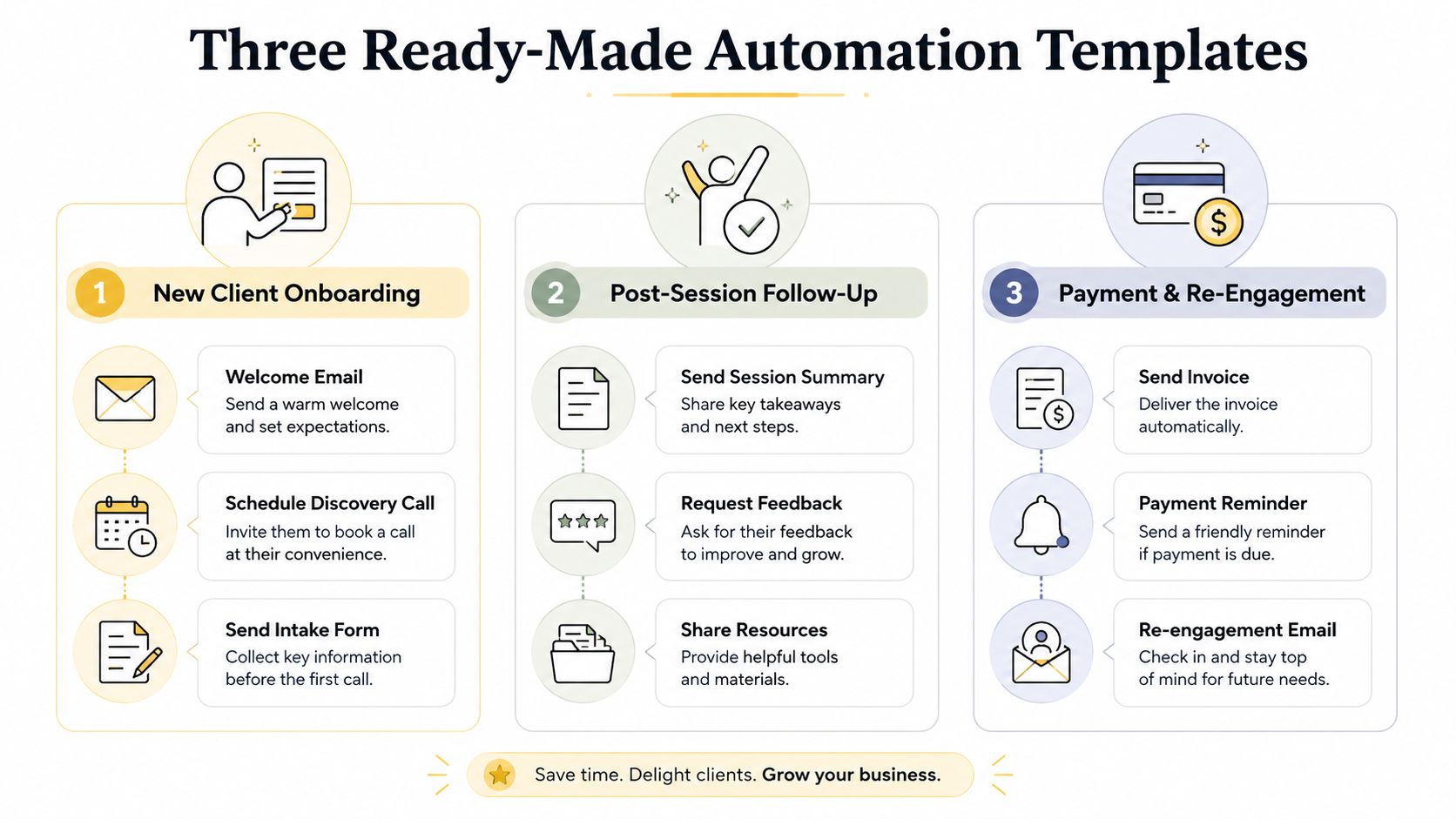
Three Ready-Made Automation Templates You Can Copy
Templates work when they include more than attractive copy. Each one needs a trigger, a channel, merge fields, branch points, and a clear override. The following examples are deliberately simple enough to build without redesigning your whole practice.
Template one for a new life-coaching client
A client signs up on a Tuesday.
- Trigger: Payment and agreement are complete.
- Channels: Email, calendar, and your coaching platform.
- Copy beats: Welcome the client, confirm what happens next, explain how to prepare, and give one clear way to ask a question.
- Merge fields: Client name, program name, coach name, first-session date, scheduling link, and intake link.
- Branch points: If the intake form is complete, send preparation guidance. If it's incomplete after 48 hours, send a reminder and create a review task.
- Human override: If the client mentions anxiety, urgency, accessibility needs, or uncertainty, you reply personally.
The sequence can send the intake form immediately, deliver the calendar link within five minutes, and send a welcome video that evening. The 48-hour check-in should feel like an invitation, not a warning: “I noticed your intake form is still open. If you're stuck on any question, reply here and I'll help.”
Template two for a corporate cohort
Mixed time zones create avoidable confusion. Let the system carry the clock.
- Trigger: Cohort session is booked.
- Channels: Email and text, if the client has consented.
- Copy beats: Confirm the local session time, state the preparation request, link to the meeting room, and explain what happens after a missed session.
- Merge fields: Client name, local date and time, cohort name, facilitator, meeting link, and preparation prompt.
- Branch points: Send the preparation email 24 hours before, a nudge two hours before, and a no-show message after ten minutes.
- Human override: After a no-show, loop the coach in before sending anything that assumes the reason.
Scheduling software commonly describes a confirmation at booking, a 24-hour reminder, and a 1-hour reminder as a reliable attendance pattern. Organizations using email and text reminders report show rates of up to 90%, while SMS reminders are reported to improve attendance by 50% versus no reminders in the cited guide. Review the coach scheduling reminder patterns before choosing your cadence.
Template three for a quarterly renewal
- Trigger: Renewal date approaches.
- Channels: Email, payment system, and coach task list.
- Copy beats: Summarize progress, state the renewal date, explain the next step, and make payment support easy to request.
- Merge fields: Client name, program name, renewal date, progress themes, payment link, and coach name.
- Branch points: Send a friendly pre-due reminder. If payment fails, send recovery instructions. If it remains unresolved during the grace period, create a personal outreach task.
- Human override: You personally handle churn signals, dissatisfaction, refund requests, or a client who says the program no longer fits.
For connected workflows, review using Zapier with Coachful and map every handoff before switching anything on.
Testing, Tracking, and Iterating Your Automations
Don't launch an automation because the steps look correct on your screen. Test it as a client would experience it, including the awkward cases.
Create a sandbox client record and run through the sequence before activating it. Check the trigger, preview every merge field, verify the recipient's time zone, test the opt-out link, and confirm that a failed action creates a visible task. Send messages to yourself and read them on mobile. A blank name field or wrong appointment time can damage trust faster than a manual delay.
Track the signals that affect the practice
A complicated dashboard won't make your coaching business healthier. Track three practical indicators:
- Session show rate: Are clients attending after reminders?
- Admin hours saved per week: Are you spending less time on repetitive work?
- Client satisfaction at session three: Does the experience feel supportive rather than impersonal?
Use a lightweight weekly review. If show rates improve but clients complain that reminders feel intrusive, change the copy or cadence. If an automation saves no meaningful time because you're constantly correcting it, pause it and redesign the process.
| Automation | Primary KPI | Target | Last 30 Days | Action |
|---|---|---|---|---|
| Session reminders | Show rate | Set your baseline and improve it | Record actual result | Adjust timing or copy |
| Intake sequence | Admin hours saved | Reduce manual chasing | Record actual result | Fix incomplete-form routing |
| Homework nudges | Reply sentiment | Supportive, not pressured | Review replies | Add a human checkpoint |
| Renewal reminders | Renewal conversations | Clear next-step responses | Record actual result | Personalize progress summary |
The broader workflow literature supports measuring time rather than assuming it. An n8n study reported an approximately 151× reduction in execution time for automated processes, while a literature review reported average operational cost reductions of 30% to 70% and productivity gains of up to 85% in repetitive tasks. Those figures come from general workflow research, so treat them as context, not a promise about your practice. The workflow automation research is most useful as a reminder to measure your own before-and-after process.
Run a 30-minute monthly review. Read a sample of sent messages, inspect failed branches, ask whether clients replied with confusion, and remove any step that adds complexity without helping the client.
Keeping It Personal and Staying on the Right Side of Data Privacy
Your clients don't experience automation as cold because it's automated. They experience it as cold when it's irrelevant, badly timed, or impossible to answer with a real person.
Write every message as if one client is reading it, because one client is reading it. Use their name in the first line, refer to a detail from intake when appropriate, end with a specific human next step, and never run a sequence you wouldn't personally respond to.
Warmth needs deliberate rules
A generic “Just checking in” message feels disposable. A useful alternative names the context: “You mentioned that preparing for difficult leadership conversations was your priority. How did that week's practice go?” The second message still uses a template, but it gives the client a reason to engage.
Follow five rules:
- Write for one person: Remove language that sounds like a broadcast.
- Use the client's name early: Don't hide personalization in a footer.
- Reference intake details carefully: Use only information relevant to the message.
- Offer a human next step: Tell clients how to reach you or request help.
- Test your own response: If you wouldn't answer the message, rewrite it.
Privacy is part of the workflow
Under GDPR, session notes, email addresses, and contact form submissions are personal data. Explicit consent is required before adding someone to marketing emails, and pre-checked boxes don't count. Data access or deletion requests should be answered within 30 days. The GDPR guidance for coaches explains these mechanics in a coaching context.
Use an unchecked opt-in box for a free resource, explain what data you collect and why, define how long you retain session notes, and review the security and permissions offered by your CRM, email provider, payment processor, and automation tools. Keep your privacy notice short enough that clients can understand it without legal translation. You can also use this data protection compliance guide as an audit prompt.
Privacy check: Can you explain where client data goes, who can access it, why you keep it, and how a client can request deletion?
Spend ten minutes this week tracing one client record from form submission to payment, notes, reminders, and deletion. That exercise usually reveals more than another hour of comparing software features.
Your 30-Day Automation Starter Plan
You don't need to rebuild your practice in one weekend. Use a four-week sprint that creates one dependable workflow, then adds carefully.
Week one audits the reality
List every recurring administrative task. Mark the ones that require copying information, sending reminders, checking status, or moving data between tools. Confirm that your calendar, payment system, email, and client records connect in a way you can understand.
- Input: Your task list and existing tools.
- Output: One Tier 1 workflow selected for automation.
- Success metric: You can name the trigger, action, and human checkpoint.
Week two builds the first workflow
Choose onboarding or session reminders. Write the exact copy, define the conditions, test merge fields, verify time zones, and add a manual review for exceptions.
- Input: One documented process.
- Output: A tested automation running on a sandbox record.
- Success metric: The flow completes without manual intervention for routine cases.
Week three adds one supportive workflow
Add homework follow-up, satisfaction check-ins, or renewal reminders. Turn on basic tracking for show rate, admin hours saved, and client replies. Don't add another workflow if the first one is generating errors you haven't fixed.
- Input: Results from the first workflow.
- Output: A second workflow with a defined escalation path.
- Success metric: You can identify whether it saves time and supports client momentum.
Week four reviews the system
Read your messages for tone, remove unnecessary steps, and document the two human checkpoints that protect personalization. Schedule a quarterly privacy audit, then write down what happens when a client opts out, requests data, misses repeated sessions, or needs urgent support.
- Input: Dashboard results, client replies, and failed-task logs.
- Output: Revised copy, documented exceptions, and a review schedule.
- Success metric: Another person could understand the workflow without asking you to explain every decision.
FAQ: How much automation should stay live? Only as much as you can inspect. What if clients dislike it? Ask directly at session three and adjust the tone or timing. What should remain manual? Crisis response, complex emotional situations, personalized program design, and any decision where context matters more than speed.
Coachful brings onboarding, scheduling, secure payments, messaging, progress tracking, program delivery, and automation into one coaching workspace, with its AI assistant Michelle able to summarize calls, draft emails and tasks, and take actions inside the dashboard. Visit Coachful to see whether a connected system can replace the scattered reminders and handoffs currently consuming your coaching time.