
Mastering Client Onboarding Automation for Coaches

Coachful
Ever get that sinking feeling when a new client signs up? Not the thrill of a new partnership, but the dread of the mountain of admin tasks that follows? You might find yourself thinking, "Great, another client! But oh no, now I have to send the contract, the invoice, the welcome packet... it's going to take me hours."
If so, you're not alone. That gap between a client's "yes!" and your first powerful session together is often clogged with manual work that sucks your time and makes you feel more like an admin than a coach. This is the client onboarding bottleneck, and client onboarding automation is how you break free.
The Hidden Costs of Manual Client Onboarding
That little voice in your head saying, "This admin work is stealing my time and energy"—it's a shared frustration among even the most successful coaches. The manual grind of onboarding isn't just annoying; it carries very real, though often hidden, costs.

Think of all the time you spend on repetitive tasks that don't move the needle. Chasing down a signed contract, sending a dozen emails to schedule one kickoff call, or manually creating and tracking invoices. Every minute spent on this is a minute you're not coaching, creating new programs, or marketing your business. It's the time you could be using to find two more clients, but instead, you're just servicing the one you have.
The Real Price of a Broken First Impression
A clunky, manual onboarding process does more than just waste your time. It quietly shapes your new client's first impression of your entire business. They're excited, they've just made a big investment in themselves—and in you. Then... silence. You're busy, so it takes a day to get back to them. The contract comes in a separate email. The payment link in another. It feels disjointed, and their confidence starts to waver.
Do any of these internal monologues sound painfully familiar?
- The Payment Anxiety: "I hope this new client pays the invoice soon. Our first session is tomorrow, and it's going to be so awkward if they haven't paid. Should I send a reminder? I don't want to sound pushy."
- The Sunday Scramble: "Ugh, it's Sunday night. Instead of relaxing, I'm stuck at my desk putting together a welcome packet and making sure I have the right intake form for my new client tomorrow morning. I'm already drained, and the week hasn't even started."
- The Scheduling Black Hole: "Okay, I suggested Tuesday at 2 PM. They said no. They offered Wednesday at 10 AM, but I have another call then. This is our fourth email back and forth. Why is it so hard just to book one call?!"
These little moments of friction might seem small, but they add up. They create doubt and chip away at the excitement a new client should be feeling. Instead of feeling confident and cared for, they start to wonder if they made the right choice. A poor first impression can directly hurt client retention and kill potential referrals before you've even had your first session.
Your onboarding is not just a process; it's the red carpet you roll out for new clients. It sets the tone for your entire coaching relationship and is your first opportunity to demonstrate the professionalism and organization they can expect from you.
Reclaiming Your Time and Professionalism
Moving to an automated system isn't just about being more efficient. It's a strategic decision to reclaim your role as a high-impact coach, not a part-time administrator. Imagine a world where a client signs up and, by the time you've finished your morning coffee, they've already received their welcome packet, signed their contract, and booked their first session in your calendar. All without you lifting a finger.
The results speak for themselves. Data from top B2B companies shows that effective onboarding automation can lead to a 53% reduction in the time it takes for a client to get started. It can even help you scale your onboarding capacity by 3x in under a year. One standout case showed how the right systems can drive 85% enhanced efficiency and a 70% decrease in overall onboarding time. You can dig into the full report on these onboarding efficiency findings to see the numbers yourself.
Ultimately, automating your client onboarding is your ticket out of the administrative weeds. It helps you build a seamless, professional, and welcoming experience that makes clients feel valued from the moment they commit—freeing you to do the work you actually love.
What Is Client Onboarding Automation Really?
When you hear the word "automation," what comes to mind? For many coaches, it sounds cold, impersonal, and frankly, the opposite of everything our work stands for. You might be thinking, "My clients pay for my personal attention, not for a robot. How can I automate the start of a relationship that's built on human connection?"
And you're absolutely right to feel that way. That's why we need to get clear on what client onboarding automation really means in the context of a coaching business.
Think of it this way: imagine you had the most amazing virtual assistant in the world. They work around the clock, never forget a single detail, and handle all the boring, repetitive admin work flawlessly. That's what a good automation system does. It’s not a replacement for you; it's a tool that executes your onboarding process perfectly, every single time, so you can focus on the human parts.
Automating the Logistics, Not the Relationship
The real power of automation is that it takes over the tasks that were never personal in the first place. Is chasing down a signed contract a moment of deep connection? Is sending an invoice an act of transformational coaching? Of course not. These are just logistical hurdles.
By handing off these repetitive tasks to a system, you get back your most precious resources: your time and your mental energy. That energy can then be poured directly into what your client actually hired you for—your focused, present, and impactful coaching.
Automation handles the impersonal tasks—paperwork, scheduling, reminders—to free you up for what truly matters: deep, human connection. It's not about replacing your personal touch; it's about amplifying it.
Consider the experience from your new client's perspective. They finally decide to invest in themselves and sign up on your website at 10 PM on a Friday. Instead of waiting until Monday morning for you to even see the notification, an automated system can give them immediate reassurance.
It can instantly:
- Send a warm welcome email using their name: "Hi Jane, welcome aboard! I'm so excited to start this journey with you."
- Deliver the coaching agreement for them to e-sign.
- Provide a private link to your calendar to book their first call.
This isn't just efficient; it’s a powerful first impression. It shows them they've invested in a professional who is organized and ready for them. That feeling of being taken care of builds trust before your first conversation even begins. To fully appreciate this, it helps to have a solid grasp of the entire client onboarding journey.
How It Works in the Real World
Let's walk through a concrete example. Say a new client, Sarah, buys your signature coaching package from your website while you're busy leading a group workshop. You're completely focused on your current clients, as you should be.
- The Trigger: The moment Sarah's payment goes through, it kicks off the entire process.
- The Workflow: An automated sequence you designed begins instantly in the background.
- The Actions:
- Immediately: Sarah gets a beautifully branded welcome email that says, "Welcome, Sarah! We're so excited to begin this journey with you. Here’s what to expect next..." This email could even include a 2-minute personal welcome video you pre-recorded.
- Simultaneously: The system sends her the coaching contract and a link to your intake form to share her goals.
- Internally: A new client profile for Sarah is automatically created in your dashboard, keeping all her information perfectly organized from day one.
By the time you finish your workshop, your new client is already welcomed, contracted, and ready to get started. This isn't just a "nice-to-have." A smooth, automated process creates a red-carpet experience that can help you increase your onboarding capacity by 3-4x without any extra work. It sets a professional and caring tone for the entire coaching relationship to come.
Six Core Automated Workflows to Transform Your Practice
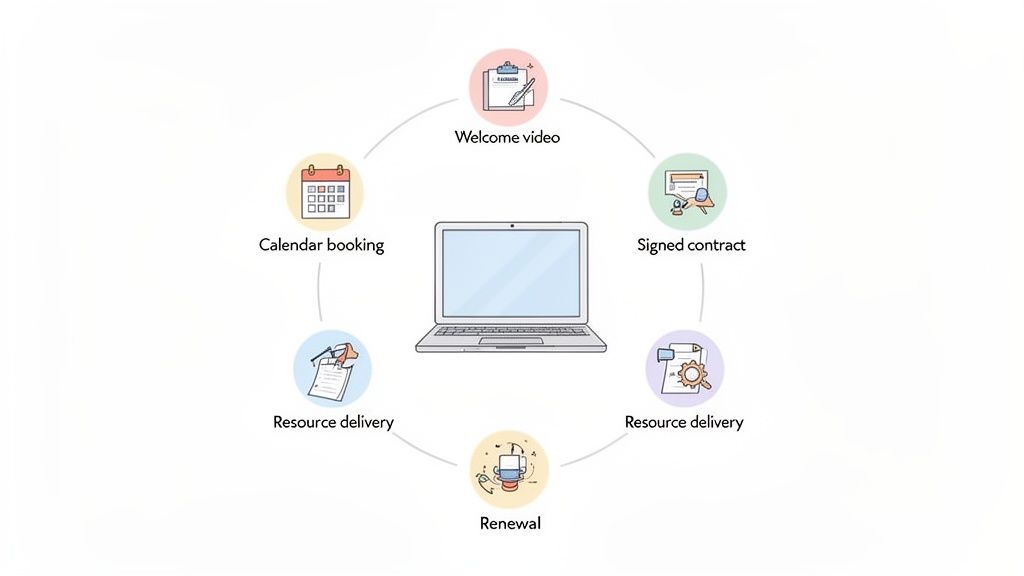
So, you get the theory behind automation. But what does a truly great client onboarding automation system actually look like day-to-day? It’s not one giant, complicated machine. It's really just a series of simple, connected workflows that run your process flawlessly every single time.
Let's walk through the six most essential workflows you can implement. Think of these as your playbook for creating that "red carpet" experience we talked about—the kind that makes clients feel instantly confident they made the right choice.
1. The Instant Welcome Sequence
That moment a new client clicks "buy" is pure gold. Their excitement is at its peak, and your first automated workflow needs to meet them right there. As soon as their payment goes through, the system should trigger a personalized welcome email.
This isn't just a boring receipt. It’s a warm, branded message that immediately validates their decision and clearly outlines what happens next. Example: The subject line could be "Welcome to the Program, [Client Name]! Your journey starts now." The email can say, "I'm thrilled to have you. Your first step is to fill out the quick intake form linked below so I can prepare for our first session." This simple step closes the gap between payment and personal contact, replacing awkward silence with professional reassurance.
2. The Effortless Payment and Contract Engine
Let’s be honest: chasing down invoices and signed contracts is a massive energy suck for any coach. This workflow takes you out of the "enforcer" role and lets your system handle the administrative heavy lifting, so you can focus on coaching.
You might be thinking, "But I need to see the payment and signature myself to be sure." Your system becomes your new failsafe. It tracks everything with perfect accuracy and only moves the client forward once those critical steps are complete.
An automated contract and payment system ensures you get paid and are legally protected without ever sending an awkward "just following up" email. It protects your cash flow and, just as importantly, your client relationship.
When a client signs up, the system automatically generates and sends their invoice and contract. It can even follow up with polite reminders if documents aren't signed or payment isn't made, making it a foundational piece of client onboarding automation.
Manual vs Automated Onboarding at a Glance
It’s one thing to talk about these workflows, but the difference becomes crystal clear when you see the time and effort side-by-side. The contrast between the old, manual way and the new, automated way is stark.
| Onboarding Task | The Manual Way (Hours & Hassle) | The Automated Way (Minutes & Magic) |
|---|---|---|
| Welcome & Next Steps | 1-24 hours. You have to see the payment notification, draft an email, and hope you don't forget. | 1 minute. A personalized, branded email is sent automatically the second payment clears. |
| Contracts & Invoices | 2-5 hours per client. Creating, sending, tracking, and sending multiple follow-up emails. | 5 minutes (one-time setup). The system generates, sends, and reminds clients automatically. |
| Session Scheduling | 1 hour of email tag. "Does Tuesday at 2 work?" "No, how about Wednesday at 10?" | 2 minutes for the client. They click a link, see your real-time availability, and book instantly. |
| Resource Delivery | 30 minutes. Finding the right files, attaching them to an email, and granting portal access. | 0 minutes. Access is granted and resources are sent as soon as the contract is signed. |
This table isn't an exaggeration; it's the reality for thousands of coaches. Automation doesn't just save you a few minutes—it reclaims entire days and projects an image of effortless professionalism.
3. The Seamless Scheduling System
The dreaded email tag to find a meeting time is officially over. This workflow gives your clients the power to book their own sessions while completely protecting your calendar and your sanity.
Once a client signs their contract, they're automatically sent a private link to your booking calendar. You set the rules—they can only book during your designated "coaching hours," preventing surprise calls on a Friday afternoon. The system handles conflict checking, adds buffer time between sessions, and sends confirmations to both of you. No more back-and-forth, just a perfectly scheduled call on your calendar.
4. Automated Resource and Portal Delivery
Your clients paid for your expertise, so don't make them wait. Manually emailing PDFs or adding people to a client portal is a bottleneck that kills momentum.
This workflow delivers value instantly. Once payment and contracts are handled, the system can automatically grant access to your private client portal, send links to foundational worksheets, or add them to the right cohort in your community platform. Example: As soon as a client signs their contract, they get an email saying, "Great news! Your access to the Client Resource Hub has been granted. Click here to explore the 'Getting Started' module before our first call."
5. The Smart Reminder and Follow-Up System
No-shows are a frustrating drain on your time and revenue. A smart reminder system is one of the easiest and most powerful automations to set up. In fact, studies show that automated reminders can improve intake form completion rates from 61% to 89% and boost kickoff call scheduling from a dismal 43% to over 90%.
Your system can send automated email and even SMS reminders 24-48 hours before a session, drastically reducing no-shows and keeping your schedule on track. To see how this fits into a bigger picture, it's worth exploring what a complete client management software for coaches can do.
6. The Client Renewal and Offboarding Loop
What happens when a coaching package ends? A great onboarding system also includes a plan for a graceful and strategic offboarding.
Towards the end of an engagement, the system can trigger an email sequence that celebrates the client's progress and presents a clear, compelling option to renew or graduate to another program. After they've finished, it can automatically send a request for a testimonial or feedback, helping you gather powerful social proof while the experience is still fresh. This closes the loop and makes renewals and feedback a natural part of your business, not an afterthought.
What's the Real ROI of Your Automation?
As a coach, you scrutinize every dollar. So when you look at automation software, you're asking the right question: "Is this just another monthly bill, or is it an investment that will actually pay for itself?"
It’s a critical distinction. You’re not just buying a tool; you're deciding where to put your hard-earned money to grow your business.
Here’s the truth: thinking of client onboarding automation as just a cost is like calling a world-class running shoe "just another sneaker." The real value isn't the shoe—it's the speed, the efficiency, and the new personal bests it helps you achieve. Let's break down what that ROI looks like in real, measurable terms.
The return on this investment isn’t a single number. It’s a series of powerful improvements across your entire business, and the key is knowing what to look for.
How to Actually Measure the Payoff
To see the true financial impact, you have to look past the monthly subscription and focus on three core areas. These numbers tell the real story of how automation transforms your coaching practice from a simple time-for-money trade into a scalable business.
Here’s what you should be tracking:
- Fewer Admin Hours: This is the most immediate and obvious return. How many hours are you losing each week to manual tasks like chasing contracts, scheduling calls, and sending reminders? A solid automation system can easily slash this time by 50-80%. It’s not an exaggeration.
- Faster Time-to-Value (TTV): This is a fancy term for a simple idea: How quickly does a new client get that first "aha!" moment? Automating resource delivery and scheduling means they get engaged and start seeing value from day one. That immediate momentum is a huge driver for keeping them long-term.
- Higher Client Lifetime Value (CLV): First impressions are everything. A seamless, professional onboarding experience creates happier clients. Happier clients stick around, complete their programs, and are far more likely to renew. Automated renewal sequences make this a natural and easy next step for them.
Think about it this way: if automation frees up just 10 hours of your week, what is that newfound time really worth? That's 10 hours you could be spending on billable coaching sessions, building out that group program you've been dreaming of, or finally focusing on marketing to attract more of your ideal clients.
The Back-of-the-Napkin ROI Formula
You don't need a complex spreadsheet to see the potential here. Let's run a quick, realistic calculation.
First, let's quantify that reclaimed time. Let's say you currently spend 15 hours a week on administrative tasks for your clients. After automating, that drops to just 3 hours (for handling exceptions and personal check-ins). You've just gained 12 hours of high-value time back in your week.
Now, let's assign a value to that time. If your standard coaching rate is $150/hour, those 12 hours represent $1,800 per week in potential revenue-generating activity. That adds up to over $7,200 per month. Suddenly, a software subscription fee of $50 or $100 a month looks pretty insignificant, doesn't it?
The real ROI isn't just about the hours you save; it's about what you do with those hours. Automation buys back your most valuable asset—your time—so you can reinvest it in the high-impact work that actually grows your income.
This isn't just theory; the data backs it up. A comprehensive study from Forrester Research, for example, found that companies using AI-powered automation cut their administrative time by 50-80% and got clients to their first "win" 65% faster. The most impressive part? They saw customer retention jump by 40% in the very first quarter. You can read more about these impressive automation benefits from Guidde.com.
Curious what these numbers would look like for your specific coaching practice? Plug your own rates and hours into our simple ROI Calculator tool to get a personalized estimate. It’s time to stop seeing automation as an expense and start seeing it for what it is: the single most powerful engine for your business's growth.
Your Step-By-Step Automation Implementation Plan
Does the thought of setting up a whole new system make your stomach do a little flip? You're not alone. The idea of building a client onboarding automation sounds technical and a bit scary. You might be thinking, "I'm a coach, not an IT guy. I'm going to spend weeks on this and probably break something."
Let's skip the generic advice. This is a practical, coach-focused action plan designed to get you from feeling overwhelmed to feeling totally in control, one simple step at a time.
Step 1: Map Your Ideal Client Journey
Before you even think about clicking a button in any software, grab a pen and paper. Seriously. Ask yourself this one question: "From the second a new client says 'yes,' what is the absolute best, most reassuring experience I can give them over the next 30 days?"
Forget about the technology for a minute. Just dream up the key moments and feelings.
- Example Day 1: Client thinks: "Wow, that was easy! I already have my welcome email and the next steps. I feel so taken care of."
- Example Day 3: Client thinks: "Great, my first call is booked. No email tag. And I've already filled out my goals form, so my coach will be prepared."
- Example Day 7: Client thinks: "I love that I have access to these resources already. I can start making progress even before our first session."
- Example Day 30: Client thinks: "That first call was incredible. I'm so glad I signed up. This is going to be life-changing."
This map is your north star. It defines the experience you want to create—the technology is just the tool you'll use to make it happen.
Step 2: Gather and Organize Your Assets
Okay, time to get organized. Create a new folder on your computer called "Onboarding Toolkit." Now, start pulling together all the digital bits and pieces you use for onboarding. I'd bet you have most of these already, they're just scattered in your email, downloads folder, or on your desktop.
Round up your:
- Coaching contract or agreement template.
- Welcome email copy (even a rough draft is a perfect start).
- Intake form or questionnaire.
- The link to your scheduling calendar.
- Any welcome packet PDFs, introductory videos, or other resources you send to every new client.
Getting everything in one spot first makes the actual setup so much faster. A good client onboarding process template can also be a huge help here, giving you a framework so you don't miss any crucial steps.
Step 3: Choose Your Technology Stack
This is where I see a lot of coaches get stuck in "analysis paralysis." You've got two main routes you can go.
- All-in-One Platforms: Tools like Coachful are built from the ground up for coaches. They bring payments, contracts, scheduling, and client resources into one place. It’s a much simpler and more connected way to get started. Best for: The coach who wants a simple, streamlined system without the tech headache.
- Juggling Multiple Tools: You can also piece together different apps you might already use—like Calendly for scheduling, Stripe for payments, and an email marketing tool—and connect them with an integrator like Zapier. This offers a lot of flexibility but comes with more complexity in both setup and maintenance. Best for: The tech-savvy coach who loves tinkering and has a very specific, custom process in mind.
My advice? If you're just starting with automation, an all-in-one platform is almost always the quickest path to a polished, professional system.
Step 4: Build Your First Workflow
Don't try to boil the ocean. Start small and focus on the single most important workflow: your Welcome Sequence.
Inside a platform like Coachful, this is pretty intuitive. You’ll set a "trigger" (something that starts the automation) and then add the series of "actions" you want to happen automatically. Your first, game-changing workflow could look like this:
- Trigger: Client's payment is completed.
- Action 1: Instantly send the "Welcome & Next Steps" email.
- Action 2: Automatically send the coaching contract for an e-signature.
- Action 3: Send the link to your intake form.
Just this one sequence solves the biggest onboarding headaches and delays. It's the perfect example of how automation works for you, freeing up your time for what really matters.
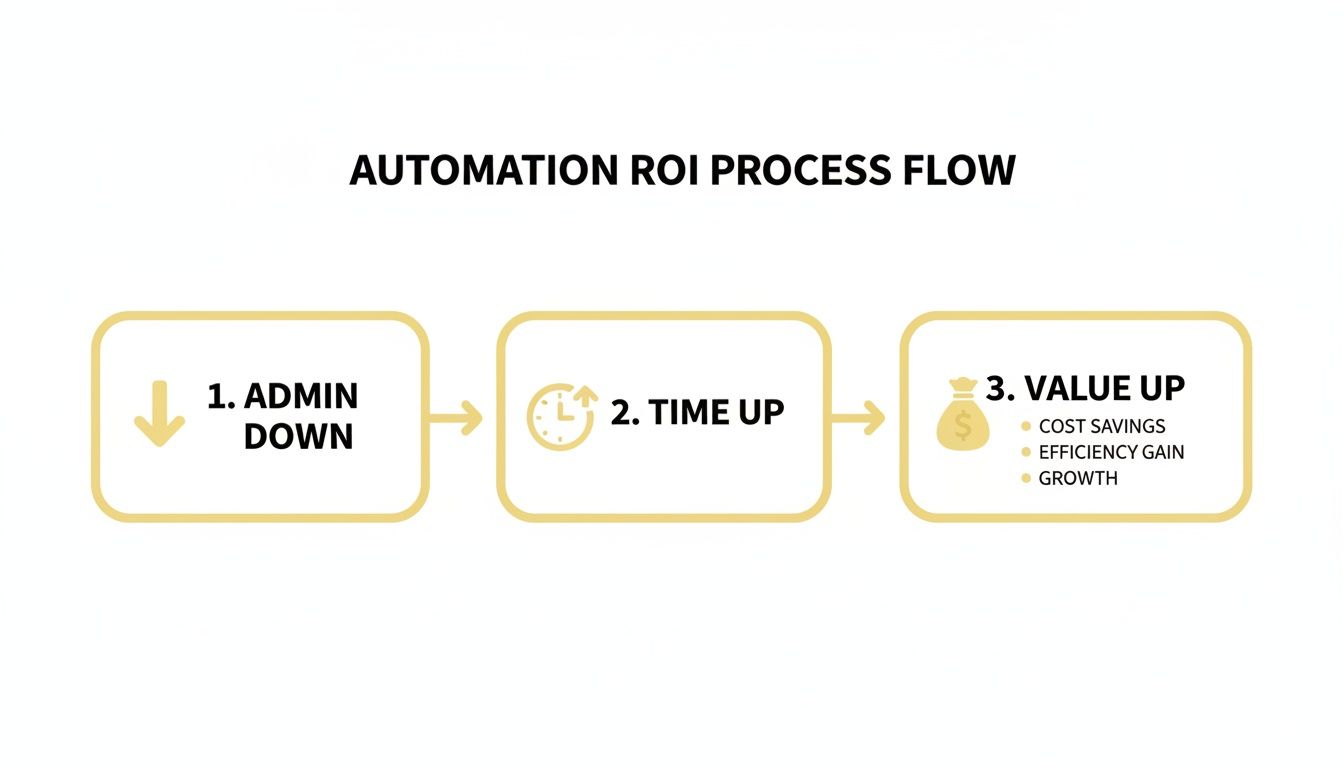
The logic here is simple: every minute you save on administrative tasks is a minute you get back to spend on high-value coaching activities.
Step 5: Test, Launch, and Monitor
Once your first workflow is built, you have to test it. Run a test purchase on yourself or have a friend do it. Go through the entire process just like a client would. Does the email look right? Do all the links work? Now is the time to find and fix any little kinks.
When you feel good about it, switch it on and pay close attention as your first few real clients go through it. This isn't a "set it and forget it" machine from day one. Think of it as a living system that you'll tweak and improve over time. For a more granular breakdown, our client onboarding checklist and template is the perfect companion.
And this is just the beginning. Experts at Gartner predict that by 2026, 40% of enterprise applications will have AI agents that actively orchestrate these workflows, turning them from static lists into smart systems that nudge people along. The impact is real; studies show that remote workers who use this kind of deep automation report 20% higher job satisfaction. This isn't just about saving time—it's about creating a better experience for everyone.
Got Questions About Automating Your Onboarding?
Even with a solid plan in place, it's natural to have a few "but what if..." questions lingering. Taking this step can feel like a big shift in how you run your business, so let's get real and talk through those common hang-ups.
"Will this make my coaching feel cold and robotic?"
This is the number one fear for coaches, and it comes from a good place. You’re worried automation will strip the personal touch from your business.
Here’s the reframe: client onboarding automation isn’t about automating your relationship; it's about automating the logistics. Think about it—is there anything truly personal about chasing an invoice or sending your Calendly link for the tenth time? Not really.
Automating these repetitive, administrative tasks actually frees up your time and mental energy. It lets you be more present and personal when it truly counts: during your coaching calls, in your feedback on their work, or when you send a spontaneous "thinking of you" check-in email. The system handles the transactional work so you can bring all your warmth and focus to the transformational work.
"I'm a coach, not a tech expert. How hard is this to set up?"
The thought of building workflows and "automations" can sound incredibly intimidating. If you're thinking, "This is way over my head, I'll probably just mess it up," take a deep breath.
You don't need to be a tech wizard. Modern platforms are built for people like us, not developers. They use simple drag-and-drop editors and pre-built templates. Example: In a tool like Coachful, you'd see a template called "New Client Welcome." You click it, and it pre-populates a workflow. You just have to insert your own email text and contract file. If you can write an email, you can do this. The trick is to start small. Just focus on automating one thing first. You’ll be surprised at how quickly it clicks.
Your system is there to handle 90% of the standard procedure, which allows it to flag the 10% that requires your personal touch. This ensures no one ever falls through the cracks, and you can intervene exactly when it matters most.
"But what if a client has a unique situation or needs special handling?"
This is a fantastic question, and it shows you're already thinking about providing a high-touch experience. What happens when someone needs a custom payment plan or is coming from a referral with a special discount?
A well-designed automation system is built to handle exceptions, not just the standard path. You can pause the automation for a specific client at any time and handle their needs manually. Or, you can build in simple "if/then" rules. Example: You could have a different intake form that, when filled out, triggers a different welcome sequence for VIP clients. Your system acts as your personal assistant, handling the routine so you can focus your energy on the exceptions. You're always in control.
"Isn't this just for big-name coaches with huge client lists?"
Not at all. In fact, it might be even more valuable when you're starting out or trying to grow.
- For New Coaches: Automation helps you look professional and organized from day one. It creates a polished system that builds trust with your first few clients and gives them an experience that rivals that of a six-figure coach. It's your secret weapon for looking established, even when you're just starting.
- For Experienced Coaches: It's often the secret to breaking through an income plateau. If you're feeling capped at the number of clients you can handle because of the admin burden, this is your solution. This is how you get your time back to create that group program or high-ticket mastermind you've been dreaming of.
Automation isn’t about the size of your client list. It's about the quality of the experience you want to provide and how much you value your own time.
Ready to stop being your own admin and start delivering a world-class client experience from day one? Coachful brings all your onboarding workflows—from payments and contracts to scheduling and resource delivery—into one seamless, intuitive platform. Discover how Coachful can automate your onboarding today.