Follow Up Reminders That Actually Get Clients to Act

Coachful
A client misses Tuesday's session. They don't reply to your check-in, skip the make-up slot, and then disappear from the group chat. You open the conversation and see that your only message was an automated calendar notification sent several days earlier. The client technically had the information, but they didn't have a clear reason, prompt, or next step to act on it.
That's the difference between a follow up reminder and a coaching reminder. One reports an event. The other protects momentum.
The Moment You Realize a Reminder Is a Coaching Tool
Most coaches first notice the problem after the client has already drifted. A session was missed, an action step wasn't completed, or a renewal date passed without a conversation. The instinct is understandable: They knew when the session was. Why didn't they show up?
Sometimes the client did forget. But the more useful question is, what job was the reminder system doing? If it only announced a date, it may have handled administration while leaving motivation, confidence, and clarity untouched.
A coaching reminder should create three feelings:
- “You remembered me.” The message connects to the person, not just the appointment.
- “I have time to act.” The timing gives them room to rearrange plans or complete the task.
- “I know exactly what to do next.” The requested action is specific and easy to find.
Practical rule: A reminder should move the client one step forward, not merely prove that you sent a message.
That might mean confirming attendance, opening a worksheet, replying with a decision, booking the next session, or telling you they need help. “Reminder: coaching call tomorrow” creates awareness. “We're working on your presentation tomorrow. Please bring the opening you drafted, and reply with ‘ready' if you've got it” creates a behavioral bridge.
Evidence supports reminders as more than a convenience feature. A systematic review covering 7 studies and 5,841 participants found healthcare attendance increased from 678 per 1,000 without a reminder to 773 per 1,000 with text reminders, with a risk ratio of 1.14. Text reminders were also comparable to phone calls and better than postal reminders in that review, as reported in the systematic review of SMS appointment reminders.
The point for a coach isn't to copy healthcare workflows. It's to recognize the operating principle: a well-designed prompt can preserve continuity when attention is competing with work, family, stress, and ordinary forgetfulness. It won't replace a coaching conversation, repair a poor offer, or make an unsuitable program work. It gives the client a timely path back into the work.
The Four Decisions You Make Before Writing a Single Reminder
Writing the message comes fourth, not first. Before opening your email or messaging tool, decide what the client should do, what state they'll be in, where they'll see the message, and what event will trigger it.
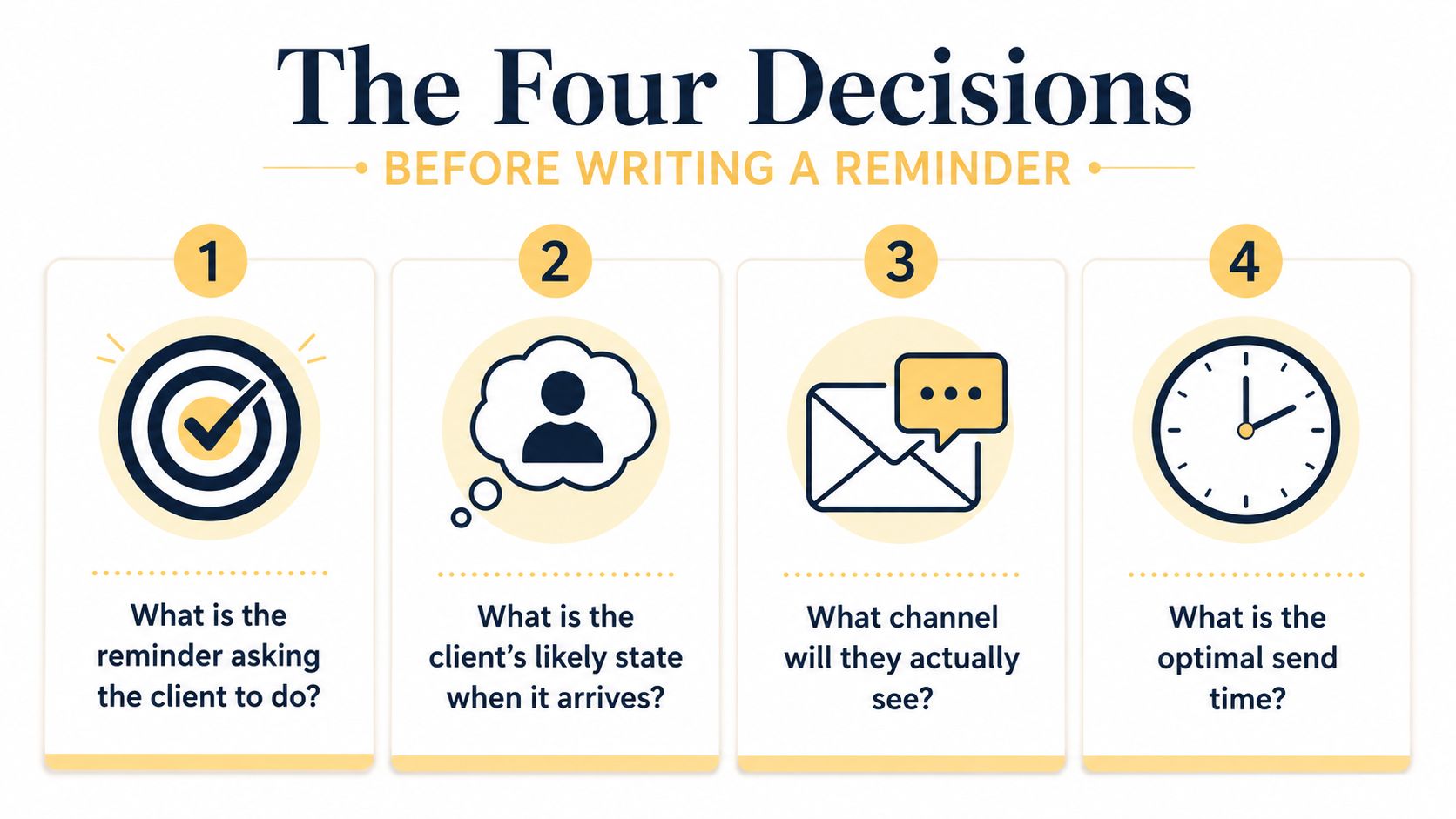
Start with the action
A session reminder asks for attendance or confirmation. An action-step nudge asks the client to complete a task. A check-in asks for a status update. A renewal reminder asks them to choose whether and how they'll continue. Re-engagement asks for a reply from someone who has gone quiet.
For a 6-week group program, suppose the next live session is Tuesday, your action step is due Friday, and the client has committed to rewriting their introduction. The reminder shouldn't say, “Don't forget your homework.” It should say, “Please rewrite the first paragraph and upload it before Friday's session.”
Account for the client's likely state
A reminder sent after enrollment reaches an optimistic client with plenty of context. A message sent two hours before a session reaches someone who may be rushing between meetings. A Friday afternoon task nudge may meet a client who's mentally finished for the week.
Use the client's state to set the emotional load. Preparation messages can provide context. Day-of messages should be short. Re-engagement messages should reduce embarrassment rather than intensify it.
Choose the channel they'll actually see
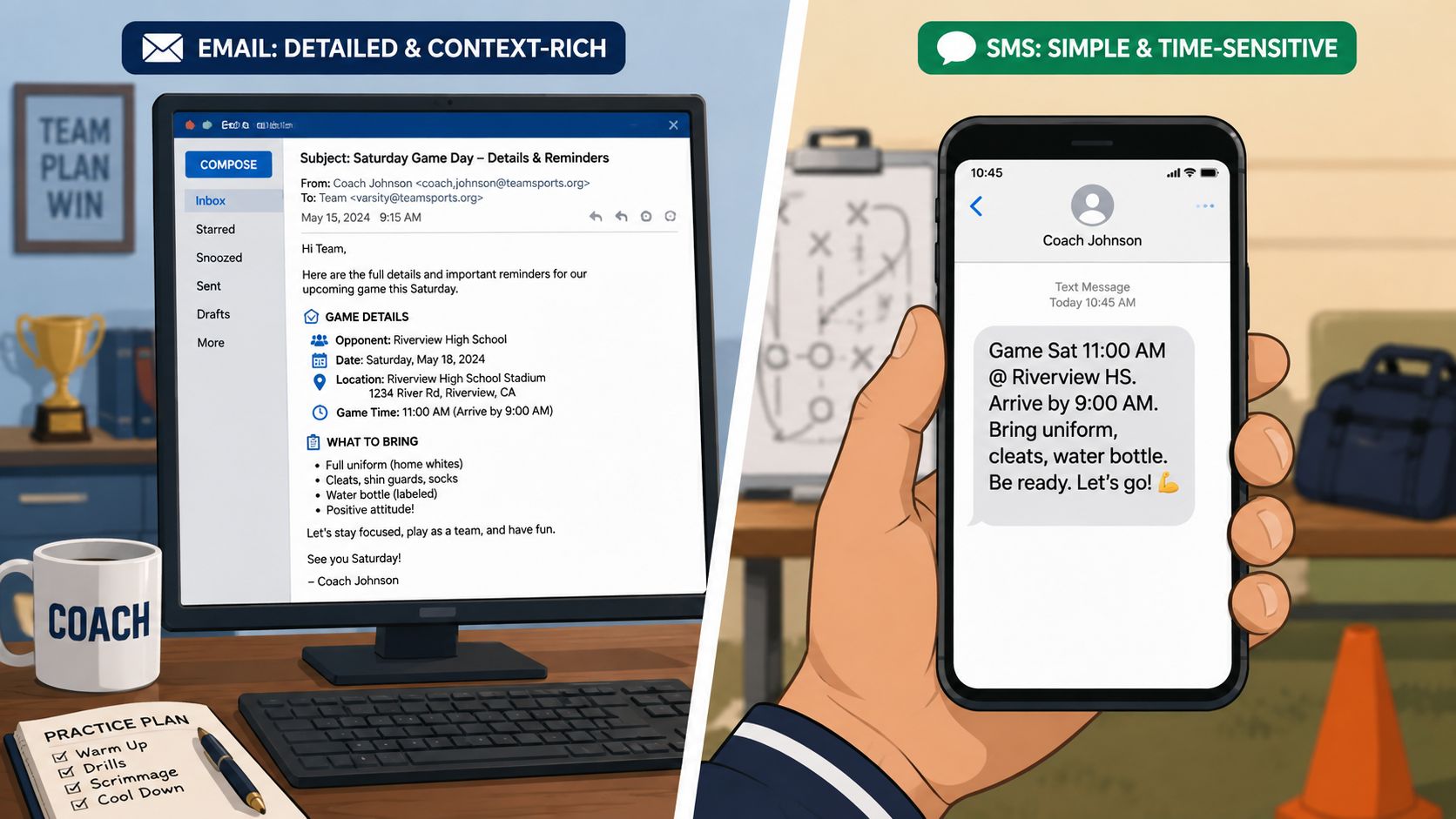
Email works well when the client needs background, links, or a meaningful explanation. SMS suits a short, time-sensitive prompt. In-app messages make sense when active members already work inside your platform. Don't choose a channel because it's your favorite. Choose the one that fits the client's behavior and the urgency of the action.
Tie it to a real trigger
Useful triggers include enrollment, a scheduled session, an incomplete assignment, a missed appointment, a quiet period, or an approaching renewal. A trigger should be observable and connected to a decision. “Send every Monday” may be easy to configure, but “send after the client hasn't submitted the action step by the due date” is usually more relevant.
Keep this planning template for each program:
| Decision | Example |
|---|---|
| Action | Upload the rewritten introduction |
| Client state | Busy, preparing for Friday's session |
| Channel | Email for instructions, SMS for the final prompt |
| Trigger | Due date approaching, then task still incomplete |
Once these decisions are made, the copy becomes much easier. You're no longer asking, “What should I say?” You're asking, “What does this person need in order to take the next step?”
Email vs SMS vs In-App Messages Without the Guesswork
Channel choice changes the behavior a reminder can produce. Email gives you room to explain the reason behind an action. SMS earns attention when the decision is close. In-app messaging keeps the prompt beside the program materials, assignments, or calendar the client already uses.
Use email for context
Email is the right home for a weekly accountability nudge that includes reflection questions, a worksheet, and a link to submit work. It also works for a resource drop, a renewal conversation, or a reminder that needs careful wording.
The trade-off is attention. Email can be searched, skimmed, postponed, or buried. Write a useful subject line and put the action near the top:
Subject: Your next step before Tuesday
Message: “You said you wanted to finish the presentation outline this week. Please add the opening and closing sections before our Tuesday session. You can upload the draft here.”
If your workflow relies heavily on email, Mava product email features can help you think through structured email delivery without treating every message as a one-off.
Use SMS for immediate action
SMS is better for a session-in-two-hours reminder, a quick confirmation request, or a short prompt after an unanswered email. Keep it focused on one action:
“Hi Maya, quick check before today's 2 p.m. session. Please bring the draft opening you mentioned last week. Reply Y to confirm or use this link to reschedule.”
SMS has less space for nuance and can feel intrusive when the client didn't expect it. Set the cadence at the beginning of the program, explain what kinds of messages they'll receive, and make it easy to stop or change preferences.
For coaches exploring conversational text workflows, the chat bot SMS guide offers useful context on where automated messaging fits and where a human reply still matters.
Use in-app messages for active members
In-app reminders work best when the client is already logging into the coaching environment. A prompt beside an assignment can say, “Your reflection is ready for review.” A group-program notification can direct members to the week's discussion or resource.
The weakness is discoverability. If the client rarely opens the platform, an in-app notification may never reach them. Combine channels only when the event deserves it. For example, send the detailed preparation email first, then use SMS close to the session if confirmation is important.
There's no universal winner. The right decision depends on urgency, complexity, client habits, and the consequence of inaction. A client who opted into a coaching program has agreed to participate in the cadence you set, but that doesn't mean they've agreed to unlimited nudging. State the rhythm clearly, then respect replies, pauses, and opt-outs.
Building a Reminder Sequence That Feels Human
A good sequence changes purpose as the client moves through the workflow. It doesn't repeat “just checking in” until the client gives up or responds.
Take the 6-week program. The client enrolls, attends weekly sessions, completes action steps, and reaches a mid-program review. Here's a practical sequence.
Enrollment confirmation
Send: Immediately after enrollment
Channel: Email
Purpose: Reduce uncertainty and establish the rhythm
“Welcome, Jordan. You're booked into the 6-week communication program. Our live sessions are on Tuesdays, your weekly action step is due before Friday, and you'll receive short reminders before sessions and tasks. Start by opening the orientation worksheet and choosing one communication goal for the program.”
The message confirms what happens next without making the client search through a welcome packet.
Preparation prompt
Send: Two days before the next session
Channel: Email or in-app
Purpose: Connect the upcoming session to the client's own commitment
“On Tuesday, we'll work on the presentation opening you want to strengthen. Please bring your current draft and mark the sentence you feel least confident about. You don't need to polish it first. Rough work gives us something useful to coach.”
The phrase “you don't need to polish it first” matters. It removes a common reason for delay, perfectionism disguised as preparation.
Day-of reminder
Send: On the day of the session
Channel: SMS or in-app
Purpose: Make attendance and preparation effortless
“Today's session is at 2 p.m. We're working on your presentation opening. Have the draft nearby. Reply if you need the access link.”
That's enough. The day-of message shouldn't repeat the entire program promise.
Action-step nudge
Send: Before Friday's deadline, then only if the task remains incomplete
Channel: Email first, SMS if time-sensitive
Purpose: Turn intention into a concrete submission
“Your next step is to rewrite the first paragraph and upload it before Friday. Use the submission link here. If the draft feels stuck, send the paragraph as it is and we'll work from there.”
A reminder can offer a smaller path without lowering the standard.
Mid-program check-in
Send: After the third session
Channel: Email
Purpose: Invite reflection and surface friction
“You're halfway through the program. What's becoming easier, and where are you still hesitating? Reply with one sentence for each. We'll use your answers to shape the remaining sessions.”
This is a coaching message, not a status report. It gives you information that a click dashboard can't.
For renewal, change the emotional frame. A 1:1 client whose package is ending doesn't need a generic “Your plan expires soon.” Try:
“We've got one session remaining in this package. You originally wanted to finish the leadership presentation and build a repeatable preparation routine. Let's review what's complete and decide whether another block of coaching supports the next stage. Choose a time here, or reply if you'd rather pause.”
The structure is reusable: initial confirmation, preparation, day-of prompt, action follow-up, and review. A guide to drip campaigns for stores can also help you think about event-based sequences, even though coaching messages need more personal context than retail promotions.
Timing, Tone, and Personalization Without Sounding Robotic
Many coaches worry that automation will make their practice feel cold. Usually, the colder experience is the reminder they forgot to send, followed by a late-night apology that puts the entire burden back on the client.
Timing should match the client's opportunity to act. A preparation reminder needs to arrive while there's still time to prepare. A day-of message can be brief because the main job is recall. A follow-up after an incomplete task should acknowledge the friction instead of pretending the client overlooked a button.
Compare these swaps:
Timing: “Reminder: session tomorrow.”
Better: “Quick check before tomorrow's session. Please bring the draft we discussed so we can work on the part that's still unclear.”Tone: “Complete your assignment by Friday.”
Better: “Your next step is to add the opening paragraph before Friday. It can be rough. We'll refine it together.”Personalization: “Please complete your task.”
Better: “You said you wanted to stop delaying the proposal. Open the draft, write the first section, and upload it here.”
Personalization doesn't require a dramatic paragraph. Use the client's name, last commitment, current milestone, and exact next action. Those details signal that the message belongs to a real coaching relationship.
More reminders don't automatically create more action. A web survey study found that 4 to 5 email reminders increased the total response rate by 15%, while 11 reminders increased it by 21%, with the highest response rate observed at a medium number of reminders. The authors' findings support a cluster early in the workflow, followed by a sharp taper, as described in the study of web survey reminder frequency.
Recent evidence points in the same direction. One 2025 trial found that an additional SMS or email reminder improved response by only 2.8 to 3.1 percentage points beyond a standard email-SMS approach, according to the review of reminder effects. Stop when the next message adds pressure but not clarity.
For deadline language you can adapt, these copy ready deadline email templates are a useful starting point. Personalize the reason and next step before sending.
Measuring Whether the Reminders Are Actually Working
Open rates and clicks tell you whether a message attracted attention. They don't tell you whether coaching moved forward.
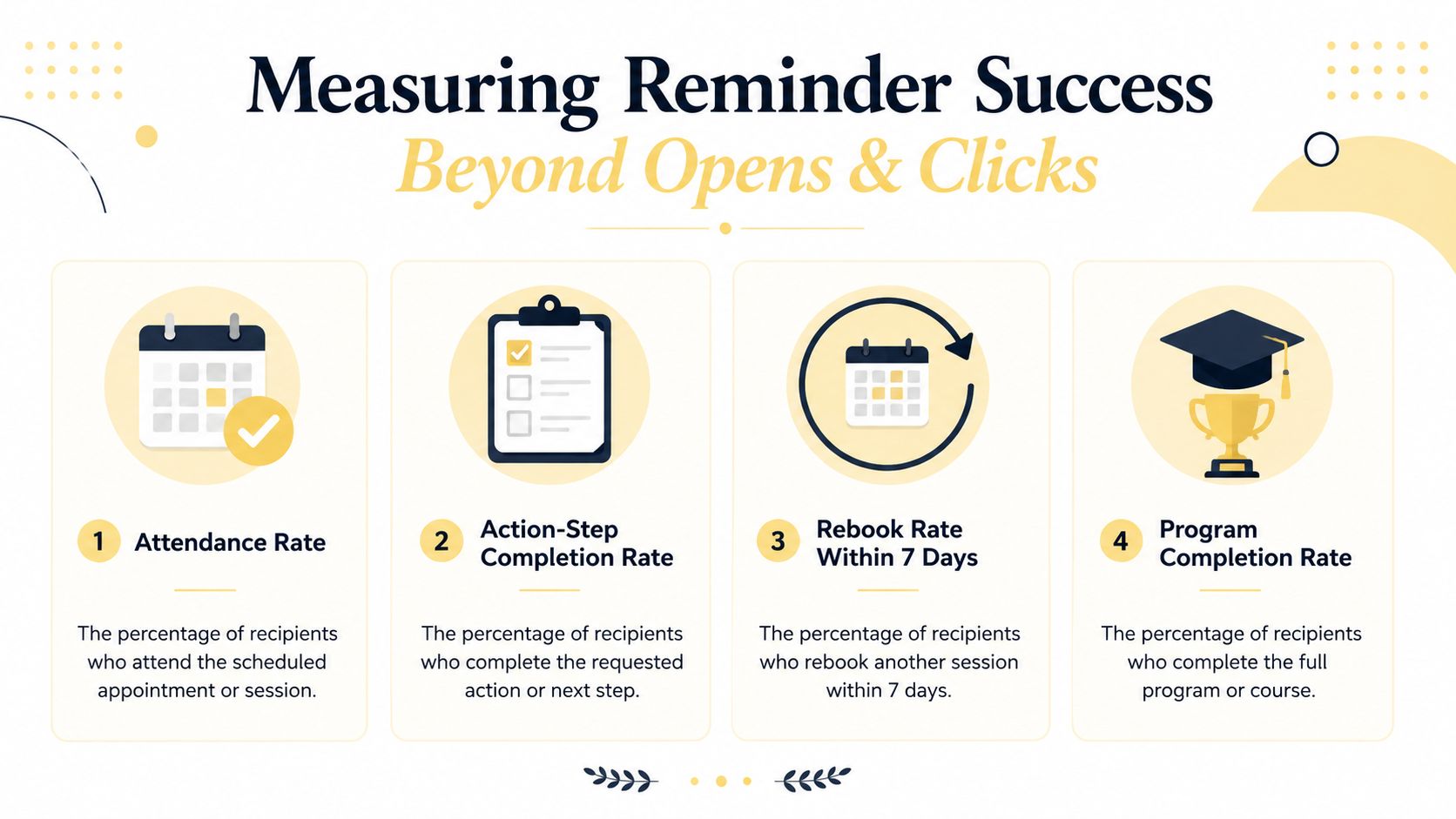
Track the outcomes that reflect client behavior:
- Attendance rate: The share of scheduled sessions attended. If it falls, inspect timing, access instructions, and whether the reminder names a meaningful session outcome.
- Action-step completion rate: The share of assigned tasks completed by the agreed deadline. If it's weak, make the task smaller, clarify the submission path, or add a progress check.
- Rebook rate within 7 days: The share of clients who schedule their next session within 7 days of the current one. If it drops, make the next decision visible before the session ends.
- Program completion rate: The share of enrolled clients who reach the final milestone. If clients vanish mid-program, review the transition points, not only the final reminder.
A Monday review can stay small. Look at last week's attendance, incomplete tasks, rebooks, and drop-offs. Then change one variable, such as the send time, subject line, requested action, or channel. Don't rebuild the whole system because one client ignored one message.
Appointment evidence also shows why layered timing deserves attention. In a randomized study of 54,066 primary care patients, two automated reminders sent 3 days and 1 day before a visit reduced missed appointments to 4.4%, compared with 5.8% for a single 3-day reminder and 5.3% for a single 1-day reminder; among high-risk patients, the two-reminder schedule produced a 20.5% no-show rate versus 25.0% and 24.2% with one reminder, as reported in the randomized study of automated appointment reminders.
For a broader measurement framework, use this client success metrics guide to connect reminder activity with outcomes rather than vanity engagement.
Shipping Your First Reminder Sequence in Coachful This Week
You can build a working sequence in a week without turning it into a systems project.
- Day 1: Map the program and define four triggers: enrollment, preparation, day-of, and follow-up.
- Day 2: Draft each message using the examples above. Give every message one action.
- Day 3: Configure the workflow in Coachful's messaging and notification tools, including email or SMS timing where available.
- Day 4: Soft-launch it with one client or cohort. Check links, time zones, conditions, and cancellation behavior.
- Day 5: Review the first signals and adjust one message or send time.
Coachful brings scheduling, messaging, client workflows, progress tracking, and automated reminders into one coaching workspace. Use these workflow templates for coaches to turn the sequence into a repeatable process rather than a collection of manual tasks.
Build the four-message sequence this week, test it with one real client, and track attendance, completed actions, and rebooking instead of opens alone. Visit Coachful to organize those reminders inside the same workspace where you schedule sessions, manage client progress, and keep the next coaching action visible.