Client Resource Library for Coaches: 5 Sections to Reuse

Coachful
Editorial Team
A coaching client resource library should help a client choose their next action, not show how many PDFs you have made. Start with five sections: Start, Practice, Decide, Recover and Continue. Put a small number of relevant resources in each, give every item a clear use instruction, and keep personal client information out of the shared collection.
If clients still ask you to resend the worksheet, the problem may not be missing content. They may not know which item matters, when to use it, or where their own work belongs. A better index usually deserves your attention before another recording does.
This guide gives coaches a reusable library structure, a copyable resource record and a practical maintenance method. The examples are hypothetical design examples, not client results or a claim that one structure suits every practice.
What is a coaching client resource library?
A client resource library is a curated collection of reusable coaching materials: worksheets, short explanations, demonstrations, checklists, recordings and selected outside links. It supports the coaching agreement and the work between sessions. It is not the client's confidential record, your private research archive or an obligation to consume everything you have ever created.
A course usually provides a sequence that builds a skill. A library lets someone retrieve the right support when they need it. A program can combine both. For example, a leadership program might include a short delegation course, a conversation-planning worksheet and a reference guide the client can revisit without repeating the course.
Keep those jobs separate. If someone needs a two-minute explanation before a meeting, making them navigate six modules is an unnecessary toll. If they need to learn a complex method safely, an unstructured folder may not provide enough guidance.

The five sections: organize by the client's job
Use these as a starting structure, not five compulsory folders or five new products. If your practice needs only three, combine sections. The test is whether a client can identify their situation and find something useful without translating your internal methodology.

1. Start: help clients get oriented
This section answers, “What do I need to know before we begin?” Include a short orientation, how to access sessions, how to contact you, your agreed response boundaries and the preparation for the first meeting. Link to the current agreement where appropriate rather than uploading an unsigned generic contract and implying it is the client's agreement.
A hypothetical career-coaching starter set could contain “Before our first session,” “How to bring a job opportunity to coaching” and “Where to keep your application notes.” Each item should state whether it is required, optional or relevant only in a particular situation.
Selection rule: include material that prevents a predictable onboarding mistake. Exclude your entire philosophy of coaching unless reading it changes something the client needs to do now. A concise welcome page can be more useful than a twenty-page welcome pack.
End the section with one explicit next step: “Before our first meeting, choose the decision you most want help making.” Do not give clients an impressive-looking homework backlog before you have agreed what the coaching is for.
2. Practice: make between-session work easier
This section answers, “How do I try the thing we agreed?” Good candidates include a rehearsal worksheet, an observation log, a short demonstration or a prompt for reflecting on one attempt. Every resource should connect to an action chosen with the client.
For a hypothetical leadership client preparing to delegate, a useful resource might ask them to identify the task, define a good outcome, clarify decision authority and rehearse the opening conversation. That is more usable than a broad reading list called “Leadership Excellence.”
Selection rule: the resource must make an agreed action easier to start, perform or review. If the client could complete it perfectly without doing anything differently, ask whether it is preparation or merely additional reading.
Put a brief instruction beside the file: “Use this after choosing a real task to delegate. Bring the opening sentence you drafted and one concern to our next session.” Estimate effort honestly and offer another format when the worksheet itself creates a barrier.

3. Decide: support a specific choice
This section answers, “How can I think through this decision?” Include option-comparison prompts, values questions, a stakeholder map or a simple decision record. Avoid presenting a worksheet score as an authoritative answer to a complex life or business choice.
A hypothetical business-coaching resource could help a client compare two offers by demand evidence, delivery effort, financial assumptions and fit with their priorities. It should distinguish facts they have verified from assumptions they still need to test.
Selection rule: choose resources that expose assumptions and trade-offs. Reject tools that produce a confident recommendation without showing their limits. Coaching material should support the client's judgment, not disguise the coach's preference as a neutral formula.
For legal, clinical, tax or regulated financial decisions, identify where qualified professional advice is needed. A coach's decision worksheet does not replace that advice. When you link to an outside source, identify its author, date and relevance rather than treating a polished download as proof of authority.
4. Recover: help clients restart without adding punishment
This section answers, “What can I do when the plan does not happen?” Include a short review of obstacles, a way to reduce the next step and a prompt for deciding whether to revise the goal. It is not an emergency-support library or a substitute for a referral.
A hypothetical habit-coaching resource might ask: “What happened just before the missed attempt? What part of the plan was unrealistic? What smaller experiment would give us useful information?” That creates a conversation you can use in the next session.
Selection rule: the material should help the client learn from an interruption. Avoid worksheets that make non-completion look like a character failure. A resource that simply adds ten more tasks to an overwhelmed person's week has misunderstood its job.
State how to contact you within the agreed support boundaries. If a concern falls outside your competence or involves immediate risk, use your established referral or emergency procedures. A library cannot promise monitoring, diagnosis or crisis response.

5. Continue: preserve what remains useful
This section answers, “What can I keep using when this engagement ends?” Include a personal review prompt, a reusable planning template and guidance for noticing when further support might be useful. Keep a client's completed reflections in their private space, not in the shared master collection.
A hypothetical executive-coaching continuation set could include a monthly delegation review, a preparation template for difficult conversations and a prompt for checking whether a new responsibility changes their priorities. It need not become a large alumni program.
Selection rule: retain resources that the client can use independently and correctly. Explain which materials they may download, how long online access lasts and whether any items are licensed only for use during the engagement.
Do not imply that finishing coaching means losing access to their own information. Agree the handover separately from your intellectual-property terms. If continued platform access depends on another service or membership, make that boundary clear before the engagement ends.
Copy this resource inventory template
Before uploading the collection, inventory what you already have. A document or spreadsheet is enough. One row per resource makes duplicate drafts, missing permissions and unclear instructions easier to spot. These fields are an editorial management template, not a claim that your platform has a matching field for each one.
- Client-facing title: the phrase a client would recognize.
- Section and use trigger: where it belongs and when to open it.
- Purpose: the decision or action it supports.
- Instruction: exactly what to do and what to bring back.
- Format and effort: document, audio, video or link, plus an honest effort estimate.
- Access: who may see it and when access ends.
- Rights: original, licensed, permission granted or link-only.
- Owner and review point: who maintains it and what prompts another review.
- Current version: the approved source and any older copies to retire.

For example, replace “Worksheet_final_v7.pdf” with “Prepare one difficult conversation.” The instruction might be: “Choose the conversation we discussed, draft your opening, rehearse it aloud and note one adjustment.” The use trigger is a chosen real conversation, not a rule that every client must complete it in week two.
Keep administrative identifiers in your inventory if useful, but do not make clients decode them. Where a title needs a version date, use it consistently. Avoid leaving both “new” and “final” copies visible with no explanation of which one to use.
Choose the delivery format without turning everything into a course
Choose a course when a sequence matters. Choose a library or reference collection when clients need to retrieve independent items. Use a private assignment or client-specific document when the material contains that person's goals, reflections or feedback.
A single shared folder can work for an early pilot if permissions are appropriate and clients can find the instructions. Its weakness is often governance: accidental sharing, duplicate files or unclear access after coaching. A client platform can connect resources to delivery, but software does not decide what belongs in the collection.
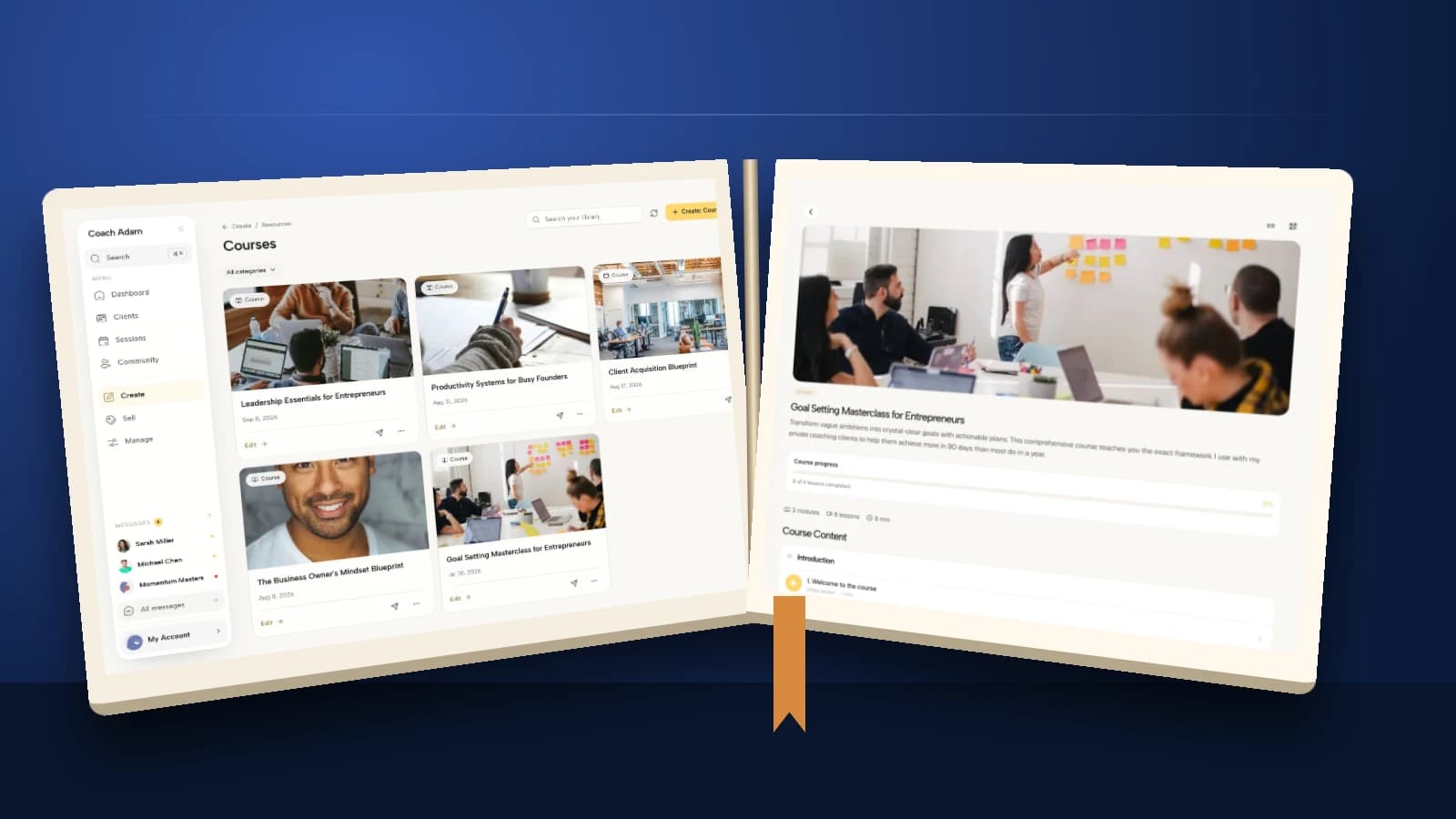
In Coachful, the published course and content overview describes libraries, worksheets, downloads and other content alongside courses. It also describes client assignment and access through the client home. That lets a coach choose the resource type that fits rather than packaging every item as a lesson.

The course screenshots here demonstrate real library, editing and client-view surfaces in the demo account. They do not mean you must build a course to share a worksheet. Nor do they prove that a client has understood or applied something because a completion marker changed.
Before committing to any delivery tool, test the exact access pattern you need: one client, a program group and a person whose engagement has ended. Check what happens to linked resources and downloaded copies. Do not infer permissions or revocation behavior from how an administrator's screen looks.
Check rights, privacy and accessibility before sharing
A useful library is not automatically a safe shared library. Separate reusable teaching materials from completed client worksheets, recordings, assessments and session notes. Never publish a client's example simply because removing their name feels sufficient to you.
Check permission before copying someone else's worksheet, assessment, image or article. Where appropriate, link to the original source instead of uploading a copy. Commercial use, adaptation and distribution can have different conditions. If you are unsure, ask the rights holder or seek appropriate advice rather than treating online availability as permission.

The Coachful resource catalogue illustrates the range of formats a coach may work with. Format is not an endorsement: assess whether each item is appropriate for your scope, the client's goal and the context in which you plan to use it.
Give accessibility the same practical attention. Use meaningful headings, readable documents, descriptive links and captions or transcripts where needed. A scanned worksheet that cannot be read by assistive technology is not equivalent to accessible text. Test the resource itself on a phone, not just the page linking to it.
Offer an alternative way to do the work when possible. A client who prefers to speak through a reflection may not need to fill a PDF. Agree reasonable adaptations with them instead of making use of a particular format a test of commitment.
Launch a small collection, then maintain it
Begin with the resources needed for the next real engagement. You do not need a hundred items, a filmed introduction for every file or a complicated taxonomy. A small collection is easier to test and correct.
- Inventory: identify the existing items that support your delivery.
- Curate: keep only material with a clear use trigger and instruction.
- Test: ask a consenting pilot user to find and open a resource from their own access level.
- Introduce: show clients where their current assignment lives and distinguish optional reference material.
- Review: ask what helped them act, then retain, revise or retire items.

Record access problems and repeated questions during the pilot. If clients repeatedly ask which file to use, improve the title, index or assignment instruction before adding another explainer. If a resource generates confusion or falls outside your current scope, remove it from active use while you review it.
Review after a pilot, after changing your method and whenever a link, policy or outside recommendation changes. A regular calendar reminder can help, but “review quarterly” is not enough for something that has already become inaccurate.
Judge usefulness through the coaching conversation: could the client find it, understand it and use it for the agreed action? Opens and completion markers can prompt a question, but they are not evidence of a better decision or a meaningful behavior change.
Frequently asked questions
How many resources should a coaching library have?
There is no universal correct count. Start with the smallest collection that supports your current coaching process. An item earns its place through a clear client use case, not because an empty section makes you uncomfortable.
Should clients see every resource immediately?
Not necessarily. Distinguish a browsable reference collection from assigned work and material intended for a later stage. Explain that optional resources are optional. Test the permissions and release behavior of your chosen tool rather than assuming that every collection supports the same controls.
Can I charge separately for the library?
You can design a paid resource offer, but make its scope, access period, licensing and support clear. A collection sold without coaching needs instructions that stand on their own. Do not price or describe it as individualized support if that is not included.
What should happen when coaching ends?
Follow the agreement you made about access, downloads and data handover. Tell clients in advance which resources remain available and which do not. Treat the client's personal information separately from your reusable intellectual property.
Build the next useful step, not a bigger archive
The strongest first improvement is usually simple: choose one recurring client task, make the relevant resource easy to find, and write a usable instruction beside it. Then watch where the person gets stuck.
If you want to test how that handoff could work inside a coaching platform, try the interactive Coachful demo. Compare the resource and client views with your five-section plan before migrating your collection. The decision is whether the delivery supports your coaching, not whether you can upload more files.