Group Coaching Office Hours: 7 Steps and a 60-Minute Agenda

Coachful
Coachful Editorial
How do you offer live access in a group coaching program without adding another weekly call that nobody uses, or letting one member take the entire hour? Run office hours as a bounded question-and-application session: collect questions beforehand, publish how you choose them, protect each discussion’s time, and finish with a next action.
Group coaching office hours should help members use the program, not quietly become unlimited private coaching in public. Start with one trial session before promising a permanent schedule. The agenda, scripts and seven setup steps below are planning recommendations, not research-backed optimal timings.
What are group coaching office hours?
Group coaching office hours are a scheduled live session where members bring questions, implementation problems or decisions connected to a coaching program. Unlike a curriculum call, the agenda comes mainly from what members need help applying. Unlike a private session, attention is shared and some topics do not belong in the room.
Explain the format when you sell it. “Monthly implementation Q&A with selected member questions” creates a different expectation from “every member receives individual coaching every week.” Do not use the first format to fulfil the second promise.
There is also an important naming distinction. Some coaches use “office hours” to mean the times they answer messages. This article is about live group Q&A, not your response-time policy. You still need a separate agreement about when messages receive an answer.
- Use office hours when several members are applying related material and can learn from shared questions.
- Use a teaching session when everyone needs the same new explanation before they can proceed.
- Use a hot seat when one member needs a longer, agreed block of focused attention.
- Use a private route when confidentiality, complexity, accessibility or professional scope makes the group unsuitable.
A familiar annoyance is spending ten minutes finding the right document while the rest of the group watches. Another is hearing “just one quick question” turn into an entire case history. Both are usually format problems before they are member problems.

A practical 60-minute office-hours agenda
Use this as a trial agenda, then adjust it to your members’ actual questions and the support you sold. The closing time is protected; it is not spare space for a final question.
- Minutes 0 to 5: open and agree boundaries. State the purpose, participation options, recording decision and question order.
- Minutes 5 to 10: identify the shared obstacle. Briefly name the pattern across submitted questions and check that it fits what people need today.
- Minutes 10 to 45: work through selected questions. Use five seven-minute rounds, or fewer, deeper discussions if your offer allows that.
- Minutes 45 to 55: apply the learning. Everyone chooses a next step, including people whose questions were not selected.
- Minutes 55 to 60: close and explain follow-up. Confirm where the summary will appear and what happens to unanswered questions.
Five seven-minute rounds occupy 35 minutes. That is a planning constraint, not a promise that five people will receive meaningful coaching on any issue. If one question needs more time, narrow it, agree an extension within the available capacity, or move it to an appropriate route.

1. Define the access before choosing the calendar slot
Write the service in one sentence: who can attend, what they can bring, how often you meet and what personal attention is included. Then specify the limits. This belongs in the offer and onboarding information, not only in a verbal explanation on the first call.
Example wording: “Members can attend one 60-minute implementation Q&A each month. Submit one program-related question beforehand. We select questions for relevance and rotate attention across members; a personal turn at every call is not guaranteed. Sensitive individual matters use the private support route described in your agreement.”
That wording is a fictional example, not a legal clause. Adapt it to your actual capacity, agreement and applicable consumer obligations. If you already promised individual time, do not replace it with this model without a proper agreement with affected members.
Decide whether attendance is optional, whether non-attendees can submit questions and how absences affect future turns. Optional attendance does not mean the support is disposable. Make sure members who cannot attend have the access you promised, rather than telling them that watching someone else’s recording is always equivalent.
Separate group access from crisis support and regulated professional advice. A health coach’s implementation Q&A is not a medical triage clinic. A career coach’s call is not employment-law advice. Name the appropriate boundary before a difficult question arrives.

2. Collect short questions without collecting unnecessary disclosures
Ask for the minimum information that lets you choose and prepare. Four fields are usually enough for a first version:
- Question: What decision or task would you like help with?
- Attempt: What have you tried, and what happened?
- Constraint: What does a workable next step need to respect?
- Sharing preference: May we discuss this with your name, discuss an agreed de-identified version, or contact you privately first?
Do not call a submission anonymous if the form captures identity or the circumstances make the person recognizable. Removing a name does not remove an employer, a distinctive situation or a client relationship. Review the actual wording before repeating it aloud.
Here is a fictional career-program example. “I have three possible career directions and want help choosing the first experiment” is workable. “Here are my employer’s internal emails and my colleague’s medical history” is not material you need for group office hours.
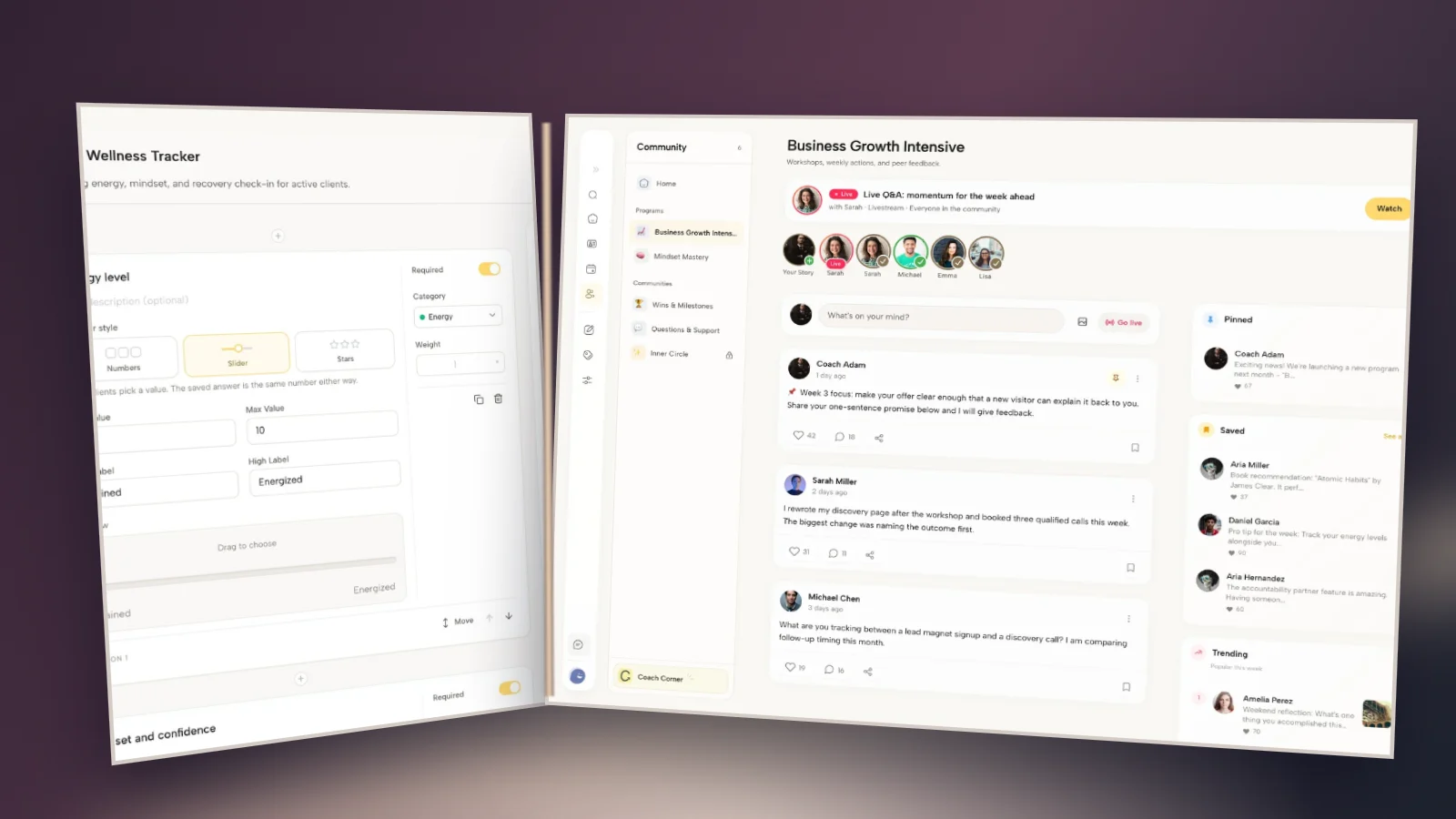
In Coachful, the form builder shows form and worksheet experiences and different question types. It can be relevant to gathering preparation. The demo form pictured below is a wellness tracker, not a ready-made office-hours queue; you would need to create and test your own questions and sharing process.

3. Choose questions fairly and keep a visible disposition
Do not let the longest submission or the most persistent member automatically win. A useful selection rule considers program relevance, the member’s previous opportunities, whether others can learn from it, and whether the question fits the available time and your competence.
Keep a short private working list with a status for each submission: selected, needs clarification, suitable for a shared explanation, private route, or awaiting a later session. This is an editorial process you can run in a document. Do not imply that a screenshot of general software is a dedicated queue feature.
Tell people the disposition of their question. Silence makes them wonder whether you saw it. A brief response is enough: “This needs more privacy than our group call allows. I will contact you through the support route we agreed,” or “This overlaps with another question; with your permission, I will combine the shared part.”
If demand repeatedly exceeds capacity, change the delivery model rather than endlessly carrying the same questions forward. Options include another session, smaller groups, clearer question scope or a separate paid service offered transparently. Do not sell an upgrade as the only way to receive support already included in the original offer.

4. Make attendance and preparation easy to find
Members need one reliable session notice with the date, start and end time, named time zone, joining route, submission deadline and participation expectations. Test the experience as a member. A coach-facing calendar that looks correct does not establish that the member received a usable invitation.
Avoid repeating joining details in five places that drift apart. Choose the authoritative session information and point other reminders toward it. Check daylight-saving changes and international attendance instead of relying on an abbreviation that can be misread.
Decide what late arrivals can expect. A short written opening note can explain the format without interrupting the current speaker. If captions or another adjustment are needed, discuss requirements privately and confirm what your chosen meeting service actually supports.
Coachful’s integrations workspace shows available connections, including video and calendar services. The screenshot illustrates where a coach can review connection choices; it does not establish that every service is connected, that a particular plan includes every meeting feature, or that this article has configured a live session.

5. Facilitate a question, not an unbounded case history
At the start of each round, agree what can usefully happen in the time. “What would make the next seven minutes useful?” is more productive than inviting the entire background and hoping a question appears.
A simple round has four moves: clarify the question, check what has been tried, explore the useful options or coaching questions, and return the choice to the member. When you switch from coaching to teaching or advice, name the switch and ask permission.
“Would it help if I explain the method briefly, then we look at how you want to use it?”
“I’m going to pause the background there so we can protect time for your actual decision.”
“We have two minutes left. What is the most useful thing to settle before we stop?”
Invite other members to contribute only when it helps and the person asking welcomes it. “Who has a relevant experience?” is different from opening a competition to diagnose somebody else. Ask contributors to describe their own context, not predict what another person must do.
Quiet attendance is still participation. Give people a written way to reflect, permission to pass and the option not to appear on camera where feasible. Do not make public disclosure the admission price for receiving value.
If the discussion becomes sensitive, stop the public exploration. “This deserves a different setting” protects the member better than squeezing an emotional disclosure into the remaining minute. Follow your existing professional scope and safety process where needed.

6. Agree the recording and summary rules before the call
A replay can improve access, but it also preserves names, voices, chat messages and personal disclosures. “We always record” is not a complete decision. Consider whether this particular format needs a recording at all.
One alternative is an unrecorded discussion followed by a short, coach-created explanation of the general learning. Another is recording only a teaching segment, with clear notice of when recording starts and stops. Neither approach removes your need to manage consent, confidentiality, access and retention appropriately.
Ask these questions before publishing anything:
- Who is allowed to access it, including future members?
- What have participants actually agreed to?
- Does it reveal information about people who were not present?
- How will captions, transcripts, chat exports and downloads be handled?
- When will the material be reviewed or deleted?
Do not promise you can guarantee other members’ confidentiality. Set expectations, control the access you can control and explain the limits. An employer paying for a program does not automatically get a recording of every member’s questions.
Keep the shareable summary lean: the general question, the explanation or options considered, and an optional application prompt. Leave out the personal story unless sharing it is necessary and appropriately agreed. The purpose is reusable learning, not an archive of vulnerability.
7. Close the loop and decide whether the format earns its place
End by asking each member to choose one next step or useful question to investigate. Someone can learn from another member’s round without adopting their answer. A good closing prompt is: “What will you try, and what would tell you whether it helped?”
Then publish the agreed summary and explain what happened to the remaining questions. Give private follow-up only within the support boundary you sold. Moving unanswered questions into your evenings is not a sustainable queue-management strategy.
Coachful’s chat channels show the distinction between individual and group conversations. Use that distinction deliberately when choosing where a summary belongs. The screenshot is a real demo communication surface, not evidence of automatic permissions or an installed office-hours workflow.

After a small trial, review practical evidence: how many members attended, how many submitted questions, how long questions waited, whether people understood the format, and whether members could name a useful next step. Collect feedback without requiring people to praise the call publicly.
Low attendance is a question, not a verdict. It might reflect the time slot, unclear value, questions answered elsewhere or members being busy applying the material. Ask what they needed before adding more reminders. If the call repeatedly becomes teaching, schedule teaching. If most questions need private attention, revisit whether office hours fits the offer.
A fictional example: office hours for a career-change cohort
A coach runs a program helping members test possible career directions. The main sessions teach the method; office hours support its application. Before the trial call, members submit short questions and choose whether their wording may be discussed with the group.
Two members ask about choosing an experiment. With permission, the coach combines the shared principle while keeping their personal circumstances private. Another asks about a disputed employment contract. The coach does not improvise legal advice; they explain the scope boundary and suggest consulting an appropriately qualified professional.
During the shared discussion, the coach helps one willing member reduce an experiment to an achievable action. Other members write how the principle might apply to their own plans. The summary contains the method and application prompt, not employers’ names or private disclosures.
The coach then checks whether this format addressed a real support need. There is no invented attendance rate, conversion uplift or client outcome here. The example demonstrates the decision process, not evidence that adding a call makes a program better.
Frequently asked questions
Should coaching office hours be weekly or monthly?
Choose the cadence that fits the speed of implementation, your members’ needs and your delivery capacity. Weekly can suit short programs with frequent application questions; monthly can suit slower work. Neither is automatically better. Trial the format and state the actual access before taking payment.
How many people can attend?
Distinguish audience size from personal attention. More people can observe than can receive a meaningful individual turn. Use the available discussion time and the length of a useful round to calculate capacity. If everyone must receive a turn, cap attendance or change the session design accordingly.
What if nobody submits a question?
Ask whether the submission process is clear and accessible. Prepare one relevant example, clearly labeled as your example, and invite voluntary questions. Do not fabricate member submissions or pressure someone to disclose a problem. Repeated silence is a reason to revisit the need, timing or format.
Can I sell office hours separately?
You can design a separate offer, but describe the scope and access accurately. Do not imply it includes individualized coaching beyond what you can provide. Check the practical and contractual implications before changing an existing client’s support or charging for something already included.
Build the member journey before adding the next call
Before launching, walk through four tasks as a member: find the session, submit a suitable question, understand how participation works and find the follow-up. If any task depends on guessing or messaging you privately, fix that step first.
To explore the program, community, form and communication surfaces shown here, try the Coachful interactive demo. Use your own four-task test rather than treating a feature list as proof that the experience fits. The demo is the next step for evaluating the workflow, not a claim that office hours will run themselves.
Sources and scope
Group Coaching HQ’s public events show a real example of recurring live Q&A alongside other group formats. That demonstrates practitioner use, not an optimal frequency or proven outcome. Coachful’s program software page describes programs, cohort groups and related delivery tools. The agenda, scripts and question-selection process in this article are editorial recommendations, not preinstalled product templates or legal advice.