How to Create an Online Course Your Coaching Clients Finish
If you explain the same thing in every first month of coaching, you already have a course hiding in your calendar. Learning how to create an online course lets you teach it once, well, and spend your live time on the part only you can do: coaching the person in front of you. It also gives people who can't afford private coaching yet a way to work with your method.
This guide covers the full process for coaches: deciding whether you need a course or a program, choosing a topic narrow enough to finish, outlining modules and lessons (with a complete sample for a voice coach), writing lessons before filming, recording on a budget, adding quizzes and worksheets, pricing, publishing and the mistakes that leave courses half-watched.
Coachful's team will also build the course for you, free on any Coachful plan: you send a topic and notes, and they write the outline, lessons, quizzes and worksheets in your account. You film any videos yourself.
Course or coaching program?
| Online course | Coaching program | |
|---|---|---|
| Main job | Teach a skill or method | Help a person apply it to their life |
| Pace | Self-paced, or released on a schedule | Set by sessions and check-ins |
| Your time | Mostly up front, then occasional answers | Ongoing, every week |
| Price | Lower, sold to more people | Higher, sold to fewer |
| Completion | Depends on the learner's motivation | Supported by accountability |
Many coaches end up with both: a course that teaches the method and a program that coaches it, with the course included inside the program. Building the course first is often the easier path, because it forces you to write the method down.
Choose a topic narrow enough to finish
Broad courses stall in module three, for the creator and the student alike. Run your topic through three filters:
- One person. "Teachers and trainers who lose their voice by Thursday", not "anyone who speaks".
- One skill. Speaking for a full day without strain, not "communication".
- One visible result. Something the student notices within a few weeks: "my throat no longer hurts by the last class".
If you can't describe the result in one breath, narrow it again. You can always build a second course later.
Outline modules and lessons
A structure that works for most coaching courses: four to six modules, two to four lessons each, and a practice item in every module (a worksheet, a quiz or a task) so students do the work rather than just watch. Each lesson teaches one idea and ends with one action.
Here is a full sample. The course is "Steady Voice", for teachers and corporate trainers who speak all day and end the week hoarse.
| Module | Lessons | Practice |
|---|---|---|
| 1. Why your voice gets tired | How the voice works, in plain words; the habits that strain it; your voice diary | Worksheet: three-day voice diary |
| 2. Breath that supports you | Breathing low; breathing between phrases; a two-minute warm-up | Task: warm-up before your first class for five days |
| 3. Resonance instead of volume | Being heard without pushing; humming exercises; finding your easy pitch | Quiz: five questions on what causes strain |
| 4. The teaching day | Planning quiet minutes into the day; using the room; water, rest and recovery | Worksheet: redesign one teaching day |
| 5. Keeping it | A weekly routine; what to do on a bad voice day; when to see a doctor | Final quiz and a one-page voice plan |
That is fifteen lessons, which most students can finish in three or four weeks. If your outline is passing thirty lessons, it is probably two courses. Our guide to building a course outline goes deeper on sequencing.

Write every lesson before you film it
Filming without a script is how a five-minute lesson becomes nineteen minutes of "um". Write each lesson to the same shape:
- Hook (two sentences): the problem this lesson solves, in the student's words.
- The idea: one concept, explained once, with one example.
- Show it: a demonstration, a story from a client (anonymized), or a quick before and after.
- The action: exactly what to do before the next lesson.
- Recap (one sentence): what they should remember.
Those written notes do double duty: they sit under the video as lesson notes for students who prefer to read, and they make the course useful even before you have filmed anything.
Record on a budget
A recent phone, a clip-on microphone and a window are enough. Sound matters more than picture: viewers forgive soft focus but leave when the audio echoes. A few habits that help:
- Film in batches, one module per session, in the same clothes and light.
- Face the window, not away from it. Soft daylight on your face beats most lamps.
- Keep most lessons under ten minutes. Split anything longer.
- Not every lesson needs video. Audio, slides or a well-written text lesson are fine for many topics.
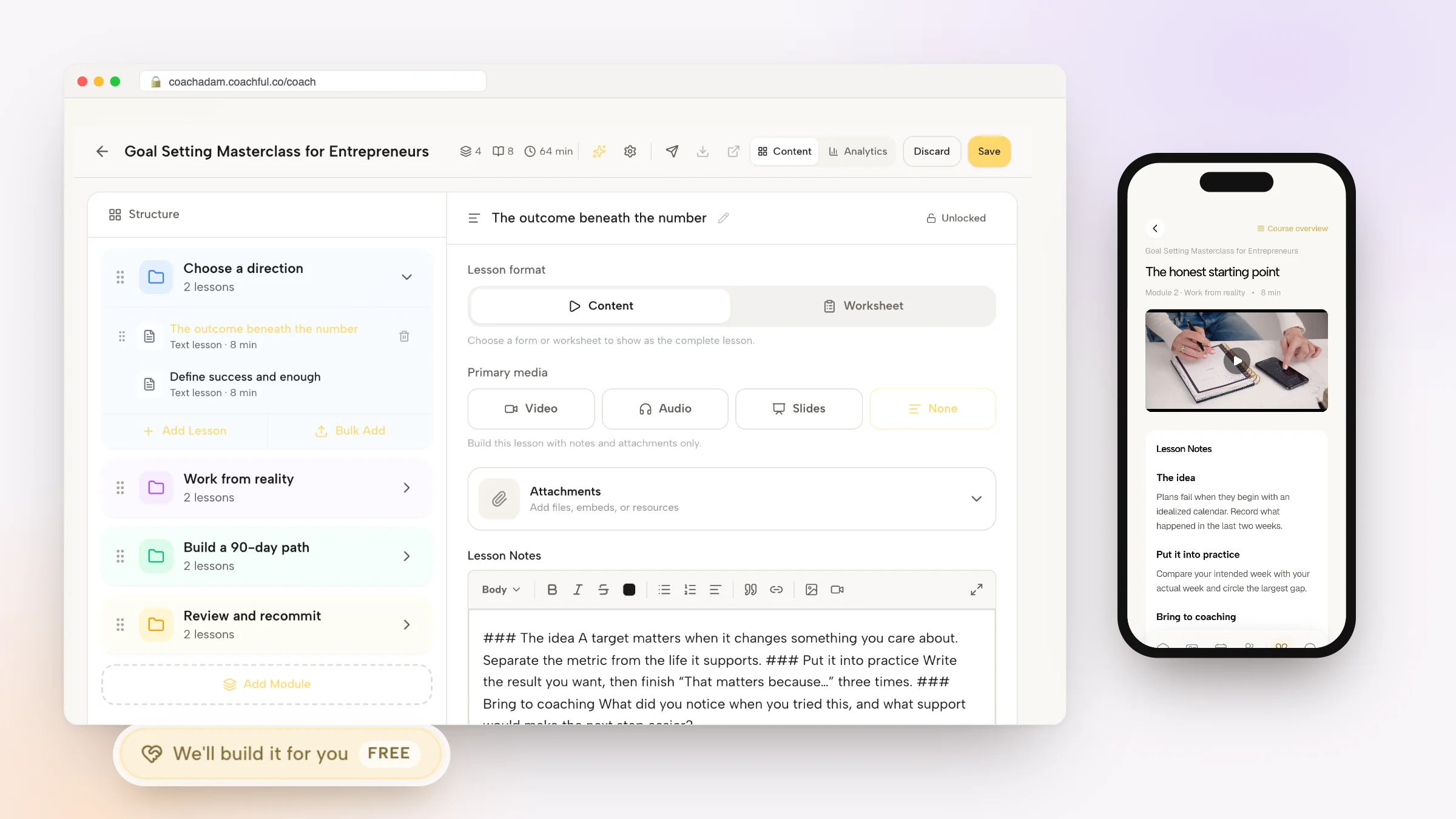
In Coachful, each lesson's primary media can be a video, audio, slides or none at all, and Coachful Studio lets you record a lesson video straight from the course editor.
Add quizzes, worksheets and a release schedule
Practice turns watching into learning. Use three kinds:
- Quizzes to check understanding. Five multiple-choice questions at the end of a module is plenty, with a pass message and a "review this lesson" message for lower scores.
- Worksheets to apply the idea to the student's own life, such as the voice diary above. See our guide to creating coaching worksheets for layouts.
- Tasks with a clear "done" state: warm up before your first class for five days.
Then decide when content opens. Everything at once suits short or lead-magnet courses. A drip schedule (a module a week, or the next module after the previous one is finished) suits courses where practice needs time between lessons.

Price and position the course
A course can play three roles in a coaching business, and the price follows the role:
- A standalone product sold to people who want the method without coaching.
- An included part of a program, so live sessions go on coaching rather than teaching.
- A stepping stone toward coaching, often low-priced or free, ending with an invitation to book a call. For that role, a shorter mini course often works better.
Our playbook on how to sell online courses covers launch and pricing tactics in detail.
Publish it where your clients already are
Students finish more when the course lives next to everything else you give them. In Coachful, courses sit in the Courses list under Create > Resources, with modules, lessons, quizzes, worksheets, drip release and completion tracking, and students take them in the same branded portal and client app on iPhone and Android as your coaching. Sales go to your own Stripe account with a 0% Coachful platform fee. New courses can start from 48 ready-to-film course templates, such as Speak With Confidence, Journaling for Clarity or Launch Your First Online Course, each with lessons, notes and filming guides written, so you only film the videos. The online course platform for coaches page has the details.

From the student's side, the course page shows progress, the number of modules and lessons, and the content list.

Inside a lesson, students mark it complete and move on, with the course overview underneath.

Mistakes that leave courses half-watched
- Too long. A course that tries to teach everything gets finished by almost nobody. Cut until it hurts, then cut one more lesson.
- All theory. If a module has no practice item, students drift. Every module needs something to do.
- Filming first. Unscripted lessons are long and repetitive. Write first, film second.
- Perfecting the camera instead of the sound. Buy the microphone before the lighting kit.
- No ending. Finish with a recap, a plan and a clear next step, whether that is a second course or a coaching call.
Have the Coachful team write your course
Coachful's team builds courses for free on every Coachful plan, as the outline and written material. In the app it is labelled FREE and Complimentary gift. You film any videos.
Start from the Create page's first chip, We'll build it for you · FREE, or from the Want us to build your course? card at the bottom of the Courses list. That card puts it simply: tell us your topic, we'll write the outline, lessons, quizzes and worksheets, and you film the videos. Opened from the Courses list, the form starts with "Course (outline only)" selected.

Describe the course ("a five-module course for teachers who strain their voice, with a worksheet in modules one and four and a short quiz in modules three and five"), who it is for and what students should be able to do at the end. Add up to eight links and up to ten files: workshop slides, handouts, a blog post you wrote on the topic or an audio recording of you explaining it. Video files are not accepted. The last box covers deadlines and anything to avoid.
The team replies by email with next steps, usually within around 24 hours, which is a typical turnaround rather than a guaranteed deadline. The course is built in your own account, with modules, lessons, written notes, quizzes and worksheets in place, ready for you to record, review, price and publish.
For one recent request, a real-estate and money coach, the team built a free nine-day bootcamp course with its own signup funnel and emails, alongside a year-long cohort program with an application form.
What the service doesn't do: record or edit your videos or audio, design logos, manage ads or run ongoing marketing. Nothing is invented, either: no fake credentials, student results, testimonials or prices; gaps are left for you to fill. The guide to the free white-glove service lists everything else the team builds.
Frequently asked questions
How do I create an online course as a coach?
Pick one person, one skill and one visible result. Outline four to six modules with two to four lessons each and a practice item per module. Script each lesson, then record video, audio or slides. Add quizzes and worksheets, choose a release schedule, price it for its role, and publish where your clients already are.
How long should an online course be?
Long enough to deliver one result and short enough to finish. Many coaching courses land between ten and twenty lessons, with most lessons under ten minutes. If an outline passes thirty lessons, it is usually two courses.
Do I need video for an online course?
No. Video helps for demonstrations, but audio lessons, slides and well-written text lessons all work. Many coaches mix formats, using video where showing matters and text where reading is faster.
What equipment do I need to record a course?
A recent phone, a clip-on microphone and good window light are enough to start. Prioritize clear sound over picture quality, film in batches and keep most lessons short.
Can Coachful build my online course for free?
Yes, as the outline and written material. On any Coachful plan, choose "Course (outline only)" in the request form, describe the topic and audience, and attach slides, handouts or a voice memo. The team writes the outline, lessons, quizzes and worksheets in your account. You film the videos.
Should my course be free or paid?
It depends on its job. A free or low-priced course works as a stepping stone to coaching, while a full course teaching your method can be sold on its own or included in a program. Decide the role first, then the price.