Coaching Worksheets: How to Create Ones Clients Fill In
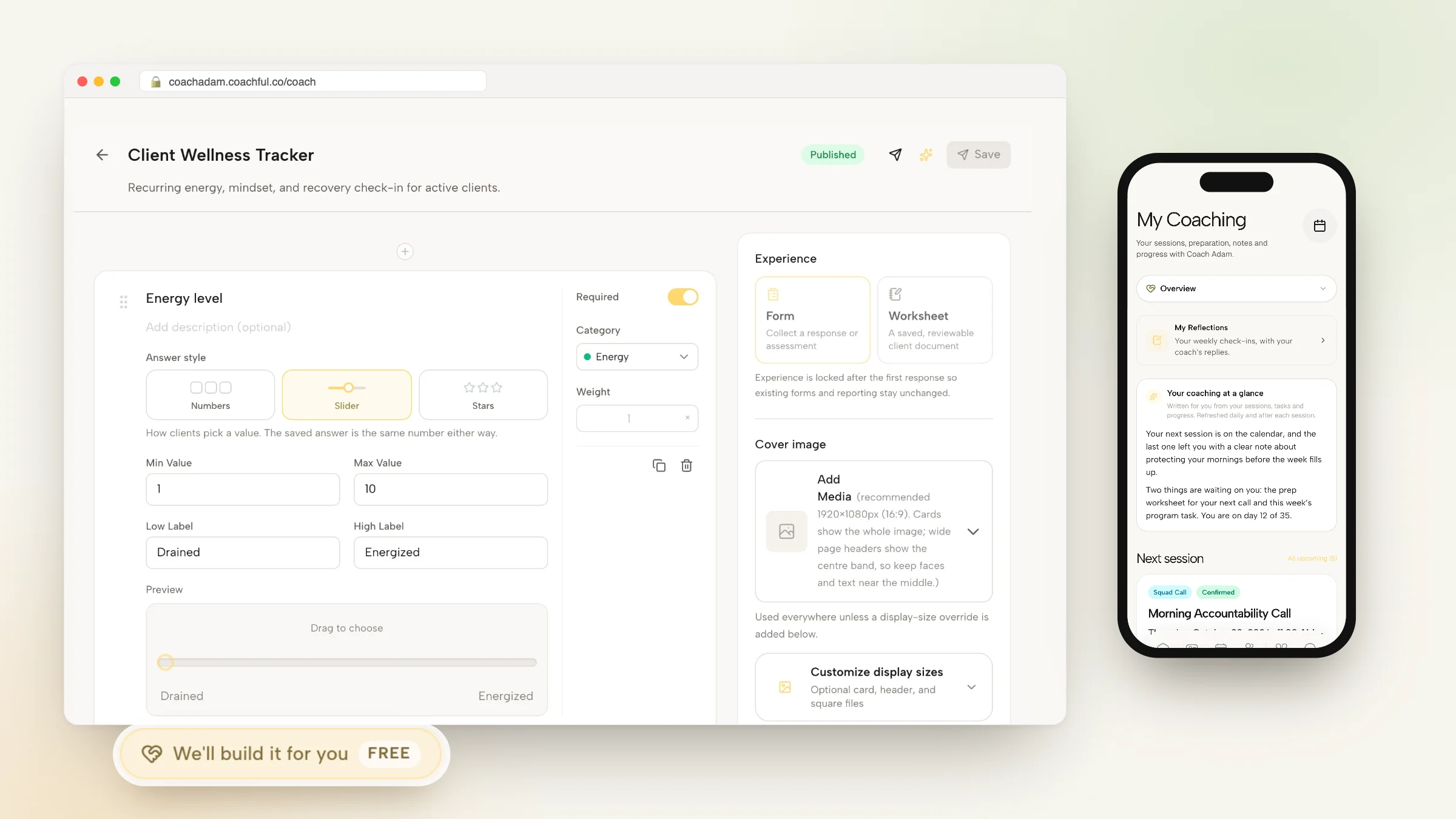
Most coaching worksheets die in a downloads folder. The client means to print it, the PDF sits next to a tax form, and the session starts with "I didn't get to the worksheet." The fix is rarely better questions. It is shorter worksheets, a clear reason to fill them in, a place to do it on a phone, and a coach who reads the answers before the call.
This guide covers how to create coaching worksheets clients actually complete: when to use a worksheet versus a form or a check-in, the anatomy of a good one, six layouts you can copy (with every field and answer type), which question types suit which job, where worksheets belong in a program, how to sell them and the mistakes to avoid.
You can also hand the job over. Coachful's team builds forms and worksheets for free on any Coachful plan: send your questions, a PDF or a rough idea through the request form, and they turn it into a worksheet your clients fill in online.
Worksheet, form or check-in?
| Type | Best for | How often | Example |
|---|---|---|---|
| Worksheet | Structured thinking the client returns to; a saved document you both review | Once per topic | Values sort, decision matrix, 90-day plan |
| Form | Collecting a response or assessment | Once, at a set moment | Intake questionnaire, feedback survey, readiness assessment |
| Check-in | Tracking momentum over time | Daily or weekly | Energy rating, weekly win and obstacle |
The distinction matters because it changes the design. A worksheet can be longer and deeper because the client keeps it. A check-in must take under two minutes or it stops getting answered. Intake forms are their own topic; our guide to coaching intake forms covers them in full.
The anatomy of a worksheet clients finish
- A title that names the outcome. "Choose your next role" beats "Career Reflection Worksheet 3".
- One line on why. "We'll use this in our next session to pick the first experiment."
- A time estimate. "About 15 minutes." People start what they can picture finishing.
- Three to seven questions, mixing quick ones (scales, choices) with one or two that need real thought.
- A "so what" question at the end: "Looking at your answers, what stands out?" This is where the insight happens.
- What happens next. "Bring this to our call" or "Your coach will reply within two days."
Put quick questions first. Momentum from three easy answers carries people into the hard one.

Six coaching worksheet layouts you can copy
Each layout below lists every field and the answer type to use. Change the wording to fit your niche.
1. Wheel of life
| Field | Answer type |
|---|---|
| Rate each area today: health, work, money, relationships, friends and family, fun, growth, environment | Eight 1 to 10 scales, shown as sliders |
| Which area, if it moved up two points, would lift the others? | Single choice from the eight areas |
| What would a two-point improvement look like in that area? | Long text |
| Looking at the whole wheel, what stands out? | Long text |
Repeat it at the end of a program so the client can see the before and after side by side.
2. Values sort
| Field | Answer type |
|---|---|
| From this list of 30 values, choose up to ten that feel important | Multiple choice (say "up to ten" in the question) |
| From your ten, choose the five that matter most right now | Short text for each of five |
| For each of your five, describe one moment this month you lived it | Long text |
| Which value is getting the least of your time? | Short text |
3. Weekly reflection
| Field | Answer type |
|---|---|
| How was your week overall? | 1 to 5 stars |
| One win, however small | Short text |
| What got in the way? | Short text |
| What do you want to focus on in our next session? | Single choice: the goal, an obstacle, something new, not sure |
This one is short on purpose. It doubles as a weekly check-in.
4. Decision matrix
| Field | Answer type |
|---|---|
| The decision in one sentence | Short text |
| Options (up to four) against criteria (up to five), each scored 1 to 5, with a weight per criterion | Client-fillable table |
| Which option scored highest, and does that feel right? | Long text |
| What would you need to know to be sure? | Long text |
The "does that feel right?" question is the point. Clients often learn more from disagreeing with the score than from the score itself.
5. Pre-session prep
| Field | Answer type |
|---|---|
| What happened since our last session? | Long text |
| How did the action from last time go? | Single choice: done, partly, not yet |
| What is the most useful thing we could talk about? | Short text |
| How are you arriving today? | 1 to 10 slider |
Send it 24 hours before each session. You walk in knowing where to start.
6. Experiment tracker
| Field | Answer type |
|---|---|
| The experiment: what you will try, and for how long | Short text |
| What you expect to happen | Short text |
| Day by day: did you do it, and one note | Client-fillable table with seven rows |
| What actually happened, and what will you do next? | Long text |
Our list of 30 life coaching exercises has many more ideas that convert well into worksheets.
Question types and when to use each
| Answer type | Use it for | Avoid it for |
|---|---|---|
| Scale (numbers, slider or stars) | Ratings you want to compare over time | Anything that needs nuance |
| Single choice | Forcing a decision, routing the next session | Questions with no clear options |
| Multiple choice | Sorting values, priorities, strengths, with the number to pick stated in the question | Long lists with no guidance on how many to pick |
| Short text | Names, one-line wins, quick facts | Reflection |
| Long text | The one or two deep questions per worksheet | More than two per worksheet |
| Client-fillable table | Matrices, trackers, plans | Simple lists |
| File upload | A resume, a photo of a journal page, a document to review | Anything you could ask in words |
The same rating stored as a slider or as stars is still a number, so you can compare answers across weeks whichever style you choose.

Where worksheets belong in a program
- Before a session, so the session starts deep (pre-session prep, decision matrix).
- Right after a session, to capture commitments while they're fresh.
- Midweek, as the practice for that week's theme (experiment tracker).
- Inside a course lesson, so students apply the idea instead of just watching it.
Aim for one worksheet a week at most. A program with three worksheets every week trains clients to skip them. Our guides to creating a coaching program and the 12-week coaching program template show where worksheets fit week by week.

Selling worksheets
A well-tested worksheet can become a product: a workbook, a toolkit or a low-priced download that introduces your method. Our guide to turning a coaching worksheet into a paid digital product covers packaging and pricing. Test it with clients first. If they don't finish it in a session, strangers won't finish it at home.
Building coaching worksheets in Coachful
In Coachful, forms and worksheets live under Create and in Tools. When you build one, you choose its experience: a Form collects a response or assessment, while a Worksheet is a saved, reviewable client document. Questions can be scales (shown as numbers, a slider or stars), single and multiple choice, short and long text, numbers, file uploads and client-fillable tables, with page breaks for longer worksheets. Tools also has ready-made worksheets, assessments, wheels and calculators you can copy and edit. You can assign worksheets to clients, add them to program weeks, or use one as a course lesson, and when you allow it, completed worksheets can be downloaded as a PDF. The coaching forms and questionnaires page has the details.
For recurring check-ins, coaching flows run on a schedule (morning, evening, weekly or custom), with reminders at each client's local time.

Worksheet mistakes to avoid
- Too many questions. Past seven, completion drops. Split it into two worksheets in different weeks.
- All open text. Five blank boxes in a row feels like homework. Mix in scales and choices.
- No reason given. Tell clients what you will do with the answers.
- Not reading them. If you never mention a worksheet in the session, clients stop filling them in.
- Printable-only PDFs. If it can't be filled in on a phone, many clients won't fill it in at all.
Get your worksheets built for free
Coachful's team will turn your questions into finished forms and worksheets in your account, free on every Coachful plan. In the app it is labelled FREE and Complimentary gift.
Start from the first chip on the Create page, We'll build it for you · FREE, or from the Want us to build your worksheet? card at the bottom of the Forms & worksheets list, which says: send us your questions, a PDF or a rough idea, and we'll turn it into a polished form or worksheet your clients can fill in. Opened from that list, the form starts with "Form or worksheet" selected.

Describe what you want ("a wheel of life worksheet with eight sliders and two reflection questions, plus a weekly reflection check-in"), who it is for and what it should achieve. Upload up to ten files: your existing PDF worksheets, a scanned page, a spreadsheet or an audio recording of you explaining how you use it. Video files are not accepted. You can also add up to eight links and a note on deadlines or anything to avoid.
The team replies by email with next steps, usually within around 24 hours. That is a typical turnaround, not a guaranteed deadline. Worksheets are built inside your own account, so you can edit questions, reorder them or add them to a program afterwards.
Worksheet and form requests often come alongside bigger builds. For a real-estate and money coach, the team built an application form as part of a year-long cohort program, and for a somatic coach leaving Kajabi, the rebuilt contact form now feeds straight into Coachful.
What it does not include: recording videos or audio, legal or clinical review of assessment content, logo design, ad management or ongoing marketing. And nothing is invented, including scoring claims, credentials, testimonials or prices; anything missing is left for you to fill in. Read the guide to the free white-glove service for everything else the team can build.
Take the worksheet you use most, cut it to five questions and send it to your next client. Their answers will tell you which two questions to keep.
Frequently asked questions
What are coaching worksheets?
Coaching worksheets are structured sets of questions or exercises a client completes between or before sessions, such as a wheel of life, values sort or decision matrix. They help clients think in a focused way and give the coach material to work with in the next session.
How do I create a coaching worksheet?
Name the outcome in the title, explain why it matters in one line, give a time estimate, ask three to seven questions that mix quick scales or choices with one or two deep questions, end with a "what stands out?" question, and say what happens next. Make it fillable on a phone.
How many questions should a coaching worksheet have?
Three to seven is a good range. Shorter worksheets get finished more often. If you need more, split the content into two worksheets and use them in different weeks.
What is the difference between a worksheet and a form?
A form collects a response or assessment at a set moment, like an intake questionnaire. A worksheet is a saved document the client and coach return to, like a values sort or a 90-day plan. Check-ins are a third type: short, recurring and designed to track change over time.
Can Coachful build my coaching worksheets for free?
Yes. On any Coachful plan, choose "Form or worksheet" in the request form from Create or the Forms & worksheets list, describe what you need and attach your existing PDFs or notes. The team replies by email, usually within around 24 hours, and builds the worksheets in your account.
Should coaching worksheets be PDFs or online forms?
Online, fillable on a phone, works better for most clients because they can answer anywhere and you can read the answers before the session. A downloadable PDF copy is still useful for clients who like to keep or print their work.