How to Host Coaching Communities Without Discord

Nour
Founder, Coachful
Learning how to host coaching communities without Discord allows executive coaches, career advisors, and leadership consultants to build professional peer environments without forcing clients into gaming-oriented chat servers. While Discord is popular for gaming and cryptocurrency enthusiasts, hosting executive cohorts and leadership masterminds in Discord creates immediate professional hesitation: corporate firewalls frequently block Discord domains, the dark-themed gamer interface alienates corporate executives, and confidential discussions get mixed with casual gaming notifications.
Using Discord for professional coaching damages executive positioning and creates unnecessary security concerns for corporate sponsors. Below: an architectural analysis comparing gaming chat tools with dedicated executive coaching community hubs, highlighting structured discussion channels, integrated video workshops, and resource archives. To connect community discussions with live workshop events, explore our guide on running masterclasses without Zoom, review our plans, and explore our coaching features.
Discord Gamer Server vs Coachful Professional Coaching Community
| Community Environment Feature | Discord Chat Server | Coachful Professional Community Hub | Executive Client & Practice Impact |
|---|---|---|---|
| Corporate IT and Firewall Access | Frequently blocked by enterprise IT security firewalls as gaming/social media. | Clean corporate web and mobile portal accessible across enterprise networks. | Ensures enterprise leaders can access materials without VPN or firewall issues. |
| Visual Branding and Positioning | Dark-themed gamer aesthetic filled with gamer bots, memes, and complex roles. | Elegant, professional interface customized with your practice branding. | Reinforces executive credibility and aligns with high-ticket advisory rates. |
| Integration with Coaching Tools | Chat-only; requires separate tools for session booking, notes, and habits. | Directly integrated with client 1-on-1 notes, goal boards, and scheduling. | Provides a unified developmental hub rather than a fragmented chat room. |
| Member Privacy and Security | Users must maintain public Discord handles with risk of unsolicited DMs. | Private, invite-only directory strictly limited to enrolled cohort members. | Guarantees absolute confidentiality and eliminates spam solicitation risks. |
The Cultural and Security Risks of Using Discord for Coaching
When corporate vice presidents, senior directors, and high-performing founders join a leadership coaching program, their expectations regarding confidentiality, professional decorum, and software usability are exceptionally high. Confronting them with Discord server invites immediately creates cognitive dissonance.
Enterprise executives are often unfamiliar with Discord complex server structures, voice channels, and bot commands. Furthermore, corporate legal and information security departments frequently prohibit employees from downloading Discord on company-issued laptops due to data privacy and malware risks.
- Corporate IT Blacklisting: Enterprise networks routinely block Discord web domains, preventing executives from participating during regular business hours.
- Inappropriate Gamer Aesthetics: Gamer terminology, animated emojis, and dark-mode defaults detract from the serious, reflective atmosphere of executive development.
- Data Privacy and Harassment Vulnerabilities: Public Discord accounts leave executives vulnerable to spam messages, unwanted friend requests, and potential phishing attempts.
Architecture of an Executive Cohort Community Hub
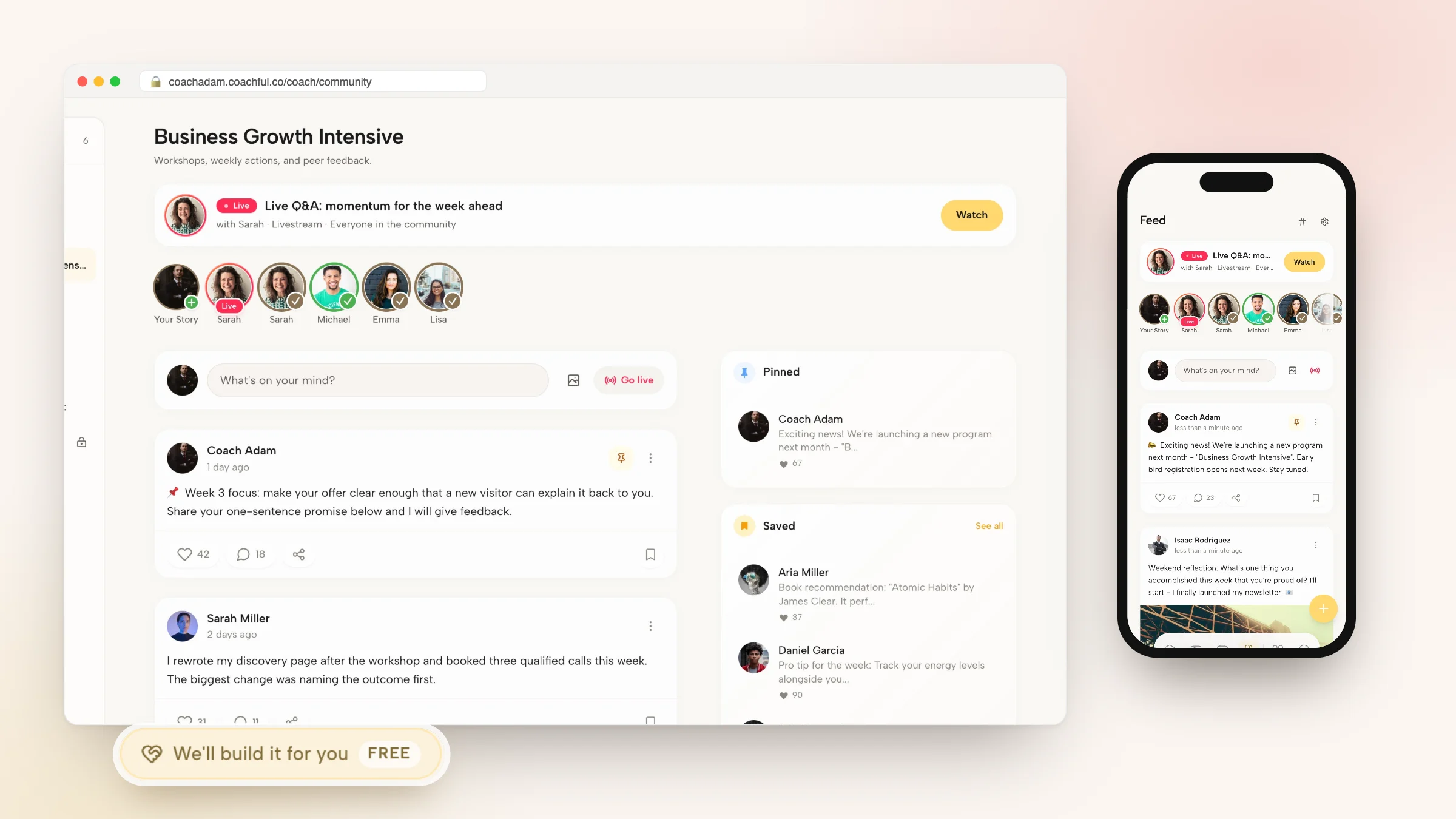
An executive coaching community requires deliberate structural organization. Rather than an endless, chaotic stream of text messages, conversations should be categorized around clear developmental topics, weekly reflection prompts, and structured peer hot seats.
By housing discussion channels, session replays, and personal goal-tracking tools within a single interface, members stay engaged without feeling overwhelmed by notification fatigue.
- Categorized Discussion Spaces: Organize conversations into clear channels such as Strategic Challenges, Executive Wins, and Book Recommendations.
- Integrated Curriculum Vaults: Provide one-click access to program frameworks, video recordings, and downloadable templates alongside discussion feeds.
- Private Cohort Directory: Enable members to view executive peer bios, LinkedIn profiles, and company roles to foster authentic high-level networking.
Facilitation Guide: Maintaining High-Signal Executive Engagement
Sustaining engagement among busy executives requires consistent, high-signal facilitation. The following weekly cadence fosters active participation without creating burden:
By curating thoughtful, high-level inquiries rather than encouraging trivial chatter, the community becomes an indispensable strategic asset for members.
- Monday Intentions and Focus: Prompt leaders to share their primary strategic priority and personal energy focus for the upcoming week.
- Wednesday Tactical Sounding Board: Introduce a real-world leadership dilemma or invite members to request feedback on active team challenges.
- Friday Wins and Retrospectives: Celebrate meaningful leadership victories, lessons learned from setbacks, and weekend renewal commitments.
Step-by-Step Blueprint: Setting Up Your Community in Coachful
Creating a professional coaching community in Coachful takes minutes and guarantees an enterprise-ready experience. Follow these four steps to launch your community.
Your clients enjoy a clean, high-performance community that honors their executive focus and protects their privacy.
- Step 1: Configure Your Community Squads: Establish private cohort groups and define custom channel names inside Coachful community settings.
- Step 2: Set Community Guidelines and Norms: Publish clear expectations regarding confidentiality, mutual respect, and active peer participation in the pinned welcome post.
- Step 3: Upload Initial Resource Materials: Populate your program library with introductory guides, session schedules, and reflection templates.
- Step 4: Dispatch Branded Onboarding Invitations: Invite cohort members via personalized welcome emails that grant instant portal and mobile app access.
Frequently asked questions about how to host coaching communities without Discord
Can members receive push notifications for community discussions on mobile?
Yes. Members can configure personalized mobile push notifications for direct mentions, direct messages, and cohort announcements.
Is community content protected against unauthorized public indexing?
Yes. All community channels, member profiles, and shared resources are completely private and accessible exclusively by authenticated cohort members.
Can I host live audio or video rooms inside the community?
Yes. You can schedule and host live interactive video sessions directly within the platform without third-party meeting links.
How do I handle member departures when a coaching cohort concludes?
You can transition departing members to an alumni community tier or deactivate access with a single click, preserving their historical 1-on-1 notes.
Your coaching community should reflect the sophistication, discretion, and prestige of your executive practice. By steering clear of gaming chat servers like Discord in favor of a dedicated coaching hub, you protect client privacy, maintain enterprise compliance, and foster meaningful leadership growth.
Build a premier executive community that clients love returning to with Coachful today.