Invoicing Software for Coaches: The 2026 Buyer's Guide

Coachful

You're halfway through the month, three clients still haven't paid, and your spreadsheet has become an archaeological dig. One retainer invoice went out late, a cohort participant received the wrong installment amount, and a corporate client wants a purchase-order number added before accounts payable will release payment. You're not struggling because you can't create a PDF. You're struggling because coaching revenue rarely follows a simple one-client, one-invoice pattern.
The right invoicing software for coaches should protect cash flow, reduce admin, and match how you sell. That means recurring retainers, installment plans, group programs, corporate approvals, international clients, payment reminders, and clean records for tax and reconciliation. This guide takes a firm position: choose the billing model first, then choose the software.
| Tool | Best fit | Recurring billing | Client portal | Multi-currency and tax workflow | Main trade-off |
|---|---|---|---|---|---|
| FreshBooks | Hourly and corporate coaches | Yes | Yes | Strong accounting orientation | Higher subscription cost as client volume grows |
| QuickBooks Online | Coaches needing accounting depth | Yes | Limited, depending on setup | Strong bookkeeping and reporting | More accounting complexity than many solo coaches need |
| Wave | Early-stage and side-hustle practices | Yes | Basic | Useful for simple bookkeeping | Lighter coaching workflow support |
| Stripe Invoicing | Payments-first practices | Yes | Customer payment history | Multi-currency depends on configuration | Less complete as a practice-management system |
| HoneyBook | Branded proposals, contracts, and payments | Yes | Yes | Moderate | Not designed around coaching cohorts or progress tracking |
Where Messy Coaching Invoices Actually Cost You
Maya runs executive coaching for independent leaders and small teams. Mid-month, unpaid invoices compete with session preparation, client messages, and planning next week's workshop. Her billing process is a spreadsheet, a payment link, and a calendar reminder she keeps postponing.
The losses arrive as small operational leaks: a missed retainer renewal, a reminder sent only after the client asks for an update, a package balance that no longer matches delivered sessions, or a corporate invoice rejected because the legal entity name is wrong. Each correction consumes time that could go to paid coaching. It also makes Maya appear less organized than her service really is.
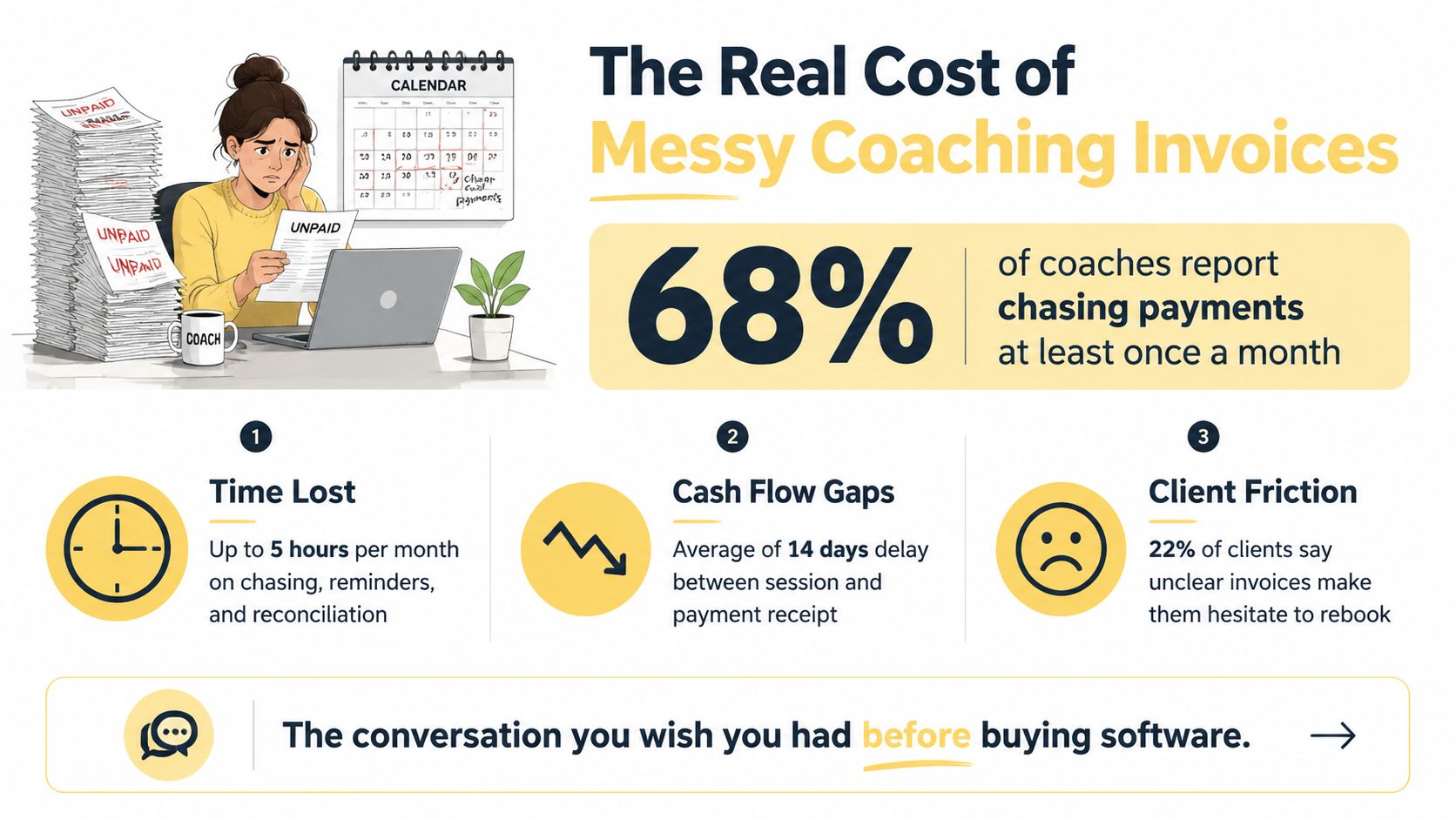
Where the leaks show up
A patchwork billing process produces predictable failures:
- Retainers vanish from the schedule: You create the first monthly invoice manually, then forget the next one.
- Cohort records lose accuracy: A bundle can create duplicate invoices, while installment payments remain separate from enrollment details.
- Failed cards sit unnoticed: An expired card declines, with no prompt retry or timely alert.
- Reconciliation becomes detective work: One-off sessions, packages, deposits, refunds, and recurring payments live in separate places.
- Tax preparation becomes a scramble: Payment data comes from one tool, expenses from another, and invoice details from a spreadsheet.
Late payment turns administrative friction into a cash-flow problem. In 2025, 56% of U.S. small businesses reported being owed money from unpaid invoices, with an average amount owed of $17.5K, while 47% said some invoices were overdue by more than 30 days, according to QuickBooks' 2025 late-payments report. A coach waiting for a package installment may fund delivery costs long after the client has received the coaching.
Operations reality: Every invoice that needs personal reconstruction becomes a recurring admin task disguised as a minor exception.
Electronic invoicing can cut processing costs by 60% to 80% compared with paper invoicing, according to the small-business software statistics summary citing Billentis. Select software based on the leaks you can identify. For coaches balancing retainers, cohorts, corporate approvals, and cross-border clients, the right system reduces follow-up, clarifies balances, and keeps revenue moving without another weekly spreadsheet audit.
Core Invoicing Features Every Coach Should Look For
Start with your offers, not a vendor's feature page. If you sell monthly access, your system needs recurring billing. If you sell a cohort, it needs enrollment-aware package or installment workflows. If you serve clients across borders, it needs multi-currency, tax categorization, and reconciliation support.
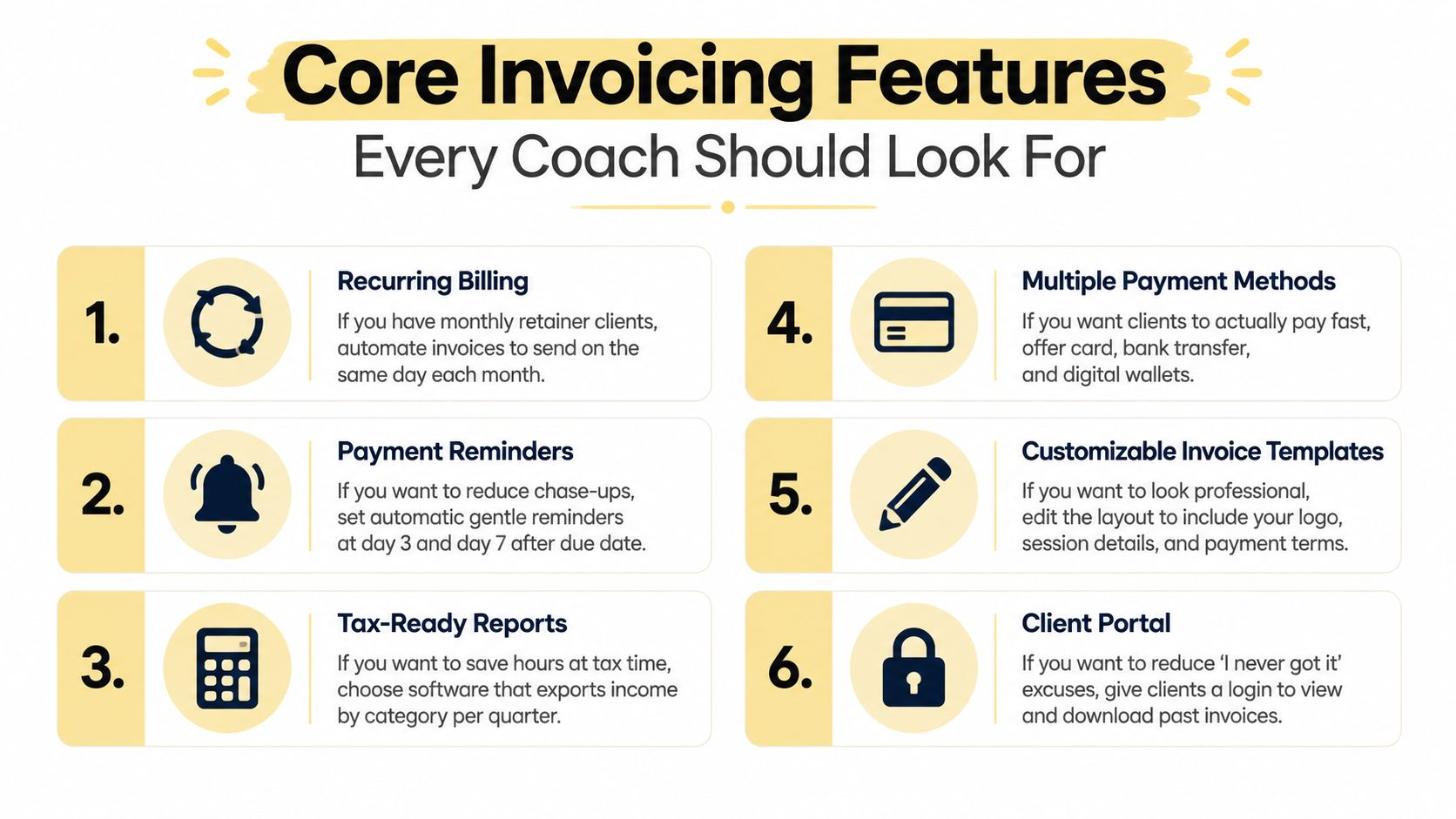
Match the feature to the coaching situation
- If you bill retainers, choose recurring invoices with autopay. The system should generate invoices on the agreed schedule, charge the saved payment method, issue receipts, and flag failures. You shouldn't rebuild the same invoice every month.
- If you sell packages, look for installments and deposits. A high-value program may require an upfront deposit followed by scheduled payments. The software should show the original commitment, paid amount, remaining balance, and next due date in one record.
- If you run cohorts, use package templates and bulk workflows. One invoice per participant isn't enough if the program has a shared start date, early-bird pricing, installment options, or multiple seats paid by one organization.
- If you bill companies, require purchase-order fields and approval-friendly documents. Corporate accounts payable teams often need legal names, tax identifiers, service periods, payment terms, and a PO reference before they'll pay.
- If clients live in different countries, prioritize multi-currency and tax handling. GetMyInvoices' coaching invoicing guidance identifies multi-currency support, VAT preparation, invoice categorization, and accounting integrations as important needs for coaching companies.
- If you chase overdue invoices, automate reminders but keep the tone human. A gentle reminder, a firmer follow-up, and a final notice should be configurable. You need visibility into who received each message, not just a checkbox saying “reminder enabled.”
- If your clients ask for old receipts, add a client portal. A portal lets clients view invoice history and download documents without emailing you.
- If your week is built around sessions, connect calendars and CRM records. The useful integration isn't merely a booking link. It's the ability to connect a signed agreement, scheduled engagement, payment status, and client record.
Security deserves a place in the buying decision. Modern invoicing systems commonly emphasize PCI-DSS compliance, encrypted data, and multi-factor authentication when they collect card payments, as reflected in the capabilities and positioning of Invoice Ninja. For a coach, that means fewer payment-risk decisions handled manually.
You can also review a coaching payment software workflow if you're evaluating billing as part of the wider client journey. For email delivery around invoice notifications, an SMTP Relay guide can help you understand how transactional messages should be routed reliably.
Side by Side Comparison of the Top Tools in 2026
No single platform wins for every coaching practice. FreshBooks and QuickBooks Online make sense when accounting and reporting drive the decision. Stripe Invoicing is stronger when payment collection and developer-friendly flexibility matter most. Wave keeps the subscription barrier low. HoneyBook creates a polished client journey from proposal to payment.
The table below is a practical screening tool, not a promise that every feature is included in every plan. Verify the current plan limits, payment availability, and tax capabilities for your country before signing up.
| Feature | FreshBooks | QuickBooks Online | Wave | Stripe Invoicing | HoneyBook |
|---|---|---|---|---|---|
| Recurring billing | Strong | Strong | Available | Strong | Strong |
| Client portal | Available | Available, plan and setup dependent | Basic | Payment and customer history | Strong |
| Branded templates | Strong | Strong | Available | Customizable | Strong |
| Calendar and CRM integrations | Good integrations | Broad business integrations | Lighter | Broad integration ecosystem | Strong workflow integrations |
| Multi-currency | Available | Available | More limited | Available with configuration | Available with configuration |
| Tax handling | Strong accounting workflow | Strong accounting workflow | Basic to moderate | Requires careful configuration | Moderate |
| Mobile app | Yes | Yes | Yes | Mobile administration through Stripe tools | Yes |
| Reporting depth | Strong | Strongest accounting depth | Basic to moderate | Payment-focused | Moderate |
| Best fit | Hourly coaches and service firms | Corporate and accounting-heavy practices | Simple, early-stage billing | Payments-first businesses | Branded, multi-step client journeys |
What each tool means for your week
FreshBooks suits a coach who bills by time, tracks expenses, and wants invoice line items to connect to logged work. Its weakness is that it doesn't understand coaching packages or cohort enrollment as naturally as a coaching-specific platform.
QuickBooks Online is the better choice when your accountant, corporate clients, or internal finance process already runs through accounting categories and reconciliations. You'll get depth, but you may spend more time configuring a system that was designed for broad business bookkeeping.
Wave is sensible for a new coach with straightforward invoices and modest operational complexity. It becomes less attractive once you need polished portals, complex approval flows, or detailed program-level billing.
Stripe Invoicing is my payments-first recommendation. The 2026 expert ranking cited in the comparison research scored it highest overall at 9.2 out of 10, ahead of Square Invoices at 8.2 and QuickBooks Online Invoicing at 7.6, as reported by the 2026 invoice-management comparison. That ranking supports a clear pattern: payments-first tools often deliver a better invoice and payment experience, while accounting-first tools deliver deeper books.
HoneyBook works well when your sales process includes proposals, contracts, invoices, and client communication in one branded flow. It's less convincing for a coach whose central challenge is cohort billing, attendance, or complex program operations.
Pricing Tiers and Payment Fees Decoded
A coach billing one retainer, several cohort installments, and corporate invoices can lose more money to payment terms than to the software subscription. Compare the platform charge and transaction charge separately, then test both against your actual payment mix.
The verified 2026 comparison reports Zoho Invoice as free for invoicing, with payment processing at 2.9% plus $0.60 per card transaction and 1% per ACH payment. The same comparison places FreshBooks at about $19.95 per month at entry level. These are comparison figures, not universal prices. Processor terms, countries, currencies, and plan conditions change the result.
| Tool | Starter tier | Mid tier | Transaction fee | Effective cost at $8k MRR, source: cited 2026 comparison report, illustrative not universal | Effective cost at $40k MRR, source: cited 2026 comparison report, illustrative not universal |
|---|---|---|---|---|---|
| Zoho Invoice | Free invoicing | Paid features vary | 2.9% + $0.60 card, 1% ACH in the cited comparison | Calculate with your transaction count and processor | Percentage cost scales with collected volume |
| FreshBooks | About $19.95/month in the cited comparison | Higher plan available | Depends on payment processor | Subscription plus processor fees | Subscription becomes less material than processing |
| Wave | Free entry option | Paid features vary | Depends on Wave Payments setup | Processor fees usually dominate | Processor fees dominate further |
| Stripe Invoicing | Payments-first entry | Advanced configuration varies | Processor-dependent | Platform and processor costs | Review processor economics and payment mix |
| HoneyBook | Paid entry tiers | Higher workflow tiers | Processor-dependent | Subscription plus processor fees | Review payment volume and plan value |
Do not treat the specific figures below as fixed costs. Calculate your own effective expense from invoice volume, average payment size, card versus ACH mix, refunds, chargebacks, and currency conversion. A coach with many small cohort installments faces a different fee profile from one collecting a few large corporate payments.
The pricing questions coaches skip
- Percentage versus flat fees: A percentage fee grows with revenue. A flat fee matters more when invoices are small and frequent.
- ACH economics: ACH can be cheaper for larger retainers, but check caps, minimums, settlement timing, and failed-payment policies.
- Currency conversion: International billing may add conversion costs beyond the visible transaction fee.
- Chargebacks and refunds: Read the processor terms before assuming a refund returns every fee.
- Annual versus monthly billing: An annual discount only helps if you will stay with the platform and use the included functionality.
- Accounting exports: A cheaper invoice tool can cost more if someone later has to rebuild categories and reconcile payments.
For tax treatment, especially when invoicing Australian clients or distinguishing tax-inclusive and tax-exclusive amounts, consult the EndureGo Tax GST invoicing guide. For a review of card, bank, and other checkout controls, use this secure payment solutions overview. These checks belong in your weekly cash-flow review, not after a payment problem appears.
Billing Beyond One Off Sessions Cohorts Retainers and Corporate Programs
Coaching revenue rarely fits one invoice. Retainers, cohorts, and corporate programs create different records, approval steps, and cash-flow risks. Choose software around the exceptions that consume your week, not only the standard invoice screen.
Retainers need exception handling
Section 2 covers recurring billing basics. The harder question is what happens when the agreement changes mid-cycle. Check how the system records a paused month, a coach-approved credit, a plan change, or a cancellation after the billing date. It should show the original charge, adjustment, refund, and remaining balance in one audit trail.
An executive client may begin halfway through the month, upgrade before the next renewal, then cancel after a scheduled payment. Your process should define whether the first period is prorated, whether the upgrade creates an immediate adjustment, and who approves a refund. Store those decisions with the invoice. Otherwise, you will reconstruct them from email when the client disputes the balance.
Use a separate cancellation status from “unpaid.” They require different actions. An unpaid invoice needs collection follow-up. A cancelled engagement may need a credit note, refund, or final invoice, depending on the contract.
Cohorts need participant-level records
A cohort has one launch date but many commercial arrangements. Paid-in-full enrollment, installments, scholarships, early-bird pricing, and a parent-paid place should remain tied to individual participants. The record should show the package, seat, amount received, balance due, and any approved adjustment.
Plutio's coaching invoicing solution reflects the broader move toward client portals and connected workflows. For cohort delivery, that connection matters because enrollment, resources, attendance, and billing affect the same seat. A separate invoice generator leaves staff matching payments to participants by hand.
Corporate programs need an approval map
Corporate coaching adds fields that a consumer invoice rarely needs: legal entity, purchase order number, service period, department, internal sponsor, approver, billing contact, participant group, and tax-document requirements. Capture them before the first invoice. A buyer may approve the engagement, a program manager may confirm delivery, and accounts payable may reject payment without the PO reference.
Set routing rules for exceptions. A credit may require the sponsor's approval, while a replacement invoice may need accounts payable to confirm the PO. Reconcile each invoice against the PO, service period, approved amount, and payment status before chasing it. Store the payer, approver, participant, and sponsor as separate roles.
Decision rule: If your programs involve seats, adjustments, or approval chains, choose software that records who owes, who approved, what was delivered, and what remains payable.
Setup Migration and Day One Checklist
You can migrate in an afternoon if you treat the work as a controlled rollout rather than a dramatic switch. Don't begin by importing everything. Begin by deciding what must be accurate before the first live invoice leaves the system.
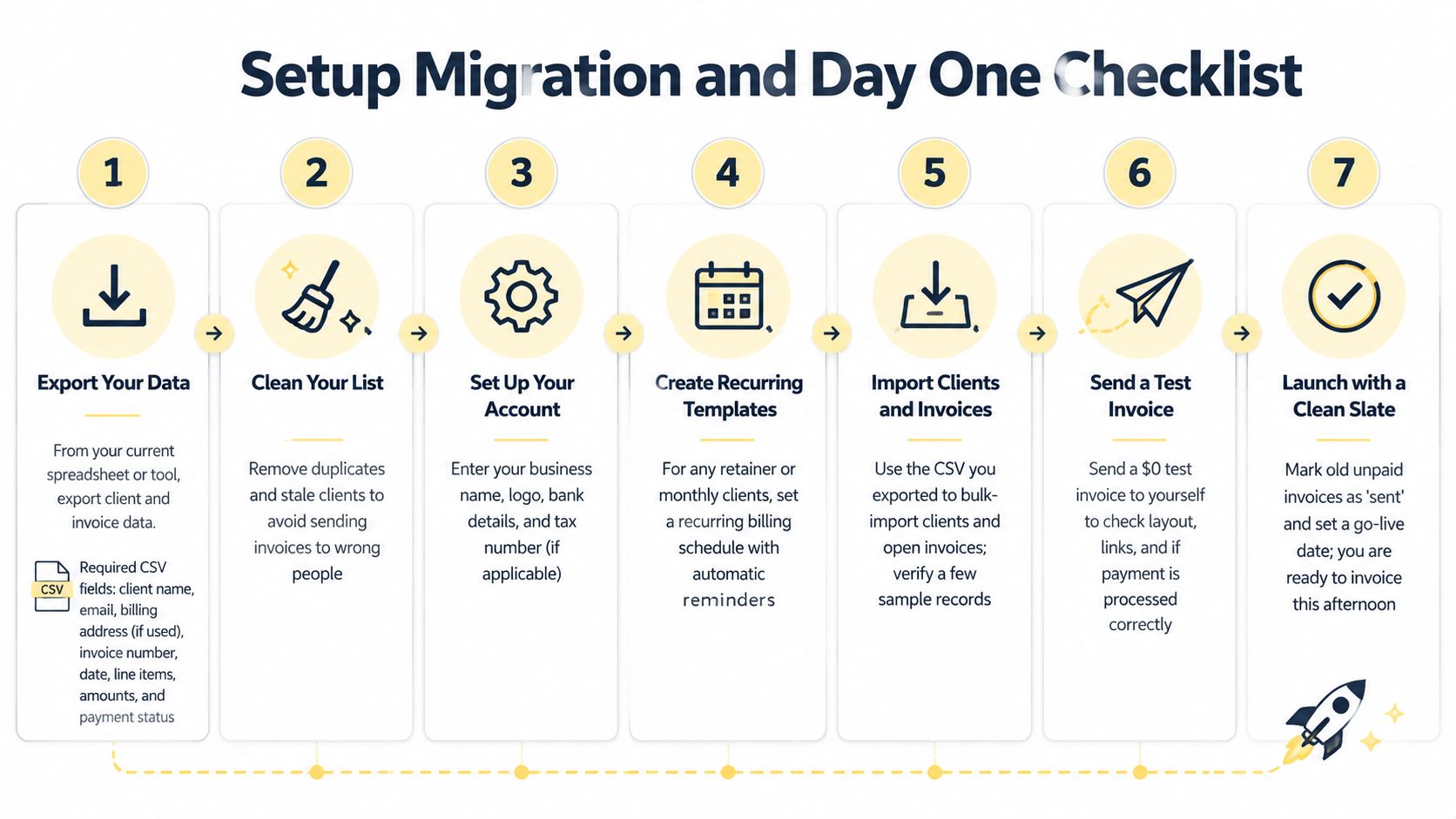
A safer migration sequence
- Export the source data. Capture client name, email, billing address, service description, unit price, tax rate, invoice number, invoice date, line items, amounts, and payment status. If your current system can't export all fields, document what you'll recreate manually.
- Clean the file. Remove duplicates, archive stale clients, standardize names, and reconcile outstanding balances. A clean import is easier than repairing incorrect invoices after launch.
- Configure the account. Add your business identity, logo, payment terms, tax rules, bank or payout details, payment gateway, and coaching-specific invoice templates.
- Build reminders before importing live records. Create a gentle reminder, a firm follow-up, and a final notice. Write them in your own voice so automation doesn't sound like a collections agency.
- Import clients and open invoices. Verify sample records against the old system, including balances, due dates, currency, tax treatment, and recurring schedules.
- Send a test invoice to yourself. Check the logo, line items, payment button, receipt, email rendering, and refund path. Use a zero-value test where the platform supports it, rather than inventing a live charge.
- Roll out in batches. Migrate live clients in groups of 10. Keep the old system active until the first complete billing cycle finishes cleanly, then set a firm go-live date and retire the old workflow.
Pitfalls that cause avoidable damage
Stripe Customer ID mismatches can attach a payment method to the wrong record or create a duplicate customer. Timezone differences can also shift recurring invoice dates, especially when you serve clients in different regions. Test recurring schedules across the timezones you use.
For the client-facing side, review how your client onboarding portal workflow connects intake, agreements, payment, and first-session scheduling. Your client shouldn't receive an invoice from one system, an onboarding form from another, and a calendar link from a third without a clear sequence.
Best Picks by Coaching Business Type
The best tool depends less on your coaching label and more on how money moves through the practice. A life coach with recurring containers needs a different system from a course creator with cohort seats, even if both use the word “coach” on their website.
| Business type | Top pick | Runner-up | Deciding feature |
|---|---|---|---|
| Solo life and executive coaches with recurring retainers | CoachBill | Invoice Ninja | Low-friction recurring billing, personal client experience, and payment visibility |
| Course creators and group-coach operators | Stripe with CoachAccountable | Wave | Installments, package logic, and connections to program delivery |
| Corporate L&D teams and boutique consultancies | FreshBooks | QuickBooks Online | PO support, multi-currency, tax handling, and approval-ready reporting |
Solo life and executive coaches
If you run a focused 1:1 practice with a manageable group of monthly retainer clients, keep the client experience personal and the billing predictable. CoachBill is the named top pick here because recurring invoices and a simple payment journey matter more than a large accounting ecosystem. Invoice Ninja is the runner-up for coaches who want invoice control and a practical client-facing record without turning billing into a full operations project.
Your test is simple: can you set up a new client, send the agreement and first invoice, schedule recurring charges, and see failed payments without opening several tools? If not, the system is adding work.
Course creators and group operators
Cohort businesses need a checkout and payment structure that understands enrollment. Stripe with CoachAccountable is the stronger combination when payment flexibility must sit beside accountability, session tracking, or participant progress. Wave belongs on the lighter end for operators whose cohort billing is straightforward and who mainly need invoices and basic records.
Don't force a cohort into a one-to-one invoice template. Track the participant, seat, program, installment schedule, and access status together.
Corporate L&D teams and consultancies
Corporate buyers care about document accuracy, approval flow, tax treatment, and reporting. FreshBooks is the practical lead for service businesses that need polished invoices and accounting support. QuickBooks Online is the stronger runner-up when finance teams require deeper bookkeeping and established reporting workflows.
My default rule is direct: under 20 active invoices per month, keep it simple; above 50, pay for automation. If your practice sits between those points, let payment failures, renewal risk, and reconciliation effort decide.
Why Software Alone Will Not Fix Your Cash Flow
Vague commercial terms sabotage billing regardless of the platform you choose. Your agreement should state the amount, due date, payment method, deposit, installment schedule, late-fee policy, and escalation path. That clarity matters even more when your week includes retainers, cohort enrollments, corporate projects, and clients paying across borders.
The cash-flow problem often starts in the contract. A coach sends an invoice without a firm due date, accepts “I'll pay you soon,” and then hesitates to follow up. Software can issue reminders and record failed payments, but it cannot give you authority that the agreement never established.
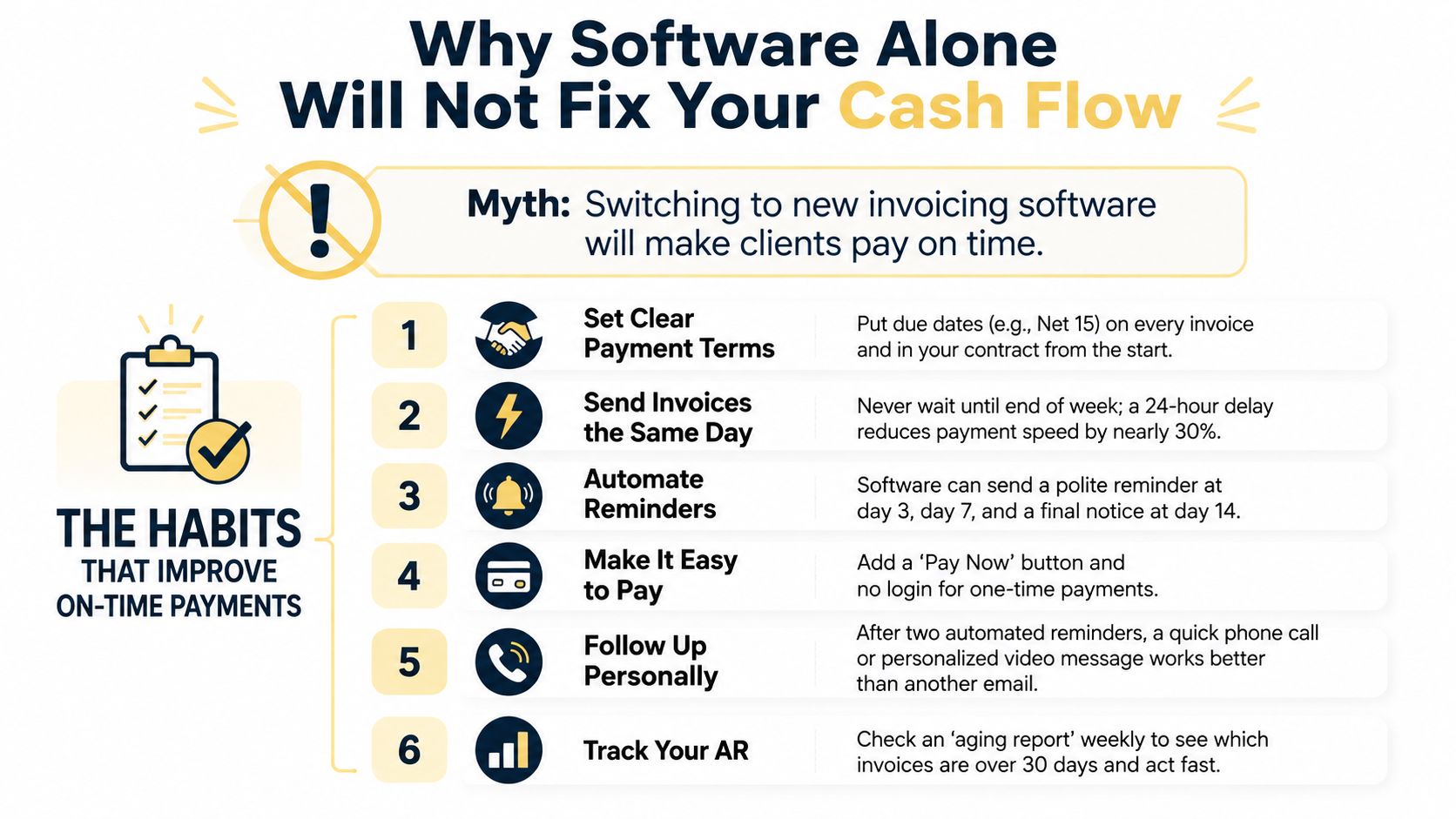
The operating habits that make software pay off
- Write payment terms into the agreement: State the due date, deposit requirement, installment schedule, and response to non-payment.
- Invoice when the commitment begins: Send the first invoice when the client signs or enrolls, not after the first session or at week's end.
- Collect deposits before reserving capacity: For retainers, cohorts, and corporate work, connect payment to access, scheduling, or project start.
- Make payment easy: Offer the methods your clients use and keep the payment path obvious.
- Review accounts receivable weekly: Check unpaid, overdue, failed, and disputed invoices before they disrupt payroll or delivery.
- Enforce the policy consistently: A late fee or escalation step that you never apply teaches clients that the due date is optional.
Payment terms materially influence cash flow. Businesses using 90-day payment terms were more likely to report cash-flow problems than those requiring immediate payment, 60% versus 40%, according to Billed App's late-payment statistics summary. The same source reports that U.S. small businesses were paid an average of 7.8 days late in the December 2025 quarter.
UK corporate clients require additional care. The UK Small Business Commissioner's FAQs state that, where no payment agreement exists or trade credit is used, payment must be made within 30 days of invoice acceptance. Overdue invoices may trigger statutory interest and a fixed compensation fee under the Late Payment of Commercial Debts Act. The guidance also notes that private-sector businesses often set deadlines of up to 60 days from the invoice date.
For a deeper operational framework, review these accounts receivable best practices and adapt them to your client relationships.
Run a 14-day test before blaming your software. Choose one late-paying client, rewrite the payment terms, enable a reminder sequence, and track the change in days-to-pay. Then decide whether the platform is the problem or the policy was never clear enough to enforce.
Coachful brings client onboarding, scheduling, secure payments, messaging, progress tracking, and group-program workflows into one workspace, with native Stripe invoices and a client billing view for invoices, payments, refunds, failed charges, and line-item details. Visit Coachful to assess whether consolidating these operations makes billing easier to manage.