How to Start a Coaching Business When You're Not Tech-Savvy
You need far less technology to start a coaching business than the internet suggests. One page that says who you help, one way for people to book a call, one way to get paid, a simple agreement, and somewhere to keep notes. That is the whole list for your first few clients. Everything else (the funnels, the podcast, the app, the content calendar) can wait until people are already paying you.
If even that list makes your shoulders rise, there is a shortcut. Coachful's team builds the technical pieces for you, free on every plan: describe what you want in a short form, or record a voice memo, and we build it inside your account. We usually reply with next steps within around 24 hours.
This guide is written for coaches who are good with people and tired of being told to "just set up a quick integration". It covers the minimum setup, what to ignore, a one-week plan, the places people usually get stuck, and how to hand the fiddly parts to us.
The minimum setup to start a coaching business
Most of what you see successful coaches using took them years to add. Here is what a first-year practice actually needs, in its simplest form.
| You need | The simplest version | What can wait |
|---|---|---|
| A place people can find you | One page: who you help, how, and a button to book a call | A blog, a podcast, ten pages |
| A way to book | A calendar link with your real availability for a free call | Multiple session types, packages of credits |
| A way to get paid | One offer with a price and a checkout | Payment plans, order bumps, discount codes |
| An agreement | A short coaching agreement your client signs before the first session | Separate contracts for every offer |
| Somewhere for clients to go | A client space with sessions, notes and a way to message you | A community, a course library |
| Notes | One record per client | Detailed analytics |
If you want the fuller business view, including niche, pricing and legal basics, our guide on how to start a coaching business covers the decisions behind this list.
What you can safely ignore for now
New coaches lose months to things that feel productive and are not. Give yourself permission to skip these until you have five paying clients:
- A logo. Your name in a clean typeface is a perfectly respectable logo.
- Every social platform. Pick the one where your future clients already talk, and ignore the rest.
- A complicated funnel. A page, a booking button and a follow-up email is a funnel.
- Your own app in the App Store. Clients can use a coaching app without you building one.
- Automation for its own sake. If you do something by hand three times and it still annoys you, automate it then.
- A perfect website. A clear page that books calls beats a beautiful page you never publish.

A one-week plan if technology is not your thing
Each day below is about an hour. None of it needs code.
- Day 1: write it down. One sentence on who you help and the result. One offer, with what is included and a price. Write it on paper first if that is easier.
- Day 2: pick one platform. Choose software that does your page, booking, payments, agreements and client space in one place, so you learn one set of buttons. Our comparison of coaching software for new coaches is a good starting point.
- Day 3: connect payments. On Coachful this means connecting your own Stripe account. Stripe asks for identity and bank details, so have them ready before you start.
- Day 4: set your availability. Choose the hours you will take calls, connect your Google, Apple or Outlook calendar so you are never double-booked, and create one session type for a free consultation.
- Day 5: make the page. Use a designed template, or ask us to build it.
- Day 6: test everything on your phone. Book a call, pay for your own offer, sign your own agreement. Note anything confusing.
- Day 7: tell people. Message twenty people you know personally. Our 50-name outreach list shows how to do this without feeling salesy.
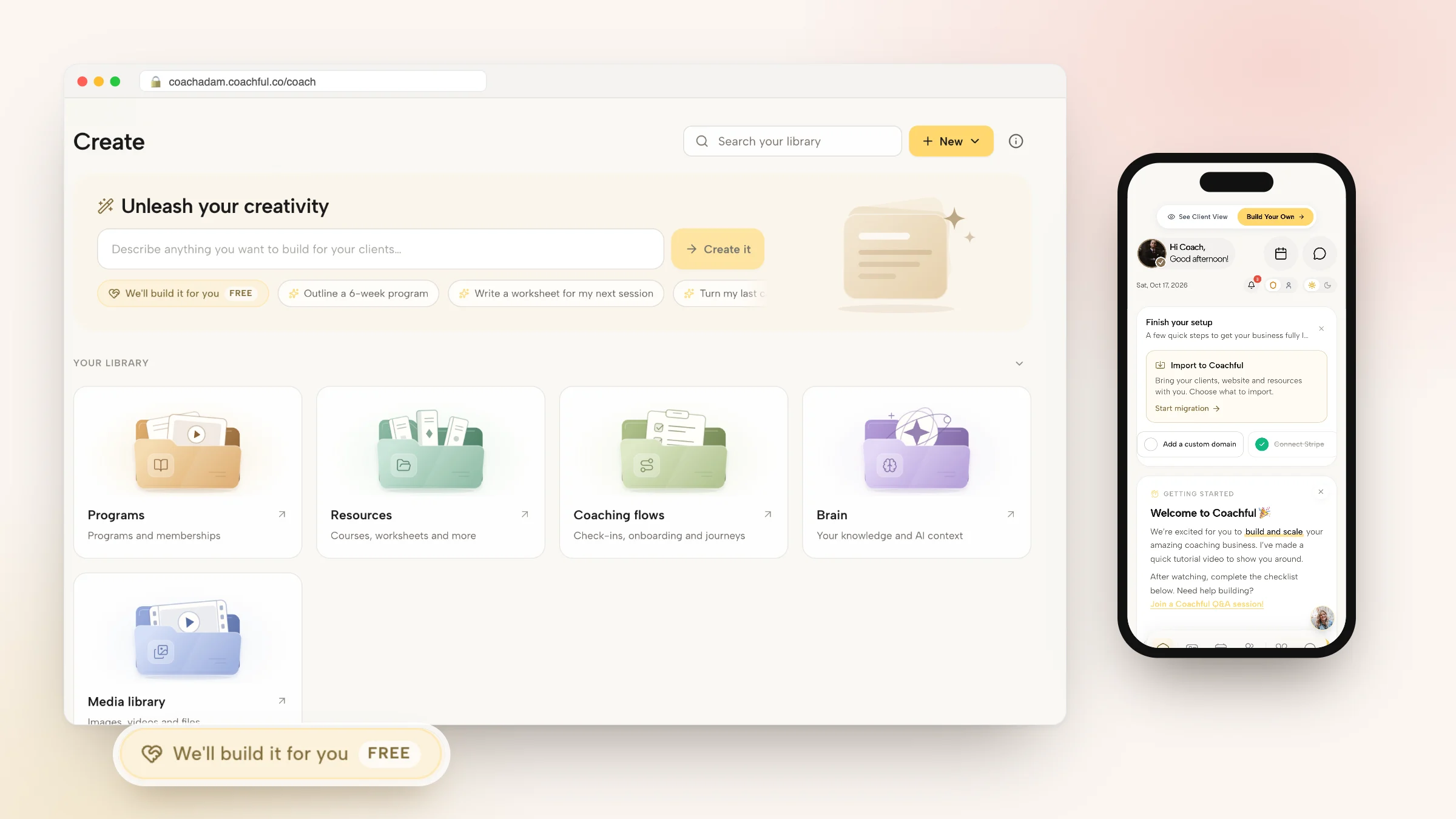
Coachful's dashboard has a short Finish your setup checklist that follows roughly the same path: add a custom domain, connect Stripe, connect social accounts and invite your first client.

Fewer tools means fewer things to break
The most common setup for a new coach is a website builder, a scheduling tool, a payment tool, an e-signature tool, a video tool, an email tool and a messaging app. Seven logins, seven bills, and seven places where something can quietly stop working on the day of your first sale.
For someone who is not technical, the integrations between those tools are the scary part. When a booking does not appear in your calendar, you do not know which of the seven is at fault.
An all-in-one coaching platform removes most of the joins. On Coachful, the page, the booking calendar, the checkout, the agreement, the client record and the client app are one system. Money goes to your own Stripe account with a 0% Coachful platform fee, calendars sync both ways with Google, Apple and Outlook, and sessions can run on built-in video or on Zoom, Google Meet or Teams links created for you.
Clients get one place too. They sign in on the web or in the iPhone and Android app and see their sessions, notes and messages in one hub.

You can also manage the essentials from your own phone: today's sessions, your clients and your messages.

Ask for help in plain words
You do not need to know what a "funnel step" or a "CNAME record" is to get one built. In your Coachful account, open Create and press the first chip, We'll build it for you · FREE. Pick what you want from a plain list (website, funnel, offer or sales page, program, course outline, form or worksheet, email sequence, link in bio and more) and describe it the way you would to a friend.

The form says "Answer what you can", and it means it. Only one answer is required. You can attach up to 10 files, including audio, so a voice memo recorded on a walk is a perfectly good brief. Video files are not accepted, but a link to a video is fine.
A request that works well might be as simple as:
"I am a menopause coach starting out. I need a simple website with a page about me and a way to book a free 20-minute chat. I like sage green. I do not have a logo or prices yet."
That is close to a real request we built recently: a five-page site (home, about, coaching, free consultation and contact) in sage and cream, with every button leading to a free 20-minute consultation booking. Another coach, a leadership coach whose Squarespace renewal was days away, asked for one clean, mobile-friendly homepage with a repeated "talk with me" button, and got exactly that.

The team replies by email with next steps, usually within around 24 hours, which is a typical turnaround rather than a guaranteed deadline. Everything is built inside your account, so you can change a word later without asking anyone. Nothing gets invented either: no made-up credentials, testimonials or prices. If something is missing, it is left for you to add.
The free build does not include recording videos, designing a logo or running your marketing. The guide to the free white-glove service explains the rest, and done-for-you coaching websites goes deeper on the website part.
Where non-technical coaches usually get stuck
These are the five that come up again and again, with the plain-English fix.
"My domain will not connect"
Connecting a domain means adding two small records at the company where you bought it. Coachful shows the exact A and CNAME records to copy and then checks them for you. Changes can take a little while to spread across the internet, so check again later before assuming it failed.
"Stripe wants documents"
That is normal. Stripe has to verify who you are before it can pay you. Have your ID and bank details ready, and finish it in one sitting.
"People book at the wrong time"
Usually a time zone mix-up. A booking calendar that shows availability in the visitor's own time zone solves it, and Coachful's does.
"I am not sure the booking actually works"
Book yourself, from a different email address, on your phone. If the confirmation email arrives and the session appears in your calendar, it works.
"I changed something and now the page looks wrong"
Edits in Coachful's website editor are saved as a draft until you publish, and the page editor has Undo. Take a breath, undo, or ask us.
Your first clients matter more than your setup
Here is the uncomfortable part. No setup, however tidy, will find clients for you. The coaches who get going fastest do the minimum above, then spend their energy on conversations: messages to people they know, a post a week in one place, and a clear way to book.
So set a limit. Give the technical side one week, or hand it to us, and give the rest of the month to people. If you want ideas for those conversations, start with ways to attract qualified clients without constant selling.
Frequently asked questions
Can I start a coaching business if I am not good with technology?
Yes. Your first clients need a page, a booking link, a way to pay, an agreement and somewhere to message you. Using one platform for all of these means learning one set of controls, and Coachful's team will build the website, funnel or program for you for free if you would rather not.
What software do I need to start a coaching business?
At minimum: a website or single page, scheduling, payments, e-signature for agreements, video calls and a client space. You can buy these separately or use an all-in-one coaching platform such as Coachful, which combines them with a client app on iPhone and Android.
Do I need a website to start coaching?
You need somewhere people can learn what you do and book a call. A single clear page does that job. You can add an About page, offer pages and a blog later, once you know what prospects ask about most.
Will Coachful really set up my coaching business for free?
The team builds what you request, for free, on every plan: a website, funnel, offer or sales page, program, course outline, form, email sequence and more. Coachful itself is a paid subscription with a free trial. The build does not include video recording, logo design or ongoing marketing.
How long does it take to set up a coaching business online?
The technical minimum takes about a week of short sessions, or less if you hand the building to Coachful's team, who usually reply within around 24 hours. Finding your first clients takes longer, so start conversations while the setup is still being finished.
Do my clients need to be good with technology?
They need to be able to open an app or a web page. Coachful clients download the free app on iPhone or Android, or use a browser, and sign in with your invitation. Their sessions, notes, worksheets and messages are in one place.