How to Switch From Practice Better: A Migration Checklist
To switch from Practice Better without losing clients, work in four stages: export your data while you still have full access, rebuild your offers on the new platform, move payments at natural renewal points, and then move clients with a clear, friendly announcement. Running both tools side by side for a few weeks is what keeps it calm. This checklist covers each stage in order, with the exact export steps Practice Better documents and the import steps on Coachful.
The slowest part is usually the rebuild, and on Coachful you do not have to do it alone. Coachful's team rebuilds your programs, forms and website for you, free on every plan, through a short request form. Courses are built as written lessons, and you record any videos yourself.
One rule before you begin: if any of your clients receive clinical care, keep those records on a compliant system. Coachful is not HIPAA-certified, so this guide is for moving coaching work.
Before you start: decide what moves
Write three short lists before you touch an export button:
- What stays clinical. Charts, superbills and anything your licensing body requires you to keep. These stay on Practice Better or another compliant EHR for as long as the rules require.
- What moves. Coaching clients, programs, intake forms, handouts, session notes you want to keep using, and your offers.
- What you will retire. Old programs nobody buys, forms you stopped sending, and tags that meant something three years ago. A move is the cheapest moment to clean house.
Step 1: Export your data from Practice Better
Practice Better's help center describes three ways to get data out. Do all three before you change anything:
- Per-client archives. In My Clients, open the menu next to a client, choose Export data, pick what to include (such as session notes, invoices and completed forms) and select Create Archive. Practice Better emails you when the archive is ready. Download it straight away: exports stay available for 48 hours and are then purged, and no backups of them are kept.
- A bulk export. For your whole roster, contact Practice Better support and request a bulk export of all client data.
- Your contact list. Export client contact information as a spreadsheet. This is the file you will import into Coachful.
We could not find a documented export for program templates or protocols, so save your own copies: open each program and copy its modules, emails and resources into a document or PDF. That file doubles as the brief for your rebuild. Store everything in one secure folder, and keep it after you leave.

Our guide to protecting your coaching data explains how to keep a clean archive of any platform you use.
Step 2: Set up Coachful and import your clients
Start the account, connect Stripe or Razorpay, and work through the setup checklist on Home. Then bring your people across:
- Clients and leads. Open Search and choose Import in its footer. Upload the contact spreadsheet as CSV, XLSX, TSV or flat JSON, up to 250 people and 4 MB per import, and split larger lists into several files. Choose whether people land as clients or as leads, match the columns, review the rows and import. You can also import remaining session credits for clients. No invitations or welcome emails are sent until you choose to send them.
- Session notes. On a client's record, open Notes or Sessions and choose Import notes. Upload PDF, DOCX, TXT or Markdown files, one note per file and up to 4 MB each, check the date and title of each, and mark them private or visible to the client.
- Documents and files. Upload PDFs, handouts and exported resources from the same Import screen, then choose who can access them.
- Your website. If your current site lives elsewhere, Import can bring its pages and blog posts in as drafts, ready to edit.


Step 3: Rebuild your programs, forms and courses
This is the step to hand over. Coachful's free white-glove service, described in full below, will rebuild programs, forms, courses and your website from the copies you saved in Step 1. If you prefer to do it yourself, here is the order that works:
- Your best-selling program first. Recreate its weeks, weekly goals, daily tasks and habits. You can start from one of more than 40 ready-to-film program templates, or upload your program as a PDF and let AI turn it into modules, weeks and tasks you can edit. Confirmed AI builds use AI credits.
- Your intake form and check-ins. Build the intake once and attach it to the booking. Add a morning or evening check-in flow if your clients used Practice Better journals for daily accountability.
- Courses. Rebuild self-paced programs as courses with modules and lessons, or start from one of 48 course templates with quizzes.
- Test as a client. Enroll yourself, on your phone, and go through week one.


If your Practice Better work included food logs or meal plans, install the Fitness & Nutrition power-up for nutrition targets, meal plans, recipes and a food log with barcode scanning. It does not sync with Apple Health or wearables, so tell clients who used that feature. More on program building at coaching program software.
Step 4: Move payments without double-charging anyone
Payments are where a switch can go wrong, so move them deliberately:
- Recreate your offers in Coachful. Packages, subscriptions and payment plans each become an offer with its own checkout. Money settles in your own Stripe or Razorpay account, Coachful charges a 0% platform fee, and every payment gets an invoice. See coaching payments.
- Leave running plans alone. If a client is midway through a payment plan in Practice Better Payments, let it finish there. Start their renewal on Coachful.
- Move subscriptions at a renewal date. Pick a date, cancel the Practice Better subscription for that client, and send them the Coachful checkout link before their next charge would have run.
- Assume cards do not carry over. We could not verify any way to move saved cards out of Practice Better Payments, so plan for clients to enter their card once at the new checkout.
Step 5: Tell your clients
Clients care about three things: what changes, what stays the same, and what they need to do. Send the announcement about a week before you invite them, and keep it short. Here is a version you can adapt:
Subject: A new home for our coaching
Hi Jordan, from the 1st, our sessions, your program and our messages will live in a new app built for coaching. The notes from our sessions come with you, and your program picks up where we are now. Next Monday you will get an invitation by email. It takes about two minutes to sign in, and I will walk you through it at the start of our next session. Until then, nothing changes. Any questions, just reply here.
Then send the invitation, open your next session with a two-minute screen share of where things live, and reply to any old-platform messages inside the new app. Our guide to switching platforms without disrupting clients has more templates and timing.
Step 6: Run both, then close Practice Better
Keep Practice Better running until the last running payment plan finishes and every coaching client has signed in to the new app. Practice Better has no contracts and you can cancel at any time. If you keep it for clinical clients, you can move down a plan once your client count fits the lower plan's limit; as listed in October 2026, Starter is $35 a month for 10 clients, or $25 billed annually. Run one final export the week you cancel.
Five mistakes that make a switch painful
- Cancelling first. Your exports, payment plans and client messages all depend on access. Cancel last, after a final export.
- Missing the 48-hour window. Practice Better purges client archives 48 hours after they are ready. Request them on a day you can download them.
- Moving everyone on the same day. Invite a few clients first, fix what confuses them, then invite the rest.
- Rebuilding every old program. Rebuild what sells and what current clients are in. Everything else can wait, or retire.
- Forgetting your links. Booking links sit in your email signature, social bios, old blog posts and directory listings. Make a list and update each one in week four.
A four-week switching timeline
| Week | In Practice Better | In Coachful |
|---|---|---|
| 1 | Export client archives, contacts and your own copies of programs | Start the account, connect Stripe, send the white-glove request |
| 2 | Keep coaching as normal | Import contacts and notes; review the rebuilt programs, forms and site |
| 3 | Announce the move to clients | Recreate offers; enroll yourself as a test client; invite clients |
| 4 | Let payment plans finish; move subscriptions at renewal | Run sessions in Coachful; point your website and links to it |
| After | Final export, then cancel or downgrade | Retire old links and keep coaching |
Let Coachful's team do the rebuild, free
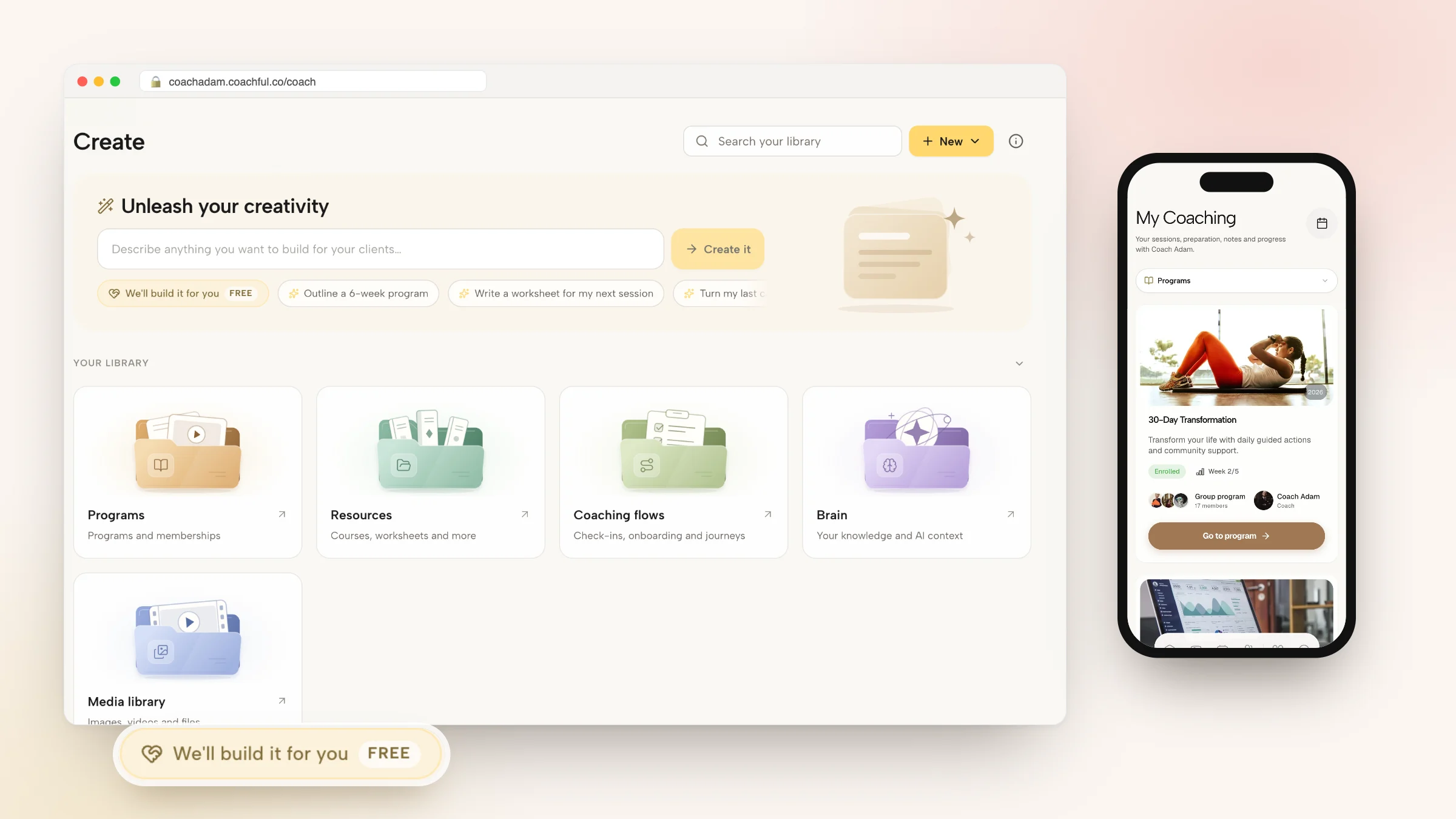
Coachful's white-glove build service is free on every plan, and in the app it is labelled FREE. Open Create > We'll build it for you, or the Want us to build it for you? card on Website, Funnels or at the bottom of the Programs list. Choose what to build: a website, funnel, offer or sales page, program, course, journey or coaching flow, form or worksheet, email sequence and more.
Send what you saved in Step 1: up to 10 files, such as program PDFs, intake forms, handouts, your logo and photos, plus up to 8 links, such as your current website. Video files are not accepted. The website form asks which pages you want, what they should do and what visitors should do next, and you can start from any of 30 designed homepage templates. They fill in with your name, offers and links, and your current site stays live until you switch.


The Coachful team replies by email with next steps, usually within about 24 hours, and builds everything inside your account so you can edit it with the normal editors. A recent request came from a life-purpose coach moving over from another coaching tool, whose program descriptions and FAQ were adapted from the old pages into a new three-page site. The team does not record your videos or audio, design logos or manage ads, and it does not invent testimonials, credentials or prices; anything missing is left for you to fill in. Read what the white-glove service includes.
Still deciding? Compare first in Practice Better vs Coachful, check costs in Practice Better pricing, or see the wider field in Practice Better alternatives.
Frequently asked questions
How do I export my client data from Practice Better?
In My Clients, open a client's menu, choose Export data, select what to include and create the archive. Practice Better emails you when it is ready, and the download stays available for 48 hours. For your whole roster, ask support for a bulk export, and export your contact list as a spreadsheet.
Can I move my Practice Better clients to Coachful?
Yes. Import your contact spreadsheet from Search > Import as clients or leads, up to 250 people and 4 MB per file, and import past session notes from PDF, DOCX, TXT or Markdown files. No invitations go out until you send them.
Will Coachful rebuild my Practice Better programs?
Yes, free on every plan. Request it from Create > We'll build it for you and attach your program copies, forms and handouts. The team rebuilds programs, forms and your website in your account, usually within about 24 hours. Courses arrive as written lessons, and you record any videos.
What happens to clients on a payment plan when I switch from Practice Better?
Let running payment plans finish in Practice Better, then renew those clients on Coachful. Move subscriptions at a renewal date by cancelling the old one and sending the new checkout link. Plan for clients to enter their card once on Coachful.
How long does it take to switch from Practice Better?
Most coaching practices can plan on about four weeks with both tools running side by side: export and request the rebuild in week one, import and review in week two, invite clients in week three, and move payments at renewal in week four.
Can I keep Practice Better for clinical clients and use Coachful for coaching?
Yes, and it is often the right setup. Keep clinical records, superbills and HIPAA-covered work on Practice Better, and run coaching programs, community and marketing on Coachful, with separate agreements for each service.
Does Coachful import my food journals from Practice Better?
No. Journals stay in your Practice Better export. Coachful's Fitness & Nutrition power-up gives clients a new food log with barcode scanning, meal plans and nutrition targets from the day they join, but it has no wearable or Apple Health sync.