Unsubscribe Page Examples for Coaches: 5 Messages

Coachful
Editorial Team
“If someone unsubscribes from my coaching newsletter, what should the page actually say?” Confirm the result plainly, name the emails that have stopped and leave the person alone. You do not need to turn their exit into a final sales conversation.
The best unsubscribe page removes uncertainty, not the subscriber's choice. “You've been unsubscribed from [newsletter]” is more useful than a sad photograph, an unexplained preferences menu or a paragraph about how much you will miss them.
Here are five original unsubscribe-page examples for coaches, with guidance on subscription scope, client communications, optional feedback and testing. These are illustrative messages to adapt, not screenshots of existing customer pages or a claim that every email platform supports a custom unsubscribe destination.
First, separate the unsubscribe mechanism from the page copy
Your email provider needs to process the opt-out. A nicely written page on your website does not do that by itself. Do not replace the provider's unsubscribe link with a normal website link that merely displays “You're unsubscribed” without changing the relevant subscription state.
Some providers let you customize the page shown after an opt-out. Others supply a default confirmation page or have different controls for preferences and complete removal from marketing. For example, Campaign Monitor's documentation distinguishes the unsubscribe process from a custom success-page destination. Check the documentation for your actual provider before implementing these examples.
If your system only offers a functional default page, keep it. Correct suppression matters more than having your favorite heading. If it offers customization, first establish whether the visitor has already been unsubscribed or still needs to make a choice. The page must describe the state that actually exists.

Do not confuse a visible footer link with inbox providers' technical one-click unsubscribe mechanisms. Your provider's supported implementation needs to handle those requirements. A custom success page is not a substitute for that infrastructure.
1. The simple newsletter unsubscribe confirmation
Use this when: the opt-out has already succeeded and the person is leaving one clearly named newsletter. This is the safest default when you have no genuine reason to show additional choices.
You've been unsubscribed from [Newsletter name].
You won't receive future editions of this newsletter at this address.
No further action is needed. Thank you for reading.
Replace “future editions” with wording your system can support. If messages already being processed have a specific behavior, explain it accurately without turning the page into a vague excuse to continue emailing. Do not promise immediate suppression unless your test verifies it.
A neutral message is not unfriendly. Someone may unsubscribe because they changed roles, joined too many newsletters or already got what they needed. They should not have to tell you which reason applies to finish leaving.

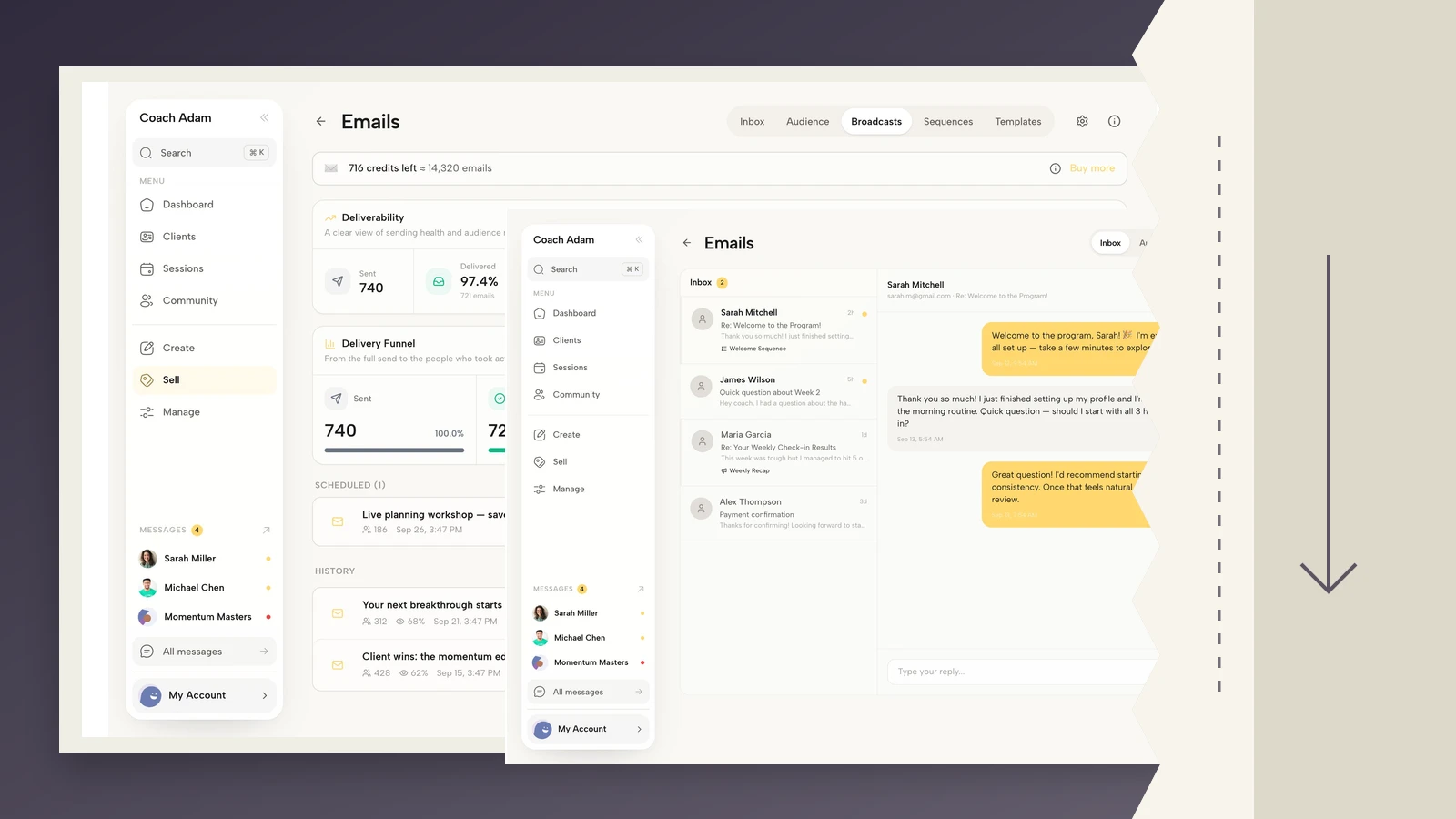
This real Coachful Broadcasts screen illustrates the campaign side of the workflow. It is not a custom unsubscribe-page editor. Keep the campaign and its subscription scope identifiable so the confirmation can accurately say which marketing has stopped.
2. An unsubscribe page for someone who is also a coaching client
Use this when: a paying client has opted out of marketing, while separate communications are genuinely necessary for an existing coaching engagement. Be precise about the difference and check your legal obligations.
You've been unsubscribed from [Business name]'s marketing emails.
This does not cancel your coaching agreement or any booked sessions.
Where necessary for your existing engagement, you may still receive practical messages such as booking information or invoices. We won't use those messages to continue the marketing you've declined.
If you need to change your coaching arrangements, contact [appropriate support route].
Only use the last line if that route is monitored and appropriate. Do not turn it into a compulsory call with you. The marketing opt-out should already be complete, regardless of whether the client contacts anyone about their sessions.
This distinction is especially important for coaches because the relationship can feel personal. A client choosing not to read your newsletter is not choosing to end coaching. Do not quietly pause their access, reduce your attention or initiate a retention conversation because of that choice.

The real Coachful email workspace illustrates individual correspondence. An administrative message still needs to be assessed by its purpose and content; calling an offer “a personal check-in” does not automatically stop it being marketing.
The FTC's CAN-SPAM guide explains that transactional or relationship messages are specific categories, not a general exemption for anyone who has bought something. It also warns that subscribers and members retain the ability to opt out of marketing. This is US guidance, not a worldwide legal checklist.
3. A completed unsubscribe with an optional feedback question
Use this when: you want to understand why people leave, and your provider can present feedback after the opt-out without making the answer a condition. If it cannot separate those actions, use the simple confirmation instead.
You're unsubscribed from [Newsletter name].
No further action is needed.
Optional: What could we improve?
[The topic wasn't relevant] [Too many emails] [I no longer need it] [Prefer not to say]
Your answer is optional and won't change your unsubscribe choice.
The bracketed options are proposed labels for a real optional survey, not functioning controls in this article. A text field can be useful, but avoid inviting sensitive coaching details. You do not need a person's diagnosis, employer dispute or private reason for leaving to improve your email frequency.
Do not make the visitor select a reason before the unsubscribe can succeed. Nor should a button labeled “Submit” ambiguously submit feedback and change marketing preferences together. Confirm the exit first, then offer a separate voluntary learning opportunity.

Coachful's real form builder demonstrates question design, not unsubscribe processing. If you use a separate form for feedback, it must remain optional and independent of the email provider's opt-out action. A form submission is not a suppression mechanism.
Review feedback as a signal rather than a verdict on your coaching. One “too many emails” response can prompt you to check your actual send pattern. It does not establish that every subscriber wants fewer messages or that your offer is wrong.
4. A preferences page that still gives a complete way out
Use this when: your system genuinely supports separate subscriptions or frequencies, and the visitor has not yet completed an opt-out. This is a choice page, not a completed-unsubscribe confirmation.
Choose which marketing emails you receive from [Business name].
You can change the subscriptions below or stop all marketing emails.
[Actual supported subscription choices]
[Save my selected preferences]
[Unsubscribe from all marketing emails]
You don't need to choose an alternative subscription to leave.
Use this only where it is compatible with the actual mechanism and applicable requirements. Do not insert an extra mandatory preference step into a provider's one-click opt-out flow. If the person has already unsubscribed, show the result instead of behaving as though the choice remains unfinished.
A real “monthly only” option means monthly-only rules exist downstream. It does not mean the coach intends to remember to skip that person manually. Likewise, “program announcements only” should not also enroll them into weekly advice emails.

The real Coachful sequence editor illustrates why preferences must be checked beyond one newsletter campaign. Review the actual enrollment and suppression behavior of every marketing route you use. This screen does not prove any particular preference option or cross-sequence behavior is configured.
For US commercial email, the FTC guide says that a menu of message types must still include an option to stop all marketing messages from the sender. It also describes limits on what you can require as a condition of honoring an opt-out. Do not use an attractive preferences page to hide the complete exit.
5. An unsubscribe success page with a quiet way to return
Use this when: the unsubscribe has succeeded and you want to accommodate an accidental click. Any return should be a new, deliberate action through your supported subscription process, not an automatic reversal.
You've been unsubscribed from [Newsletter name].
No further action is needed.
Unsubscribed by mistake? You can choose to subscribe again through [newsletter signup page]. Nothing changes unless you complete that process.
Link to the real signup process, not a button that silently removes suppression on a casual page visit. If your system uses a confirmation email, say what happens only after you have checked it. Avoid “one click and you're back” unless that accurately describes the supported behavior.
The return option should be secondary to the confirmed result. Do not give the visitor a large “Stay with me” button and a tiny gray exit. They have already made a choice; the page is not a referendum on your worth as a coach.

The real Coachful link editor shows a public entry page with a visitor preview. A general coaching link is not necessarily a newsletter signup. If you offer a return route, send the person to the specific subscription choice, not to a booking page or unrelated offer.
What to remove from your unsubscribe page
Start with language that makes leaving emotionally expensive. “I thought you were committed to changing your life” is not cheeky founder copy; it uses the person's development goals against them. Coaches should be particularly careful not to imply that declining marketing reflects resistance, fear or lack of commitment.

Also remove unnecessary hurdles. Do not require a password, an explanation, a discovery call or a form containing extra personal details simply to stop marketing. The exact legal requirements vary, so review your setup for your jurisdiction rather than borrowing a competitor's obstacle course.
Avoid a new promotional email whose only purpose is to persuade the person to undo the opt-out. A clear on-page result is usually the more respectful communication design. If your provider sends any confirmation message, review what it contains and the rules that apply; do not add an offer merely because the template has space.
Finally, remove promises about data deletion unless the relevant deletion process actually happened. “You've been unsubscribed” and “We've deleted all your information” are different claims. A coaching practice may need some records for a current engagement, legal obligations or honoring the person's marketing preference.
Test the opt-out, not just the heading
Use only test addresses you control in an appropriate test setup. Do not send a campaign to real subscribers as a way to check whether your unsubscribe page works.
- Start from an actual provider-generated test email. Follow the supported unsubscribe route and note whether the action is already complete when the page loads.
- Compare the page with the record. Confirm that the relevant marketing subscription state changed. A success heading alone proves nothing.
- Check other marketing routes. Review manual campaigns, automated sequences and any separate tools that could still send promotional content.
- Test optional controls separately. Ignore the survey, leave the preferences unchanged or close the page. The completed opt-out must not depend on extra interaction.
- Check the return route. Visiting a signup page should not silently undo the earlier choice. Verify the supported resubscription process.

Test the page on a phone, with images unavailable and using a keyboard. The outcome, scope and any remaining choice should be understandable in live text. Do not place the only “Unsubscribed” message inside an image.
Also check an import or migration procedure before using it on a real audience. The UK's ICO electronic-mail guidance recommends keeping a do-not-contact list and screening against it. Its page notes that guidance is under review. Use the current applicable guidance and qualified advice for your situation, rather than treating this article as legal approval.
Where Coachful fits
Coachful's broadcast-email help guide describes unsubscribe handling and email preferences. The screenshots here show campaign, sequence, form and correspondence surfaces; they do not establish that Coachful offers a custom unsubscribe-page builder or every preference option in these examples.
If you are choosing a platform for coaching emails, inspect the exit as carefully as the signup. Try the interactive demo to explore the email workspaces shown here. Then verify the actual unsubscribe and suppression behavior in your configured account before planning a real campaign.
Keep the provider's working default page if customization would make the behavior less clear. Your reader does not owe you a beautiful goodbye. They need confidence that their decision has been respected.
Frequently asked questions
Should my unsubscribe page say “Sorry to see you go”?
It can, but the result needs to come first. “You're unsubscribed from [newsletter]” communicates something definite. A warm farewell without that confirmation leaves the reader wondering whether the action worked.
Can I ask why someone unsubscribed?
You can offer an optional question where appropriate, after ensuring the opt-out does not depend on answering it. Make the optional nature explicit and avoid collecting sensitive coaching information.
Does unsubscribing cancel a coaching package?
Not by itself. Marketing preferences and coaching agreements are different things. Explain the actual scope, preserve the person's marketing choice and handle any cancellation under the relevant agreement and applicable law.
Should I delete an unsubscribed contact immediately?
Do not treat deletion and marketing suppression as interchangeable. Check your retention obligations and how your system prevents future marketing. Deleting a record without preserving the appropriate suppression state can create problems when addresses are imported again.