How to Create a Free Website for Career Coaches
Most career coaches find their first clients on LinkedIn, and then lose some of them one click later. Someone reads your post about salary negotiation, taps your profile, taps the link in your Featured section and lands on a page that says "Coming soon" or a booking calendar with no explanation. A website for career coaches exists to catch that person: explain what you do in one screen, show the services with clear scope, and let them pay for a CV review or book a call before the moment passes.
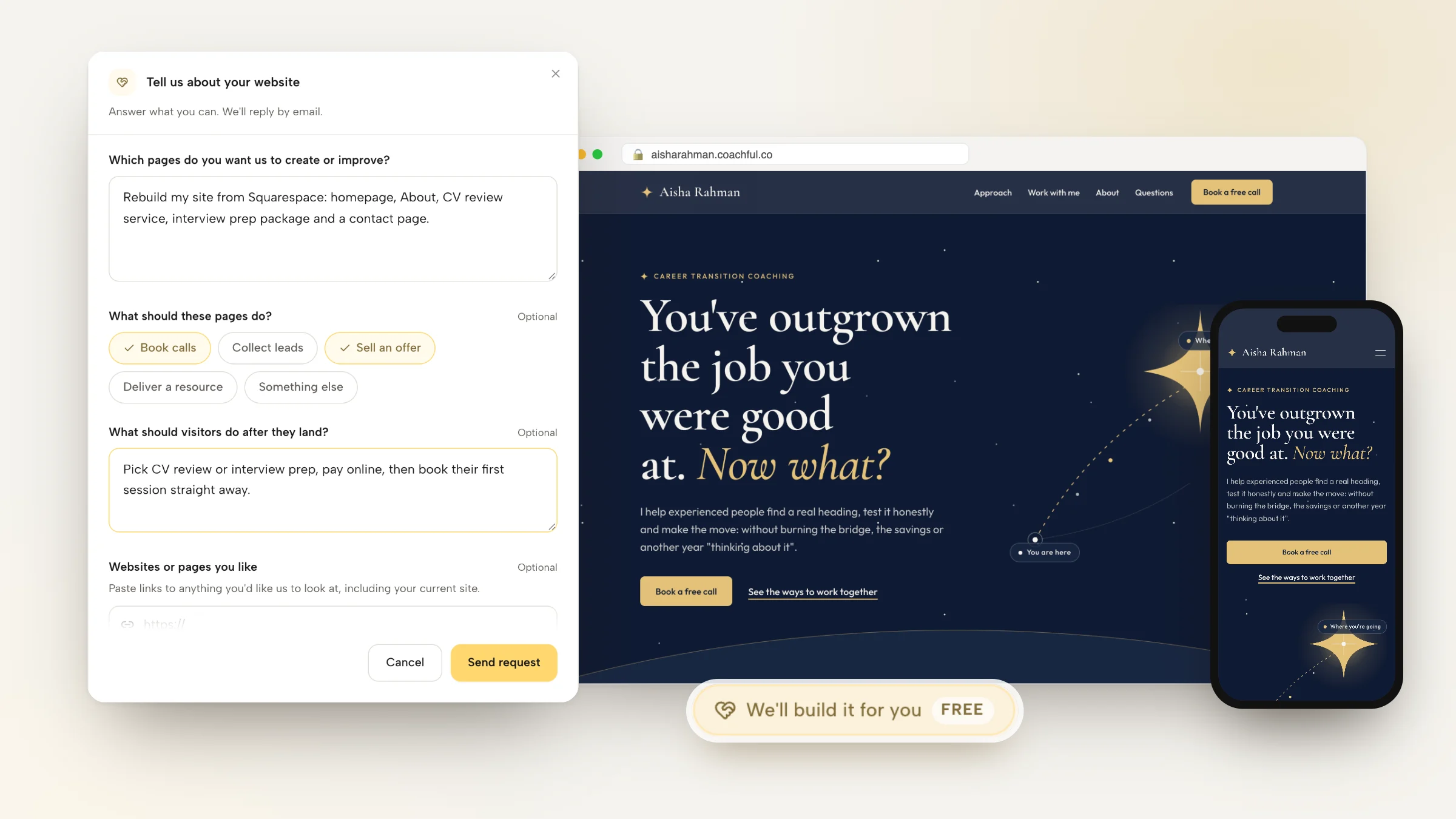
Below is how to build that site yourself, starting with free options, plus a page map, sample copy for a full homepage and the two booking flows that suit career coaching. And if you'd rather skip the building, Coachful's team will build the whole career coach website for you for free on any plan, from a short form.
What a website for career coaches does that LinkedIn can't
LinkedIn is where people meet you. It's a poor place to buy from you. A profile can't show three services side by side, take a payment, collect a CV before the session or send a follow-up email to someone who wasn't ready this week. Your site handles those jobs:
- Fixed-scope services, sold plainly. Career clients often want a defined thing: a CV rewrite, two interview practice sessions, a 90-day transition plan. Each needs its own description, deliverables and price or starting price.
- Payment before the work starts. For a CV review, paying up front and then booking the session is normal and saves you chasing invoices.
- Collecting documents. A short form where the client uploads their current CV and the job they're targeting means the first session starts with substance.
- Credibility you control. A page with your method, your background (the recruiting or HR years count for a lot here) and real client outcomes, in your words.
- A list of people who are almost ready. Job seekers often look months before they move. A free checklist or scorecard keeps you in touch until they do.
Free ways to get a career coach website online
You can start for nothing, and for some coaches that's the right call while they test a niche. The honest version of each option:
- Google Sites costs nothing with a Google account and shows no ads. Design control is limited and there's no booking or payment built in, so you link out to other tools.
- Carrd's free tier gives you one neat page on a carrd.co address. Forms and your own domain need a paid tier.
- Free plans from Wix and WordPress.com give you a subdomain and show the platform's ads or banner. Taking payments and connecting your own domain generally means upgrading.
- A LinkedIn profile plus a free scheduler link is the real minimum. It works for warm referrals and falls apart when someone wants to compare services.
The pattern is the same everywhere: the page is free, and the parts that turn a visitor into a paying client (booking, checkout, intake, email follow-up) are either paid upgrades or separate tools. On Coachful the site comes with the plan rather than for free, but those parts are already in it: booking pages, paid sessions, forms with file uploads, email sequences and a custom domain, with payments going to your own Stripe account and a 0% Coachful platform fee. You can see the full list on the coach website builder page.

The page map for a career coach website
Six pages cover nearly every career coaching practice. Start with the first three if you're new.
| Page | Its job | Sample headline | Main button |
|---|---|---|---|
| Home | Name who you help and the move they want to make | "You've outgrown the job you were good at. Now what?" | Book a free call |
| Services | Lay out each service with scope, format and price | "Three ways to work together, from one session to ninety days" | Choose a service |
| About | Show why your background makes you useful | "Ten years hiring people. Now I help them get hired." | Book a free call |
| CV review | Sell one fixed-scope service end to end | "A CV that gets you the interview, rewritten together in one week" | Pay and book |
| Interview prep | Sell practice sessions for a specific interview | "Walk in having already answered the hard question" | Pay and book |
| Contact or FAQ | Answer the questions people email you about | "Before you book: the questions people ask first" | Send a message |
For the About page in particular, career clients want to know you understand hiring from the inside. If you spent years in recruiting, HR or a specific industry, say so plainly near the top. Our guide to becoming a career coach has more on how to frame that background.
Worked example: a career transition coach's homepage, written out
Here's the copy for a complete homepage, block by block, for a fictional coach who helps mid-career professionals change direction. Borrow the structure and rewrite the words in your own voice.
Hero
Eyebrow: Career transition coaching. Headline: "You've outgrown the job you were good at. Now what?" Sub-line: "I help experienced people find a real direction, test it honestly and make the move without burning the bridge or the savings." Buttons: "Book a free call" and "See the ways to work together".
Who this is for
"You're eight to twenty years in. You're good at your job and you can't picture doing it for another ten. You've updated your CV twice and sent it nowhere." Three sentences that make the right reader nod and the wrong one leave, which is also useful.
The method
Four numbered stages with one line each: Take stock (what you actually want from work now), Explore (three possible directions, tested with real conversations), Decide (one direction and a plan with dates), Move (CV, LinkedIn, applications and interviews for that direction).
Services
Three cards. "CV and LinkedIn rewrite: one week, two sessions, a finished CV." "Interview prep: two practice sessions for a specific role." "Career change program: twelve weeks, weekly sessions, written plan." Each card gets its own button.
Proof
Real outcomes only, with permission: "Moved from finance to product management in five months." If you're new, use your own relevant experience instead and add testimonials as they come.
Free resource
"Not sure you're ready? Take the free career clarity scorecard." Ten questions, a score and a short email series.
Questions and closing
Four questions (Do you work with my industry? Will you write my CV for me? How long does a career change take? Do you help with salary negotiation?) and a last band: "One conversation won't change your career. It might change your next six months." Then the button again.

Two of the designed templates shown here suit this structure closely. Northstar, at the top of this section, was drawn for career transition coaches, with a starfield hero and a compass-rose method. Editorial, above, is a magazine-style page with serif headlines and numbered offers, drawn for career, leadership and business strategists. Both are sample designs with fictional coaches, filled with your own name, offers and links when you use one.
Pay first or call first: two booking flows for career coaches
Career coaching usually mixes small fixed services with bigger programs, and they need different flows.
Flow A: pay, then book (CV review, interview prep)
- The visitor reads the service page: what they get, how long it takes, what it costs.
- They click "Pay and book", pay at checkout, then pick a session time straight away.
- A short form asks for their current CV, the target role and the job ad if they have one.
- Confirmation and reminder emails go out automatically.
Flow B: call first (career change program)
- The visitor books a free 20 or 30-minute call with two intake questions ("What role are you in now?" and "What's prompting the change?").
- On the call, you decide together whether the program fits.
- A yes gets an offer link with payment and an agreement, and the first session is scheduled.
Run both from the same site. The homepage button goes to the free call, and each service page carries its own pay-and-book button. On Coachful, paid sessions are sold at booking, so Flow A doesn't need a separate checkout tool. If you want a lead magnet like the scorecard, the quiz funnel guide shows how to build one, and these career coaching questions make good intake material.

Having our team build your career coach website for free
Coachful's team builds coaching websites for free on every plan. Coachful is a paid subscription with a free trial to start; the build costs nothing on top. It's real people on our team, working inside your own account.
Where to find it
Open Create and choose the first chip, We'll build it for you · FREE. The same request opens from the "Want us to build it for you?" card on the Website and Funnels pages via Fill in a form.

What to put in the form
The website form asks which pages to create or improve, what they should do (book calls, collect leads, sell an offer, deliver a resource), what visitors should do after they land, sites you like, materials to include and anything broken or unfinished. For a career coach, the useful extras are:
- A link to your current site and your LinkedIn profile (up to 8 links).
- Your service list with scope and prices, even if it's a rough note.
- A headshot, logo if you have one, and any brand colors (up to 10 files; no video files).
- Which services are pay-then-book and which need a call first.

In the example above, a career coach asks to rebuild their site from Squarespace with a homepage, About, CV review, interview prep package and contact page, and wants visitors to pick a service, pay online and book their first session straight away.
What happens after you send it
The team replies by email with next steps, usually within about 24 hours, though that's a typical turnaround and not a promised deadline. Everything is built in your account, so you can edit it afterwards with the normal editors.
A recent example: a leadership coach whose Squarespace renewal was only days away got one clean, mobile-friendly homepage with a repeated "talk with me" button, visually connected to the coach's sister company. Another coach, who teaches real estate and money, got an eight-page website on their own domain alongside a year-long cohort program with an application form. In every build, nothing is invented: no made-up credentials, testimonials or prices, and anything missing is left for you to fill in.
What isn't included
No logo design, no recording of your videos, no ad management and no ongoing marketing. The full scope of what the team builds (websites, funnels, programs, emails and more) is on the free white-glove service page.

Five career coach website mistakes
- Describing yourself, not the move. "Certified career coach with a passion for helping people" could be anyone. "I help engineers move into management without a title cut" is someone.
- Hiding the scope. If a CV review page doesn't say how many rounds of edits, what format and how long it takes, people email to ask, and some don't bother.
- One giant services page. Fixed services sell better with their own page and their own button.
- A dead LinkedIn link. Your Featured section and headline link should point to the page that matches the post that brought people there.
- Testimonials without the outcome. "She was great!" is kind. "Two offers in six weeks after nine months of silence" is useful. This LinkedIn guide covers turning profile visits into site visits.
The Circuit template above shows how specific a career niche can get: it was drawn for coaches of engineering managers and tech leads, with spec-sheet offers and a before-and-after table.
Frequently asked questions
Do career coaches need a website?
Not on day one, but very soon after. LinkedIn finds you clients; a website lets them compare services, pay and book without a back-and-forth. A simple three-page site with a home page, a services page and a booking page covers most career coaches for the first year.
What should a career coach website include?
A homepage that names who you help and the move they want, a services page with scope and pricing, an About page that explains your hiring or industry background, a booking page for free calls, and separate pay-and-book pages for fixed services like CV reviews and interview prep.
Can I build a career coach website for free?
Yes, with Google Sites, Carrd's free tier or the free plans of Wix and WordPress.com. Expect a subdomain or platform ads, and plan on separate tools for booking, payments and email. That's workable for testing a niche and gets fiddly once you sell several services.
Will Coachful build my career coach website for free?
Yes. Coachful's build service is free on every plan; Coachful itself is a paid subscription. Send the website request form with your pages, services and links, and the team replies by email with next steps, usually within about 24 hours. Coaching sites moving from Squarespace, Wix or Kajabi are common requests.
Should a career coach show prices on the website?
For fixed services like CV reviews, yes: people expect a price and will pay without a call. For longer programs, many coaches show a starting price or none and discuss it on a free call. Showing at least a range filters out people who can't afford the program.
How do I move my career coaching site off Squarespace?
Rebuild the pages on the new platform first, connect booking and payments, then point your domain at the new site so nothing goes dark in between. Coachful's free build team can rebuild from a link to your current site. The full process is in moving a coaching website off Kajabi, Wix or Squarespace, and here's how Coachful works for career coaches once the site is live.
When the site is up, change one thing on LinkedIn: put the link in your headline area and Featured section, and point it at the page that matches what you post about most. That single link does more work than any redesign.