How Long Should Online Course Lessons Be? 5 Decisions for Coaches

Coachful
Editorial Team
For a self-paced coaching course, start by planning roughly five to ten minutes of explanation for one useful client action, then adjust to the task. That is an editorial starting point, not a scientific optimum. A demonstration may need longer, a reminder may need much less, and the client's practice time belongs in the lesson budget even when it happens off-screen.
The mistake is treating the recording's duration as the learning experience. Your six-minute video might ask a client to spend another twenty minutes thinking, writing and trying something difficult. Making the video shorter does not automatically make that assignment manageable.
If you are deciding whether to cut a recording, ask a better question: can the client finish one worthwhile action, stop, and return without losing the thread? These five decisions help you choose lesson length before filming, edit existing material and test the result without relying on attention-span folklore.
1. Decide what the client should be able to do afterward
Write a lesson outcome that describes an action you can inspect or discuss. “Understand difficult conversations” is too broad to set a runtime. “Draft an opening for one conversation they are currently avoiding” gives you a teaching boundary.
Then list only the information needed for that action: what belongs in the opening, what to leave out and one worked example. The history of communication theory, three adjacent frameworks and your favourite story may be interesting. They do not necessarily belong in this lesson.
A useful planning sentence is: “After this lesson, the client can [action], using [method or resource], ready for [next step].” If you need several unrelated verbs, you may have several lessons. If you cannot name an output, a shorter recording will not fix the design.

Choose a tentative format after the outcome, not before it. A screen demonstration helps when the client must see a sequence. A written example may be faster to scan when they need wording. Audio can suit a reflection, provided the instructions do not require looking at a worksheet while moving around.
For an initial draft, consider these flexible planning ranges:
- A recap or reminder: one to three minutes of explanation may be sufficient when the client already knows the method.
- One concept with an example: plan around five to ten minutes, then remove anything that does not support the action.
- A worked demonstration: allow the time needed to show the complete process, with clear stopping points and practice instructions.
- A reflection or rehearsal: separate your short introduction from the client's potentially longer activity rather than narrating through every quiet minute.
These are production choices to test, not prescribed doses. A complex demonstration should not become incomprehensible just to fit a number. Equally, a ninety-second instruction does not need an eight-minute preamble to look valuable.

For a coach, the output may become material for the next session: a draft decision, a tested routine or a question the client wants to explore. Keep the outcome within your competence and agreement. A course on communication preparation should not promise to resolve workplace disputes or replace HR, legal or clinical support.
2. Budget the whole lesson, not just the video
Before you record, estimate what the client will actually do. Include watching or reading, finding the relevant resource, completing the exercise and checking what to bring back. If the exercise requires real-world action, distinguish preparation time from the later action itself.
Here is a hypothetical lesson for a leadership coach teaching conversation preparation:
- Watch: six minutes explaining a specific opening and showing an example.
- Write: eight minutes drafting an opening for the client's own situation.
- Rehearse: five minutes saying it aloud and revising awkward wording.
- Review: one minute choosing a question to discuss with the coach.
The planned commitment is twenty minutes, not six. That is an estimate for this example, not a claim about how quickly clients ought to work. Some will need longer, and some will choose to return later.

Write the expectation in the lesson introduction: “The video is six minutes. Allow about twenty minutes including the draft and rehearsal; pause or return later if useful.” That helps clients decide when to begin without making slower work feel like failure.
Also check the weekly load. Several individually short lessons can create a heavy week once each has an assignment. If clients are also attending coaching sessions, doing workplace experiments or completing substantial reflection, account for that work instead of treating the course as free extra time.
Ask pilot participants how long the activity actually took and where they stopped. Do not insist that your estimate was correct because the recording length is fixed. The estimate is there to make participation easier, not to grade the client.
If the realistic workload exceeds what your offer promised, reduce scope, spread the work or change the expectation before inviting more people. Do not hide the excess by labelling everything “bite-sized.” A tiny video can still introduce an enormous assignment.

Review the client-side lesson list too. Names such as “Module 2, Part B” make the person reconstruct where they left off. A title like “Draft the first two sentences” offers a practical return point. Keep any duration labels accurate after replacing a recording.
3. Split at a useful decision, not an arbitrary timestamp
A longer recording is not automatically a bad lesson. Sometimes the viewer needs to see an uninterrupted example. The question is whether the recording contains independent jobs that would be easier to complete separately.
Watch your draft and mark every point where the client could do something useful. If the next section introduces a different output, that is a candidate split. Do not cut midway through an explanation merely because a timer reaches a round number.
Suppose a hypothetical recording tries to cover choosing a difficult conversation, drafting an opening, rehearsing it and reviewing what happened afterward. Those are different stages, and the final one may happen days later. Packaging them as one continuous sitting makes the work look more immediate than it is.

You could instead create three lessons: choose the situation, draft the opening, then rehearse and revise. Put the later real-world review in an appropriate follow-up task or coaching conversation. Each lesson needs a brief orientation, but not a repeated biography, lengthy recap and identical motivational ending.
Use this editing test:
- Name the output. What can the client produce or try before leaving?
- Find the natural pause. Does the explanation reach a complete point before you ask for action?
- Remove dependencies you can avoid. Put the relevant instructions beside the exercise rather than making the client hunt through an earlier video.
- Check the return. Can someone restart at the next lesson without remembering an unfinished chain of reasoning?
Shortening has costs too. Ten fragments with duplicated introductions can demand more navigation than one coherent demonstration. Preserve the sequence when seeing it whole is the teaching value; use clear written stages and pause instructions instead of pretending every topic needs the same cut.
For existing courses, revise the most confusing lesson first. You do not need to refilm the whole library because one recording runs beyond your initial target. A better title, tighter introduction or separate practice instruction may solve the actual problem.
4. Protect practice time and accessible ways to participate
Do not fill every minute with your voice. After demonstrating the action, tell clients when to pause, what to do and how to know they are ready to continue. The goal is a usable practice opportunity, not an uninterrupted performance by the coach.
Give an example without completing the client's personal work for them. A career coach might show how to compare two options using an invented scenario, then ask the client to apply the same questions to their own options. Clearly label invented examples and never imply that they represent a client's results.

Where repetition matters, distinguish a first attempt from ongoing practice. A brief introduction to a habit does not mean the habit is learned in a brief sitting. A tracker may help organise the attempt, but ticking boxes is not proof of a changed behaviour or a successful coaching outcome.
Make the essential instructions available in readable text. Provide accurate captions or a transcript for spoken material where possible, and explain meaningful visual information rather than assuming everyone can see the demonstration. Check the actual resources you supply; do not promise accessibility simply because a platform supports video.
Ask clients what format and pace help them participate, without requesting unnecessary personal or medical details. Some will read faster than you speak. Others may need to pause, replay, use assistive technology or work in several sittings. Those differences are not evidence that their attention is defective.
For more sensitive reflection, offer a clear stopping option and keep the activity within the coaching agreement. Do not use a countdown or forced disclosure to rush someone through material they do not want to share. If the work requires individual support, reconsider whether a self-paced lesson is the appropriate setting.
The practical quality check is simple: can the client find the exercise, understand it without the image, and return later? Test that on a phone as well as a laptop. Small labels, dense worksheets and navigation friction can undermine a well-edited video.
5. Revise using client work, not completion alone
After a small pilot, review several kinds of evidence together: whether clients started the lesson, where they reported friction, whether they attempted the action and what the work looked like. A completion mark answers only one narrow question.
If a lesson is not being completed, investigate before cutting. Clients may not know why it matters, may lack a prerequisite, may struggle with the sound or may have been assigned too much that week. Runtime is one possible explanation, not the diagnosis.

If your platform provides video engagement information, use it to decide where to inspect the content. Repeated stopping near a transition can suggest a confusing example or an appropriate pause for practice. A replay can mean interest or uncertainty. Neither interpretation is certain without other evidence.
Ask three concrete pilot questions: “What did you actually do after the lesson?”, “Where did you need more explanation?” and “What could we remove without making the action harder?” These are more useful for revision than a general request to rate how much the client enjoyed your presentation.
Where appropriate and agreed, review a draft, reflection or practical attempt together. Avoid collecting sensitive work merely to populate an analytics process. You can often improve the lesson from voluntary feedback and the coaching conversation without retaining additional private documents.
Change one meaningful design choice at a time when practical: remove a detour, add a worked example or split one independent action. Record what changed. With a small coaching audience, treat improvements as useful observations rather than declaring a statistically proven winning lesson length.

A client who watches everything but cannot apply the method needs a different response from someone who already knows the idea and skips to the task. Follow the purpose of your coaching offer, not the vanity of a completely green progress bar.
What does research actually say about short lessons?
A widely cited study by Philip Guo, Juho Kim and Rob Rubin examined video engagement in edX courses and found shorter videos more engaging in that setting. Its recommendation to segment videos into short chunks is useful context for course production.
But the authors explicitly describe a retrospective study, not a controlled experiment, and warn against drawing conclusions about learning solely from video engagement. The courses, learners and viewing conditions were not the same as every small coaching practice. The paper does not establish that every coaching lesson must stop at six minutes.
Use that evidence as a reason to remove unnecessary lecture and offer sensible stopping points, not as a universal adult attention-span rule. Your practical test remains whether clients can understand and apply the lesson in the circumstances your offer creates.
Source: How Video Production Affects Student Engagement. For another planning perspective, Tech-Enabled Learning's guide to lesson length and microlearning distinguishes duration by content type. The planning ranges and worked examples in this article are editorial guidance, not findings attributed to those sources.
Frequently asked questions
Is a twenty-minute online course lesson too long?
Not necessarily. Check whether it demonstrates one coherent process or bundles several independent tasks. Keep necessary detail, add clear stopping points and test the client's total workload. A shorter explanation plus a separate practice activity may be easier to use, but a complete demonstration can justify more time.
Should every lesson in my coaching course be the same length?
No. Consistent navigation and clear expectations matter more than identical runtimes. A recap, a worked example and a rehearsal serve different purposes. Explain those differences so a brief lesson does not look incomplete and a longer practice does not arrive as a surprise.
How do I shorten a lesson without losing its value?
Keep the objective, essential explanation, useful example and action. Remove repeated introductions, unrelated theory and stories that do not clarify the task. Split a genuinely separate output into its own lesson. Do not speed up speech or remove accessibility support just to hit a runtime target.
Do longer lessons justify charging more for a course?
Length alone is a poor explanation of value. Describe the problem addressed, the work included, the support available and the boundaries of the offer. Padding recordings to make a course seem substantial increases the client's commitment without necessarily helping them apply anything.
Test one lesson before recording the rest
Choose a lesson your clients will use soon. Write one practical outcome, budget the entire activity and create the simplest version that teaches it. Have someone test the client experience, then revise the point that actually caused friction.
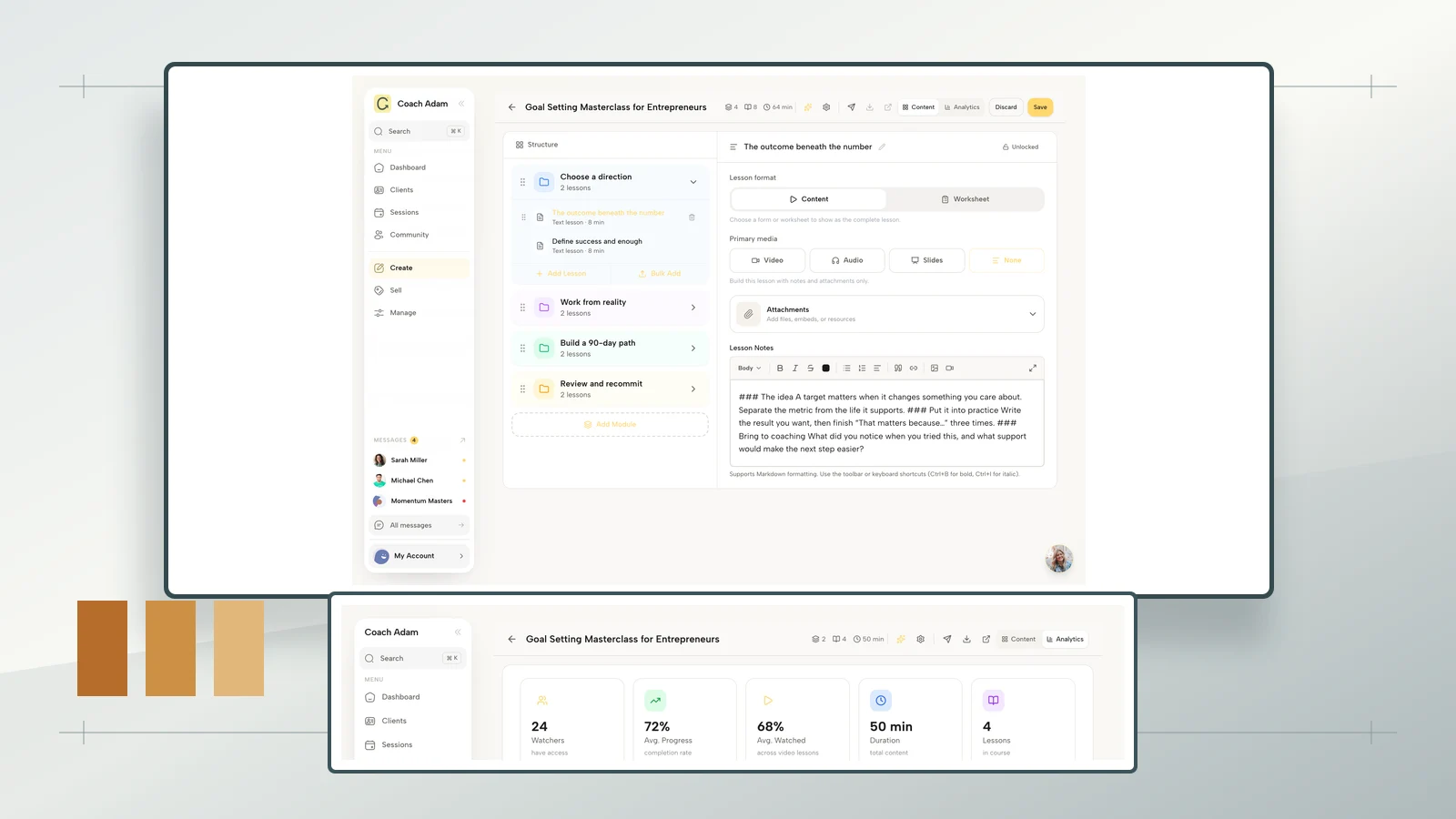
If you are choosing a place to deliver that experience, Try the interactive demo with a specific test: inspect the course builder, open the client-side course and compare the available course analytics with the evidence you really need. The real demo screenshots above show those surfaces; they do not promise that software can determine the right teaching duration for you.
For the wider build, use our guide to creating an online coaching course. Solve the lesson-level question first: enough explanation to support the action, enough room to practise, and no extra minutes added merely to look comprehensive.