Link in Bio for Coaches: What to Put on It, in Order
On Instagram and TikTok, the link in your bio is the only door out of the app. Most coaches send it to their homepage, or to a list of fourteen links that all look equally important. A link in bio for coaches works better as a small, deliberate page: who you help in one line, one main thing to do, one free thing to take, and your offers underneath, each of which books or sells without sending people somewhere else.
This guide covers what to put on the page, in what order, with sample copy for a fictional parenting coach, plus what to leave off, how to keep it in step with your content and what to measure.
If you'd rather have it set up for you, Coachful's team builds link-in-bio pages for free on every Coachful plan, including the look. There's a section on how that works further down.
Three visitors, one page
Everyone who taps your bio link is one of three people, and the page has to work for all of them in a few seconds:
- The new follower. Saw one post, liked it, wants to know who you are. Needs: one clear line about who you help, and something free.
- The warm follower. Has watched you for months. Needs: an easy way to take the next step, like a call or a small offer.
- The ready buyer. Already decided. Needs: to book or pay in two taps, without hunting.
A page that tries to show everything serves none of them. A page with a clear order serves all three.
The order that works: five sections, top to bottom
- Profile: photo, name and a one-line description of who you help.
- The main action: the one thing you most want people to do this month.
- The free thing: a lead form or a free resource for people who aren't ready.
- Your offers: two or three at most, each with a short line on who it's for.
- Everything else: socials, podcast, a recent video, your website.
Our example coach, Clare, helps parents of toddlers handle tantrums and bedtime without shouting. She posts short videos on Instagram and TikTok, and almost every video ends with "link in bio". Here's how her page reads, section by section.
Write the profile line
One sentence: who you help, with what, and ideally how it feels afterwards. Skip the job title stack ("certified coach, speaker, mama, coffee lover").
- Clare: I help parents of toddlers get through tantrums and bedtime without shouting.
- A career coach: I help mid-career professionals change jobs without starting over.
- A fitness coach: Strength training for adults over 50 who've never lifted.
- A money coach: Helping couples pay off debt without fighting about it.
For longer bio formulas, see 20 life coach bio examples that book calls.

Choose one main action
The first tile under your profile gets the most taps by a distance, so decide what it's for. Pick based on what you need right now:
| If you need... | Make the first tile... | Example label |
|---|---|---|
| Clients this month | A discovery call booking | Book a free 20-minute call |
| A bigger list | A lead form or free guide | Get the bedtime routine checklist |
| Seats filled | Your workshop or webinar | Join Thursday's free workshop |
| Sales of a small offer | The offer itself | The Calm Bedtime mini-course |
Change it when your focus changes. During a launch, the first tile is the launch. The rest of the month, it's your evergreen next step.
The free thing
Most people who tap your link aren't ready to book anything. Give them a reason to leave their email, right on the page.
- Title: The 7-night bedtime reset
- Line under it: The exact routine I give every new client, free in your inbox.
- Button: Send me the reset
- After signup: "It's on its way. While you wait, here's my most-watched video on the 6pm meltdown."
A form on the page converts better than a link to another site, because there's one less page to load on a phone. If you don't have a free resource yet, our guide to creating a lead magnet for coaches walks you through making one, and a coaching newsletter gives people a reason to stay.

Your offers, two or three at most
Under the free thing, list what people can buy or book, each with one line on who it's for:
- Free 20-minute call: for parents who want to talk through their child's situation.
- The Calm Bedtime mini-course: a self-paced course for families who want a plan they can start tonight.
- Six-week 1:1 coaching: for families who want support while they make changes.
Ideally each one opens right on the page: the booking calendar, the checkout or the course details. Every extra page between the tap and the payment loses people.
What to leave off
- Your entire website menu.
- Old launches and expired webinars.
- Five social icons as big buttons. Small icons at the top or bottom are plenty.
- "My favorite products" affiliate lists, unless they're genuinely part of how you coach.
- Anything you'd have to explain in person.
Keep it in step with your content
Your bio link is only as good as the reason people have to tap it. A few habits help:
- Say what's there. "Link in bio" is weaker than "The bedtime checklist is the first link in my bio."
- Match the first tile to this week's posts. If you're posting about tantrums all week, the tantrum resource goes to the top.
- Use stories for urgency and the bio for the evergreen path.
- Check it on your own phone every time you change it.
Worked example: Clare's page
| Section | What's on it |
|---|---|
| Profile | Photo with her kids' toys in the background; "I help parents of toddlers get through tantrums and bedtime without shouting." |
| Main action | Book a free 20-minute call (opens her calendar on the page) |
| Free thing | Lead form: "The 7-night bedtime reset" |
| Offers | Calm Bedtime mini-course; six-week 1:1 coaching |
| Media | Her most-watched video, embedded |
| Socials | Instagram, TikTok and YouTube icons |
What to measure
- Page views per week, to see whether your content is sending people.
- Taps per tile, to see what people want.
- Leads from the page, by source.
- Bookings and sales that started on the page.
If views are high and taps are low, the page is confusing. If taps are high and signups are low, the free thing or the form needs work.

Link in bio mistakes
- Pointing the bio at a homepage built for desktop visitors.
- Fifteen equal buttons, so nothing stands out.
- Every tile leading off to a different website.
- No way to leave an email.
- Never changing it, so last spring's webinar is still at the top.
Building your link in bio page in Coachful
Coachful's link-in-bio page is part of the same account as your calendar, offers, programs and leads, so most tiles work right on the page instead of sending people away. If you're comparing tools, our roundup of link-in-bio tools for coaches compares eight on selling rather than just linking.
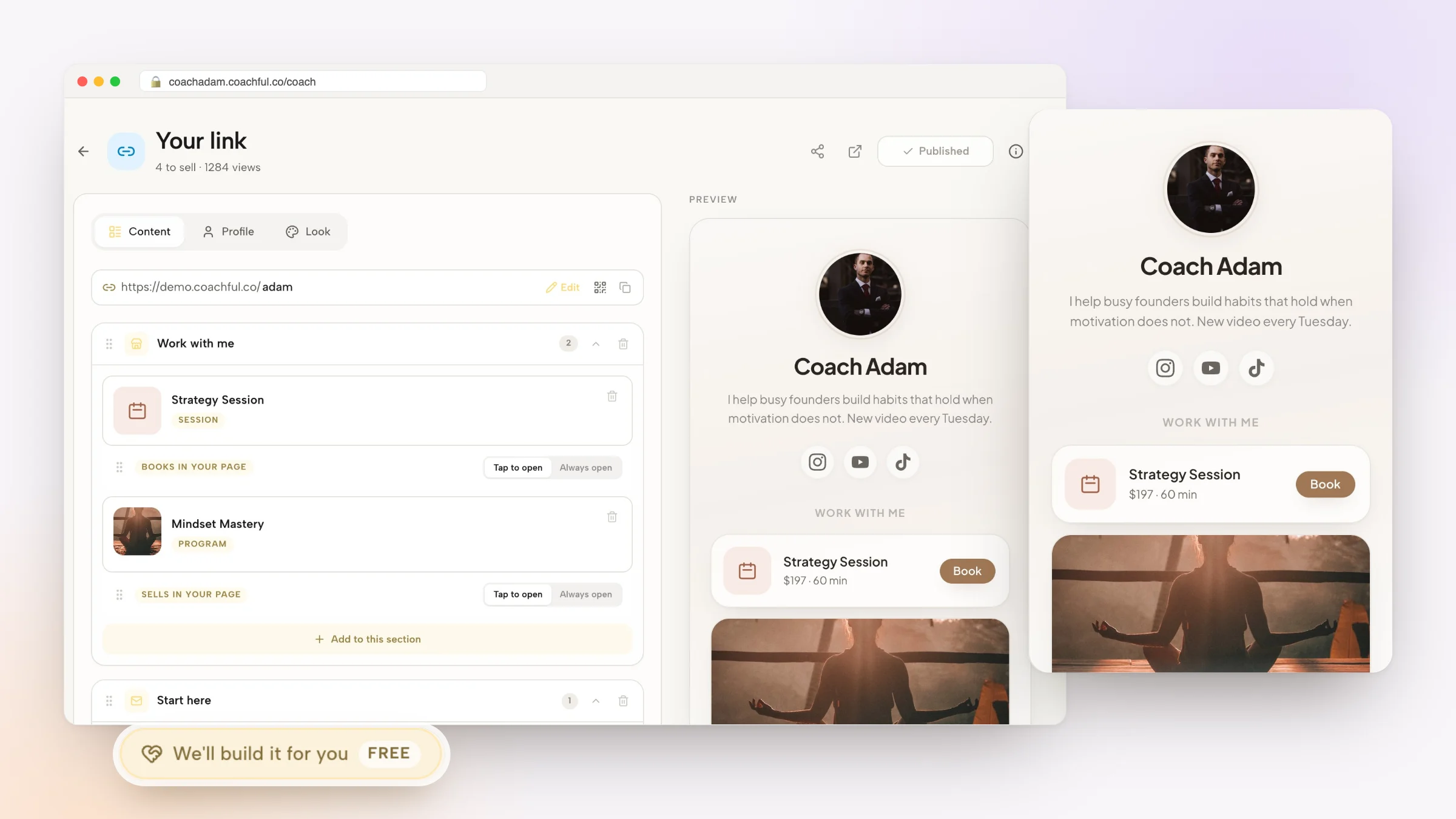
- Sections. Build the page from sections: Things to sell (offers, programs, calls, funnels), Lead capture, Media (an image, a video or a sales video), Explainer (how it works, FAQs, discounts), Links, Socials and Social embeds such as a podcast or YouTube video.
- Things open on the page. A call books in the page and an offer or program sells in the page, so the visitor never leaves. You choose whether each tile is tap to open or always open.
- Lead forms. Collect a name and email, and a phone number if you want one, with your own title, button text and thank-you message.
- Looks. Choose from 17 designed looks (Classic is the default), then adjust the accent color and background. Edits stay a draft until you press Publish.
- Leads and offers. Signups land in your leads list with Link in bio as the source, and any offer can be added to the page from its sharing settings.

Or let our team build your link in bio page, free
On every Coachful plan, the Coachful team will build your link-in-bio page at no extra cost. The app calls it a complimentary gift.
How to ask. Open Create, choose "We'll build it for you", and pick "Link in bio" under "What should we build?". In the link-in-bio editor's Look tab, the last tile, "Want a look made for your brand?", opens the same free form with Link in bio already selected.
What to send. Who you help, what the page should do (book calls, collect emails, sell a course), the offers and free resource to include, and your social accounts. Add links to pages you like and your Instagram or TikTok profile (up to eight links), plus up to ten files: your photo, logo, brand colors or a screenshot of a page you like. Video files aren't accepted.
What happens next. The team replies by email with next steps, usually within about 24 hours, which is typical rather than guaranteed. The page is built in your own account, ready for you to edit and publish.
From recent requests. A business mentor for beauty professionals who sells on Instagram had a sales page and checkout built for a 12-week mentorship, with the coach's free guide funnel connected to it. A psychologist-turned-coach got a homepage with three clear paths: book a call, join the free community or enroll in the program. Clear paths are exactly what a bio page needs too.
What it doesn't include. The team doesn't post to your social accounts, grow your following or manage ads. Nothing is invented: no fake reviews or follower claims. The free white-glove service page has the full list.

For the booking side of your bio link, see our discovery call funnel guide. Parenting and family coaches tend to start with Coachful for life coaches, which covers programs, chat and check-ins.
Frequently asked questions
What should a coach put in their link in bio?
A one-line description of who you help, one main action (usually a free call or your current offer), a free resource with an email form, two or three offers, and small social icons. Keep it short enough to understand in a few seconds on a phone.
Should my link in bio go to my website?
Usually not. Most websites are built for desktop visitors with lots of pages. A dedicated link-in-bio page loads fast on a phone, matches what you're posting about and puts the next step at the top.
How many links should be on a coaching link in bio page?
Five to eight tiles is plenty: one main action, one free thing, two or three offers and a couple of extras. Past that, every link gets fewer taps and the page feels cluttered.
Can I take bookings and payments from my link in bio?
Yes, if your tool supports it. In Coachful, calls book on the page and offers or programs sell on the page, with payments going to your own Stripe account, so visitors don't have to leave for another site.
Can Coachful build my link in bio page for free?
Yes. On every Coachful plan, the team builds link-in-bio pages at no extra cost. Open Create, choose "We'll build it for you" and pick "Link in bio", or use the "Want a look made for your brand?" tile in the editor's Look tab. The team replies by email, usually within about 24 hours.
How often should I update my link in bio?
Whenever your main focus changes, such as a launch, a new workshop or a new free resource, and at least once a month to remove anything out of date. Check it on your own phone each time.