Secure Client Portal Software: A Coach's Complete Guide

Coachful
You've just finished a coaching session and need to send the client's summary. You open Gmail, search for the right thread, attach the PDF, and type the first few letters of the client's name. Autocomplete fills in the wrong address. Or you reply to a group thread and attach Client A's notes to a conversation that includes Client B.
The mistake takes seconds. The cleanup can occupy the rest of your day. You apologize, check exactly what was exposed, reread the intake form with its personal history, and wonder whether the file was downloaded or forwarded before you caught it. This is the point where scattered email, Drive folders, and chat messages stop feeling merely inconvenient and start looking like a confidentiality system held together by luck.
The Moment a Coach Realizes Email Isn't Enough
I've seen this pattern repeatedly in coaching practices. A practitioner uses Gmail for communication, Google Drive for documents, Zoom chat for quick follow-ups, and a spreadsheet for client status. Each tool works on its own. Together, they create a loose network of copies, links, permissions, and old threads that nobody fully owns.
The coach usually notices the problem after a near miss. Two clients have similar names. A contractor still has access to a folder after the engagement ends. A shared Drive link was created for convenience, then reshared outside the intended relationship. The coach may never experience a confirmed breach, but the boundaries have already become difficult to prove.
A useful review of client communication tools for coaches helps explain why the issue goes beyond choosing a nicer inbox. Email pushes a copy of a document outward. A portal keeps the working record inside an authenticated space where access can be limited and reviewed.
The uncomfortable question: If you had to identify every person who can open a client's notes right now, could you do it without checking several tools?
That question changes the buying conversation. You're not purchasing a productivity upgrade because your inbox looks untidy. You're creating a dependable boundary between one client's story and another client's file.
A secure client portal software platform gives each client a defined relationship with your practice. Session notes, agreements, resources, billing records, and messages can live inside controlled workspaces rather than scattered attachments. The goal isn't to eliminate every email. It's to stop email from being the place where sensitive client records escape your control.
What Secure Client Portal Software Does
Secure client portal software creates a logged-in workspace where each action connects to a verified identity, defined permissions, and a reviewable record. Clients sign in to access assigned materials, upload documents, review agreements, and message you without scattering sensitive information across inboxes and shared folders.
A secure portal functions like a locked consulting room. You control the door, the schedule, the client chart, and the people permitted to enter. The important distinction is authorization design: Client A's records must remain unavailable to Client B, even when names, links, or workflows look similar.
Three jobs email can't reliably perform
First, the portal isolates client assets within distinct workspaces and credentials. Client A's intake form belongs in Client A's area, not in a broad folder holding every active engagement. Per-client isolation limits the harm from a mistaken search, misnamed file, or incorrectly shared link. Client onboarding portal guidance can help you decide which early documents should move into that controlled space.
Second, it establishes a single source of truth. The current agreement, latest homework, approved notes, invoice, and resource library each have a defined home. You no longer need to determine whether the authoritative version sits in Gmail, Drive, a downloaded PDF, or an old message thread.
Third, it preserves an activity history. If a client asks, “What did we agree to in March?”, you can check the record rather than rely on memory or search unrelated conversations. That history also supports review of permission changes, downloads, uploads, and deletions.
| Dimension | Email + Drive | Secure Client Portal |
|---|---|---|
| Client separation | Depends on folder setup and individual habits | Enforced through authenticated workspaces and permissions |
| Document control | Multiple attachments and duplicate files | A central record with controlled access |
| Access changes | Permissions can drift across folders and links | Named users and roles can be reviewed and revoked |
| Accountability | Limited visibility into who opened a file | Activity can be recorded in an audit trail |
| Offboarding | Old links and shared folders may remain active | Access can be removed from the client's account and workspace |
| Client experience | Fragmented across inboxes and tools | One defined place for the relationship |
A portal is more than a file locker. It defines where the engagement lives and gives your practice a repeatable operating model as you add associates, contractors, cohorts, or corporate sponsors. That boundary matters most when one person's credentials, invitation, or workspace must never expose another client's information.
Security Features That Actually Matter for Coaches
A feature checklist is a starting point, not a security strategy. The ultimate test is whether the portal can stop one client's credentials, link, or workspace from exposing someone else's information.
Authentication is the outer lock
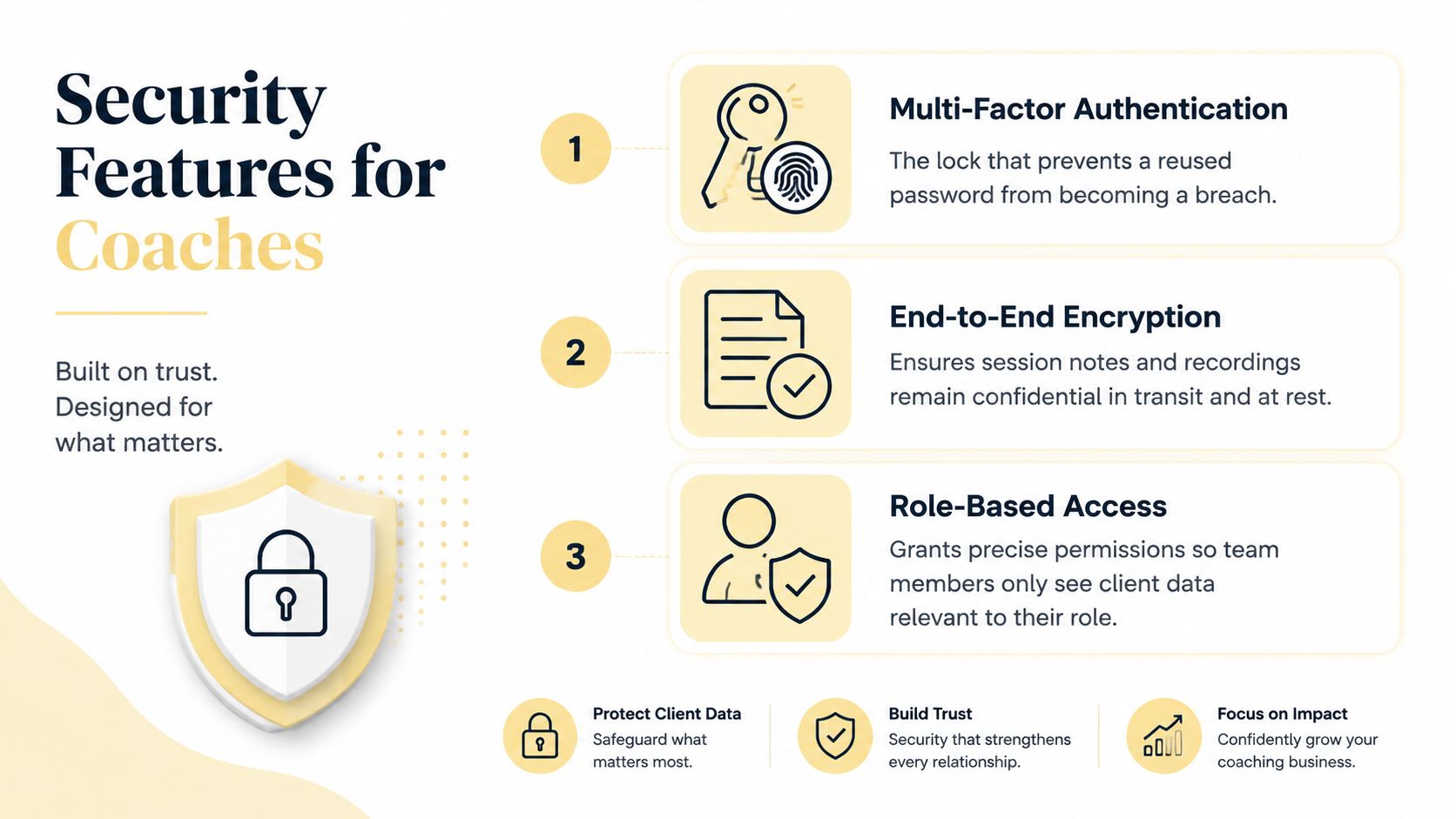
Multi-factor authentication should be mandatory for coaches and administrators. NIST defines MFA as the use of two or more distinct authentication factors, such as something you know, have, or are, and recommends it for access to personal information and higher-assurance systems in its MFA guidance for small businesses.
The coaching example is straightforward. You reused a password years ago, and another service suffers a credential leak. Without MFA, that reused password could put every active engagement behind one login. With MFA, the attacker still needs another factor before reaching your workspace.
Passkeys are also part of the broader move away from password-only access. The FIDO Alliance's Passkey Index 2025 highlights adoption across platforms including Amazon, Google, Microsoft, PayPal, Target, and TikTok. You don't need to force every client into a complicated authentication ritual, but you should choose a platform with a credible path beyond passwords.
Encryption protects the contents
Ask how the vendor protects data in transit and at rest. A stolen laptop at a conference shouldn't turn a cached portal session or downloaded session note into an open client file. Encryption doesn't fix bad permissions, but it reduces the damage when devices, connections, or storage layers are exposed.
OWASP recommends TLS for sensitive information and emphasizes secure handling across requests in its secure coding practices checklist. That matters because authorization and transport protection need to apply beyond the login screen.
Roles must reflect the coaching team
A lead coach may need full access to session notes. An assistant may need to upload homework without reading private reflections. A client should see only their own space. That's role-based access control, and it should be specific enough to support least privilege rather than offering one broad “staff” role.
Audit logs complete the picture. They're the receipt book for your practice. If you need to know who accessed a file last Tuesday, the answer should come from evidence, not a guess based on who was online.
Finally, look for workspace or tenant isolation. A compromised credential should not become a sideways door into another client's record. For a broader perspective on protecting sensitive customer information, data protection for creators offers a useful resource for people managing digital relationships and client assets.
Compliance and Data Residency Without the Legal Headache
Coaches often overbuy compliance because vendors use legal language as a sales lever. They also underbuy it because they assume a small practice is invisible. Both approaches are poor operations.
Start with the people on your roster, not the badge on a pricing page. If you store identifiable personal data about an EU resident, UK GDPR obligations may apply, including a lawful basis for processing, access and erasure handling, hosting-location transparency, and a data processing agreement. The data protection compliance guide can help you organize those questions before you start comparing vendors.
Match the framework to the work
GDPR is relevant when your practice processes personal data connected to people in the relevant jurisdictions. You'll need to understand what data you collect, why you collect it, how clients can exercise their rights, how long you retain it, and which processors handle it.
SOC 2 is different. It's usually a vendor assurance and procurement question, especially when a corporate L&D buyer asks for documentation. The vendor carries the report, but you still need to verify that it's current and covers the controls your buyer cares about. A marketing logo isn't a substitute for reviewing the report or asking what it covers.
HIPAA-adjacent concerns depend on the information and relationships involved. A life or executive coach who doesn't handle protected health information may not need to treat the practice like a healthcare provider. A health coach working with medical information, healthcare entities, or covered workflows should get qualified advice rather than making assumptions.
| Framework | Applies When | Coach's Actual Obligation |
|---|---|---|
| GDPR | You process identifiable personal data connected to relevant EU or UK individuals | Establish a lawful basis, support rights requests, document processors, and clarify hosting location |
| SOC 2 | A corporate buyer or procurement team requires vendor assurance | Request current documentation and confirm it covers the relevant controls |
| HIPAA-related duties | Your work involves protected health information or covered healthcare relationships | Determine whether the relationship and data fall within the applicable rules, then document the required safeguards |
| Data residency | Your clients, contracts, or internal policy restrict where information is stored | Ask where files, backups, and logs reside, and whether a region can be selected |
Data residency deserves a direct conversation. Ask where primary files, backups, support access, and audit logs are stored. Don't assume that a vendor's office location tells you where your client data lives.
Your Vendor Evaluation Checklist for Demos
A polished demo can hide weak authorization design. Don't spend the meeting watching a vendor upload a logo. Make them demonstrate what happens when a real coaching relationship changes.
Start with the uncomfortable scenario
Ask the vendor to show how Client A could accidentally see Client B's files. Ask what would have to go wrong, which permissions stop it, and whether the system checks authorization on every request. If the answer is only “clients have separate folders,” keep probing. Folder names aren't an access-control model.
Then ask:
- Role changes: “Show me an assistant being removed from a client workspace while the contract is active. What can they still open?”
- Offboarding: “What happens when a client ends coaching today? Which access disappears, and how quickly?”
- Deletion: “If I delete a recording, does it disappear from every client view, search result, backup process, and shared location?”
- Audit evidence: “Can I see who viewed, downloaded, edited, or deleted this session note?”
- Session notes: “Can I lock a note during a live call, preserve versions, and clearly identify which draft is current?”
- Session timeout: “When does an unattended browser session expire, and can administrators set the policy?”
- Password recovery: “What identity checks protect a reset, and how much friction will a nontechnical client face?”
- Export: “Can I export one client's full record in a usable format, including notes, files, messages, and billing history?”
Demo-room rule: Don't ask whether the platform is secure. Ask the vendor to break the boundary in front of you, then show you which control stops the attempt.
Contract terms matter as much as interface features. Ask where data is stored, what happens after cancellation, whether the export includes metadata and audit history, and whether the vendor can change retention practices without clear notice.
Two answers should stop the purchase. The first is any limitation on exporting your own client records. The second is vague breach notification language. If the vendor can't explain what happens after an incident, who gets notified, and under what contractual timeline, you're accepting uncertainty where your clients expect responsibility.
How This Plays Out for Solo Coaches and L&D Teams
Maya runs an executive coaching practice with twelve active clients. They work for different companies and sometimes share first names, so one client's files must never appear in another client's workspace. Her clients want a polished experience without learning an enterprise system. She needs simple invoicing, a login busy clients will tolerate, and a complete export if she retires or changes practices.
Maya does not need SSO today. She needs authorization designed around one client at a time. Her setup should use separate workspaces, MFA on her account, clear access removal, straightforward billing, and an export she can easily use. A platform with advanced corporate controls is still the wrong choice if daily client access creates confusion.
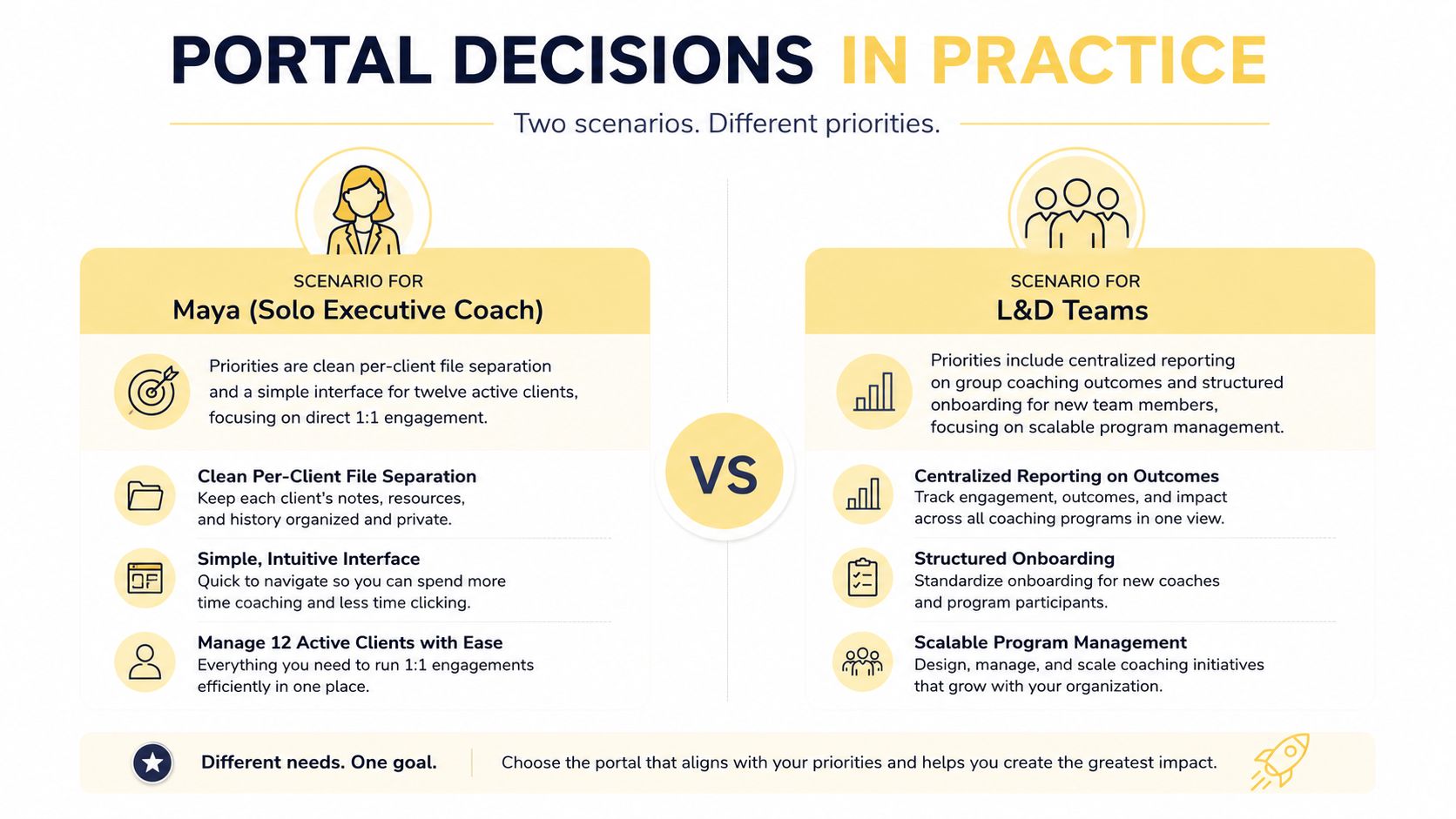
Northwind L&D runs coaching for forty emerging leaders across two regions. Its program manager needs group-level reporting without access to private session content. HR may need participant status and completion data. Coaches need separate notes, while procurement may require SSO, automated provisioning from an HRIS, and SOC 2 documentation.
The product category is the same, but the authorization model changes. Northwind should test group permissions, reporting boundaries, identity lifecycle management, regional storage, and administrator access. A portal that works for one coach and direct clients may expose too much when program-level visibility enters the design.
The portal is infrastructure. It defines where each engagement lives, who can access it, and what different stakeholders can see. The configuration matters as much as the platform itself. Set permissions around today's operating model, then confirm the vendor can support added coaches, cohorts, regions, or corporate programs without weakening client boundaries.
A 90-Day Implementation Roadmap With Sample Policies
A portal rollout fails when the owner treats it as a software purchase instead of a behavior change. You need an inventory, an access model, a migration plan, and a simple explanation clients can follow.
Build the foundation first
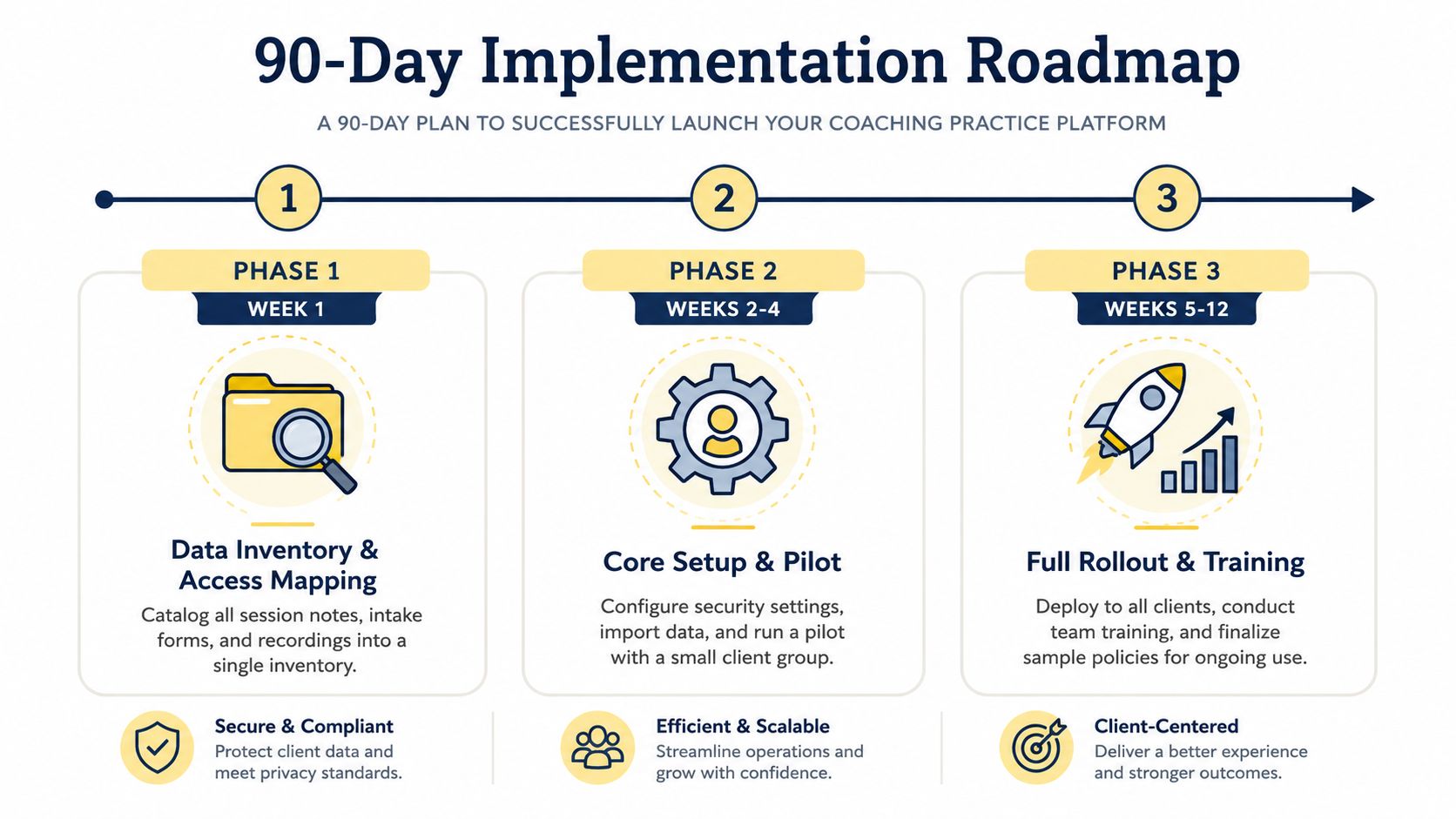
During Week 1, list every place client information currently lives. Include session notes, intake forms, agreements, recordings, invoices, resource files, email attachments, and contractor folders. For each category, identify the owner, intended audience, retention expectation, and current access.
During Weeks 2 and 3, configure the core environment. Set up SSO if your team needs it, assign roles, enforce MFA, create client workspaces, and draft an Acceptable Use Policy in plain language.
A practical policy can say:
Access policy: Team members may access only the client records required for their assigned work. They must not download, forward, copy, or store client information outside approved systems. Managers must remove access when a role or engagement ends.
Migrate without overwhelming clients
Use Weeks 4 through 6 for a controlled client migration. Start with a small group that can give useful feedback, then move the remaining records after you've tested permissions and naming conventions.
Your onboarding email can be direct:
We're moving session notes, agreements, resources, and billing information into your private client portal. Email will still work for general scheduling questions, but sensitive documents and coaching records will live in the portal. Your invitation explains how to sign in and reset your password. Please contact us if the account details don't look right.
Upload something valuable before asking clients to log in. A welcome packet, next-steps checklist, coaching agreement, or personalized resource should greet them on the other side. The first login should feel useful, not bureaucratic.
Train, monitor, and refine
Use Weeks 7 through 10 to record a short client walkthrough and create an internal runbook for associates and contractors. Cover uploading, finding notes, responding to requests, reporting a suspicious message, and handling an access change.
During Weeks 11 and 12, review audit logs regularly, recertify permissions quarterly, and formalize retention. A sample clause might state that session recordings are deleted after 24 months, unless a legal requirement requires longer retention. Treat that as a policy example, not a universal rule. Confirm the right period for your contracts and jurisdiction.
What Coaches Are Really Asking Before They Buy
The questions coaches hold back during sales calls usually matter more than the feature tour.
Practical blockers
Can I migrate clients without forcing a password reset? Ask the vendor to explain the migration path and security limits. Convenience is useful, but it shouldn't weaken identity verification.
Will nontechnical clients use it? Test the login and upload process with someone who doesn't live in software. If you need a long training call for a basic task, adoption will suffer.
What happens if I cancel? The answer should cover export format, timing, included metadata, deletion, and backup handling. “You can download your files” isn't enough if your notes and audit history disappear.
Cost and scale
Will adding a contractor create a pricing trap? Model the roles you use, including assistants, co-coaches, program managers, and external facilitators.
Is pricing based on clients or coaches? A solo practice and a cohort program have different usage patterns. Understand whether every participant requires a paid seat or whether client access is handled separately.
Trust and risk
Where is the data stored? Ask about files, backups, logs, and support access, not just the vendor's headquarters.
Can I review the SOC 2 report? If a corporate buyer requires it, request the current report and confirm its scope.
What is the breach notification timeline? Require clear contract language. Vague promises belong in the rejection pile.
The two deal-breakers are restricted data export and unclear breach notification. Price, branding, integrations, and convenience can't compensate for losing control of your records or being unable to explain an incident.
You may still wonder whether a portal is overkill. It isn't when you manage private notes, intake information, recordings, billing details, or a team with changing access. Choose a platform that makes authorization visible, client separation enforceable, and offboarding routine. Coachful is one option that brings client onboarding, scheduling, secure payments, messaging, progress tracking, and a private client portal into one workspace, with permissions designed to protect sensitive information.
If you're ready to replace scattered email threads and Drive folders with a more controlled coaching experience, explore Coachful and review how its client portal, onboarding, billing, messaging, and progress workflows fit your practice. Start by mapping your current client records and access points, then use the platform to build a cleaner, safer operating system for every engagement.