Videos in Blogs: The Coach's Guide to Engaging Clients

Coachful
You've written the blog post. The ideas are sharp. The advice is useful. But when you read it back, it still feels a little flat.
That feeling is common for coaches.
Your work depends on nuance: the pause before a hard truth, the warmth in your tone when someone feels stuck, the way you simplify something emotional without making it simplistic. Text can carry part of that. Video carries more of it. For many coaches, videos in blogs are the missing layer between “This person seems smart” and “I could trust this person with something important.”
The good news is that this doesn't require turning your business into a media company. You don't need studio lighting, cinematic edits, or a weekly vlog. You need a few intentional videos that help the right people feel your presence before they ever book a call.
Moving Beyond Text to Build Deeper Connections
A blog post can teach. A video can teach and reassure at the same time.
That matters because coaching isn't only an information business. It's a relationship business. Prospective clients aren't just asking, “Do you know what you're talking about?” They're also asking, “Will I feel understood by you?” and “Can you guide me without overwhelming me?”
Video answers those questions faster than text alone.
You're not betting on a fringe format, either. YouTube has over 2.5 billion monthly active users, and it's the world's second-largest search engine, which is why it matters so much for discovery and embedded blog content according to this industry roundup. That scale changes the conversation. Video isn't extra anymore. It's part of how people evaluate expertise online.
Why coaches hesitate
Most coaches resist video for sane reasons:
- “I don't want to sound scripted.” That usually means you need a lighter structure, not less preparation.
- “I'm not technical.” Embedding and publishing are easier than commonly thought when you use managed platforms.
- “I don't have time for another content channel.” You don't need another channel. You need one blog asset that works harder.
A short video inside a strong article can do three jobs at once. It can improve clarity, show your communication style, and pre-qualify readers who prefer your approach.
Practical rule: Don't think “content production.” Think “scaled first impression.”
If you're reviewing your overall publishing mix, this breakdown of key content methods for 2026 is useful because it helps place blog video in the bigger strategy, rather than treating it like a random add-on.
A simpler way to think about it
For coaches, the best use of videos in blogs is usually this: take one idea that clients regularly struggle with and explain it the way you'd explain it in session.
Examples:
- A leadership coach records a 5-minute explanation of how to give corrective feedback without triggering defensiveness.
- A health coach adds a short walk-through of what “all-or-nothing thinking” looks like during a bad week.
- An executive coach embeds a video on the difference between urgency and importance for overwhelmed managers.
That's not “creating video content.” That's extending your coaching presence into your blog.
How Video Transforms Your Blog into a Trust Engine
Trust doesn't come from information alone. It comes from felt experience.
A reader can agree with your framework and still hesitate to contact you. They may wonder if you're too rigid, too vague, too intense, or too polished to feel real. Video resolves a lot of that uncertainty. When someone sees your face, hears your pacing, and notices how you handle complexity, they get a preview of the client experience.

What text can't fully communicate
Text is excellent for structure. Video is excellent for signal.
A blog post can say you're compassionate, direct, strategic, calm, or challenging. A short embedded video lets people decide whether that's true. They can hear whether your directness feels grounding or abrasive. They can tell whether your calm feels wise or detached. That's why coaches often find that the right video doesn't just increase attention. It improves fit.
This is especially useful if your style is distinctive.
- A high-touch executive coach can show concise thinking and strong presence.
- A life coach can model emotional safety without drifting into vagueness.
- A group program leader can show energy, pacing, and how they teach a room.
- A career coach can reduce anxiety by sounding practical and steady.
Why this helps lead generation
Many coaches secretly worry that video will create more work without changing business results. Usually, the opposite happens when the video has a job.
A useful blog video can:
- Reduce friction before discovery calls because prospects already feel familiar with you
- Filter out bad-fit leads who realize your style isn't what they want
- Warm up hesitant readers who need more than written advice to take the next step
- Strengthen authority because your expertise is demonstrated, not just stated
Think about a common coaching article such as “how to set boundaries at work.” The written post might outline the framework well. The video adds the part clients care about even more: how you'd say the difficult sentence, what tone you'd use, and what you'd do when the other person pushes back.
A strong blog video gives prospects a low-risk experience of being coached by you.
The real payoff for coaches
The best videos in blogs don't chase views. They compress trust-building.
That's a very different goal from general content marketing. You're not trying to entertain a massive audience. You're trying to help the right person think, “This coach gets what I'm dealing with, and I can picture working with them.”
When that happens, the blog stops being a library and starts functioning like a trust engine.
Choosing the Right Video Content for Your Coaching Blog
The hardest moment is often the first one: opening your laptop, turning on the camera, and realizing you have no idea what kind of video belongs inside a blog post.
Start with the client question behind the post. Don't ask, “What should I film?” Ask, “What would help this reader feel clearer, safer, or more capable right now?”
That shift usually solves the blank-page problem.
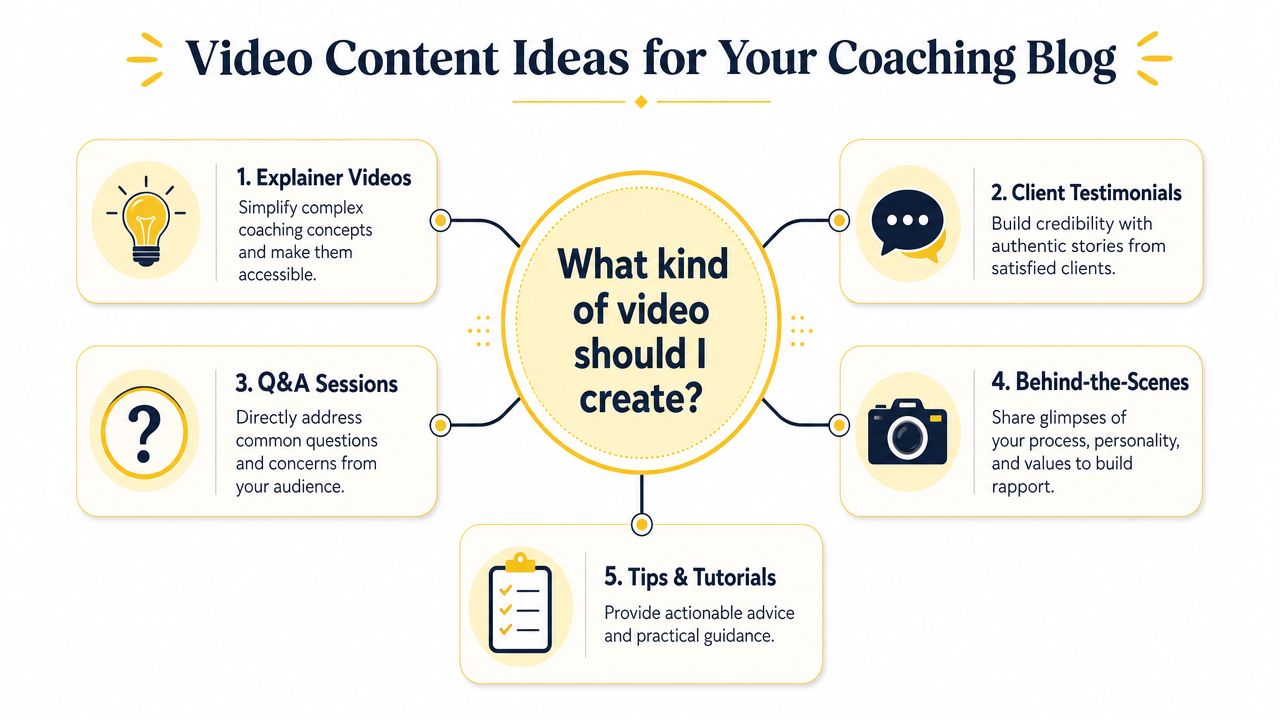
Here's a simple visual map of formats that work well for coaches.
Match the format to the coaching outcome
One industry survey found that ideal video length for technical or subject-matter expert content is between 4 and 10 minutes, which is a strong fit for focused teaching rather than long lectures in this ActualTech Media roundup. For coaches, that's useful because it reinforces a simple rule: cover one problem well.
Some video formats work especially well inside blog posts:
The 5-Minute Framework
Use this when your post introduces one signature tool. For example, a burnout coach might explain a decision filter for identifying what to stop, delegate, or renegotiate this week. This works well when readers need a fast mental model.The Client Question Hotseat
Answer one recurring objection or fear. A business coach could respond to, “What if I raise my prices and lose clients?” This format creates intimacy because it feels close to a real session.The Philosophy Breakdown
This is ideal when your differentiation comes from how you think. A leadership coach might unpack why accountability without reflection often creates compliance, not growth. These videos attract clients who resonate with your worldview.
After you've seen a few examples, this becomes easier to plan:
A practical menu for different coaching models
If you sell different offers, your blog videos should reflect that.
| Coaching model | Best video type | Why it works |
|---|---|---|
| 1:1 premium coaching | Philosophy breakdown | Shows how you think, not just what you teach |
| Group coaching | Mini workshop | Demonstrates teaching energy and structure |
| Corporate or executive coaching | Framework walk-through | Signals clarity, brevity, and practical judgment |
| Lower-ticket program | Tips and tutorials | Gives prospects a sample of your teaching style |
You can also build posts around formats readers already understand. If you want to deliver impactful tutorials for coaches, use a blog post to frame the lesson and a short video to model the exact action.
What to avoid
A few formats tend to underperform for coaching blogs:
- Long, wandering videos that cover five ideas when the post only needs one
- Generic motivation clips with no clear takeaway
- Heavily scripted reads that flatten your personality
- Client stories without context where the lesson is vague or self-congratulatory
A better approach is simple. Choose one client problem, one promised shift, and one next step. Then record the explanation you'd naturally give if that client asked you the question live.
Where Your Videos Should Live Hosting Explained
Where you host your video affects more than storage. It shapes discoverability, page experience, brand control, and how much technical responsibility lands on your plate.
For coaches, there are usually three realistic options: YouTube, Vimeo, and self-hosting. None is universally right. The right choice depends on whether you care most about discovery, presentation, or control.
The fast read on each option
YouTube is the easiest starting point for most coaches. It supports discovery, search visibility, and simple embedding. It also comes with platform baggage. You may see related videos, outside branding, and opportunities for visitors to click away from your site.
Vimeo is often a better fit when client experience matters more than public discovery. The player is cleaner, and the presentation usually feels more aligned with a premium brand. If your blog supports executive coaching, therapy-adjacent work, or private program content, this matters.
Self-hosting gives you the most control and the most responsibility. You're handling the file delivery, bandwidth considerations, compatibility issues, and troubleshooting when something loads poorly on mobile.
Video Hosting Comparison for Coaches
| Feature | YouTube | Vimeo (Paid Plans) | Self-Hosting |
|---|---|---|---|
| Discovery potential | High | Lower | Low unless supported elsewhere |
| Player branding | YouTube-branded | Cleaner and more brand-neutral | Fully controlled by you |
| Ease of setup | Very easy | Easy | More technical |
| Risk of sending visitors away | Higher | Lower | Lower |
| Performance management | Managed platform | Managed platform | Your responsibility |
| Good fit for | Public blog education and search reach | Premium client experience and embedded lessons | Advanced teams with technical support |
How coaches should decide
Pick the hosting option based on the role the video plays.
Use YouTube when:
- You want the post and the video to work together for discovery
- You're building topical visibility around common client questions
- You don't mind some platform branding in exchange for reach
Use Vimeo when:
- You want the blog page to feel cleaner and more premium
- Your audience values discretion and a polished presentation
- The video supports lead nurture rather than broad search discovery
Use self-hosting when:
- You have a strong technical setup already
- You need full control for product or membership reasons
- You're comfortable solving delivery and performance issues
If your first priority is trust and professionalism on-page, Vimeo often feels better than YouTube. If your first priority is discoverability, YouTube usually wins.
A practical setup for most coaching sites
For many coaches, the simplest arrangement is this:
- Put public educational videos on YouTube.
- Embed selectively into blog posts where the video adds emotional clarity or teaching nuance.
- Use a cleaner player for more controlled client-facing experiences.
- Keep your site infrastructure simple unless you have a real reason to own every part of delivery.
If you're still shaping the site itself, a coaching website builder can make those embed and layout choices much easier to manage without custom development.
One more practical note. If your programs include lesson libraries, session prep, or private resources, Coachful is one option that supports video lessons and video calls inside a broader coaching workflow. That kind of setup can reduce tool sprawl when you're balancing blog content with actual client delivery.
Technical Steps for a Fast and Findable Video Blog
Most coaches have the same fear here: “If I add video, is my site going to get slow and annoying?”
That concern is valid. Video can improve a page and still hurt the user experience if you handle it poorly. Guidance from Goldcast notes that self-hosting without the right bandwidth and file handling can hurt Core Web Vitals and mobile UX, which is why managed platforms like YouTube or Vimeo are often the safer starting point for blog video use.
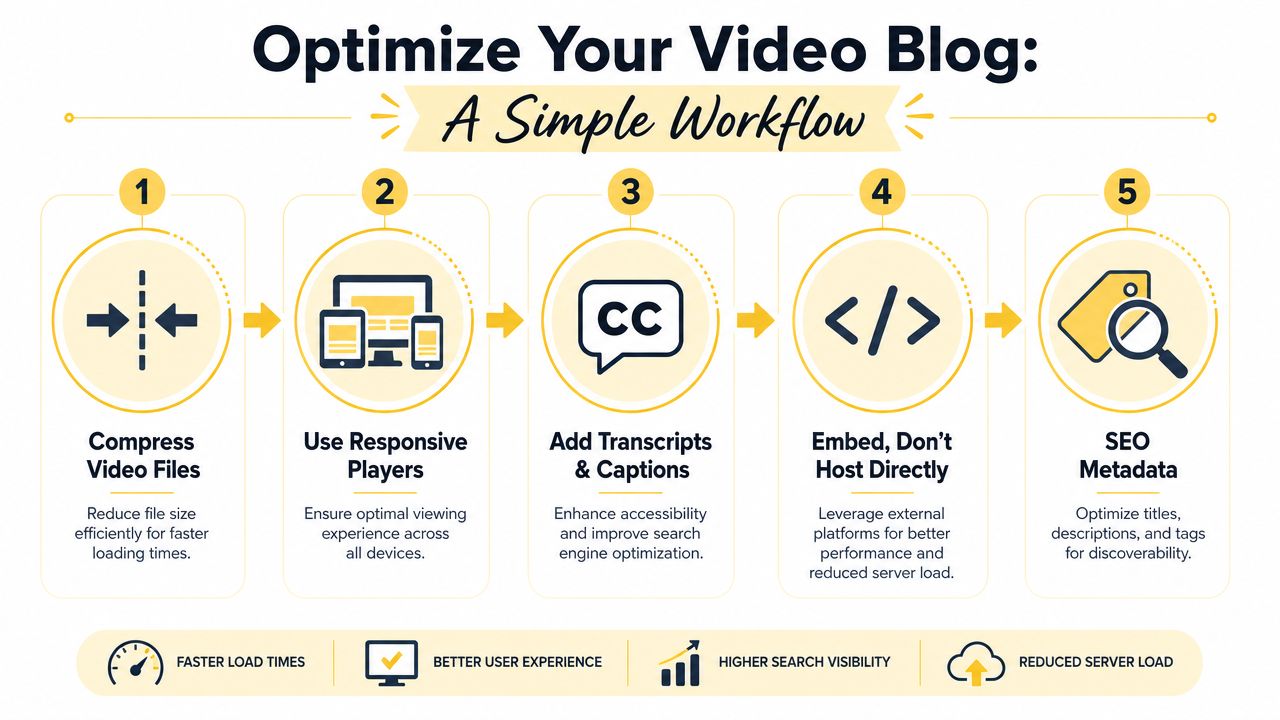
This is the workflow to keep things clean.
Keep the page fast
Think of video compression like zipping a file before sending it. You're reducing the weight without changing the core content for the viewer.
What matters most:
- Compress before upload if you're hosting files anywhere that gives you control over size and format
- Use responsive players so the video fits mobile screens properly
- Lazy load embeds so the video doesn't fully load the second someone lands on the page
- Use thumbnails intentionally because they reduce visual clutter and give the visitor a clear click target
If you want a more hands-on walkthrough, this guide on video optimization for coaches covers the practical side in plain language.
Make the video easier to understand and easier to find
Search visibility isn't just about the blog text. It's also about helping platforms understand the media on the page.
Use these basics every time:
Give the video a descriptive title
“How to handle client ghosting after a proposal” is stronger than “Coaching tip of the week.”Write a useful description
Summarize what the video covers and who it's for.Add captions and transcripts
This improves accessibility and helps readers who skim or watch without sound.Place the video where intent is strongest
Usually near the section where the reader most needs demonstration, not automatically at the very top.
A lot of coaches now also think about how their videos may surface in AI-driven discovery. If that's on your radar, these AI-cited YouTube content strategies are worth reviewing because they connect structure, clarity, and discoverability in a practical way.
Don't treat the embed as decoration. Treat it like a content asset that needs context, packaging, and a reason to exist on the page.
The technical mistakes that create friction
The most common problems are avoidable:
- Uploading huge files directly to your site
- Embedding a video with no intro text, so readers don't know why they should watch
- Skipping captions, which weakens both accessibility and usability
- Using one oversized video when three smaller clips would teach better
A fast page with one relevant video beats a slow page with an impressive-looking embed every time.
Measuring Your Video's Impact on Your Coaching Business
If you're serious about using videos in blogs, don't judge them by views alone.
Views can tell you that someone clicked. They don't tell you whether the video built trust, clarified a decision, or moved a reader toward becoming a lead. For coaches, the useful analytics are diagnostic. They reveal where connection is happening and where friction begins.
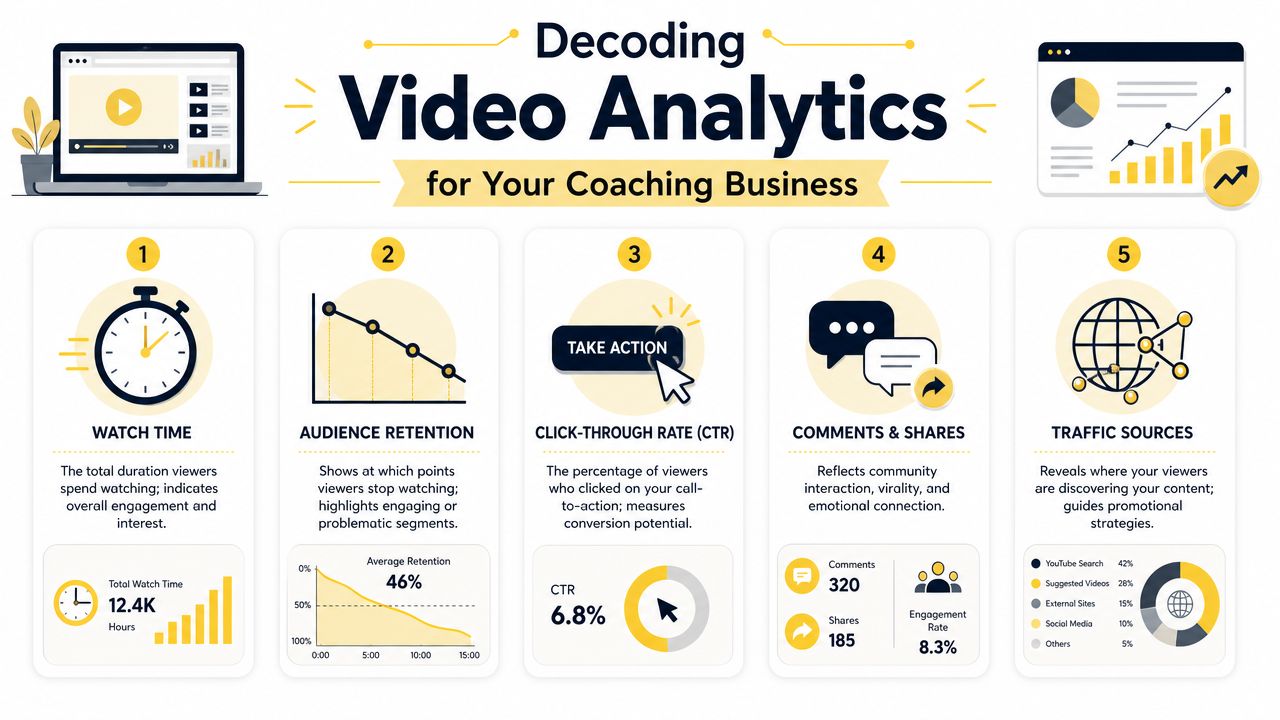
Here's the dashboard view that matters.
Start with retention, not vanity metrics
The most actionable metric is retention by timestamp. If people repeatedly exit at the same second, that often points to a pacing or structural issue at that exact moment, which gives you something concrete to fix instead of forcing you to guess as explained in Mango Media's guidance on video analytics.
That changes how you review performance.
If viewers leave when your intro is still circling the point, shorten the setup.
If they leave right when you shift into theory, use an example sooner.
If they stay through the teaching but leave before your invitation to take the next step, your CTA may be too abrupt or too generic.
Read your numbers like coaching feedback
A coach already knows how to listen for resistance, confusion, and readiness. Video analytics work the same way.
Use this lens:
- Play rate asks whether the placement, thumbnail, and lead-in copy make the video feel worth watching.
- Retention shows whether your teaching structure holds attention.
- Traffic sources help you see whether people are finding the video through search, the blog itself, or outside promotion.
- Comments and shares can reveal emotional resonance, especially when people repeat your language back to you.
A drop-off point isn't a failure. It's audience feedback with a timestamp attached.
A practical review routine
Don't obsess over every video. Review patterns across a handful of posts.
Ask:
- Where do people stop watching?
- Which topics get strong watch depth?
- Which videos support inquiry or booking behavior on the page?
- Which videos attract the wrong audience, even if they get attention?
For example, a leadership coach may find that videos on difficult conversations hold attention much better than broad motivation pieces. A wellness coach may discover that practical food-planning demonstrations keep viewers engaged longer than mindset-only videos. That's not just content feedback. It's market feedback.
When you treat analytics this way, your blog becomes less of a publishing habit and more of a listening tool.
Actionable Best Practices for Every Video You Create
Most coaching videos don't fail because the coach lacks expertise. They fail because the video has no strategic filter.
Before you record, decide what role the video is playing. Is it helping a reader understand a concept, feel your coaching style, overcome hesitation, or take a next step? If you can't answer that clearly, don't hit record yet.
The checklist that keeps videos useful
Choose one problem only
One blog post can hold several ideas. One embedded video usually shouldn't. Keep the teaching tight.Add captions every time
This supports accessibility and helps people who skim, multitask, or watch without sound.Frame the video before the embed
Give readers a reason to watch. A one-line setup such as “This is the exact reframe I use with clients who feel guilty setting boundaries” is often enough.Use a simple, consistent visual setup
A clean background, decent window light, and clear audio will outperform a fussy setup that you avoid using.Get explicit permission for client stories
Even anonymized examples need care. Trust is part of the product.
Know when not to use video
Good strategy shows itself.
Wistia's guidance suggests asking whether your audience is even looking for video on the topic. Low demand on YouTube can signal that video may not be the best format, while a field full of weak videos may reveal a strong opportunity for a better version.
So don't force videos into every post.
Use text alone when:
- the topic needs a checklist people will save
- the information is highly skimmable
- the value comes from templates, scripts, or examples people need to reread
- your audience needs speed more than presence
If you're trying to build a repeatable publishing system around those decisions, this AI-powered content scaling guide is helpful because it frames scale as a workflow problem, not just a volume goal.
The strongest videos in blogs feel like coaching, not content theater. That's the standard worth aiming for.
If you want a simpler way to deliver coaching content, manage client experience, and keep your practice organized in one place, take a look at Coachful. It's built for coaches who want structured programs, client communication, and a more consistent delivery system without stitching together a stack of separate tools.