Coach Corner: Inside Coachful's Community for Coaches
Coach Corner is the private community for coaches inside Coachful. Every coach on an active Coachful plan, including the free trial, is added to it automatically, it lives inside the Community tab of the app, and your clients never see it. Coaches use it to share wins, ask questions, get feedback on offers and funnels, introduce themselves and message each other directly.
This article walks through the room the way a new member would see it, using screenshots from Coachful's demo community. The coaches in those screenshots (Elena Rodriguez, Sarah Chen, Marcus Johnson, Priya Raman, David Okafor, Hannah Brooks and the rest) are sample personas written to show how the space works. Nothing here quotes a real member, because what coaches say in Coach Corner stays in Coach Corner.
One more thing before the tour. Coach Corner is where a lot of coaches first hear "your offer is great, but your sales page is burying it." When that happens, Coachful's team will build the page, funnel or website for you inside your account, free on every plan. We cover how that works near the end.
What Coach Corner is, and who gets in
The header says it plainly: "A private room for coaches. Your clients never see it." It is a platform-wide space, separate from the community you run for your own clients, and it connects coaches across every Coachful workspace.
- Who can join: any coach with an active Coachful subscription, on any plan, including during the free trial. You are added when your subscription starts, so there is no application and no waiting list.
- Where it lives: on desktop, open Community in the left menu and you will find Coach Corner as the highlighted card pinned at the bottom of the channel list, labeled "Coaches only". On a phone, tap Community in the bottom dock, tap the # button at the top right and choose Coach Corner at the bottom of the sheet.
- How you notice new posts: a badge on the Community row signals new Coach Corner activity, and the Coach Corner card on your Home dashboard can show the latest posts.
- Leaving: you can leave from the Coach Corner settings and rejoin any time. If your Coachful subscription ends, your access to the room ends with it.
It is included in your Coachful membership. There is no separate community fee and no second login.

A tour of the room, channel by channel
Every post belongs to a channel, shown as a colored tag next to the author's name. The All posts menu above the feed filters to one channel when you only want, say, questions. Here is what each channel is for, with the kind of post the demo community shows in it.
| Channel | What goes there | Example from the demo community |
|---|---|---|
| Updates | Announcements, with replies open to everyone | A pinned reminder about a group call on pricing a first premium offer |
| Wins | Progress you can describe specifically | A leadership coach signing a client after simplifying the promise on her landing page |
| Questions | Something you are stuck on, with enough context to answer | A fitness coach asking which webinar reminder sequence improves show-up |
| Marketing | Headlines, funnels, content, ads | A mindset coach sharing the quiz funnel headline change that worked better |
| Resources | Checklists, templates, things that saved you time | A career coach sharing the onboarding checklist she sends after payment |
| Introductions | Who you coach and what you are building | A nutrition coach moving from one-to-one into her first group program |
| Product | Product talk; in the demo, program design and delivery | A coach who cut his program in half and saw more clients finish it |
| General | Open discussion about running a practice | A question about how many discovery calls everyone holds each week |
| Off-topic | Life outside the business | A coach posting that she took her first proper Friday off and nothing broke |
When you write a post, you pick its channel inside the composer, and the writing prompt changes to match. Your very first post opens on Introductions. Pick Wins and the prompt reads "What moved forward? Make the progress specific…". Pick Questions and it asks what you are stuck on and reminds you to give enough context for a useful answer.
What coaches post in Coach Corner
Most posts fall into four kinds. Knowing them makes it easier to post your first one.
Wins, with the part that made the difference
A good win post says what changed and why. In the demo, Sarah Chen posts in Wins that she signed a new client and that the biggest shift was simplifying the promise on her landing page and finally asking for the sale. The replies are where it gets useful. Marcus asks what the promise said before and after, and Sarah answers: before, "Leadership coaching for ambitious managers"; after, "Get promoted in the next 12 months without working weekends." Elena adds the lesson in one line: specific outcome, specific timeframe, the fear removed.
Questions with real context
The demo's Questions channel has a coach whose webinar sign-ups are healthy but whose attendance is not. Two coaches reply, one sharing the reminder sequence that worked for him (a day before, an hour before, and a text at the start with the join link) and one suggesting a check on whether the registration page promise is vague. Then the original poster comes back to say he is adding the text reminder this week and will report the results. That last reply is the part people underestimate. Closing the loop is what turns a forum into a room of colleagues.
Offer and funnel reviews
Coaches paste a headline, a promise or a funnel step and ask for honest eyes. In the Marketing channel, Priya shares how changing a quiz headline from "Find your coaching style" to "Find out why your clients stall in week three" changed who opted in. Hannah asks whether lead quality changed or only volume, and Priya answers that the new headline attracts people with a problem they can name.
Introductions
New members say hello in Introductions. The demo shows Hannah, a nutrition coach, explaining that she is moving from one-to-one work into a group program and wants to learn how others run cohorts without living in their inbox. One reply points out that her folder of answered client emails is most of a curriculum already.

How coaches help each other: the offer rewrite thread
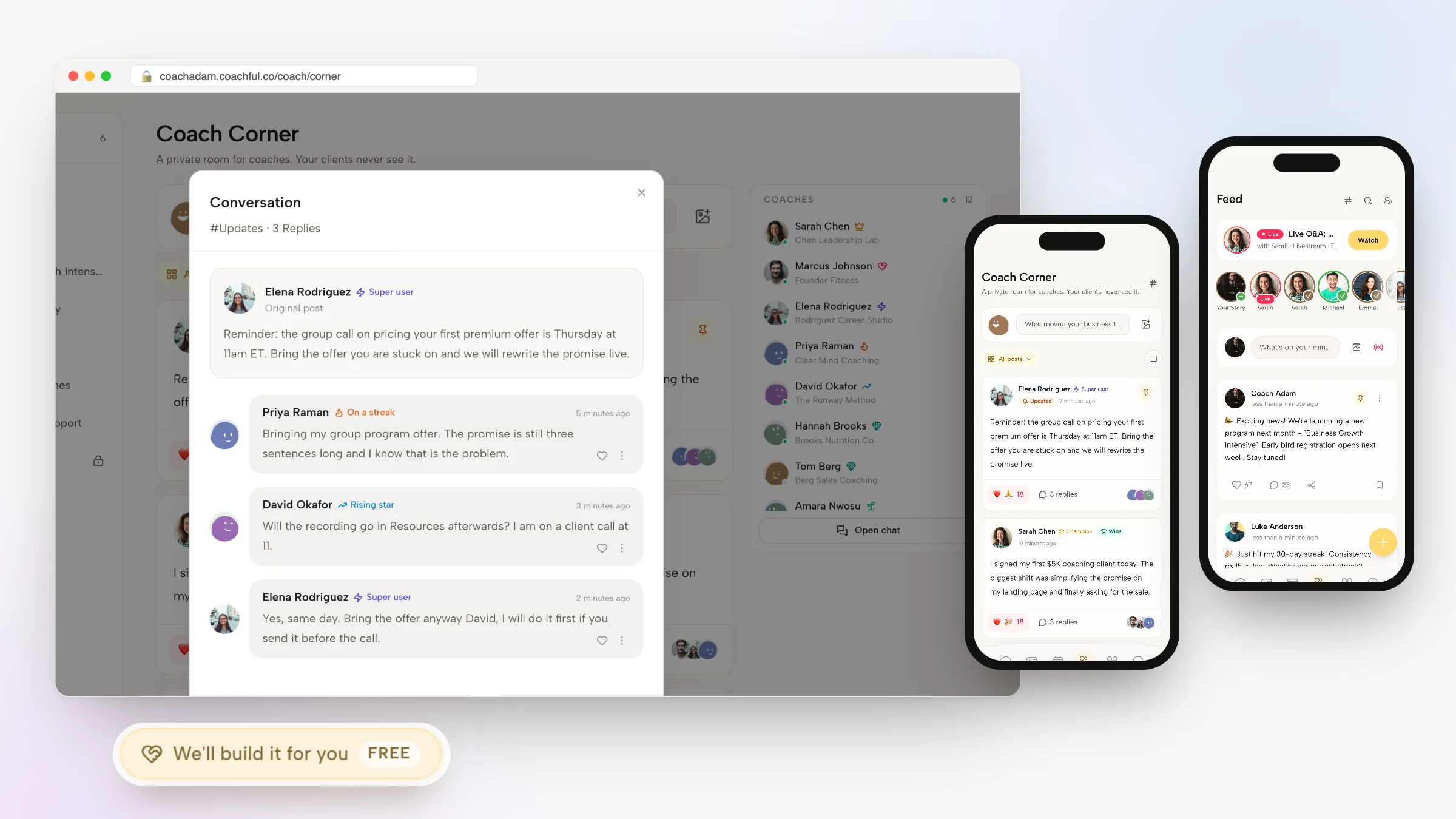
The thread we like most in the demo community starts with a pinned reminder about a group call on pricing a first premium offer, with an invitation to bring the offer you are stuck on so the promise can be rewritten live. Open the replies and three things happen in about five minutes.
- Someone admits the problem. Priya replies that she is bringing her group program offer: "The promise is still three sentences long and I know that is the problem."
- Someone can't make it. David asks whether the recording will be available afterwards, because he is on a client call at that time.
- Someone makes room for him anyway. Elena answers: "Yes, same day. Bring the offer anyway David, I will do it first if you send it before the call."
Nobody in that thread is selling anything. One coach offers to rewrite another coach's offer, first in line, because he has a scheduling conflict. That is the tone Coach Corner is designed for, and the reply box under every thread nudges it along: "Write a thoughtful reply…".

A few details make that kind of help easy. Reactions sit under every post. Replies are threaded, so a conversation stays attached to the post it belongs to. The author is notified when someone reacts or replies, so a question asked at 7am does not get lost by lunch. And the search icon in the Coach Corner header finds posts, replies and people's names, so the answer to "has anyone dealt with a client asking for a refund in week two?" is often already there.
Engage posts: polls, Q&A, commitments and pulse checks
The Coach Corner composer has the same Engage button as the community you run for clients. It offers four kinds of post, one per post:
- Poll: members vote on options. Useful for "which of these two headlines would you click?"
- Q&A: a question where the replies are the answers. In Coach Corner the coach who asked can mark one reply as the accepted answer, which then shows an Accepted answer tag, and only the asker (or a Coachful admin) closes the question. Open "ask me anything" style Q&As in Coach Corner are hosted by the Coachful team; coaches ask their questions inside the thread.
- Commitment: one tap to say "I'm in", with an optional deadline and a Mark done step. Good for "I am sending my first newsletter by Friday, who's with me?"
- Pulse: a one-tap check-in on a 1 to 5 face or number scale. It is anonymous by default, and results appear after you answer.
Commitments are the quiet accountability tool here. A launch date you tap "I'm in" on, in front of other coaches, is harder to postpone than one you keep in your head.
Badges, and why nobody hands them out
You will notice small labels beside names: Champion, Super user, Welcomer, Rising star, On a streak, Early adopter and New here. Nobody awards them. A nightly job looks at what each coach actually did and assigns badges from fixed rules, and the strongest one shows beside your name while your profile card lists them all.
| Badge | What earns it |
|---|---|
| Champion | One of the coaches doing the most for the room: posting, answering and showing up week after week |
| Super user | In Coachful nearly every day and using it properly |
| Welcomer | Lifts other coaches up with replies, welcomes and reactions well beyond their own posts |
| Rising star | A big jump in activity over the last 30 days |
| On a streak | Opened Coachful every day for at least five days running |
| Early adopter | Was in Coach Corner in its first months |
| New here | Joined in the last three weeks, so say hello |
Notice what the rules reward. Welcomer is earned by replying to other people, and Champion by answering as well as posting. The room is built to notice helpfulness rather than volume.
The coaches directory and chat
On desktop, the right-hand rail lists the coaches in the room, online members first, each with their business name underneath. In the demo you see Sarah Chen of Chen Leadership Lab, Marcus Johnson of Founder Fitness, Elena Rodriguez of Rodriguez Career Studio and so on. Click a name to open their profile, with whatever they have chosen to add (about, work, location, website, social links) and a Message button for a direct conversation.
Below the list, Open chat switches from the feed to the real-time chat view, channel by channel. The feed is for posts you want people to find later. Chat is for "is anyone around to look at this headline in the next ten minutes?" On a phone, the chat button sits beside the All posts menu.

Direct messages are where referrals start: you message the coach whose answers you have been reading for months.
Why Coach Corner stays private from your clients
Coaches need a place to say "I don't know what to do with this client" without that client ever seeing it. Coach Corner is only offered to coaches, it is a separate space from your own community, and nothing in it appears in your client app.
Your client community is a different product surface entirely. It is the feed, channels, program communities, cohort groups, stories and live Q&As that you switch on for the people you coach, branded as your space. Coach Corner is the staff room. Your community is the classroom.

Privacy from clients does not mean anything goes. Coaching conversations are confidential, so the habit worth building is to strip identifying details before you ask for advice: no names, no employers, no specifics that would let someone recognize the person. "A client in a senior finance role wants to pause for a month" is a question you can ask. Anything more identifying is not. If you want a fuller view of setting those expectations for group work, our guide to group coaching confidentiality covers it.
How to get the most from Coach Corner in your first two weeks
Communities reward people who show up early and specifically. A simple plan:
- Day 1: introduce yourself with a hook. Who you coach, what you are building this quarter, and one thing you want help with. "Life coach for new parents, launching my first group program in March, unsure how to price it" gets replies. "Hi, excited to be here" gets a wave.
- Days 2 to 5: answer before you ask. Find two questions where you have real experience and reply with what you did, not what people should do. Specific beats general.
- Day 6: ask one well-framed question. Context, what you have tried, what kind of answer you want. If it is about an offer or a page, paste the actual words.
- Day 8: post a commitment. One thing you will finish by a date. Use the Engage button.
- Day 14: close a loop. Go back to a thread where you got help and report what happened. Those are the posts people remember.
Notifications can be switched on or off in the Coach Corner settings, and the Your contributions icon in the header lists your own posts and replies, privately.
If you are comparing places to spend that time, our guide to choosing a coaching community covers the kinds worth joining, and our roundup of online coaching communities compares Coach Corner with professional bodies and open groups.
When the advice is "fix your page": the free build
Peers are very good at diagnosis. They will tell you the promise is too long, the booking button is below the fold or the free guide does not lead anywhere. Doing the fix is the part that stalls. Coachful's team will do it for you, free on every Coachful plan.
You ask from Create > We'll build it for you · FREE, or from the Want us to build it for you? card with its Fill in a form button on the Website and Funnels pages. The form asks what to build (a website, funnel, offer or sales page, program, course outline, form, email sequence, lead quiz and more), what it should do and where your visitors come from. You can attach up to 8 reference links and up to 10 files such as logos, photos, brand guides and copy. The team replies by email with next steps, usually within about 24 hours, and builds inside your own account so you can edit everything afterwards.

One recent request: a psychologist-turned-coach got a homepage with three clear paths (book a call, join the free community, enroll in the program). The team does not invent testimonials, credentials or prices; anything missing is left for you to fill in. It does not record your videos, design logos or run your ads. More detail is in our guide to the free white-glove service.
If you want to build a community for your own clients next, read how to create an online coaching community and see what the community features include.
Frequently asked questions
What is Coach Corner in Coachful?
Coach Corner is Coachful's private community for coaches. It has a feed with channels such as Wins, Questions, Marketing, Resources and Introductions, threaded replies and reactions, Engage posts, a coaches directory with direct messages, and a real-time chat view. It sits inside the Community tab, and clients never see it.
Who can join Coach Corner?
Any coach with an active Coachful subscription, on any plan, including the free trial. You are added automatically when your subscription starts. If the subscription ends, access to Coach Corner ends too. You can leave from the Coach Corner settings and rejoin later.
Can my clients see what I post in Coach Corner?
No. Coach Corner is only offered to coaches and is separate from the community you run for your clients. Nothing posted there appears in your client app. Even so, remove names and identifying details before asking about a client, because coaching conversations are confidential.
Does Coach Corner cost extra?
No. It is included in your Coachful membership on every plan. There is no separate community subscription. The Coachful Collective, a separate 12-month program, adds a private Collective channel for its members, but the main Coach Corner channels are open to every coach.
Is Coach Corner a good place to get feedback on my coaching offer?
Yes, it is one of the most common kinds of post. Paste the actual promise, headline or funnel step in Marketing or Questions, say who it is for and what you want feedback on. Specific posts get specific replies, and coaches often answer with their own before-and-after wording.
How are Coach Corner badges awarded?
Automatically. A nightly job measures activity, such as replies and welcomes to other coaches, posting and answering over time, and daily use of Coachful, then assigns badges like Champion, Welcomer, Rising star and On a streak. The strongest badge shows beside your name and your profile lists them all.
Will Coachful really build my website or funnel for free?
Yes. The white-glove build is free on every Coachful plan. Fill in the short form from Create or from the Want us to build it for you? card, add links and files, and the team replies by email, usually within about 24 hours. Everything is built in your own account so you can edit it.
The best way to understand Coach Corner is to post one specific question, then come back the next day and answer somebody else's.