Email Marketing Metrics for Coaches: 5 Numbers to Track

Nour
Founder, Coachful
Your newsletter gets opens, but your coaching calendar is still quiet. Which number tells you whether to change the email, fix the booking page or simply give the conversation more time?
Track delivery, unique clicks, relevant replies, qualified bookings and list health. Treat opens as a supporting signal, not the verdict. For a small coaching list, put the actual number of people beside every percentage and compare campaigns at the same age.
Those five measures let you diagnose the handoff from inbox to inquiry without pretending every click is a prospective client. This guide gives you definitions, formulas, a worked example and a copyable review log. It is for a coach deciding what to improve, not a marketer collecting a more impressive dashboard.
The five email marketing metrics to track first
- Delivery rate: did the receiving servers accept the messages?
- Unique CTA click rate: did people follow the next step you actually offered?
- Relevant reply rate: did the message start useful two-way conversations?
- Qualified booking rate: did suitable prospective clients book the intended call?
- List health: did unsubscribes, complaints or bounces reveal a permission or relevance problem?
Use this selection when your newsletter is meant to generate coaching inquiries. A client-support email or event reminder has a different job. Judge those against the promised action, such as submitting pre-work or attending, rather than forcing every email to sell coaching.

1. Delivery rate: establish whether the email reached a server
Delivery rate = delivered messages ÷ attempted sends × 100. Use the provider's final reported delivered count and the corresponding attempted-send count for the same campaign. Exclude suppressed contacts from your denominator when the platform never attempted to send to them.
Delivered does not mean inboxed, read or welcomed. A receiving server can accept a message that later lands in spam. Start here because a sudden delivery problem makes later comparisons misleading: fewer people had a chance to respond.
Check bounce reasons before changing your subject line. Invalid addresses, temporary server issues and policy rejections are different problems. Follow your provider's suppression rules; do not repeatedly upload hard-bounced or unsubscribed contacts to make the next send reach them.
If delivery changes abruptly, check your sending-domain configuration, recent list imports and provider notices. Send a test to mailboxes you control and inspect the links and reply path. Test mailboxes are a useful spot check, not proof that every subscriber sees the same placement.
The coaching decision: repair a documented sending or permission problem before rewriting a whole offer. A new promise cannot compensate for mail that never had a fair chance of arriving.
2. Unique CTA click rate: measure the specific next step
Unique CTA click rate = unique people recorded clicking the main call-to-action link ÷ delivered messages × 100. This deliberately uses people, not total clicks. One reader returning five times is not five interested prospects.
Your provider may report a campaign-wide unique click rate covering every tracked link. That is not necessarily the same measure. A privacy-policy click, an article link and a discovery-call click express different intentions. Label the exact field you have instead of silently renaming it “booking interest.”
Check which links the report includes, whether it deduplicates people and whether automated activity is filtered. Mailchimp explains that security scanners and other bots can inflate opens and clicks. Filtering reduces distortion; it does not turn every remaining click into a verified buying signal.
When your tool cannot isolate the main link, record its available campaign-wide measure and note that limitation. Do not invent a more precise number. If you add campaign parameters to a destination URL, use non-sensitive campaign labels, never a client's name, email address or coaching concern.
The coaching decision: few credible next-step clicks suggest testing the relevance, clarity or prominence of that invitation. Plenty of clicks with no inquiries suggest inspecting the destination before making the subject line louder.

Check the journey the reader actually takes
Open the exact emailed link on a phone. Does the page repeat the promise? Can a prospective client see who the coaching is for, what happens next and what they are being asked to commit to? Is the booking button usable without hunting through a menu?
A newsletter promising a short suitability conversation should not land on an unexplained payment page. Likewise, a useful article email should not be judged as a failure solely because its readers did not book immediately. Decide whether the email was educational, exploratory or conversion-ready before interpreting its result.
3. Relevant reply rate: count conversations, not inbox noise
Relevant reply rate = unique recipients who send a relevant human reply ÷ delivered messages × 100. Define “relevant” before reviewing the campaign. For an inquiry email, it might mean a question about fit, the process, availability or an identified coaching goal.
Record automatic replies, delivery notices and administrative messages separately. A thank-you note is a welcome response, but it is not the same as someone asking about an engagement. You can keep an appreciation category without turning it into a sales lead.
Count a person once within your chosen observation window, even if they send several messages. If someone replies to several issues, keep campaign-level counts for the individual issues and deduplicate people again when reporting monthly totals. Otherwise your monthly report becomes a count of conversations disguised as a count of prospective clients.
Some prospective clients prefer replying to clicking. Read those messages before declaring that a low click rate means nobody is interested. A useful question may reveal that your invitation needs a clearer explanation rather than a more aggressive pitch.

The coaching decision: use replies to identify what readers are unsure about, then answer that uncertainty in your next issue or on the offer page. Never reuse a client's private account of their situation as marketing copy without appropriate permission.
4. Qualified booking rate: separate the calendar event from a suitable inquiry
Qualified booking rate = unique suitable prospective clients who book the intended call within the observation window ÷ delivered messages × 100. This is a campaign-level measure, not the same as your booking page's visitor conversion rate.
Choose a modest qualification rule appropriate to your practice. For example: an adult prospective client seeking the service you offer, in a location you serve, who understands that the booking is an introductory call. Avoid arbitrary lead scores or intrusive health questions that you do not need to decide fit.
Keep total bookings, qualified bookings, attendance and new clients as separate counts. Exclude test bookings and duplicates. Record cancellations consistently; for this guide's example, canceled bookings are excluded from the qualified-booking count at the review date. If you use a different convention, write it down.

You can also calculate qualified bookings per unique CTA clicker. That ratio helps inspect the click-to-booking handoff, but only when both counts cover the same people and period. A person who replies and books through a different route can make a careless ratio misleading.
Ask a light attribution question such as, “What prompted you to book now?” A newsletter may assist a decision originally sparked by a referral. Record both when known. Do not claim email caused a purchase just because it was the last tracked touchpoint.

The coaching decision: clicks without bookings call for a destination, fit or friction review. Suitable calls without enrollments call for a separate look at the offer and sales conversation. Neither pattern justifies rewriting every newsletter at once.
5. List health: keep permission and relevance in the report
List health is a small group of guardrails, not one magic score. Record unsubscribes, reported complaints and bounces as counts, with the provider's rate definitions beside them. For an unsubscribe measure you calculate yourself, use unique unsubscribers ÷ delivered messages × 100.
Do not apply that denominator automatically to every provider's complaint or bounce percentage. Reporting conventions differ, and complaint feedback is not complete across every mailbox provider. Zero reported complaints does not prove every subscriber was happy.
An unsubscribe is not a personal rejection. People change jobs, finish solving a problem or decide your work is not for them. A sudden change after an import, a long silence or a sharp increase in frequency deserves investigation, especially when replies also show confusion about why people received the email.
Make leaving straightforward and honor the choice. Do not add unsubscribers back through a new spreadsheet, treat an old client relationship as blanket marketing permission or use a re-engagement message to bypass a suppression. Applicable marketing and privacy rules depend on your audience and jurisdiction.
The coaching decision: investigate a permission or expectation mismatch before pursuing growth. A larger list is not an improvement if the people on it did not knowingly choose the relationship.
A worked example: what a small coaching newsletter actually tells you
The following campaign is entirely hypothetical. A career coach sends one invitation email about a suitability call. At the agreed fourteen-day review, the log contains:
- 500 delivered messages.
- 20 unique people recorded clicking the main CTA.
- Six people sending relevant human replies.
- Four qualified booked calls, after removing duplicates and cancellations.
- One new paying client.
- Three unsubscribes and no reported complaints.

The unique CTA click rate is 4%: 20 divided by 500. The relevant reply rate is 1.2%, the qualified booking rate is 0.8%, and the unsubscribe rate is 0.6%. These are calculations from invented counts, not targets or industry averages.
If all four qualified bookings came from those twenty clickers, that handoff is 20%. If two bookings came through reply conversations instead, report that route separately. Do not divide unrelated people into a percentage just because both counts appear on the same dashboard.
The practical finding is not “email converts at 0.8% forever.” It is that this invitation produced several suitable conversations and one observed enrollment. Review the unanswered questions and booking journey, then choose one improvement. You do not yet have enough evidence to promise a reliable acquisition rate.
Why open rate is not the lead metric
An open is generally inferred through tracking technology, not a verified reading event. Privacy features can load remote content without a person reading the message, while blocked images can prevent a genuine read from registering. Automated scanners can affect clicks too.
That makes open-based measures useful only with clear limits. A click-to-open rate inherits uncertainty from its open denominator. A subject-line “winner” based on a handful of opens may be a privacy or sample-size artifact rather than a meaningful improvement.
Keep open trends as context within the same reporting setup. Do not infer that a named individual read a sensitive message, automatically classify every non-opener as disengaged or resend repeatedly solely to force the number up. Respectful communication matters more than manufacturing a prettier report.
Compare campaigns at the same age
A send reviewed two days later has had less time to generate conversations than a send reviewed after two weeks. Choose an initial reporting checkpoint and a later outcome checkpoint that fit your practice. Fourteen days below is an example convention, not a universal coaching sales cycle.

Keep a send-date cohort: attach subsequent replies, bookings and enrollments to the original campaign using your stated attribution rules. Label unresolved outcomes as pending. Do not move a booking between campaigns simply because a newer newsletter arrived before the call happened.
Small lists also make percentages jump. With 500 deliveries, one additional booking changes the campaign booking rate by 0.2 percentage points. Always display “four bookings from 500 deliveries” beside “0.8%.” Compare several reasonably similar sends before treating a pattern as a dependable baseline.
A copyable fifteen-minute campaign review
This is a manual working log, not a claim that Coachful automatically calculates these custom definitions. Copy it into a private document or spreadsheet and use the same conventions each time.

- Campaign and purpose: [send ID, date, audience, intended next step].
- Review date and window: [days after sending; later review due].
- Attempted / delivered: [counts and provider definitions].
- Unique main-link clickers: [count, denominator, filtering limitations].
- Relevant human repliers: [unique people; relevance rule].
- Qualified bookings: [count; qualification and cancellation rules].
- Attendance / new clients: [separate counts; pending outcomes].
- Unsubscribes / complaints / bounces: [counts and definitions].
- Attribution uncertainty: [other touchpoints or unknown routes].
- Next test: [one change and the result you will inspect].
First check technical and permission issues. Then read the human replies and inspect the destination. Finally choose the weakest meaningful handoff you can improve. Do not simultaneously change the audience, offer, send frequency and page; you will not know which change mattered.
Where Coachful helps with the review
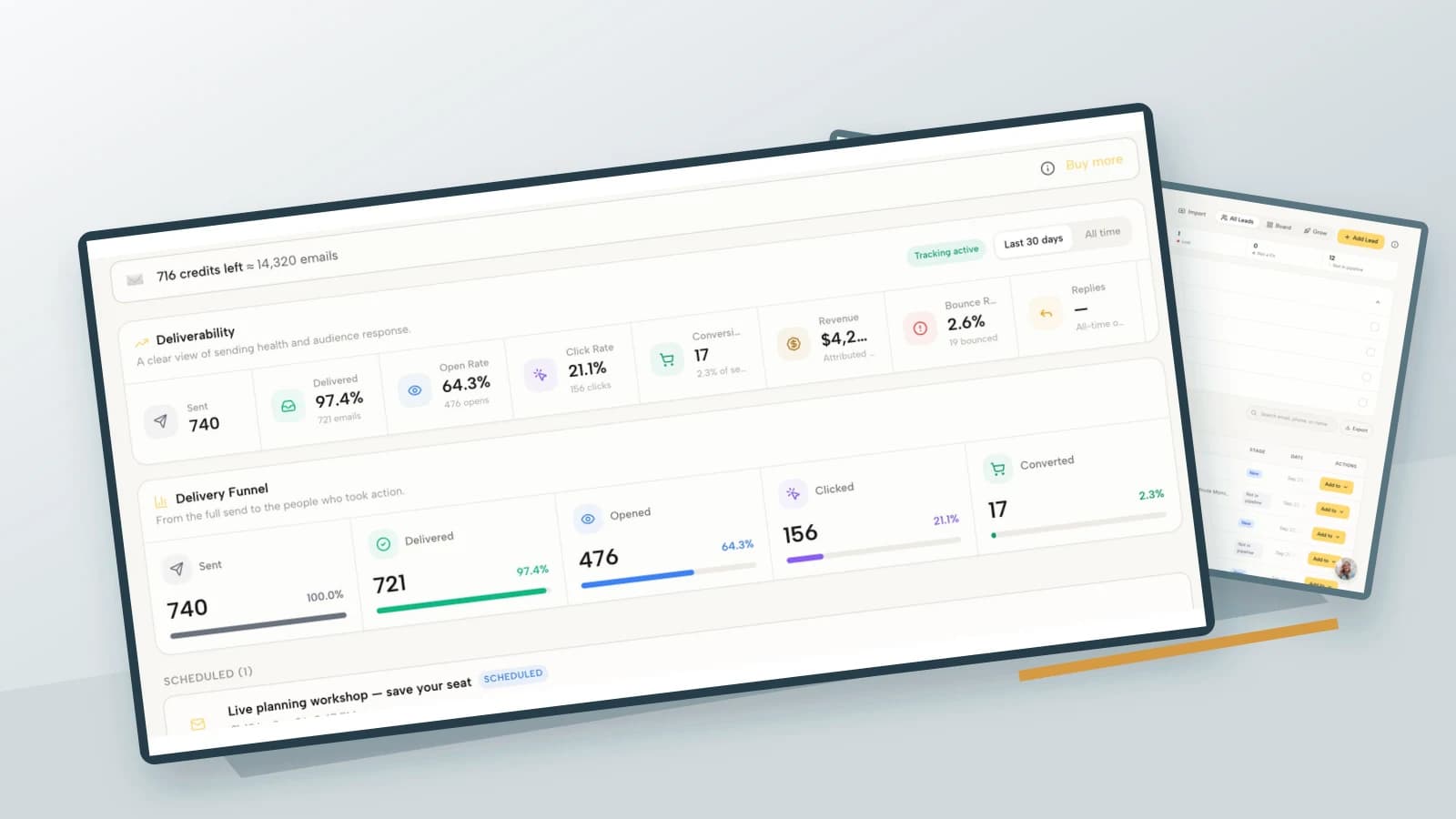
Coachful's email marketing feature page documents delivered, opened, clicked, bounced, unsubscribed and replied counts, plus campaign conversions and attributed revenue. Those are useful inputs, not a substitute for checking definitions or deciding whether a booked inquiry fits your practice.
The same page states that opens and clicks are tracked through a verified sending domain, not for mail sent through a connected Gmail account. Do not expect a connected personal mailbox to provide the same reporting. Nor should attributed revenue be treated as a causal experiment or combined across currencies without an explicit conversion policy.
If your problem is starting the newsletter, use our coaching newsletter setup guide. If the problem is judging an existing one, take your latest send through the log above. Then try the interactive Coachful demo to inspect the reporting and lead surfaces you would use for that review, before moving any real subscribers.
Frequently asked questions
What is a good email open rate for a coach?
There is no single reliable target for every coaching list. Provider measurement, privacy settings, audience source and message purpose all affect the number. Start with your own consistently defined trends, and prioritize credible actions and suitable conversations over a borrowed open-rate benchmark.
How many newsletter subscribers do I need before tracking metrics?
Start with your first sends, but treat small counts honestly. A handful of subscribers can teach you about broken links and reader questions. It cannot support a stable forecast of bookings or revenue. Record counts and use the review to learn, not to manufacture certainty.
Should I remove everyone who does not open?
No. Recorded non-opening is not proof that someone never reads. Consider permission, subscriber expectations, other engagement and your provider's policies together. A transparent preference or re-engagement process is different from repeatedly emailing suppressed contacts.
Which metric matters most for getting coaching clients?
For an inquiry-focused campaign, qualified bookings and relevant conversations are closer to the business decision than opens. Keep delivery and list-health guardrails beside them. Enrollment and collected revenue matter later, but they require enough time and careful attribution before you draw conclusions.