Health Coaching Platform: How to Choose One That Works

Coachful
You didn't start your practice to become a part time administrator for five disconnected apps. You started it to coach. If you're reading this, you're probably asking a sharper question than which tool has the longest feature list. You're asking which system will give you your week back without making your clients feel processed. That's the right question, and it's how you should judge every health coaching platform you test.
The Monday Morning That Made You Search for a Health Coaching Platform
You open your laptop and the week has already started without you. Discovery calls sit on different calendars. A client who paid through PayPal asks where her receipt is. Another client lost her welcome form, and you're digging through a shared Google Drive folder to find the version you swear you sent last Tuesday.
Your group program starts Thursday, but there's still no simple place for members to log check ins. You've got Calendly for booking, Stripe for payments, a private Slack channel for messages, email for everything else, and a spreadsheet you keep promising yourself you'll stop maintaining. Each tool works. Together, they don't.
The Thought Running Underneath the Chaos
Your inner dialogue probably sounds familiar. "I'm a competent coach, so why does my business feel this fragile?" "If I take on two more clients, what breaks first?" "Am I losing people because my coaching isn't strong, or because my follow up is buried in my inbox?"
Those aren't confidence problems. They're infrastructure problems. You're stitching together booking, billing, forms, messages and tracking by hand, then blaming yourself when the stitching shows. Clients feel it too, even when they're polite about it. A lost form or a late reminder tells them your practice is less organized than your coaching is.
A platform isn't a tool you operate. It's the operating system your practice runs on.
That's the mental shift that matters before you spend anything. You're not buying software to look professional. You're trying to stop losing hours, clients and confidence to admin that should never have needed your brain in the first place.
Judge every option against one question from here on. Does it remove friction from the work that changes clients, or does it just add another dashboard you'll ignore by month two? If you can't answer that clearly in a trial, don't buy it.
Defining a Health Coaching Platform Without the Jargon
"Is this a CRM, a course platform or a scheduling app?" Every coach asks this, usually while staring at a pricing page that uses all three terms. Here's the plain version you can repeat to a skeptical colleague.
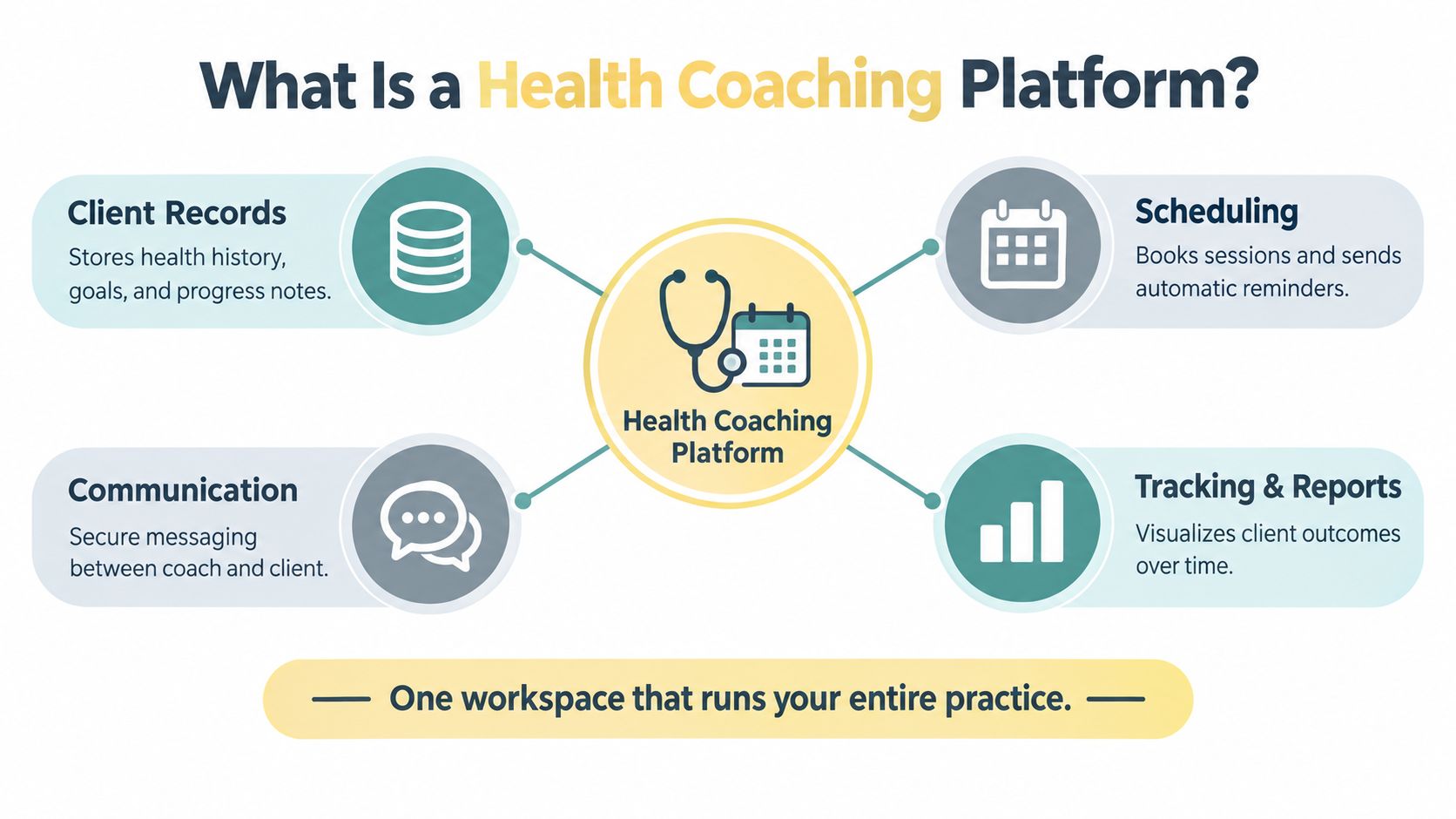
A health coaching platform is one workspace that runs the recurring mechanics of coaching. That means onboarding, scheduling, payments, secure messaging, progress tracking, automation and group programming in one place. Think of it as your practice's back office, where reception, billing and records used to live, except it's now connected instead of scattered across tabs.
The four parts below cover what that back office does day to day.
What It Is Not
It is not a medical device. It is not a clinical EHR, and it is not a generic course marketplace where your program competes for attention next to unrelated products. Blurring those lines creates real risk. Coaches who treat a coaching platform like clinical software tend to overpromise outcomes, while coaches who treat it like a course host underdeliver on accountability between sessions.
That boundary matters commercially too. A 2025 systematic review of 35 digital health coaching studies found human, AI and hybrid coaching generally feasible and acceptable, but engagement measurement was inconsistent, with a pooled estimated dropout rate of about 43%. Your platform should help you define and watch engagement properly. It shouldn't let you hide behind logins and call that progress.
If you can explain to a client, a partner or a tax advisor that you're paying for one connected back office instead of six subscriptions, you understand the category. If a vendor can't explain it clearly, move on.
The Seven Workflows Every Health Coaching Platform Must Handle
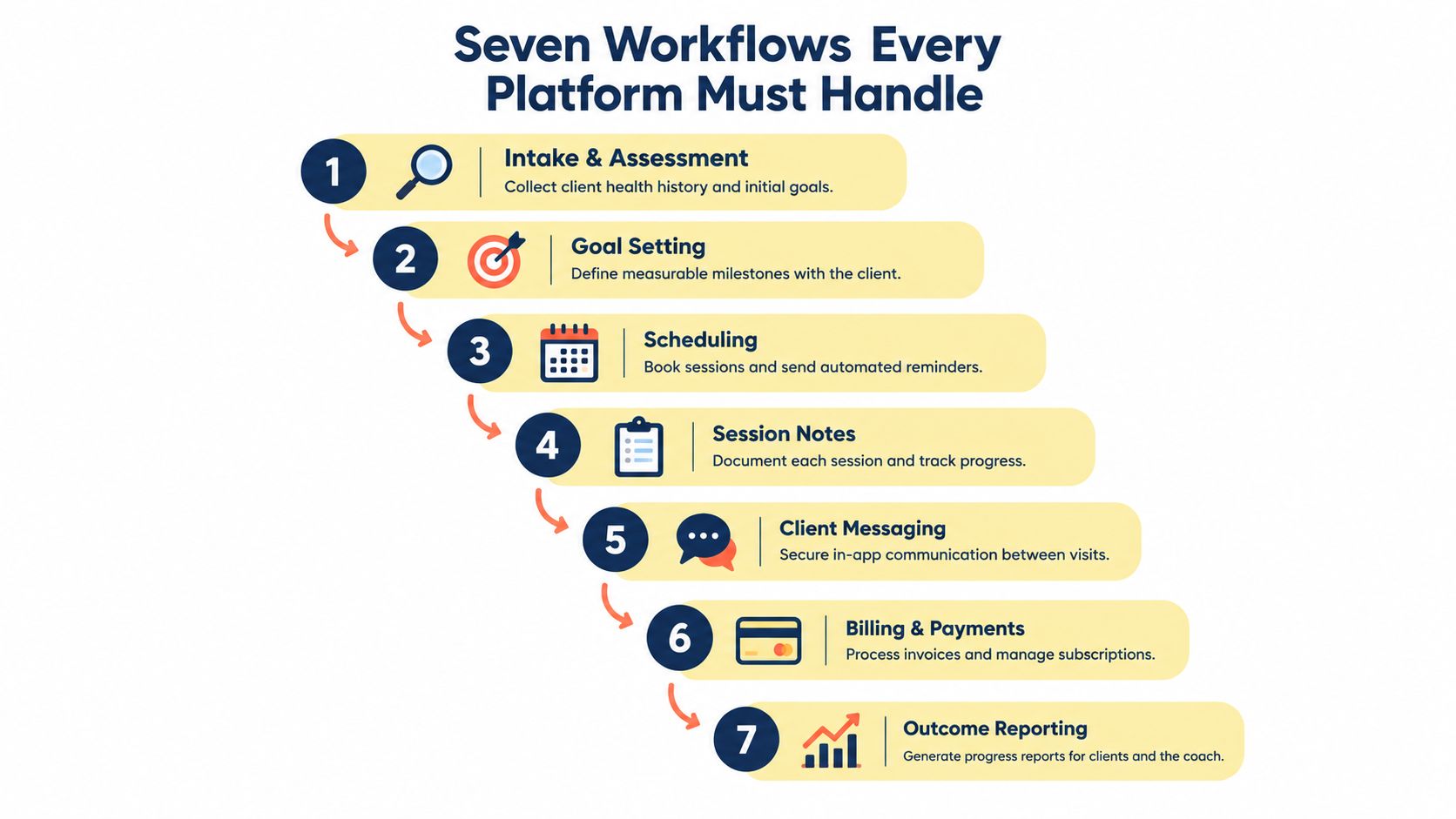
Stop comparing feature lists side by side. That's how coaches end up regretting a purchase once real clients hit the system. Test workflows instead, in the order they show up in your week.
The sequence below maps those workflows from first intake through outcome reporting.
The Workflows to Test Live
- Client onboarding: Good onboarding doubles as a behavior change intake. It captures goals, barriers and readiness, not just contact details, and confirms the client understands reminders, privacy controls and how to reach you.
- Scheduling: It should handle time zones, buffers and reschedules without a chain of apologetic emails. Test a reschedule from the client's phone, not from your desktop.
- Payments and billing: Subscriptions, pauses, receipts and failed payment retries should run without you becoming a debt collector. If dunning costs extra, ask why.
- Secure messaging: Conversations belong attached to the client record. If you're still searching email and texts to remember what someone promised last week, the platform failed.
- Progress and goal tracking: You need early momentum and longer term retention shown separately. A client can log in often while stopping the actual habit you agreed on.
- Automation: Reminders, renewals and milestone nudges should prevent quiet disengagement. They should sound like you, not like a marketing funnel.
- Group programs and cohorts: Look for structured curricula, assignments and community touchpoints you can reuse. Starting from structured health coaching templates saves you rebuilding the same intake, check in and review forms for every cohort.
Coaches supporting clients with ongoing conditions also need context between sessions, which is why resources on app-connected tools for chronic care can be useful when you're mapping what data a client already tracks elsewhere. Your platform doesn't need to replace those tools. It needs to give their output a coaching home, tied to goals and next actions.
A systematic review of digital health coaching for people with long term conditions identified personalization, regular feedback, low system complexity and human connection as recurring requirements for engagement. Use that as your test in a trial. Can a nervous new client complete onboarding without help, get feedback that leads to a next step, and still feel they're dealing with a person?
This walkthrough shows how those workflows look when they're connected in practice rather than sold as separate features.
Your inner objection here is predictable. "Do I really need all seven on day one?" No. But you need a platform that handles them without forcing a migration later, because migrating twice is worse than buying carefully once.
A Buyer's Checklist That Saves You From Tool Regret
Forget glossy comparison tables. You need a short, opinionated scorecard you can fill in during a demo while the salesperson is still talking. Start by being honest about whether you're buying for a solo practice or for other coaches who'll work inside your system.
| Feature area | Solo coach priority | Organization priority | What to test in demo |
|---|---|---|---|
| Branding | Clean client facing pages in your name | Consistent branding across instructors | Change a logo and preview the client view |
| Permissions | Simple privacy controls | Role based access for staff and coaches | Restrict one user and confirm what disappears |
| Calendars | One calendar, buffers, reschedules | Multi coach calendars and coverage | Book, move and reassign a session |
| Group programs | One repeatable cohort format | Several cohorts running at once | Copy a program and enroll a test client |
| Data control | Export notes and client records anytime | Auditable records across teams | Export a full client file during the trial |
Questions That Expose Weak Answers
Ask about data export rights before you ask about new features. Ask what happens to client access when you cancel, how fast support responds, and whether notes stay locked inside the app. Ask how accessible the client experience is on an older phone, and who owns coaching data, you or the vendor.
Watch for red flags I've seen cost coaches real money. Group features hidden behind the highest tier. Billing that charges extra to chase failed payments. Onboarding that buries goal setting behind screen after screen of account setup. If goal setting feels like an afterthought in the demo, it'll feel like one to your clients too.
That ordering isn't cosmetic. A 2022 systematic review and meta analysis of 20 randomized controlled trials involving 3,222 participants found structured processes including goal setting, accountability, education, behavior tracking and regular follow up produced a small but statistically significant reduction in HbA1c. Buy the structure that supports those processes, not the prettiest dashboard.
Your niche also changes what good looks like. A coach researching personalized coaching for women in their 40s, for example, should test whether intake, check ins and messaging can reflect life stage specific goals without awkward workarounds. Platforms like Coachful bundle onboarding, scheduling, payments, messaging and progress tracking in one workspace, which is the category of setup to compare against, whatever vendor you choose.
Two Coaches, Two Wins From the Same Health Coaching Platform
Theory is cheap, so let's get specific about what changes in a real week. These are composite examples drawn from the patterns I see when coaches migrate off duct taped tools, and they're useful because you can picture your own version.
Maya the Solo Coach
Maya coached well and administered badly. Discovery calls lived in one app, payments in another, client homework in email threads she couldn't find during sessions. Her private worry wasn't marketing. It was, "My clients think I'm disorganized, and between sessions I am."
She moved onboarding, booking, payments and check ins into one system and stopped rebuilding her welcome process for every client. She set automated milestone nudges for missed check ins, wrote them in her own voice, and reviewed a simple weekly list of who hadn't engaged. The win she tracked wasn't a vanity metric. It was admin hours recovered, sessions that started with last week's commitment already on screen, and fewer clients fading between calls.
What Maya actually bought: Not features. She bought the ability to open a session already knowing what her client did, skipped and struggled with.
The Academy Running Cohorts
A coaching academy had the opposite problem. It had demand, instructors and a shared spreadsheet nobody trusted. The program director couldn't see which students were falling behind until they asked for refunds, and every instructor ran onboarding slightly differently.
They standardized templates, kept branding consistent across instructors, and used role based dashboards so the director could spot at risk students early. The metric that mattered was cohort completion tied to specific behaviors, assignments submitted, sessions attended and goals updated, not a single blended engagement score.
Both examples rest on continuity, not intensity. A review of behavior change interventions found coaching delivered both in person and remotely produced sustained weight loss at 24 months in a randomized trial of 415 adults, and more than 10 remote coaching sessions were a common feature of interventions that improved outcomes. One inspirational call won't carry a client. A repeatable contact structure, visible in your platform, gives your coaching somewhere to accumulate.
AI, Humans, and the Clients the Platform Should Not Leave Out
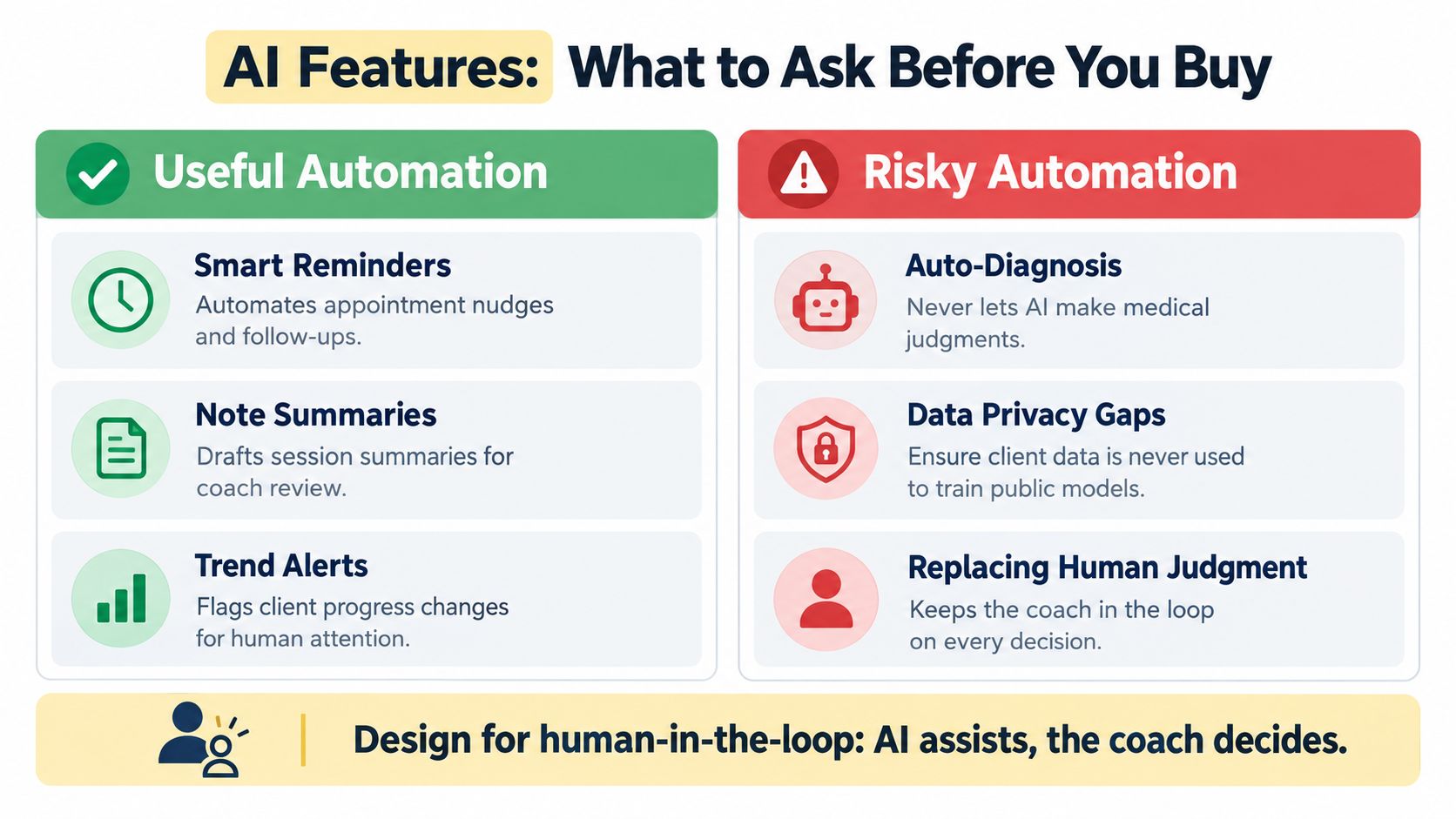
Every platform now claims AI features, and most coaches I talk to have the same uneasy thought. "If I don't use this, am I falling behind? If I do use it, am I still coaching?" Both instincts are healthy. The mistake is treating automation as progress by default.
Useful automation handles routine work and flags what needs you. Risky automation makes judgments, sends advice you haven't reviewed, or personalizes confidently with missing context. This comparison is a practical starting point for vendor questions.
Your Human in the Loop Rules
- Messages needing human review: Anything involving symptoms, medication, distress, disordered eating signals or a client asking whether coaching is enough. Define this list before you launch, not after an awkward incident.
- Escalation and referral: Write down who reviews flagged messages, how quickly, and where you refer outside your scope. A platform should make that path easy to document.
- Data ownership and audit: Ask where coaching data is stored, whether it's used to train models, and how you can inspect or override AI generated summaries and recommendations.
- Consent: Clients should know what is automated, what you personally read, and how to opt for a human only route.
For coaches tracking clients with ongoing conditions, a structured specialist tracker for chronic conditions approach shows why auditable goals, adherence and client reported outcomes matter more than a chatbot that sounds confident. Wellness coaching is not regulated clinical care. Your system should make that boundary clearer, not blurrier.
Then there's the client most platforms design out. She has a shared device, patchy bandwidth, low digital confidence, or a job where app notifications are impossible. A 2025 review identifies technology access, cost, digital literacy and data security concerns as recurring barriers to digital health coaching, with older adults and socioeconomically disadvantaged groups facing disproportionate obstacles to smartphone and internet use.
Ask vendors directly about phone and SMS fallback, asynchronous check ins, plain language and low literacy workflows, multilingual support and resources that still work with a weak connection. Measure engagement beyond logins, because a client who replies by text and completes her habit is succeeding, even if your app analytics call her inactive. Adding more features can worsen inequity. Designing a low tech path protects outcomes.
Implementation Playbook for the First 90 Days
Buying is the easy part. Most tool regret comes from a sloppy first month, when a coach tries to migrate everything, confuses clients, then blames the platform. Go narrower and sequence it.
Days 1 to 30 Activate
Migrate no more than three workflows first, usually onboarding, scheduling and payments. Write the welcome sequence in your own voice, and treat that work seriously, since a structured client onboarding workflow is where clients learn goals, reminders and expectations. Broader product lessons in 7 onboarding tactics for SaaS teams translate well here, especially progressive disclosure instead of dumping every feature on a new client at once.
Define five events that count as real engagement. I recommend check in completion, session attendance, goal updates, assignment submission and retention at set review points. If you don't define these now, you'll argue with your own dashboard later.
Days 31 to 60 Automate Carefully
Add reminders and milestone nudges one at a time. Read every automated message as if you're a tired client at 9 p.m. If it sounds like marketing, rewrite or delete it. Turn a missed check in into a coach task or a revised plan, not just a red compliance score.
Days 61 to 90 Prove the Return
Use a simple formula you can defend to a spouse, business coach or finance team.
Return check: Hours of admin removed, plus clients retained who would likely have drifted, minus platform and migration cost. Review it with real records, not impressions.
Durability is why this review matters. A 2023 randomized trial found health habits improved by 3.1 units at eight weeks and 2.4 units at 20 weeks in the health literacy group, while improvements in self care agency among participants with high blood pressure were not sustained at 20 weeks. Track early momentum and maintained habits separately. Watch missed check ins, time since last goal update and attendance gaps, because those three signals usually appear before a refund request does.
Stop Buying Software, Start Building Coaching Infrastructure
That Monday morning chaos wasn't a software problem. It was an infrastructure problem, and it returns every time your practice grows faster than your systems. Make three decisions this week.
First, decide whether you need another tool or an operating system. Second, decide which five events count as real engagement in your practice. Third, decide which coaching moments must never be automated, and write that down.
Coaches stay with platforms that protect those human moments while handling everything else. Buy for that, and you'll stop shopping every year.
If you're ready to replace scattered calendars, payments and spreadsheets with one workspace for onboarding, scheduling, messaging, programs and progress tracking, visit Coachful and test it against the workflows in this guide. Bring your scorecard, run a real client journey through it, and keep it only if it gives you time back for coaching.