How to Create a Coaching App Without Hiring Developers
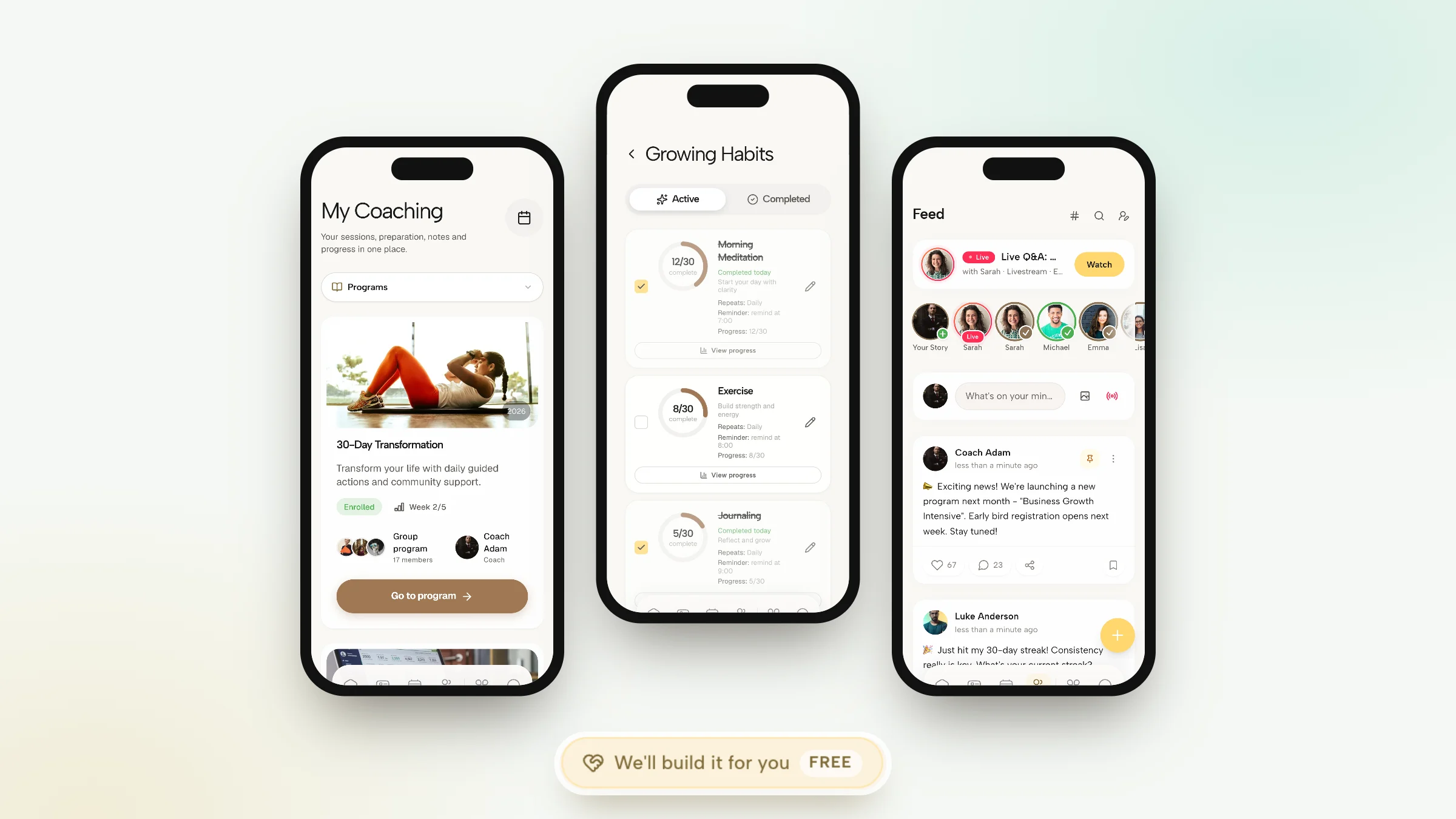
There are two ways to create a coaching app. You can build your own and publish it under your name in the App Store and Google Play, which is a software project with developers, store reviews and updates for as long as the app exists. Or you can give clients a coaching app that already exists and make the inside of it yours: your logo, your colors, your program, your words. For most coaches the second route is the sensible one, and it takes an afternoon rather than a year.
Coachful works the second way, and we want to be precise about it. Clients download the Coachful app on iPhone or Android, sign in with your invitation, and see your branding and your content. The app is listed in the stores under Coachful, not under your own developer account. What goes inside it (your program, worksheets, check-ins, onboarding journey) our team will build for you for free.
This guide explains what building your own app really involves, what a branded coaching app can and cannot do, what clients should be able to do in it, and how to set one up step by step.
Option one: build your own app from scratch
A custom app makes sense for some businesses. It is worth knowing what you are signing up for before you get a quote.
- Design and development for iPhone and Android, often as two codebases or one cross-platform one, plus a web version if clients use laptops.
- A back end: accounts, logins, data storage, notifications, payments and security.
- Developer accounts with Apple and Google, and the store review process for every release.
- Updates every time a new phone operating system changes something, which is at least once a year.
- Support: someone has to answer "I can't log in" at 9pm on a Sunday.
- The coaching side: scheduling, programs, chat and progress tracking still have to be built, or connected from other tools.
It is the right call if the app itself is your product, if you have a large audience paying for a unique experience, or if you need features no coaching platform offers. If you are a coach with 10 to 50 clients who want to see their tasks and message you, it is a very expensive way to get a home screen icon. Our earlier guide to white-label apps and client portals covers portals more broadly; this one is about the app itself.
Option two: a branded coaching app your clients download
With a coaching platform, the app already exists and is maintained for you. Your job is to make it feel like your practice. On Coachful, that means:
- Your logo in light and dark versions, your accent color and your app title.
- Your words. Rename product words in the English interface, so "programs" can be "playbooks" or whatever your practice calls them.
- Your menu. You choose and order the client menu. The first four items sit in the phone dock and the rest open from More.
- Your start page. Choose where clients land when they open the app: Home by default, or My Coaching, their program, the community or another page.
- Your widgets. Home screen widgets carry your logo, name and accent color.
- Your domain for the web version, on plans that include a custom domain.
And the honest limits: the app ships under the Coachful listing on the App Store and Google Play rather than your own developer account, so clients search for and install Coachful. The client menu holds up to six items on mobile and eight on desktop, with at most two custom entries. There is no wearable or Apple Health sync; habits and check-ins are entered by the client, and daily metrics can be imported from a file.

What clients should be able to do in a coaching app
Whatever you choose, judge it by what happens between sessions. Here is the checklist we would use.
| Clients should be able to | Why it matters | In Coachful |
|---|---|---|
| See what to do today | Coaching fails in the gaps between calls | A today view with focus tasks (three a day by default) and a backlog |
| Track habits | Small daily actions are where change shows | Habits with reminders, counts and streaks |
| Check in | You see how they are doing before they tell you | Morning and evening check-ins plus a weekly reflection |
| Join sessions and prepare | No hunting for links | The next session with its joining link and any prep worksheet |
| Message you | Conversation moves out of personal WhatsApp | Direct chat with voice notes, photos, video and files |
| Open what you gave them | Materials stop getting lost in email | A content library with courses, worksheets and downloads |
| Talk to each other | Groups keep each other going | Program group chats and a community feed |
| Get reminded | People forget, kindly | Push notifications, plus email, SMS and WhatsApp session reminders once messaging is on |
| See progress on the home screen | The app works even when they do not open it | Interactive widgets on iPhone and Android, plus lock screen and StandBy on iPhone |

How to set up your coaching app on Coachful, step by step
- Brand it. Go to Manage > Customize > Branding. Add your accent color, a square logo and a horizontal logo, check them in light and dark, and set your business name, which appears in the sidebar, emails and invoices.
- Shape the menu. In Language & Menus, choose which sections clients see, put the four most important in the dock, rename any product words, and pick a start page. A phone preview shows what clients will get.
- Put something inside. An app with nothing in it is a sad app. Add a program, a welcome flow and one worksheet at minimum. Our guide to client onboarding journeys shows what the first two weeks can look like.
- Decide on chat. Choose who gets a direct chat with you, and whether there is a community or group chat.
- Optional: the AI Coach. If you want clients to have someone to message at 11pm, you can switch on an AI Coach with your rules, topics to avoid and the moments it should send them back to you. It stays off until you set it up, and replies use AI credits.
- Invite yourself first. Install the app on your own phone with a test client account and go through day one.
- Invite clients. They join by your invitation, by buying one of your offers, or through a funnel sign-up step. The app costs them nothing.

The coach side lives in the same app
Sign in as the coach and the same app opens your practice: every client with their task completion and a status (thriving, active, inactive or at risk), today's sessions with their joining links, your messages and your own task list. Between two calls you can spot who has gone quiet this week and send them a message.

Building a program or editing your website is easier on a bigger screen, and the same account opens in any browser.

Where the free build fits in
Coachful's free white-glove service does not make you a separate app; nobody gets their own App Store listing through it. What it does is fill the app with the things that make clients open it. From Create > We'll build it for you · FREE you can ask for:
- a program with weeks, tasks, worksheets and resources, from your outline, notes or a voice memo;
- a journey or coaching flow, such as a welcome flow or a daily check-in, with the screens, questions and timing;
- a form or worksheet your clients fill in inside the app;
- a course outline with lessons, quizzes and worksheets (you film any videos);
- and the website, funnel or link in bio that gets people into the app in the first place.

Send what you have (up to 10 files, including audio; video files are not accepted) and the team replies by email with next steps, usually within around 24 hours. That is a typical turnaround, not a guaranteed deadline. Everything is built in your account and stays editable. The guide to the free build service covers the full list.
App, client portal or WhatsApp?
A lot of coaches start with WhatsApp and a shared folder. It works until it does not.
- WhatsApp holds the conversation but none of the work. Tasks, worksheets and notes live somewhere else, and your personal phone never goes quiet.
- A client portal in a browser is a page clients visit when they remember to.
- A coaching app puts today's tasks, habits, check-ins, the next session and the chat in one place, with notifications that bring people back.
You do not have to give up WhatsApp entirely: on Coachful, session reminders can still go out by WhatsApp an hour before the call once messaging is enabled. If you want to compare apps more widely, see our roundup of the best coaching apps for online coaches, and the coaching client app page for the full feature list.

Getting clients to actually open it
An app on a phone is only useful if it gets opened. A few habits help:
- Invite people during a session, not by email afterwards. Ask them to install it while you are both on the call, and walk through the first screen together.
- Give them something to do on day one. One small task and a two-minute welcome flow beat an empty home screen.
- Move the conversation in. If you reply in the app and gently move WhatsApp messages there, clients tend to follow.
- Suggest the home screen widget. Ticking a habit without opening anything is the lowest-effort check-in there is.
- Refer to it in sessions. "I saw your Tuesday check-in" tells a client the app is where the coaching happens.
- Give groups a reason to post. A weekly prompt in the community does more than a dozen announcements; our guide to creating an online coaching community has examples.
For more on the between-session side, read how to keep coaching clients engaged between sessions, and see the coaching app page for what the coach and client sides each include.
Frequently asked questions
How do I create a coaching app for my clients?
The practical way is to use a coaching platform with a client app and brand it: add your logo and colors, set up the client menu, add a program and check-ins, then invite clients. Building your own app means hiring developers, publishing to both app stores and maintaining it every year.
Can I have my own coaching app in the App Store with Coachful?
No. Coachful's client app ships under the Coachful listing on the App Store and Google Play rather than your own developer account. Inside, clients see your logo, colors, app title and renamed product words, and home screen widgets carry your branding.
Do my clients pay for the coaching app?
No. Only the coach subscribes to Coachful, with no per-client charge on any plan. Clients download the app for free and sign in with your invitation, by buying one of your offers or through a funnel sign-up step.
Does the coaching app work on iPhone and Android?
Yes. Coachful has native apps on iPhone and Android, and the same account works in any browser. Both phones get interactive home screen widgets, and iPhone adds lock screen and StandBy widgets.
Can Coachful build the content for my coaching app?
Yes, for free. The team can build a program, a welcome flow or check-in, worksheets, a course outline and the website or funnel that brings clients in. You send notes, files or a voice memo, and everything is built inside your account so you can edit it later.
Does the Coachful app connect to Apple Health or wearables?
No. There is no wearable or Apple Health sync. Clients enter habits and check-ins themselves, and daily metrics such as steps, sleep or weight can be imported from a file.