Life Coach Website Template: 8 Designs and How to Use Them
Yes, you can find a free life coach website template in about four minutes. Wix, Squarespace, WordPress themes, Canva and Carrd all have pretty ones. The catch is that a template is the easy part. It gives you a layout and a color palette, and you still have to write every headline, decide what the buttons do, connect a booking calendar and make it all work on a phone. A good life coach website template helps with those harder parts too: it comes with the right sections in the right order, and it fills in what it can for you.
This guide covers what a useful template should include, eight of Coachful's 30 designed homepage templates and who each suits, how a template gets filled in with your name, offers and links, the matching pages that come with many of them, an honest look at free templates elsewhere, and a quick decision guide. And if you'd rather not choose one at all, Coachful's team will build the whole site for you for free on any plan.
What a good life coach website template gives you
Judge a template by its structure before its looks. A template worth using has these sections built in, in roughly this order:
- A hero with room for a specific headline, a one-line sub-heading and one main button.
- A short proof strip for three or four true facts about you.
- A "sound familiar?" or problem section written in the client's words.
- A simple "how it works" in three steps.
- Offer cards with space for format, length and price.
- A personal note or About preview with your photo.
- Testimonials, with a clear way to leave them out until you have real ones.
- A free resource or email sign-up.
- An FAQ block.
- A closing call to action, ideally with your booking calendar right there.
It should also look right on a phone without fiddling, use readable fonts at normal sizes and let you change the accent color to your own. If a template is all hero image and no structure, you'll end up designing the rest yourself.

Eight Coachful templates for life coaches and close niches
Coachful has 30 designed homepage templates, grouped in the gallery as Business, Wellness, Performance, Creative and Life. Each one was drawn for a specific kind of coach and comes with fictional sample copy, which is replaced by yours when you use it. These eight suit life coaching and the niches next to it.
1. Hearth
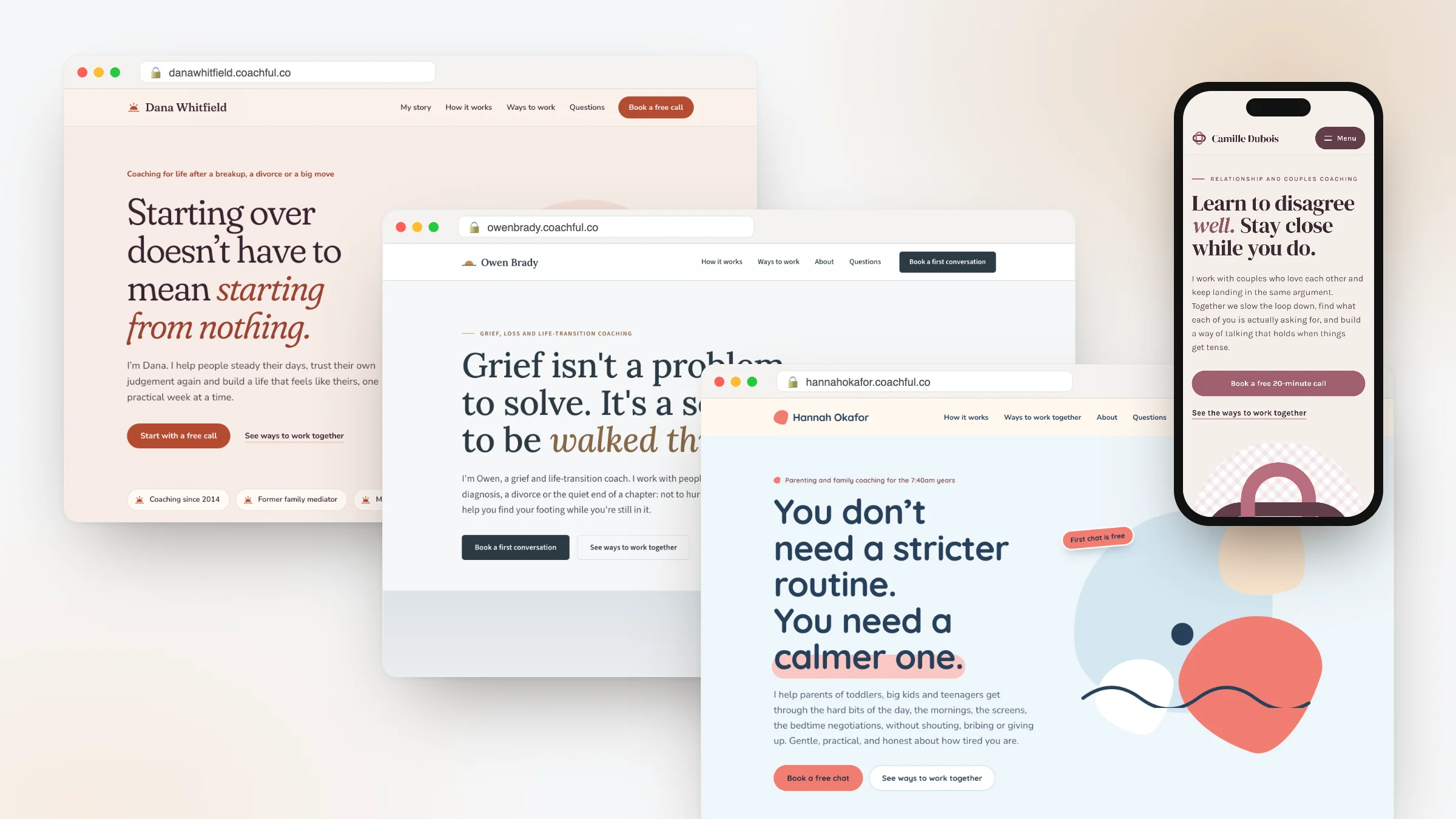
Look: warm and personal, with a handwritten letter and soft shapes in blush and terracotta. Suits: life, relationship and transition coaches. Sample headline: "Starting over doesn't have to mean starting from nothing." Good if your clients come to you after a breakup, a move or a big change and you want the site to feel like a kitchen table, not an office.

2. Loom
Look: woven textures, interlocking pills and side-by-side layouts in plum and rose. Suits: relationship and couples coaches. Sample headline: "Learn to disagree well. Stay close while you do." The side-by-side layouts make it easy to describe two people's perspectives, which is why it works for couples work.

3. Lantern
Look: warm amber light on deep teal, with radial glows and a simple flame. Suits: spiritual and purpose coaches. Sample headline: "Something in you already knows the way." A dark design that still feels warm, for life coaches whose work is about meaning and direction.

4. Harbor
Look: a horizon line, fog gradients and steady, unhurried spacing in slate and soft gray. Suits: grief, loss and life-transition coaches. Sample headline: "Grief isn't a problem to solve. It's a season to be walked through." The calmest of the eight, with a dark, clear "Book a first conversation" button.

5. Tidewater
Look: layered waves, soft gradients and room to breathe, in teal and white. Suits: burnout and recovery coaches. Sample headline: "You don't need to be fixed. You need room to recover." Ideal for life coaches who mostly see exhausted professionals.
6. Sanctuary
Look: calm and airy, with arched frames, soft botanicals and slow pacing. Suits: mindfulness, somatic and wellness coaches. Sample headline: "You were never meant to live at this speed." For life coaches who work with the body and breath as much as goals.
7. Northstar
Look: a starfield hero, one gold star and a compass-rose method on navy. Suits: career transition coaches. Sample headline: "You've outgrown the job you were good at. Now what?" A good fit if your life coaching keeps turning into career-change coaching.
8. Ember
Look: dark and warm, with a giant statement headline and a glowing orange accent. Suits: public speaking and confidence coaches. Sample headline: "Speak like the room is already yours." For confidence-focused life coaches who want a bold first impression.
The gallery screenshot near the top of this article shows several others, including Editorial, Kinetic, Atelier, Studio and Meridian, if your coaching leans toward career, fitness or leadership.
How a Coachful template gets filled in with your details
Choosing a template in Coachful takes three steps, shown in the gallery as "choose a template", "preview" and "make it yours".
- Choose. Open Website, then Templates or Browse all, and filter by Business, Wellness, Performance, Creative or Life. Each card shows the colors, a description and a "Best for" line.
- Preview. Look at the full page on desktop and phone sizes before committing.
- Make it yours. Coachful fills in your business name, logo and photo; your published offers, prices and booking link; and client testimonials from your profile, or clear bracketed placeholders like "[A few words from a client about the change they felt]" for you to replace. You can also choose Use my brand color to swap the template's accent on buttons and highlights.
There's also an optional Write the words for me setting, where AI writes every headline and paragraph from your coaching profile and offers. You can add a short note about who you help and how you like to sound. It uses AI credits and is available on plans that include the AI builder; without it, the sample copy stays in place for you to edit by hand.
Two safety details matter. The new page is saved as a private draft, so nothing goes live until you choose Make this my homepage. And your current site stays live until you switch, which means you can try three templates on a Tuesday afternoon without anyone noticing. The fictional sample coach's name is replaced wherever it appears, so you never publish a stranger's name by accident.

Matching pages: About, Services, Pricing and more
A homepage alone isn't a website. Fifteen of the 30 designs, including Hearth, Lantern, Tidewater, Sanctuary, Northstar, Editorial and Ember, also come with matching pages drawn in the same style:
- About: your story, what you believe and how you work.
- Services: your offers laid out in depth.
- Contact: with a working form that lands in your website submissions.
- Pricing: showing only the prices you have set.
- FAQ: for the questions clients ask before they book.
- Book a call: a page that walks people to your calendar.
- Newsletter: a sign-up form that adds subscribers to your newsletter list.
Each matching page is saved as a private draft too. If you're writing the About page yourself, our guide to the life coach About page pairs well with these.
Editing after you pick: what you can change
A template is a starting point, not a cage. In Coachful's visual editor, a designed template's blocks show up as individual sections you can add, move, hide, duplicate and style. Colors, fonts & sizes (the palette icon) changes heading and body fonts across your website, and the palette and text sizes across that template family's pages; reset controls bring back the originals. You can format any text inline, delete text blocks you don't need and undo as you go. Changes stay in the draft until you press Publish.
If your homepage has a session type people can book, the live booking calendar can sit right under the closing "book a call" section, and that section's button scrolls down to it. And if you'd rather work in Coachful's own section builder, Use Coachful's builder instead keeps every word and rebuilds the page as editable native sections. More on the builder itself is on the coach website builder page.
Free life coach website templates elsewhere, honestly
If you search "life coach website templates free", you'll find plenty. What each kind usually means:
- Website builders (Wix, Squarespace and similar): templates are free to choose, and publishing on your own domain without the builder's branding generally needs a paid plan. Booking and payments may be built in or may need add-ons.
- WordPress themes: many free themes exist; you need hosting, and booking, payments and email are plugins you install and maintain.
- Canva and Carrd: fast and pretty for one page; check what the free tier allows for your own domain, forms and payments.
None of these is wrong. Just compare the full cost and the number of tools you'll be gluing together, not the price of the template. On Coachful, the templates come with the plan at no extra charge, and the site shares one account with booking, payments, email and client delivery. For a wider comparison, see the best platforms to build a coaching website and our guide on how to create a free website for life coaches.
Rather not pick one at all? Have the site built for free
Picking a template still leaves you writing and arranging. If you'd rather skip that, Coachful's team builds coaching websites for free on every plan. Coachful is a paid subscription with a free trial to start; the build costs nothing extra.
Open Create > We'll build it for you · FREE, or click Fill in a form on the "Want us to build it for you?" card on the Website page. The form asks which pages to create or improve; what they should do (book calls, collect leads, sell an offer, deliver a resource); what visitors should do after they land; up to 8 links to sites or templates you like (naming a Coachful template you love is a perfectly good brief); up to 10 files such as a logo, photos, a copy document or audio notes (no video files); and anything broken or unfinished.

The team replies by email with next steps, usually within about 24 hours, which is a typical turnaround and not a promised deadline. The site is built in your own Coachful account, so you can edit every word with the same tools described above.
Recent builds include a dark forest-green site for a life-purpose coach, with the three programs drawn as one pine at three heights from the coach's emblem, and a five-page site in sage and cream for a menopause and midlife health coach who started with no site, logo or prices, every button leading to a free 20-minute consultation. Nothing is invented in any build: no fake credentials, testimonials or prices; gaps are left for you to fill. The team doesn't design logos, record videos, run ads or manage marketing. Here's everything the free build service covers.
Choosing in ten minutes: a quick decision guide
| If your clients are mostly... | Start with |
|---|---|
| Rebuilding after a breakup, divorce or move | Hearth |
| Couples who keep having the same argument | Loom |
| Searching for meaning or purpose | Lantern |
| Grieving or in a hard life transition | Harbor |
| Exhausted professionals | Tidewater |
| Drawn to breath, body and mindfulness | Sanctuary |
| Changing careers | Northstar |
| Working on confidence and being seen | Ember |
Still torn between two? Use both as private drafts, send the links to two past clients and ask which one feels more like you. Then publish that one and get back to coaching. Here's how Coachful works for life coaches beyond the website.
Frequently asked questions
Are there free life coach website templates?
Yes. Wix, Squarespace, WordPress, Canva and Carrd all offer free templates, though publishing on your own domain usually requires a paid plan. Coachful's 30 designed templates come with the Coachful plan at no extra charge; Coachful itself is a paid subscription.
What should a life coach website template include?
A hero with one main button, a proof strip, a problem section in the client's words, a three-step "how it works", offer cards, a personal note, testimonials (optional until you have them), a free resource, an FAQ and a closing call to action with booking.
Can I change the colors and fonts on a Coachful template?
Yes. Colors, fonts & sizes changes the palette, the heading and body fonts and the text sizes, and Use my brand color swaps the accent when you first apply a template. Fonts come from the offered list. Every section can be moved, hidden, duplicated or edited.
Will using a template replace my current website straight away?
No. A Coachful template is saved as a private draft, and your current site stays live until you choose Make this my homepage. You can try several templates first.
Will Coachful build my life coach website for free instead?
Yes. The build service is free on every Coachful plan. Fill in the website request form with your pages, goals and any template you like, and the team replies by email with next steps, usually within about 24 hours.
What are the best coaching website templates for niches other than life coaching?
Coachful's gallery covers business, wellness, performance and creative coaches too, from Kinetic for fitness to Ledger for money coaches and Meridian for executive coaches. See our guides for health coach websites and executive coach websites for niche-specific picks.