How to Create a Free Website for Life Coaches
A free website for life coaches is easy to get and hard to make useful. Google Sites, Carrd and the free tiers of Wix and WordPress.com will all put a page on the internet this afternoon without asking for a card. What they won't do on the free tier is book a call, take a payment or send the worksheet someone just asked for, and those three jobs are most of the reason a life coach has a website at all.
This guide covers both routes honestly. You'll get the five pages a life coach website needs, what each one says (with headlines you can borrow), a full sample homepage and the booking flow behind it. If you would rather not build any of it, our team builds the whole site for you, free, on any Coachful plan: you fill in a short form and the pages get built inside your account.
A note on the word "free". Coachful is a paid subscription (you can start with a free trial) and the website is part of it. The build service is the free part: it costs nothing extra, on every plan.
What a free life coach website can and can't do
Free builders are good at one job: proving you exist. Someone who hears your name at a dinner party and searches for you should find a real page with your face, what you do and a way to reach you. Any of the tools below can manage that.
The trouble starts when you want the site to do work. Here is roughly what each free tier gives you at the time of writing. Free plans change, so check current terms.
| Free option | Your address | What visitors see | Booking and payments | Good for |
|---|---|---|---|---|
| Google Sites | A sites.google.com address, or a domain you already own | No ads, simple layouts, little design control | Nothing built in; you link or embed an outside scheduler | A one-page placeholder while you test a niche |
| Carrd (free tier) | A carrd.co subdomain | A small Carrd badge, single-page layouts | Forms and your own domain need a paid tier | A tidy single page that links to a booking tool |
| Wix (free plan) | A wixsite.com subdomain | A Wix ad banner on every page | Your own domain and online payments need a paid plan | Trying the editor before you buy |
| WordPress.com (free) | A wordpress.com subdomain | Ads shown to visitors | Plugins need a paid plan; booking means an outside tool | A blog you plan to grow into |
Add up a typical "free" setup and you get a page on one tool, a scheduler on a second, a payment link on a third and an email list on a fourth. Together they leave you copying names between tabs at 11pm and hoping the confirmation email actually went out.
The other route is a life coach website that lives in the same place as your booking, payments and client work. On Coachful the website is part of the plan, with a custom domain, a blog and booking built in (here's how the coaching website works). That isn't a free life coach website in the strict sense, but nothing has to be stitched together, and the building itself can be done for you.
The five pages every life coach website needs
Most life coaches need fewer pages than they think. Five covers it, and you can launch with three (Home, About, Free call) and add the rest as you go.
1. Home: who you help and what happens next
The homepage has one job: tell the right person they're in the right place within a few seconds, then show them the next step. Lead with the person you help and the change they want, not with your certificates.
- "Starting over doesn't have to mean starting from nothing." (a life-transition coach)
- "For women in their 40s who did everything right and still feel stuck." (a midlife coach)
- "Make the decision you keep postponing, with someone in your corner." (a clarity coach)
Under the headline, add one sentence on how you work ("one practical week at a time", "twelve sessions over three months") and a single button.
2. About: why you, in their language
Your About page is read by people who are almost ready. They want to know whether you'll understand them. Open with their situation, then tell your story only as far as it explains your approach, then give the practical facts: training, how sessions run, where you're based. We wrote a full walkthrough in how to write a life coach About page, and these life coach bio examples show the short version.
3. Work with me: the offer, plainly
Say what it is (format, length, number of sessions), who it's for, what changes and what it costs or how to find out. A sample line: "Twelve weekly 60-minute video sessions, a shared notes space between calls and messaging support on weekdays." Whether to print the price is your call; this piece weighs showing prices before the discovery call.
4. Free call: the booking page
This is the page every button points to. Keep it short: what the call is ("20 minutes, by video, no pitch unless you ask for one"), who it suits, two or three intake questions and the calendar. Intake questions do double duty. They help you prepare, and they gently filter out people who aren't ready.
5. Contact: for people who won't book
Some visitors will never book a stranger's calendar. Give them a short form (name, email, "what's on your mind?") and say when you reply.

A sample homepage for a life coach, section by section
Here's a full homepage outline for a fictional life-transition coach. Swap in your own specifics but keep the order, because each section answers the question a visitor has at that point in the scroll.
- Top bar. Your name, four links (My story, How it works, Ways to work, Questions) and one button: "Book a free call".
- Hero. Eyebrow: "Coaching for life after a breakup, a divorce or a big move." Headline: "Starting over doesn't have to mean starting from nothing." Sub-line: "I help people steady their days, trust their own judgement again and build a life that feels like theirs." Buttons: "Start with a free call" and "See ways to work together".
- Proof strip. Three or four short facts that are true: years coaching, a relevant past career, how sessions happen ("by video, any time zone"). Leave it out until you have real ones.
- The problem, in their words. Three short cards: "You're doing fine on paper", "Everyone has advice", "You don't recognize your own week". One or two sentences each.
- How it works. Three steps: a free 20-minute call, a first session where you map what changed and what matters now, then weekly sessions with something small to try between them.
- Ways to work together. Up to three offers with a line and a button each, such as "Three months, twelve sessions" and "A single clarity session".
- A note from you. A short, warm letter in the first person, signed with your first name. This is where your personality lives.
- Testimonials. Real ones only, used with permission. If you don't have any yet, skip the section; an empty quote box looks worse than none. Here's how to ask for good ones.
- Free resource. "Not ready to talk? Get the free values worksheet." An email field and one button.
- Questions. Five honest answers: is this therapy, how long does it take, what if I don't know what I want, do you work across time zones, what does it cost.
- Closing call to action. The promise again in new words, the free call button and, if you can, your calendar right underneath.
The template pictured above is Hearth, one of Coachful's 30 designed homepages, drawn for life, relationship and transition coaches. The coach in it is fictional sample copy. When a coach uses a template, their own name, offers and links replace it.
How the booking and lead flow should work
A life coach website usually has two doors. The front door is the free call. The side door is a free resource for people who aren't ready yet. Sketch both before you build anything:
- Every "Book" button opens the same booking page, with your availability and two intake questions.
- Booking sends an instant confirmation and a reminder before the call. Reminders are the cheapest no-show fix there is (more in how to prevent coaching no-shows).
- The free resource form adds the person to your email list and sends the worksheet straight away.
- Three or four short follow-up emails over the next two weeks end with an invitation to book the call.
- After the call, a client who says yes gets a payment link and an agreement, and the first session goes in the calendar while you're both still on the line.
On free builders, each of those steps tends to be a different tool. On Coachful, the booking page, the email sequence, the payment (into your own Stripe account, with a 0% Coachful platform fee) and the agreement all sit in one account, which is the dull, practical reason it's easier to keep running. The lead magnet guide covers the worksheet side in detail.

Templates drawn for life coaching
If you'd rather start from a design than a blank page, these four were drawn for life coaching niches. Each one is a homepage with sample copy that gets replaced by yours.
- Hearth: warm and personal, with a handwritten letter and soft shapes. For life, relationship and transition coaches.
- Lantern: warm amber light on deep teal, with a simple flame. For spiritual and purpose coaches.
- Harbor: a horizon line, fog gradients and unhurried spacing. For grief, loss and life-transition coaches.
- Loom: woven textures, interlocking shapes and side-by-side layouts. For relationship and couples coaches.

Using one takes three steps: choose it, preview it on desktop and phone, then let Coachful fill in your business name, photo, published offers and booking link. You can also ask for the words to be written for you from your coaching profile, which uses AI credits. The new page is saved as a private draft, and your current site stays live until you switch. There are more designs in our walkthrough of life coach website templates.

Get your life coach website built for free by our team
If everything above reads like a weekend you don't have, hand it over. Coachful's team builds coaching websites for free on every plan. A person on our team does the work inside your account; the app labels it FREE because that's what it is.
How to ask for it
In Coachful, open Create and choose We'll build it for you · FREE, or go to Website and click Fill in a form on the "Want us to build it for you?" card.

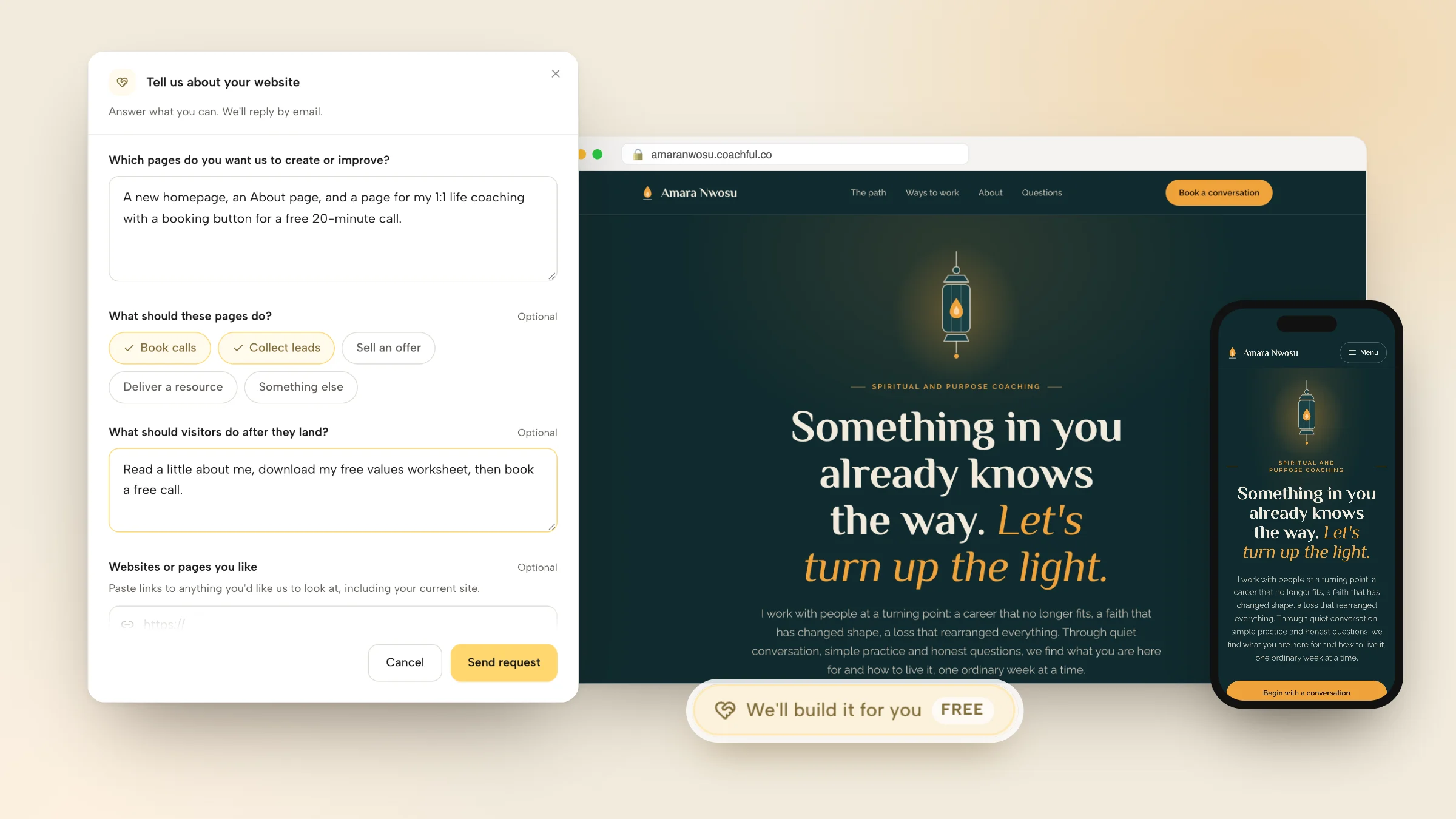
The website form asks six things, and only the first is required:
- Which pages to create or improve.
- What the pages should do: book calls, collect leads, sell an offer, deliver a resource or something else.
- What visitors should do after they land.
- Websites or pages you like, including your current site (up to 8 links).
- Branding, copy, images or offers to include, with up to 10 files: a logo, photos, screenshots, a brand guide, a copy document or audio notes. Video files aren't accepted.
- Anything that feels confusing, broken or unfinished.

The example above is filled in the way a new life coach might: a homepage, an About page and a 1:1 coaching page, every button pointing to a free 20-minute call, and a free values worksheet for people who want to look around first.
What happens next
The request goes to the Coachful team, who reply by email with next steps, usually within about 24 hours. That's the normal turnaround, not a guaranteed deadline. The pages are built in your own account, so you can change any word later with the normal editor.
What recent builds looked like
- A life-purpose coach moving over from another coaching tool got a dark forest-green site with home, about and coaching pages. The three programs were drawn as one pine at three heights, taken from the coach's own emblem, and the program descriptions and FAQ were adapted from the old pages.
- A menopause and midlife health coach who started with no site, logo or prices got five pages (home, about, coaching, free consultation, contact) in sage and cream, with every button leading to a free 20-minute consultation.
- An author and speaker sent a copy document and photos and got five pages: a new welcome homepage, a free community signup page and a book page that waits quietly for launch day.
One rule runs through all of them: nothing gets invented. No made-up credentials, testimonials or prices. Anything missing is left clearly marked for you to fill in.
What it doesn't include
The team doesn't design logos, record your videos, run your ads or manage your marketing month to month. It builds the pages, forms and flows you asked for, and then they're yours. The same form also covers funnels, programs, email sequences and more; here's everything the free build service covers.
Mistakes that keep a life coach website quiet
- Leading with the credential. "ICF-certified life coach" tells a visitor what you are, not whether you can help. Move it to the About page.
- Five competing buttons. "Book", "Contact", "Subscribe", "Follow" and "Learn more" all pull in different directions. Pick one main action and repeat it.
- A homepage that's really an essay. If the first screen is three paragraphs, plenty of people never reach the button.
- Mountaintop stock photos. A clear, friendly photo of you beats any sunrise. If you do need stock, pick it carefully.
- A booking link that bounces people around. Every hop to another tool loses a few of them.
- Never checking it on a phone. A lot of your visitors arrive from Instagram or a text message. Open your own site on your phone before you share it.

Already have a site? Run it through the coaching website audit checklist first. Often it's two fixes, not a rebuild.
If you only do three things this week, write your homepage headline, set up one bookable free call and put a real photo of yourself on the page. Everything else on this list can come later.
Frequently asked questions
Can I make a life coach website for free?
Yes. Google Sites, Carrd's free tier and the free plans of Wix and WordPress.com all let you publish a basic page at no cost. The trade-offs are a subdomain or ads, and no booking or payments built in, so most coaches add a separate scheduler and payment link. That works, but it means several tools to keep in sync.
What should a life coach website include?
Five pages: a homepage that names who you help, an About page, a Work with me page for your offer, a free call or booking page, and a contact page. Add a free resource with an email sign-up if you want to stay in touch with people who aren't ready to book yet.
Do I need my own domain name as a life coach?
You can start without one, but your own domain looks more established and is easier to say out loud than a subdomain. Coachful supports a custom domain, and most free builders ask you to upgrade before you can connect one.
Will Coachful really build my life coach website for free?
Yes. The build service is free on every Coachful plan. Coachful itself is a paid subscription, but asking the team to build your site costs nothing extra. Fill in the website form from Create or the Website page, and the team replies by email with next steps, usually within about 24 hours.
How long does it take to build a life coach website?
Doing it yourself, a simple three-page site takes a weekend if your copy is ready and several weekends if it isn't. The writing is the slow part, not the building.
Can I move my existing life coach website to Coachful?
Yes. The Website page has an Import website option, and the free build team can rebuild pages from your old site if you paste the link in the form. Your current site stays live until you switch. Our guide to moving a coaching website off Kajabi, Wix or Squarespace walks through it, and here's how Coachful works for life coaches beyond the website.