How to Switch From Paperbell Without Losing a Client
To switch from Paperbell without losing anyone, move in this order: list your clients and what each one has left, rebuild your packages as offers, connect payments, rebuild the website, bring over contracts and notes, then send new clients to the new link and move existing clients at their renewal. Done that way, nobody loses a booked session and nobody gets charged twice.
This is the full checklist for a switch from Paperbell to Coachful, written for a solo coach with a real client list. It covers clients, packages, payments, the site, contracts, notes and the email you send. If you would rather hand over the rebuilding, Coachful's team rebuilds your site, offers and forms for free through the white-glove request, and we show exactly what to send them.
Before any of it, a fair word: if you coach alone and your clients need nothing between calls, Paperbell may still be the right tool, and our Paperbell review explains why. Coaches usually switch when they want programs with daily tasks, habits and check-ins, a community, courses, a second coach or a client app. If that is you, read on.
Before you switch from Paperbell: take an inventory
Spend one evening collecting everything below into a single spreadsheet or folder. It is the least exciting hour of the migration and the one that prevents every later problem.
| Collect | Where it lives in Paperbell | Why you need it |
|---|---|---|
| Client names, emails, phone numbers | Clients area | The import file |
| Sessions left for each client | Each client's packages | Becomes session credits, so nobody loses what they paid for |
| Active subscriptions and payment plans, with next billing dates | Each client's purchases | Decides when each client moves |
| Package names, descriptions, prices and payment options | Packages | Rebuilding your offers |
| Contract text and signed contracts | Contracts and client records | Your agreement template and your records |
| Intake and exit survey questions | Surveys | Rebuilding your forms |
| Session notes | Client records | Importing client history |
| Files and links you share | Content | Rebuilding your client library |
| Automated email text | Package emails | Rewriting welcome and reminder emails |
| Site copy, photos, testimonials and your domain settings | Your site and domain registrar | The new website |
We could not find a documented bulk export of client data in Paperbell's help center, so ask Paperbell support what they can send before you plan around one. Anything they cannot export, copy by hand while you still have access. Check your Paperbell billing date too: the annual plan is prepaid, so if you are mid-year, there is no rush to cancel and every reason to move calmly.

Step 1: Move your clients
In Coachful, open Search and choose Import in its footer. Pick Clients & leads, then choose Paperbell as the source. It takes a contact spreadsheet (CSV, XLSX or TSV, up to 250 people and 4 MB per import), or you can download Coachful's template and paste your list into it.
Coachful matches familiar column names and leaves anything ambiguous for you to choose. Then you review every row before it is added. A few details make this safer than it sounds:
- Sessions left become credits. Add a "Sessions left" column for anyone mid-package and map it to session credits for a session type you choose. Those credits become bookable once the client verifies their account.
- Package names are kept as notes. They do not create purchases or enrollments, so nobody is charged by importing.
- Nothing is sent. The import sends no invitations or welcome sequences. You review invitations when you are ready.
- Clients or leads. A Type column lets you send past enquiries to your pipeline and paying clients to your client list in one file.
The Paperbell import brings contact details only. Appointments, purchases, coaching-hour history and files are not recreated, which is why the inventory above matters.

Step 2: Rebuild your packages as offers
A Paperbell package becomes a Coachful offer: the promise, the price, the payment option, the calls it includes (which turn into session credits), private chat or community access, and anything else that comes with it. Each offer gets its own page with checkout, and can also appear on your website, your link in bio and inside funnels.
| In Paperbell | In Coachful |
|---|---|
| A pack of sessions paid up front | A one-time offer with a fixed number of calls as session credits |
| A monthly subscription with sessions each month | A monthly subscription offer whose call allowance renews each billing period |
| A payment plan | A payment plan, with an optional down payment |
| A setup fee | A setup fee on the subscription or plan |
| Pay-in-full discount or coupon | A discount code, or a lower one-time price beside the payment plan |
| Pay what you can | We could not find a pay-what-you-can price; use a discount code or a separate lower-priced offer |
| A group program | A group program, which creates a cohort group with chat and a feed on enrollment |
| A digital download or online class | A resource, course or bundle, sold alone or included in an offer |
| A free discovery session | A free session type on your booking page |
This is also the moment to add what Paperbell could not hold. A six-session package can now carry a short program with a task each week and a daily habit, so new clients feel the difference from their first login. Our guide to creating a coaching offer covers the promise and structure, and Coachful coaching packages lists every option.

Step 3: Connect payments, and leave live billing alone
Connect your Stripe account (or Razorpay) in Coachful's payment settings. Payments go to your own account and Coachful charges a 0% platform fee, the same as Paperbell. If some of your clients pay through PayPal today, plan for that: Coachful takes cards, Apple Pay and Google Pay through Stripe, not PayPal.
The rule for subscriptions and payment plans that are already running in Paperbell is simple: do not rebuild them alongside the old ones. The Paperbell import does not recreate purchases, and two live billing schedules for one client is how you end up refunding someone and apologising. Choose one of these for each client instead:
- Let it finish. Payment plans are an agreement to pay the whole amount, and clients cannot self-cancel them in Paperbell. Let them complete there, then renew the client on Coachful.
- Switch at renewal. For a monthly subscription, cancel the Paperbell subscription after its last paid period and send the client the new Coachful offer link before the next one would have started.
- Gift the remainder. If a client has sessions left on a finished payment, import them as session credits (Step 1) and charge nothing new until the package ends.

Step 4: Rebuild your website and point your domain
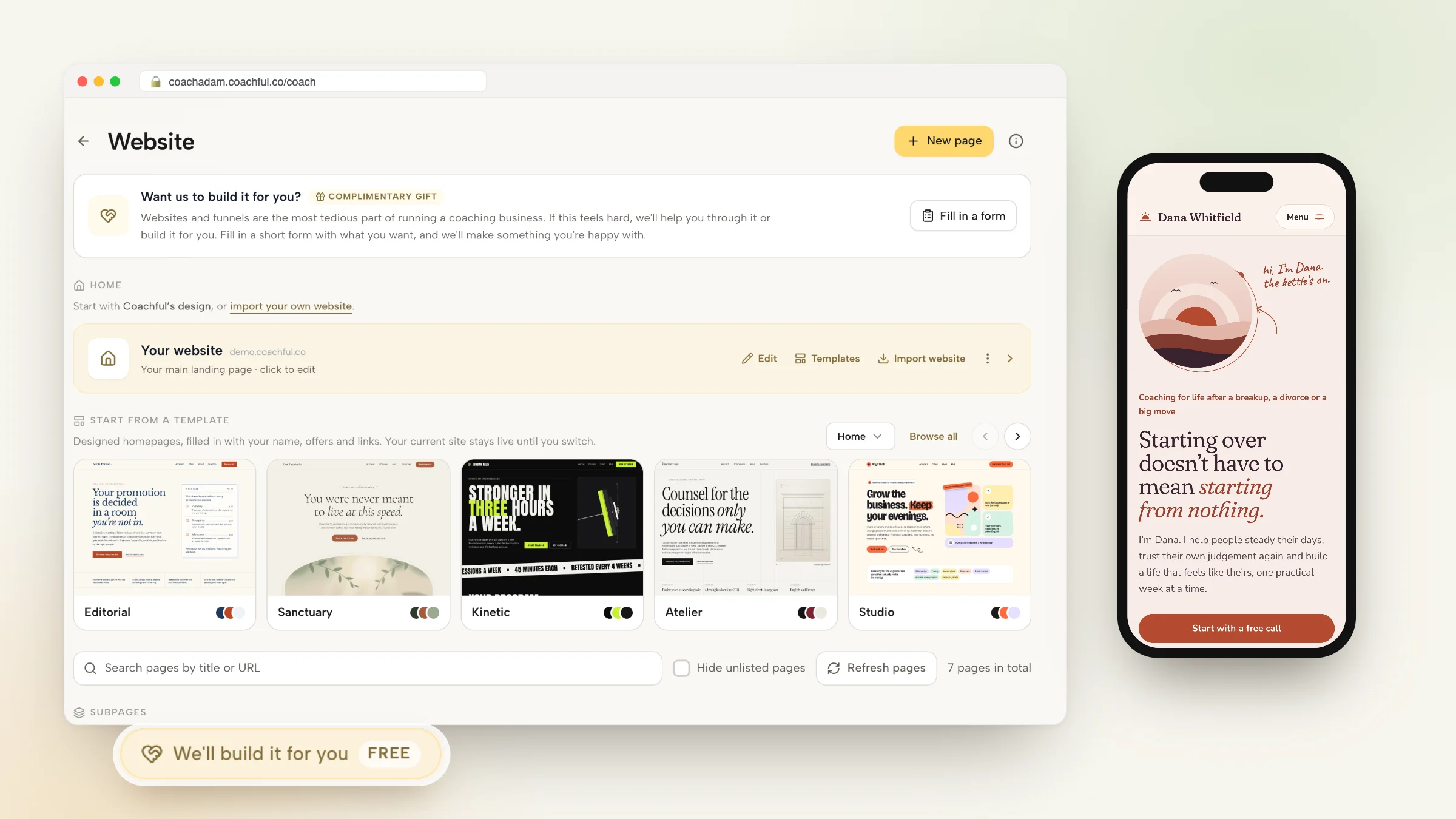
A Paperbell site is generated from your packages: an About section, package cards, testimonials, a FAQ and a booking button on one scrolling page. Coachful gives you three ways to replace it with a full site:
- Import website. Paste your current site's address, pick up to 10 pages and your blog posts, and Coachful brings them in as drafts you edit in place. Importing never changes your current homepage or domain.
- Start from a template. Pick one of 30 designed homepage templates, and Coachful fills it with your business name, real offers, prices and booking links. It opens as a private draft; your current site stays live until you switch.
- Ask the team to build it, free, as described below.
When the new site is ready, connect your domain from the website settings: Coachful shows the A and CNAME records to add at your domain registrar, then checks them. Until you change those records, your domain keeps pointing at Paperbell, so you can build without any downtime. Update the link in your Instagram bio, email signature and directory listings on the same day. If you want more on protecting search traffic during a move, see how to move a coaching website without losing traffic.

Step 5: Contracts, intake forms and session notes
Contracts. Paste your Paperbell contract text into a Coachful agreement template and add it to the offer's client journey, so it goes out for e-signature before the first call. For contracts clients already signed in Paperbell, download the PDFs and drop them onto the Agreements page: Coachful reads each document, matches it to the client and files it next to the ones signed in Coachful. The coaching agreement itself is yours to supply; our coaching agreement template lists the clauses worth checking while you are in there.

Intake forms. Rebuild your intake survey as a questionnaire and attach it to your booking or your client journey, so answers land on the client record. This is a good time to cut the questions you never read.
Session notes. On any client's Notes or Sessions tab, choose Import notes and add files in PDF, DOCX, TXT or Markdown. Each file becomes a separate past session with its original date, and you decide whether each note is private or shared. Importing sends no invitations, emails or notifications, and historical sessions use no session credits.
Files. Upload the PDFs, worksheets and recordings you share through Paperbell's Content area to Coachful as resources, then choose which clients or offers get access.
Step 6: Calendar, video and reminders
Connect Google Calendar, Apple Calendar or Outlook for two-way sync, then set your availability rules, buffers and minimum notice on each session type. Choose built-in video, or let Coachful create Zoom, Google Meet or Teams links automatically. Email reminders go out on every booking, with SMS at 24 hours and WhatsApp at one hour once messaging is enabled.
Then book a session on your own site from your phone, as a client would, and check what arrives in your calendar and your inbox. Do it twice: once for a free call and once for a paid offer.

Step 7: Tell your clients, in this order
Send new enquiries to Coachful first. Existing clients get one short, specific email a week before their move, with a single action in it. Something like:
Hi Maya, from next month our sessions, notes and your weekly plan live in one place: a client app on your phone and the web. Your three remaining sessions are already there. You'll get an invitation on the 1st; tap it to sign in, then book your next session as usual. Nothing changes about what you've paid. Reply to this email if anything looks off.
Invite clients from Coachful once their move date arrives, cancel the last Paperbell subscription after its final paid period, and keep your Paperbell account until the last client has moved and you have your records. For more scripts, see our guide to switching coaching platforms without disrupting clients.
A realistic timeline
| When | What happens |
|---|---|
| Week 0 | Inventory; ask Paperbell support about exports; send the white-glove request if you want the rebuild done for you |
| Week 1 | Import clients as a review, rebuild offers, connect Stripe and calendars, rebuild or review the website |
| Week 2 | Point your domain, send new enquiries to Coachful, test bookings and checkout on your phone |
| Weeks 3 to 8 | Move each existing client at the end of their current package or billing period |
| Last client moved | Download remaining records, then cancel Paperbell |
Let Coachful's team rebuild it for you, free
Why Coachful stands out: a free white-glove service. Every Coachful plan includes a build service at no extra cost, and a Paperbell move is exactly what it is for. Open Create > We'll build it for you · FREE, or press Fill in a form on the Want us to build it for you? card on the Website page.

The website form asks which pages to create or improve, what they should do (book calls, collect leads, sell an offer, deliver a resource), what visitors should do after they land, sites you like, what to include, and what feels broken or unfinished. You can add up to 8 reference links and up to 10 files. For a Paperbell switch, send:
- Your Paperbell site and each package page as links.
- Your logo, a few photos and any brand colours.
- Your contract text and intake questions as documents.
- A one-line note on what each offer should become, for example "the 6-session package should include a weekly task and a daily habit".
The team replies by email with next steps, usually within around 24 hours, and builds the website, offers, forms, a program or an email sequence inside your account, so you can edit everything afterwards. One recent request came from a life-purpose coach moving over from another coaching tool: a dark forest-green site with home, about and coaching pages, the three programs drawn as one pine at three heights from the coach's emblem, and the program descriptions and FAQ adapted from the old pages. The team works from what you send and invents nothing, so missing prices or testimonials are left for you to fill in. They do not record videos, design logos or manage ads. Read everything the white-glove service builds, or compare the products first in Coachful vs Paperbell and on our Paperbell alternative page.

Frequently asked questions
Can I export my clients from Paperbell?
We could not find a documented bulk export in Paperbell's help center, so ask Paperbell support what they can send. Either way, Coachful's Import tool has a Paperbell option that takes a contact spreadsheet or Coachful's template, up to 250 people per import, and lets you review every row before anyone is added.
Will my clients' Paperbell payment plans and subscriptions transfer?
No, and that is deliberate. The import brings contacts only, not purchases, so nobody is charged twice. Let payment plans finish in Paperbell and move subscriptions at the end of a paid period. Sessions a client still has can be imported as session credits that become bookable once they verify their account.
How long does it take to switch from Paperbell?
The setup takes about a week of evenings, or less if Coachful's team does the rebuild, which usually starts with a reply within around 24 hours. Moving existing clients takes as long as their current packages: most coaches finish within one or two billing cycles by moving each client at renewal.
Can I keep my domain when I leave Paperbell?
Yes. Build the new site first, then connect your domain in Coachful's website settings by adding the A and CNAME records it shows at your registrar. Until you change those records, your domain keeps pointing at Paperbell, so there is no gap in between.
Should I cancel Paperbell before I set up Coachful?
No. Keep Paperbell running until your last client has moved and you have downloaded the records you need. Paperbell's monthly plan can be cancelled any time from the app; the annual plan is prepaid, so if you are mid-year, use the time to move clients gradually.
Can I bring my old session notes and signed contracts?
Yes. Import notes from a client's Notes or Sessions tab as PDF, DOCX, TXT or Markdown files; each becomes a dated past session, private or shared, with no notifications sent. Drop signed contract PDFs onto the Agreements page and Coachful matches each one to its client.
Will Coachful rebuild my Paperbell site, offers and forms for free?
Yes, on every Coachful plan at no extra cost. Request it from Create > We'll build it for you, paste your Paperbell pages as links and attach your logo, contract and intake questions. The team builds it in your account, usually within about 24 hours, and you can change anything afterwards.