Video Call Integration for Coaching Platforms

Coachful

You're three minutes into a high-value coaching session when your client messages, “The link says the meeting doesn't exist.” You resend it. They try from a phone. The browser asks them to install an app, the calendar shows a different timezone, and the session starts with an apology instead of a useful conversation. For the coach, video call integration isn't just a technical feature. It's the operating layer between a scheduled promise and a completed session.
Video conferencing has become routine business infrastructure. A 2026 industry summary reports that the global video conferencing market reached $37.29 billion in 2025 and is projected to reach $41.62 billion in 2026. The same summary reports that remote workers attend an average of 7.3 video calls per week, compared with 4.1 for hybrid workers and 2.6 for fully in-office workers, while paid subscriptions had reached about 89 million by 2025 after doubling since 2020 (industry video conferencing statistics). Coaches therefore need more than a camera button. They need a dependable path from booking to joining, with security, accessibility, recording, and recovery built in.
Why Your Current Video Setup Might Be Losing Clients
A high-ticket executive coach notices the problem during a sales call. The prospect has already received a calendar invitation, a reminder email, and a manually pasted Zoom URL. None works. After the third failed attempt, the prospect says they'll “try again another time.” Ten minutes later, they're comparing a competitor whose platform opens the consultation directly inside the client portal.
No one has explicitly rejected the coach's expertise. The experience rejected it for them.
Small points of friction create large trust problems
Clients shouldn't have to search through email for the latest link, decide whether a browser or mobile app is required, or calculate whether 10:00 a.m. means the same thing in their location. A rescheduled session can leave an old URL in a calendar event. A client on a phone may tap a link that leads to a desktop-only flow. A reminder can arrive without the updated room information.
These problems are especially damaging in coaching because the session itself depends on psychological safety and momentum. If a client spends the opening minutes troubleshooting, the coach has less time to establish focus. If an executive is joining between meetings, even a short delay can make the service feel disorganized.
The historical lesson is useful. AT&T's Picturephone commercial service launched on June 30, 1970, with the inaugural call placed from Pittsburgh Mayor Peter Flaherty to Alcoa Chairman and CEO John Harper. The service opened to customers the next day, with 38 Picturephones across eight Pittsburgh companies, and usage expanded to about 450 sets by 1973 (history of video conferencing). The technology was novel, but the business objective was familiar: make live visual communication fit ordinary enterprise work.
Practical rule: A client should know where to join, what device to use, and what happens if the first path fails before the session begins.
Shadow IT adds another layer of risk. A coach may adopt a personal meeting account because the official platform feels slow, or send clients a private link because it's easier than configuring the approved workflow. Guidance from the Cybersecurity and Infrastructure Security Agency recommends centrally managing approved collaboration tools, continuously updating security settings, removing unauthorized clients, blocking end users from installing client software, and avoiding work email registration for unapproved free tools (CISA video conferencing recommendations).
That tension shapes every product decision. Coaches want sessions to start without technical overhead. Platform teams must decide whether to embed video, rely on external providers, or support both. Authentication, recording, permissions, calendar behavior, and fallback routes should all serve the same outcome: the coach and client reach the conversation on time, with confidence that sensitive information remains controlled.
For teams also evaluating broader communication workflows, a practical guide to a team communication app for clubs offers useful context on how messaging, coordination, and shared updates can sit alongside live communication. The principle carries over to coaching: fewer disconnected places means fewer chances for a client to miss the next step.
Choosing Between Embedded SDK and External Links
The choice usually comes down to control versus speed. An embedded SDK, such as Daily, Twilio Video, or Agora, places video inside your product. An external-link model uses Zoom, Google Meet, or Microsoft Teams and sends the participant elsewhere.
Neither approach is automatically correct. The right answer depends on how often clients join, how much the brand experience matters, what enterprise buyers require, and whether the team can own the operational burden of WebRTC.
Three coaching scenarios
A life coach running back-to-back 30-minute sessions can't afford a transition that asks each client to open a separate application, find the correct account, or approve an unfamiliar permission request. Embedded video can keep the client inside the coaching workspace, preserve the coach's context, and make the next session feel like a continuation of the same workflow. The trade-off is that the product team now owns browser edge cases, camera permissions, media quality, and TURN capacity.
An executive coach serving enterprise clients may face a different objection: “Can you document your security controls?” An external provider may already have mature enterprise documentation and administrative tooling, but the coach's platform still needs to explain how links, recordings, identity, and offboarding are controlled. Buying a compliant plan doesn't transfer every responsibility to the vendor.
A group coaching program with 15 participants joining from mixed devices needs predictable admission, clear participant controls, screen sharing, and a workable fallback when someone's browser or bandwidth behaves badly. An SDK gives the product team more authority over the waiting room and interface, but it also requires careful testing across phones, tablets, laptops, browsers, and network types. An external service may launch faster, yet participants still pay a context-switching cost when they leave the coaching platform.
What each architecture gives up
Embedded SDKs support branded rooms, one-click joining, custom waiting rooms, controlled screen sharing, and tighter links between the call, client profile, notes, and program records. They also create ongoing engineering work. WebRTC negotiation can fail behind restrictive NAT or firewall configurations, browser behavior changes, and media infrastructure needs regional planning and monitoring.
External links reduce time to launch and offload much of the conferencing infrastructure. They're often sensible for a small practice validating demand. Their weaknesses appear in the seams: expired or stale links, inconsistent identity, separate recording policies, and a client who must move between systems at exactly the moment the coach wants attention.
| Criteria | Embedded SDK | External Links |
|---|---|---|
| Team size | Suits teams able to maintain a video surface and its support processes | Suits small teams seeking a fast operational start |
| Compliance requirements | Allows tighter control over room creation, permissions, and data flows, but configuration remains your responsibility | Can provide mature provider controls, while your platform still must govern access and data handling |
| Customization needs | Strong control over branding, waiting rooms, screen sharing, and session context | Limited control over the provider's interface and join behavior |
| Time to launch | Slower because WebRTC, browser, mobile, and infrastructure concerns need testing | Faster because the provider carries more of the conferencing stack |
| Operational failure | Your team diagnoses media, permissions, and fallback behavior | Your team diagnoses link, account, calendar, and handoff failures |
Decision test: If the call is the product experience, embed it. If the call is merely a scheduled appointment and speed matters most, an external link may be adequate.
A hybrid model can work, but only if the fallback is explicit. Don't send clients to a personal account when the embedded room fails. Define which provider is approved, how the alternate room is authenticated, how recording is handled, and how the coach sees that the fallback was used.
Building Reliable Scheduling and Authentication Flows
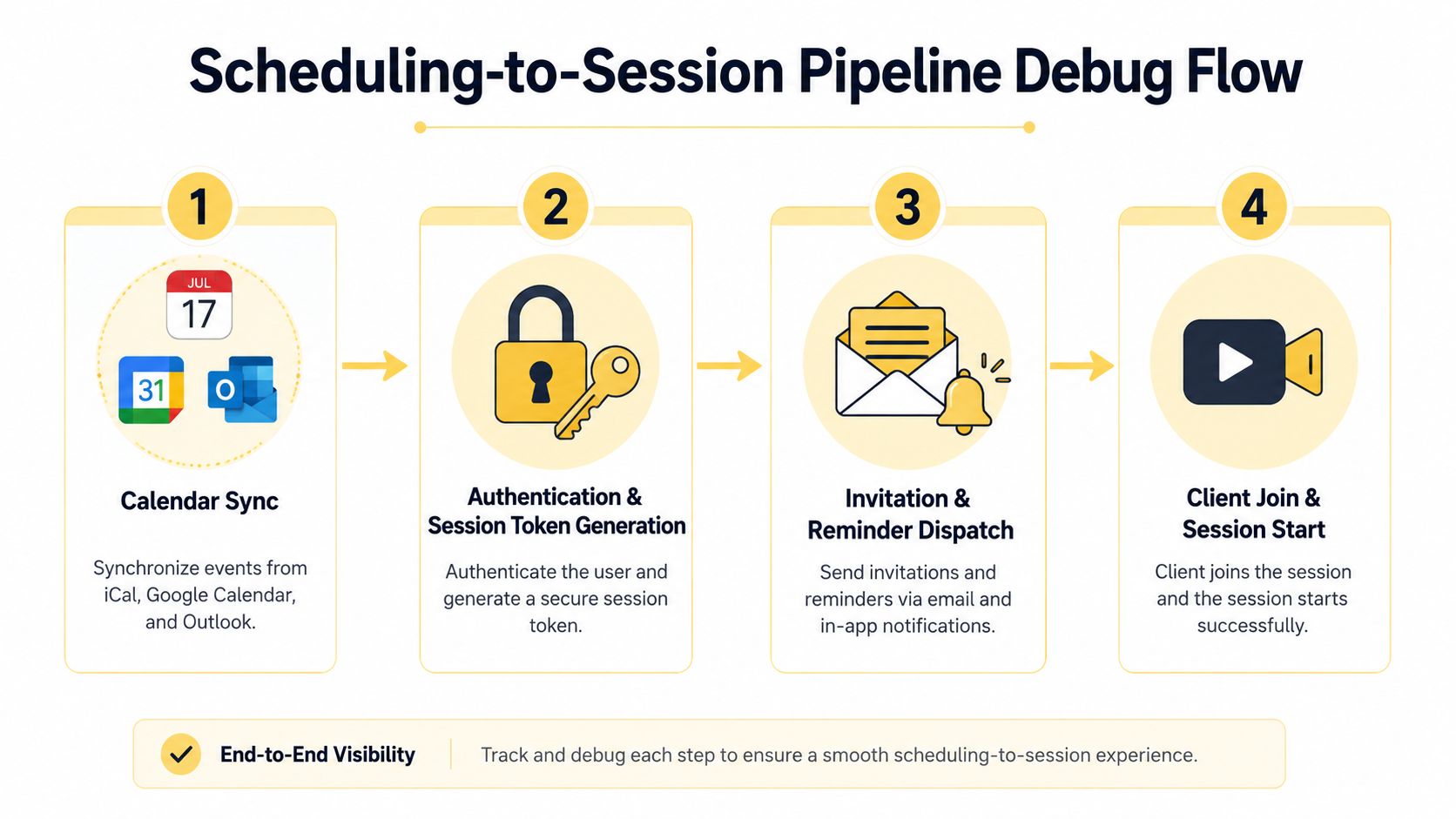
A no-show caused by technology is rarely a single bug. It's a broken chain. The booking exists, but the calendar entry has the wrong timezone. The reminder contains a stale URL. The session token expired after a reschedule. The client clicks Join from an unsupported browser and receives no useful next step.
Debug the pipeline in order.
Start with the calendar record
Normalize timezone data when the appointment is created, not when the reminder is sent. Your iCal feed, Google Calendar API connection, and Outlook integration should preserve the participant's intended local time, account for daylight saving transitions, and enforce buffer time between sessions. If a coach schedules consecutive calls, the system should prevent accidental overlap rather than trusting the coach to calculate travel or reset time manually.
When a session changes, update the canonical appointment record first. Then regenerate or revalidate the room association, update the calendar event, and send a reminder that points to the current session. Don't assume that changing the booking automatically changes an event already stored in a client's calendar.
For coaches who want the scheduling layer to remain connected to the rest of the practice, Coachful scheduling software is one example of a coaching-oriented workflow to evaluate alongside standalone calendar tools.
Treat authentication as a handoff
Generate a unique session token at booking time, but don't treat token creation as proof that the meeting is valid forever. At join time, the platform should verify the participant's identity, confirm the session is active, check the token's expiry and appointment association, and route the participant to the correct room. A rescheduled session must invalidate the old path or redirect it safely.
Use narrowly scoped permissions when an assistant schedules for a coach who hosts. The assistant may create or modify appointments, while the coach can enter the room, manage participants, and access session records. OAuth refresh failures deserve explicit monitoring because a calendar can appear connected while stopping synchronization.
Give failure a useful shape
A client on an unrecognized device shouldn't see a blank error. Offer a browser-based route where supported, explain camera and microphone permissions in plain language, and provide a tested fallback when WebRTC isn't available. The coach should see whether the client is waiting, blocked by authentication, denied permissions, or disconnected.
A WebRTC usage study found an average session failure rate of 12%, with 85% of those failures caused by NAT or firewall traversal problems. It also reported that about 20% of sessions dropped after the conference had already been established (WebRTC performance benchmarks). That's why STUN and TURN fallback, reconnection behavior, and visible diagnostics belong in the product plan, not just the infrastructure backlog.
Security Compliance and Accessibility Requirements
Coaching sessions can contain disclosures about work, relationships, health, finances, and personal goals. The platform must protect the session itself, the identity of each participant, and every recording, transcript, note, and calendar connection around it.
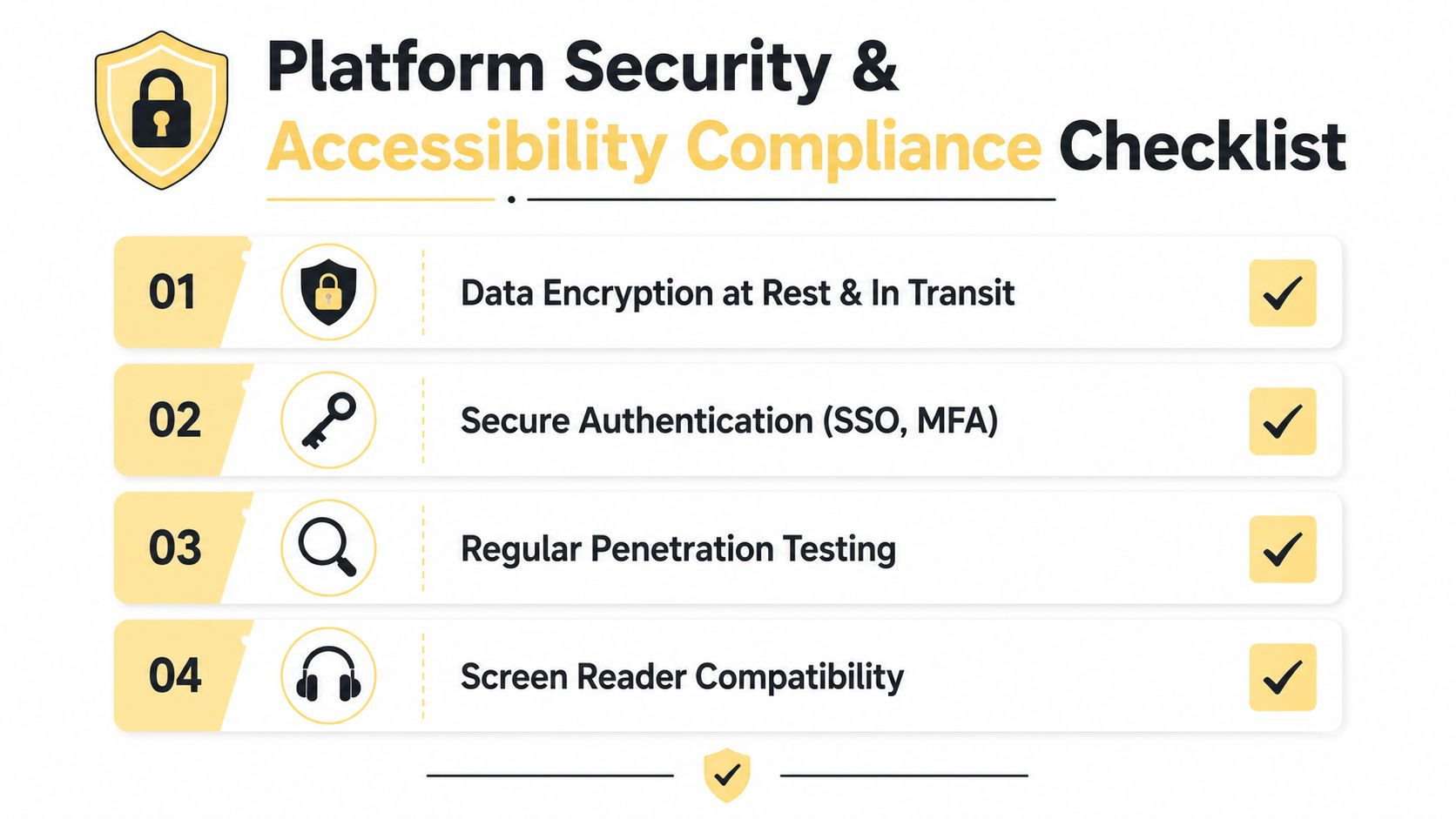
Security controls should be visible in the architecture without making the client feel interrogated. Use encrypted transport and storage, strong identity controls, waiting rooms where appropriate, unique room identifiers, expiring session access, and audit records for administrative actions. If a health-adjacent coaching practice may handle regulated information, the platform and vendor relationship should support the required contractual and operational review. A BAA, where applicable, is only one part of that assessment.
Control integrations, not just meetings
CISA's guidance is especially relevant because the risk sits beyond the video room. Approved collaboration tools need centralized management, continuously updated settings, unauthorized clients should be removed, and end users shouldn't install unmanaged software. Apply the same thinking to OAuth connections for calendars, messaging systems, storage providers, and recording services.
A useful risk review groups integrations by what they can expose:
- Identity connections: SSO and MFA can strengthen access, but offboarding must revoke sessions and connected applications.
- Recording and storage: Confirm who can retrieve files, where they're stored, and how deletion is enforced.
- Messaging and files: Limit access to the client or cohort context instead of exposing a broad workspace.
- Third-party applications: Require approval, document scopes, and review persistence after a user leaves.
The practical purpose of a security and privacy review is to give coaches an answer when an enterprise buyer asks how client information moves through the system. A focused data protection and compliance guide can complement a product-specific review, but it shouldn't replace one.
Accessibility must work during the conversation
The FCC's 2024 Video Conferencing Order requires at least one captioning mode that displays spoken communication accurately and synchronously. The guidance defines accurate captions as verbatim, in the order spoken, without summarizing or paraphrasing. Synchronous captions begin when speech begins, keep pace with the speaker, and remain visible long enough to read (FCC video conferencing accessibility guidance).
That requirement changes the implementation question. “Captions available” isn't enough if a client can't activate them quickly or the words trail behind a fast coaching exchange. Platforms must also allow users to connect third-party captioning services, which makes captioning interoperability a concrete integration requirement.
FCC guidance further says users must be able to activate and adjust captions, speakers, signers, and user names without host permission. Controls should support changes to caption size, font, position, color, opacity, and background, as well as window minimization, pinning, multi-pinning, spotlighting, and related configurations (FCC accessibility interface requirements).
For a coach, that could mean a deaf client enlarges captions independently during a fast group exercise while the facilitator spotlights shared material. Keyboard navigation, screen reader labels, permission prompts, and mobile usability should be tested by people who rely on them, not inferred from a checklist.
Operationally minded teams may also compare their scheduling process with a practical Calendly setup for merchants, particularly when payment and appointment workflows intersect. The important question is whether each connection has a clear owner, scope, and revocation process.
Designing the Client Experience Around Recording and Storage
Recording isn't a file feature. It's a promise about what happens to a sensitive conversation after the call ends. The experience begins with consent, continues through capture and storage, and finishes when a client watches, downloads, or asks for deletion.
A coach should see a clear recording state before speaking about a personal issue. Participants should receive a consent prompt that reflects the applicable jurisdiction and the session's purpose, with a meaningful choice rather than a buried setting. The interface should provide a visible indicator, a clear pause action, and an understandable explanation of who can access the result.
Connect capture to governance
Store recordings in encrypted object storage and deliver them through signed, expiring URLs rather than permanent public addresses. Retention should match the coaching agreement and the client's expectations. Automatic deletion is more reliable than asking a busy coach to remember a future administrative task.
Platform-managed storage offers a coherent playback experience and tighter control, but it creates storage, support, and liability responsibilities. Sending files to a client-owned cloud bucket can reduce platform storage obligations, but it fragments search, permissions, playback, and deletion. Neither model works if the coach can't explain where a recording lives and who can access it.
A data retention policy framework can help teams turn broad privacy intentions into concrete rules for recording, notes, exports, and deletion.
Make playback useful on a phone
Clients often revisit recordings while moving between commitments. The player should work on small screens, support speed controls, and load progressively on variable connections. Chapter markers linked to session notes can turn a long conversation into an actionable resource, especially when the coach marks a goal-setting moment, a difficult decision, or a committed next step.
| Coaching Vertical | Auto-Record Default | Retention Window | Client Access Model | Compliance Notes |
|---|---|---|---|---|
| Executive | Off by default unless the engagement requires review | Defined by the coaching agreement | Private, authenticated playback | Obtain explicit consent and respect enterprise data rules |
| Wellness | Off by default, with recording enabled for agreed learning use | Short, purpose-specific retention | Authenticated playback with deletion request path | Treat personal disclosures as sensitive and limit secondary use |
| Career | Optional, selected per session | Aligned with the program or engagement terms | Client portal playback with controlled sharing | Explain access, downloads, and deletion before recording begins |
These defaults aren't substitutes for legal review. They're product decisions that reduce ambiguity. A coach should never have to discover after a session that an automatic recording was stored indefinitely, shared with an unexpected administrator, or made inaccessible to the client who requested it.
Testing and Rolling Out Your Video Integration
The first month in production exposes conditions that a clean staging environment rarely reproduces. A staff laptop on a reliable office network doesn't represent a client joining from a phone, a restrictive corporate firewall, or a noisy commute.
Start with a controlled internal launch. Have staff run real coaching sessions, reschedule appointments, join from mobile browsers, deny permissions, switch networks, pause recordings, and reconnect after interruption. Test NAT and TURN fallback, browser compatibility including iOS Safari behavior, and adaptive bitrate under throttled connections.
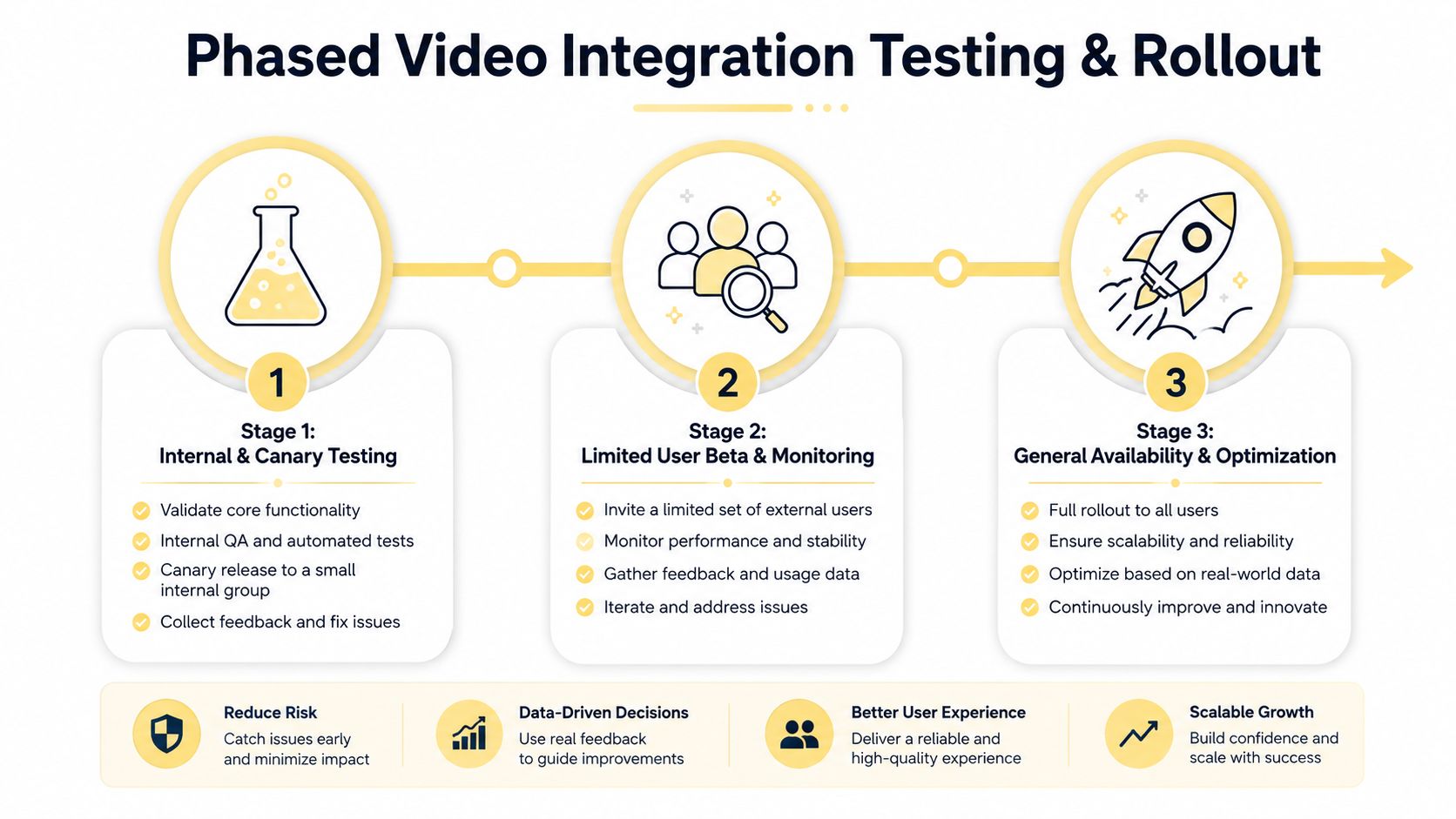
Then expose the workflow to a limited client cohort with a visible feedback route. Monitor not only whether a room was created, but whether the participant joined, whether media started, whether the call remained stable, and whether the recording completed.
Check the failures coaches actually feel
- Timezone mismatch: Compare the booking timezone, stored appointment time, calendar event, reminder, and room start time. Alert when they disagree.
- Expired token: Reproduce a reschedule and return visit. Regenerate access safely and invalidate the obsolete token.
- Speakerphone echo: Join from a phone with external audio, detect likely echo conditions, and guide the participant to headphones or muted playback.
- Corrupted recording: Interrupt an upload and verify resumable or recoverable behavior. Alert the coach when processing fails instead of showing a misleading completed state.
- Spam-bound reminders: Send test messages through common mailbox providers and monitor delivery failures, bounces, and spam placement.
Benchmarks for cloud contact centers found that 100% of intracontinental calls stayed within generally acceptable real-time thresholds for RTT, packet loss, throughput, and jitter, while fractional packet loss was typically under 1% except on Africa-to-North America and Europe-to-Asia routes (independent WebRTC quality dataset). That supports region-aware media deployment and continuous quality monitoring, but it doesn't remove the need to test a coach's actual audience and geography.
The rollout can move from internal testing to a limited beta and then general availability only when support knows the fallback process. Define rollback criteria in advance. If join failures, missing recordings, or authentication errors rise beyond an acceptable operational threshold, disable the new path without deleting appointment data and tell coaches exactly which link or workflow to use temporarily.
The mobile-first reality deserves attention. A 2026 statistics roundup reports that 86% of remote workers use video conferencing tools at least once a week, 72% of users have joined from a smartphone at least once, and mobile devices account for 42% of total video conferencing sessions (video conferencing usage data). A coach whose client is joining between meetings needs a large, obvious Join button, minimal permissions friction, and a fallback that works when the ideal browser path doesn't.
Coachful brings scheduling, client workflows, session management, and built-in video calling into one coaching workspace, including scheduled and instant calls and native group sessions. Visit Coachful to evaluate whether its integrated approach can reduce broken-link anxiety, simplify client joining, and give your practice a more controlled path from booking to completed conversation.