Data Retention Policies: A Guide for Coaches

Coachful

You're probably holding client data in more places than you realize.
A few session notes live in Google Docs. Intake forms came through email. A client sent a vulnerable message on WhatsApp late one night and you kept it because it felt important. Zoom recorded a session you meant to delete later. Stripe has billing records. Calendly has appointment history. Somewhere in Dropbox, there's an old folder from a program you no longer run.
If that sounds familiar, you're not disorganized. You're running a modern coaching business.
Still, there comes a point where growth stops feeling clean and starts feeling heavy. A quiet question appears in the background of your work: What am I supposed to do with all this client data? Not in theory. In your actual practice, with your actual tools, your actual clients, and your actual limited time.
That's where data retention policies become useful. Not as legal theater. Not as a stack of jargon. As a practical operating rule for what you keep, why you keep it, where it lives, and when you delete it.
For coaches, this matters more than is often acknowledged. You're not just holding contact details and invoices. You may be holding personal histories, health-related disclosures, career struggles, relationship stress, identity questions, performance concerns, and private reflections clients would never want mishandled. A retention policy helps you protect those clients and protect yourself.
Why Your Coaching Data Is a Ticking Clock
A coach I once advised had built a solid practice the way many coaches do: one tool at a time. Gmail for intake. Zoom for calls. Google Drive for notes. A spreadsheet for leads. Voice memos after sessions. PDFs of signed agreements in a folder labeled “admin.” It all worked, until it didn't.
The issue wasn't one dramatic failure. It was accumulation.
She started asking normal questions that had no easy answer. Which version of a client's intake form was the current one? Why was a former client's divorce story still sitting in an old document folder? Did she really need years of session recordings she'd never rewatch? If a client asked what data she had, could she even find it all?
That's the ticking clock. The longer you keep scattered client data, the harder it becomes to manage responsibly.
What coaches often tell themselves
Most coaches don't keep everything because they're careless. They keep everything because each item once felt useful.
- “I might need this later.” Maybe. But “maybe” is not a retention rule.
- “Deleting it feels risky.” Sometimes keeping it is riskier.
- “It's just my small practice.” Small practices still handle highly personal information.
- “I'm being thorough.” Thoroughness without boundaries turns into clutter and exposure.
A messy digital filing cabinet creates two kinds of stress. One is operational. You waste time hunting through systems. The other is emotional. You know you're carrying confidential material without a clear framework for handling it.
Practical rule: If you don't know why you still have a piece of client data, you probably shouldn't still have it.
Why keeping everything fails
The “save it forever” approach sounds safe because deletion feels final. But indefinite retention usually creates more problems than it solves.
It leaves old notes, outdated forms, and forgotten recordings sitting in tools you no longer actively monitor. It makes client requests harder to handle. It increases the amount of sensitive information you'd need to review if there were a dispute, a security issue, or a client asking for clarity.
A good data retention policy changes the feeling of your business. You stop carrying invisible weight. You know what belongs in your systems, what doesn't, and what gets reviewed on a schedule. That isn't just compliance. It's professionalism.
Decoding Data Laws Without a Law Degree
Privacy law looks intimidating because the labels sound technical. GDPR. CCPA. PIPEDA. Local state laws. Country-specific rules. For many coaches, the first reaction is emotional, not legal: Surely this is for larger companies, not me.
That's not a safe assumption.
If you coach clients across borders, collect personal details through forms, store session notes, send emails, process payments, or record calls, privacy obligations can apply to your practice. The exact rule set depends on where you operate, where your clients are, what kind of data you collect, and how you use it.
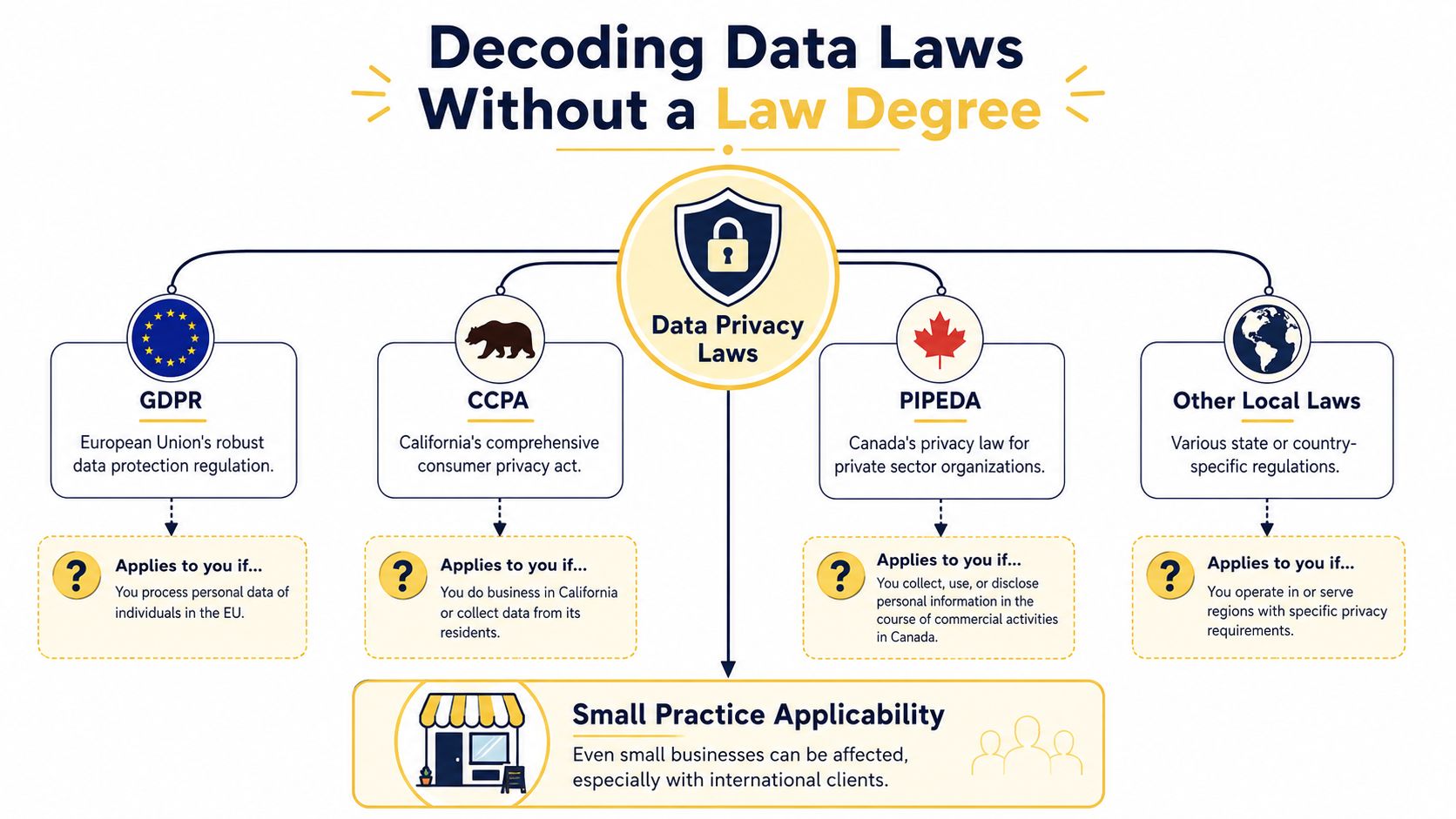
Translate the legal terms into coaching language
Here's the simpler version of the legal vocabulary coaches usually get stuck on.
| Term | What it means in a coaching practice |
|---|---|
| Personal data | Any information tied to a person, such as name, email, phone number, intake responses, session notes, or messages |
| Sensitive data | Information that feels especially private or protected, such as health details, identity-related disclosures, or highly personal reflections |
| Data controller | You, if you decide what client data you collect and how you use it |
| Processor | A tool or vendor handling data on your behalf, like Zoom, Stripe, Google Drive, or your email platform |
| Lawful basis | Your reason for collecting and using data, such as running the coaching service a client signed up for |
| Retention | How long you keep the data before deleting or anonymizing it |
Coaches often treat session notes like informal working material, but legally and ethically, they're more than that. They can contain some of the most personal information in your business.
A practical way to decide what applies to you
You don't need to become a privacy lawyer. You do need a basic sorting process.
Ask yourself:
- Where am I based? Start with the laws that apply where your business operates.
- Where are my clients located? If you coach internationally, don't assume your local rules are the only ones that matter.
- What data do I collect? Names and emails are one level. Session notes and personal disclosures are another.
- Which tools touch that data? Every app in your workflow matters.
- What promises have I made in contracts or policies? Your own language can create obligations too.
If that last point feels abstract, look at your agreements. Many coaches use templates that define confidentiality, records, and communication boundaries, but they forget to align those terms with actual practice. If you're updating your client agreements, these coaching contract templates are a useful place to review how your documentation supports your process.
Law is only part of the picture
Some coaches focus so hard on digital files that they forget about hardware. An old laptop, external drive, or retired phone may still contain notes, recordings, or client emails. When devices leave your control, disposal matters just as much as storage. If you ever need guidance on secure device handling, this resource on secure ePHI disposal with Beyond Surplus is worth reviewing because it shows what responsible disposal looks like when sensitive information may be involved.
If you can explain your data choices in plain English to a client, you're already much closer to compliant than a coach who hides behind vague legal wording.
Where Is Your Client Data Actually Living
Most coaches underestimate their data footprint because they think in categories, not locations.
They think, “My client notes are in one place.” Usually they aren't. A note might start in an intake form, move into a CRM, get copied into a Google Doc, then show up again in an email recap. The same client may also appear in your scheduling system, payment processor, video platform, cloud storage, and newsletter tool.
That's why the first real task isn't writing a policy. It's building a data map.
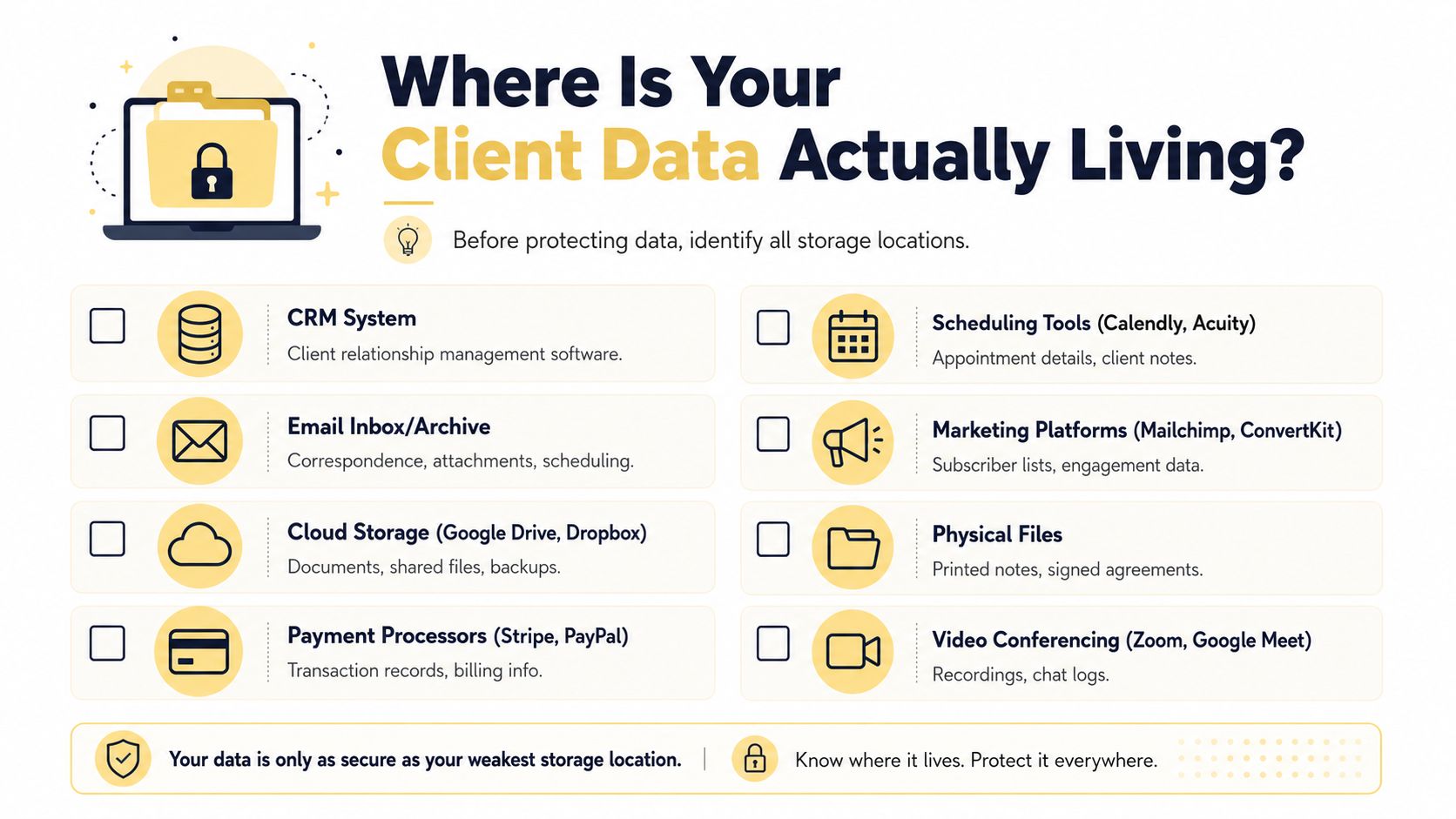
Start with the obvious places
Open a blank document and list every system you use from first contact to final invoice.
For most coaches, that includes some mix of:
- Email accounts such as Gmail or Outlook, including archives, folders, and attachments
- Cloud drives like Google Drive, Dropbox, iCloud, or OneDrive
- Call platforms such as Zoom or Google Meet, especially if recordings or chat logs are enabled
- Payment systems like Stripe or PayPal
- Scheduling tools such as Calendly or Acuity
- Marketing tools like Mailchimp or ConvertKit
- Messaging apps including WhatsApp, Slack, or text threads
- Paper records like signed forms, handwritten notes, or printed worksheets
Then add anything you almost forgot. Lead spreadsheets. Voice notes on your phone. Download folders. Old course platforms. Archived folders from prior offers. Shared folders with subcontractors or team members.
Use the questions that uncover hidden storage
A strong data map comes from asking uncomfortable, specific questions.
Did you save intake forms as email attachments and then also upload them somewhere else?
Did Zoom default to cloud recording?
Do you have a folder called “old clients” that no one has reviewed in ages?
Did a virtual assistant ever have access to a shared drive?
Do former discovery call leads still sit inside your scheduling tool?
Are there client details inside your client management software that never got cleaned up after a program ended?
Those questions matter because retention policies fail when data exists in places the policy never accounted for.
Build a simple map you can actually maintain
Don't overcomplicate this. A practical map can live in a spreadsheet with columns like these:
| Data type | Where it lives | Why you keep it | Who can access it | Review trigger |
|---|---|---|---|---|
| Intake form responses | Form tool and email inbox | Client onboarding | Coach only | End of client relationship |
| Session notes | Notes app or document folder | Service delivery | Coach and authorized team member | Inactivity review |
| Invoices and receipts | Payment platform and accounting folder | Financial records | Coach and accountant | Financial review cycle |
What matters is visibility. Once you see the full picture, your anxiety usually drops. You're no longer guessing where client data might be. You know.
A coach without a data map usually has duplicate records, forgotten records, and records nobody meant to keep.
What works and what doesn't
What works is one authoritative list of systems, reviewed whenever you add a new tool or launch a new service.
What doesn't work is relying on memory. It also doesn't work to assume a vendor handles everything for you. Your tools may store the data, but you're still responsible for deciding what should be there and for how long.
How Long Should You Keep Client Data
This is the question most coaches really want answered. How long is long enough?
The frustrating but honest answer is that there isn't one universal rule for every coaching practice. The right retention period depends on your legal obligations, your contracts, your accounting needs, the sensitivity of the information, and whether the data still serves a real purpose.
That said, there is a useful principle that keeps your decisions grounded: keep data only as long as you can justify keeping it.
Here's the visual version of that decision process.
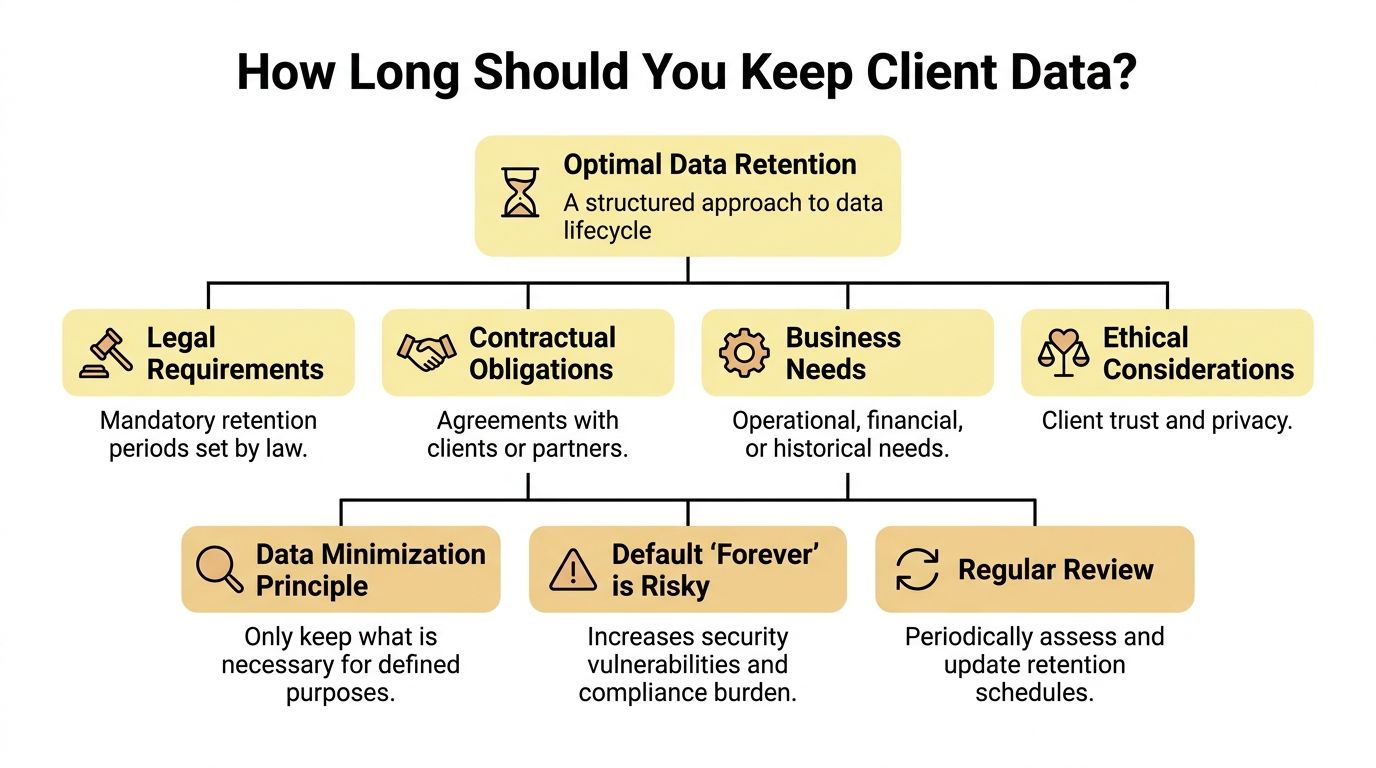
Why “forever” is usually the wrong answer
Coaches often keep data indefinitely for emotional reasons.
They want to preserve the client journey. They worry they'll need old notes if a past client returns. They think old records might protect them if a misunderstanding comes up later. Sometimes they don't want to make the wrong deletion decision, so they make no decision at all.
But “forever” is rarely defensible. Old data becomes stale, context gets lost, and sensitive material sits around long after its original purpose has ended. If a client disclosed burnout, trauma history, workplace conflict, or health concerns during coaching, ask yourself whether you can still explain the business reason for storing that information years later.
A starter retention schedule for coaches
Use this as a working template, not as legal advice. The value is in the reasoning.
| Data category | Practical retention approach | Why this often makes sense |
|---|---|---|
| Prospect inquiries | Keep only while actively following up, then delete or anonymize if the person never becomes a client | Old lead data loses relevance quickly |
| Discovery call notes | Retain briefly if needed for enrollment decisions, then delete if no coaching relationship begins | These notes often contain personal context without an ongoing service reason |
| Active client records | Keep during the coaching engagement while they're needed to deliver the service | You need current records to coach well |
| Inactive client records | Move to a limited-access archive, review on a schedule, then delete when no longer needed | This balances continuity with minimization |
| Invoices and payment records | Keep according to accounting, tax, and bookkeeping requirements in your location | Financial records usually have separate retention needs |
| Marketing consent records | Keep as long as needed to show how and when consent was obtained, and stop marketing if consent is withdrawn | Consent should be traceable if questioned |
| Session recordings | Avoid keeping them by default unless there is a clear, documented reason | Recordings are high-sensitivity and easy to over-retain |
A few examples make this concrete.
If someone books a discovery call, shares a difficult career story, and never signs on, keeping detailed notes indefinitely is hard to justify. If a current client is in a long-term leadership engagement, active notes may remain necessary during the work. If you recorded sessions “just in case” but never use the recordings, that's a strong sign they shouldn't be part of your default workflow.
The questions that produce a defensible timeline
When deciding how long to keep a category of data, ask:
- What purpose does this serve now? If the original reason has ended, retention needs stronger justification.
- Is this legally required elsewhere? Financial and tax records often follow different rules than coaching notes.
- How sensitive is it? The more personal the information, the stronger your reason should be for keeping it.
- Would I be comfortable explaining this to the client? If the answer is no, revisit the retention period.
- Can I archive instead of keep it active? Not all data needs immediate deletion, but inactive data shouldn't remain mixed with live records.
Client-centered test: If a former client asked, “Why do you still have that?”, your answer should be specific, calm, and credible.
Retention is not the same as backup
Many coaches confuse live records, archived records, and backups.
A backup exists so you can restore systems if something breaks. It's not a reason to keep unnecessary client data in active use. Archiving means moving inactive material into a controlled, limited-access location. Retention means deciding how long any version of that data should continue to exist.
That distinction matters because deleting a file from your main folder doesn't always remove every copy everywhere. You need to know whether your systems sync, archive, or preserve prior versions.
A short explainer can help anchor the concept:
What a good schedule feels like in practice
A workable schedule doesn't try to be perfect. It tries to be consistent.
It should be simple enough that you'll follow it during a busy month. It should distinguish between active clients, former clients, prospects, financial records, and marketing lists. It should also leave room for exceptions, such as unresolved disputes, insurance questions, or a legal hold where deletion must pause.
What doesn't work is creating one vague line in your privacy policy that says you keep data “as necessary” and never defining what that means internally. Good data retention policies turn that phrase into actual decisions.
Putting Your Data Retention Policy into Action
A written policy feels productive. Implementation is what protects you.
Many coaches find themselves stalled. They've decided what should happen, but their day-to-day systems still run on habit. Notes stay where they land. Old forms remain in inboxes. Recordings pile up because no one set a reminder to review them. The policy exists, but the workflow doesn't.
Turn the policy into recurring actions
You need a small operating system, not a heroic cleanup day.
Start with these core habits:
- Choose one source of truth for client records. If notes live in three places, your retention policy will drift immediately.
- Create review triggers. End of engagement, inactive period, contract completion, or financial close are all practical checkpoints.
- Separate active from inactive records. Former clients shouldn't sit mixed into your daily workspace.
- Use a deletion log. Keep a simple record of what was deleted, when, and by whom.
- Set calendar time for data review. Even solo coaches need designated “data officer time.”
That last point matters. If no one owns retention, retention doesn't happen. In a solo practice, that owner is you.
Deletion needs to be deliberate
Dragging a file to the trash may remove the visible copy, but it doesn't necessarily complete the job across synced folders, archived emails, downloaded attachments, device storage, or vendor systems.
Use a checklist for deletion workflows:
- Primary file removal from the working location
- Duplicate cleanup in email, downloads, and shared drives
- Recording review in Zoom or other video platforms
- Third-party review in forms, scheduling, and messaging tools
- Audit note documenting the action
If you need a broader reference point for structuring those rules, this guide to data retention is useful because it frames retention as an operational discipline, not just a legal checkbox.
Build retention into your intake and delivery flow
A clean process starts before the first session.
If your coaching intake forms ask for information you don't really need, you create retention work for yourself later. Every field should earn its place. Don't collect detailed medical, family, or employment history unless it is genuinely relevant to your coaching scope and you know how you'll store and retire it.
A practical implementation model looks like this:
| Stage | What to do |
|---|---|
| Before onboarding | Limit fields to necessary information and document where submissions land |
| During active coaching | Keep working notes in one controlled system with clear access boundaries |
| At offboarding | Change client status, move records for review, and trigger your retention clock |
| During review cycles | Archive what must be kept, delete what no longer has a purpose, log the action |
Good implementation feels boring. That's the point. Your policy should run as a routine, not as a recurring crisis.
Turning Your Policy into a Client Trust Signal
Many coaches worry that talking about data will make the relationship feel clinical.
Usually the opposite happens. Clients notice when your practice has boundaries, care, and thought behind it. A clear approach to privacy signals maturity. It tells people you don't just know how to hold space emotionally. You also know how to hold their information responsibly.
That matters because clients don't separate the coaching experience from the administrative experience as much as coaches think they do. A thoughtful intake process, clear confidentiality language, and a calm explanation of your data handling all support the same conclusion: this coach is safe to work with.
What to say without sounding legalistic
You don't need dense policy language in your client communication. You need clarity.
Here are examples you can adapt:
I take your privacy seriously. I only collect information I need to deliver coaching, and I review client records regularly so I'm not keeping personal information longer than necessary.
Coaching notes and administrative records are stored in the tools I use to run my practice. Access is limited, and records are reviewed according to my internal retention process.
If you have questions about what information I keep or how I handle it, you can ask at any time.
That language works because it sounds human. It answers the client's real concern, which is not “Do you know privacy terminology?” but “Will you handle my personal information with respect?”
Where to place the trust signal
Use your retention approach in a few key moments:
- In your agreement with a brief section on records, storage, and deletion practices
- In your privacy policy with plain-language retention wording
- During onboarding as a short verbal or written reassurance
- At offboarding so clients know what happens to their information after the work ends
What doesn't work is burying everything in tiny legal text you never follow operationally.
The deeper benefit for coaches
There's also a psychological shift on your side.
When you know what you keep and why, you stop carrying a low-grade sense of disorder. You're less likely to hoard notes out of fear. You're less likely to collect too much in the first place. You make cleaner decisions because your business has an ethical framework around information, not just a pile of tools.
That's why strong data retention policies are more than compliance documents. They're part of how a serious coach creates safety, trust, and professional steadiness.
If you want one place to manage onboarding, notes, scheduling, payments, and client progress without stitching together disconnected tools, Coachful gives coaches a more controlled foundation for running a modern practice. It helps reduce data sprawl, simplify workflows, and support the kind of organized client experience that makes retention policies easier to follow in real life.