Learn What Is Community Manager for Coaches in 2026

Coachful
You started coaching because you're good at helping people change. You didn't start so you could answer the same onboarding question in three places, chase silent clients in a group, and spend your evenings trying to wake up a dead comment thread.
This is the trap many coaches create by accident. The program sells. More clients join. The group gets bigger. Then the client experience gets thinner because you become the bottleneck for every welcome message, every reminder, every check-in, every conflict, and every dropped ball.
If you're asking what is Community Manager in a coaching business, here's the blunt answer. It's the person who keeps your client ecosystem alive, useful, and accountable so your coaching can scale without your attention being split into fragments all day.
Are You Drowning in DMs and Group Comments
A coach launches a group program. At first, it feels manageable. Ten clients become twenty, then more. The private messages start stacking up. Someone can't find the worksheet. Someone else wants reassurance before the live call. Two clients ask the same question in different places. A few strong members dominate the conversation, and the quieter ones start disappearing.
The coach tells herself she's “being available.” What she's really doing is building a business that depends on her constant manual presence.
The hidden cost of doing it all yourself
When you handle every comment and every nudge personally, three things happen.
- Your coaching quality drops: You spend prime thinking time on low-impact responses instead of preparing for sessions, refining your framework, or noticing deeper client patterns.
- Clients get an uneven experience: The loudest people get the fastest help. The quiet people drift.
- Your group loses momentum: Communities don't stay healthy on hope. Someone has to welcome, guide, prompt, and follow up.
A lot of coaches try to patch this with better posting habits. Messaging matters, but posting alone won't save a flat group. If you need a cleaner communication rhythm first, this guide on how to create group messages for coaches is useful. But messaging is only one slice of the problem. You still need someone owning the human flow around it.
A quiet group doesn't always mean clients don't care. It often means nobody is actively shaping participation.
This is a real role, not a made-up online title
Some coaches hesitate because “community manager” sounds like internet jargon. It isn't. The role has real labor-market footing. The U.S. Bureau of Labor Statistics classifies related work under social and community service managers and projects 6% employment growth from 2024 to 2034, with about 18,600 openings per year on average and a median annual wage of $78,240 in May 2024 according to the Bureau of Labor Statistics occupational outlook.
That matters for one reason. It confirms this isn't random admin help. It's management work tied to engagement, support, and program oversight.
What this looks like in a coaching business
In a coaching practice, the pain shows up in ordinary moments:
- New members arrive confused: They join your Circle group, Slack, Facebook group, or portal and don't know what to do first.
- Questions repeat endlessly: You answer the same logistics issue over and over instead of building systems around it.
- Energy dips between calls: The live sessions are strong, but the days in between feel empty.
- You become the only source of accountability: If you don't post, comment, or check in, everything stalls.
That's where a community manager changes the game. Not by “doing social.” By protecting the client experience from chaos and making sure people stay engaged long enough to get results.
The Heart of the Role A Community Manager Defined
A community manager is not your hype person. Not your comment responder. Not your content scheduler with a friendlier title.
A community manager is the operational layer between your coaching business and the people inside it. In practice, that means they turn member feedback into action while shaping an environment where participation happens. That's consistent with how the role is defined by The Community Roundtable's explanation of what defines a community manager.
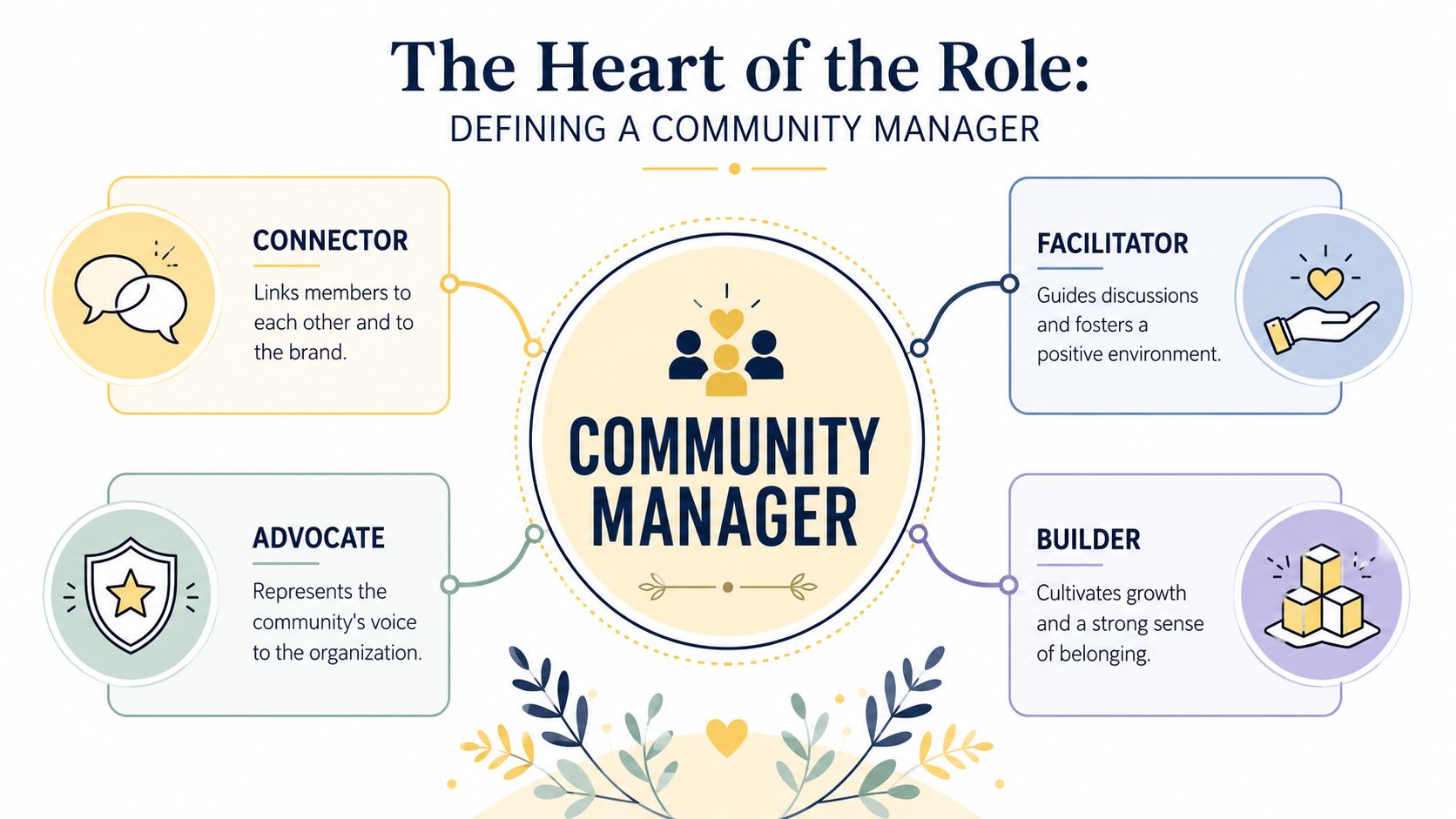
Think gardener, not broadcaster
The easiest way to understand what is Community Manager is to stop thinking in marketing terms.
A marketer broadcasts. A community manager cultivates.
A gardener doesn't force growth by yelling at plants. They create the conditions that make growth likely. They prepare the soil, notice what's dying, remove what harms the environment, and help healthy things spread. That's what a strong community manager does inside a coaching business. They make it easier for clients to connect, participate, and support each other.
Think host, not moderator
A moderator keeps the room from falling apart. A host makes people want to stay.
That's a major distinction. If your group only has rules and reminders, it may stay orderly, but it won't feel alive. A community manager notices who hasn't spoken yet, introduces people with common goals, celebrates useful contributions, and helps members understand how to participate without feeling awkward.
If you're working out your own model for how to build online community, keep that distinction in mind. Building a community isn't just collecting people in one place. It's designing repeated interactions that create belonging.
What this means for coaches specifically
For coaches, the role sits between your expertise and your clients' day-to-day experience.
Your framework may be excellent. Your calls may be sharp. But if clients feel lost between sessions, unsupported in the group, or disconnected from each other, your delivery breaks down. A community manager closes that gap.
Here's the practical definition I use for coaching businesses:
- They translate your program into lived experience: Clients know what to do, where to go, and how to engage.
- They protect momentum between coaching touchpoints: The group doesn't go dark when you're busy.
- They surface signal from noise: You hear what clients are confused about, resisting, enjoying, and needing.
If you want more practical structure around this, these strategies to grow an engaged coaching group will help. But the strategic takeaway is simple. A community manager doesn't replace your coaching. They make your coaching land better.
The role is about relationship throughput and participation quality, not just message reach.
Core Responsibilities and Daily Rhythms
Once coaches understand the concept, the next question is usually more direct. “Fine. What would this person do all day?”
Good. That's the right question.
In practice, the role usually combines engagement, writing, client care, moderation, and internal coordination. A review of 30 community manager job descriptions found the most requested skill was writing ability (83%), followed by customer relations in online channels (76%) and working with other departments (53%). The same review also found 43% asked for participation in social networks beyond the owned community, 43% required a bachelor's degree, and most expected roughly 2.5 to 3 years of relevant experience, according to this review of community manager job descriptions.
That profile fits coaching businesses surprisingly well. You don't need a mascot. You need a sharp operator who can write clearly, care about people, and coordinate across moving parts.
What they do daily
A good community manager often starts the day by scanning the room.
They check unanswered posts, review DMs or support questions, flag anything sensitive, and look for momentum gaps. If a thread is useful, they keep it moving. If a member sounds discouraged, they respond or escalate. If somebody is posting thoughtfully, they amplify it so the group learns that contribution gets noticed.
Then they create structure.
- Welcome and onboarding: Greeting new members, pointing them to the first action, and making sure they don't arrive to silence.
- Prompting participation: Posting check-ins, reflection questions, wins threads, or accountability cues that fit the program stage.
- Answer routing: Handling simple issues directly and escalating coaching questions to you when needed.
- Community hygiene: Cleaning up spam, duplicative posts, off-topic friction, and unclear threads.
What they do weekly
The weekly rhythm matters even more than the daily one because it marks the point where community stops being reactive.
A strong community manager will usually:
| Focus area | Typical tasks | Why it matters |
|---|---|---|
| Engagement | Seed discussions, tag members thoughtfully, revive stalled threads | Keeps the group from becoming passive content consumption |
| Content support | Surface member wins, repurpose client questions, organize resources | Makes the community feel relevant and alive |
| Moderation | Enforce boundaries, de-escalate tension, reinforce norms | Protects safety and trust |
| Operations | Track patterns, report friction points, update onboarding and FAQs | Improves the program over time |
Practical rule: If a task helps clients feel seen, know what to do next, or stay connected between calls, it probably belongs with the community manager.
What you can hand off first
Most solo coaches don't need a full-scale hire on day one. They need relief in the right places.
Start by handing off work that is important but shouldn't require your direct involvement:
- Repeated logistics questions: Where links live, how to submit work, when calls happen.
- Member activation: Welcome posts, intro prompts, check-in reminders, re-engagement nudges.
- Conversation shaping: Pulling useful comments into bigger threads and connecting members with each other.
- Group continuity: Keeping energy up after workshops, office hours, or live coaching calls.
If you want a closer look at the broader discipline, this article on Grow your coaching client community gives a useful operating lens. The key point is simple. Your community manager handles the layer of interaction that keeps clients engaged enough to benefit from your work.
Key Differences from Other Online Roles
Here, coaches make expensive mistakes.
They hire a VA who can post captions and answer a few comments, then wonder why the group still feels flat. Or they assign moderation to an assistant and expect retention, referrals, and peer support to magically improve.
Those are different jobs.
The fast distinction
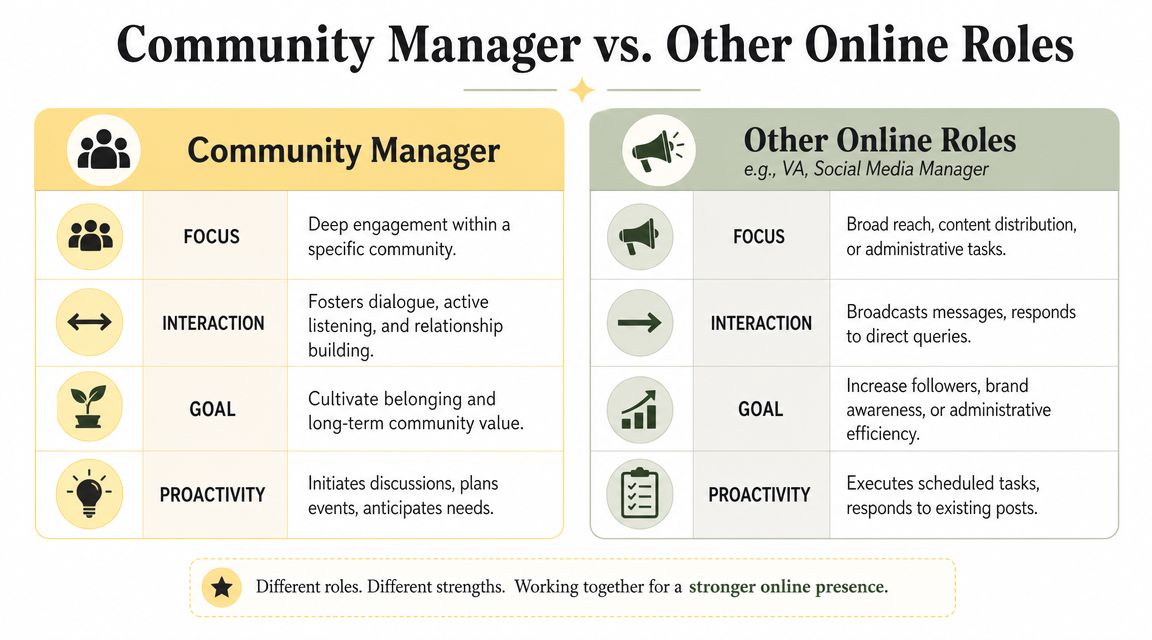
A community manager owns belonging, participation, and feedback flow.
A social media manager owns publishing, reach, and platform presence.
A moderator enforces rules and keeps spaces safe.
A community builder is often a founder-level strategist who designs the broader vision, offer structure, and long-term ecosystem.
Community Manager vs related roles
| Role | Primary Goal | Core Tasks | Key Metric |
|---|---|---|---|
| Community Manager | Deep engagement inside a defined group | Welcome members, guide discussions, encourage peer support, surface feedback, protect culture | Participation quality and ongoing member involvement |
| Social Media Manager | Reach and visibility across public channels | Create posts, schedule content, monitor engagement, support campaigns | Audience attention and content performance |
| Moderator | Safety and rule enforcement | Review posts, remove harmful content, handle disputes, maintain order | Community safety and policy compliance |
| VA | Task completion and admin support | Calendar work, inbox help, formatting, posting, organization | Operational efficiency |
| Community Builder | Design the overall ecosystem | Define vision, structure offers, create pathways for connection and contribution | Strength and coherence of the overall community model |
The coaching-business version of this mistake
Let's make it concrete.
A social media manager can help you publish Instagram content about mindset, leadership, health habits, or executive presence. Useful. But that doesn't mean they know how to revive a silent mastermind group, welcome a nervous new client, or spot that half your cohort is confused about the week's assignment.
A moderator can remove inappropriate comments. Also useful. But that doesn't mean they can create accountability pods, identify emerging leaders in the group, or tell you that clients are stuck on a pattern you need to address in your next call.
Hiring for the wrong role doesn't save money. It delays the fix.
When you need which role
Use this simple filter:
- Need more visibility? Hire social media help.
- Need admin relief? Hire a VA.
- Need safety and rule enforcement in a large space? Add moderation.
- Need clients to engage, stay, and support each other? You need a community manager.
Coaches often bundle these roles in one person at first. That's fine if you're realistic. Just don't confuse posting content with managing community. They overlap, but they are not the same job.
How a Community Manager Transforms a Coaching Program
The value of this role gets obvious when you stop looking at tasks and start looking at client behavior.
A coaching program without community management often relies on the coach's charisma. A coaching program with community management relies on structure, connection, and follow-through. That's much more scalable.
Example one, the accountability problem
A health coach runs a group program. The weekly calls are strong. Clients leave inspired, then disappear for days. The coach starts carrying the whole accountability load by hand, checking in one by one, answering food log questions, and trying to restart conversation every time the group goes quiet.
A community manager changes the environment.
They create daily check-in threads. They pair members with similar goals. They welcome every small win publicly so progress becomes visible. They notice who stops posting and send a warm nudge before that person fully drops out.
Now the group no longer depends on the coach being everywhere. Members start helping each other. The program feels active even on non-call days.
Example two, the silent premium group
An executive coach runs a high-ticket cohort. Smart clients. Busy schedules. Good calls. Nearly no interaction between sessions.
The coach assumes these clients don't want community. That's often false. Many busy professionals do want it. They just don't want awkward, empty, forced community.
A community manager can make the group useful without making it noisy.
- They open a thread for live implementation takeaways after each session
- They connect members facing similar leadership challenges
- They curate discussion around a specific decision, bottleneck, or team issue
- They pull recurring patterns back to the coach so future sessions hit the mark
The result isn't “more activity” for its own sake. It's more relevant interaction.
Example three, the alumni asset most coaches waste
A lot of coaches finish a program and let the relationship fade into occasional launches and scattered referrals.
That's a miss.
A community manager can keep alumni connected through themed discussions, light-touch touchpoints, curated wins, and invitations to contribute insight back into the ecosystem. Past clients stop being “former buyers” and become part of your practice's reputation, culture, and referral engine.
Clients stay longer and refer more naturally when they feel part of something, not just processed through something.
What actually changes
When this role is working, a coaching business feels different:
- New members get oriented quickly
- Quiet clients participate sooner
- Strong contributors get recognized
- Confusion gets surfaced before it turns into disengagement
- Your group develops memory, rhythm, and culture
That last part matters more than most coaches realize. Culture is what keeps a community moving when you aren't in the room.
Measuring Success and Essential Tools
If you hire or assign this role, don't measure it with vanity metrics. Likes don't tell you whether clients are getting supported. Follower counts don't tell you whether your group is becoming more useful.
The right question is simpler. Are people participating, staying engaged, and getting pulled into the program instead of drifting to the edges?
Use a measurement loop, not random observation
At a technical level, community managers increasingly work in a loop built around social listening, moderation, and analytics, then use engagement and performance signals such as reach, engagement, and conversions to adjust content, response speed, and moderation rules, as described in Indeed's overview of what a community manager does.
For a coach, that loop should look like this:
- Listen: Notice where members are active, confused, silent, or frustrated.
- Interpret: Decide what the pattern means. Is onboarding weak? Are prompts too broad? Is one topic triggering strong response?
- Adjust: Change prompts, improve response timing, refine norms, or escalate coaching issues.
- Review: Check whether participation and client feedback improve.
Metrics that matter in a coaching business
You don't need a complicated dashboard to start. You need a few practical indicators.
- Participation quality: Are members posting thoughtful updates, asking useful questions, and replying to each other?
- Response speed: How long do unanswered questions sit before someone responds?
- Member-to-member interaction: Is the community depending entirely on you, or are clients supporting each other?
- Retention signals: Are people staying involved through the life of the program?
- Advocacy signals: Are members sharing wins, inviting peers into conversations, and staying connected after the formal engagement ends?
You can also track qualitative patterns. Those often matter more in coaching than raw counts. Are clients saying they feel supported? Do they know what to do next? Are they using the space between sessions?
The basic tool stack
Most coaches need tools in three categories.
| Category | What it handles | Examples |
|---|---|---|
| Community platform | Group space, discussions, onboarding, resource access | Circle, Slack, Facebook Groups, Mighty Networks |
| Client management | Programs, notes, scheduling, payments, progress tracking | Coachful, practice management tools, CRM systems |
| Analytics and follow-up | Tracking engagement, tagging patterns, reminders, communication | Native platform analytics, email tools, CRM workflows |
If you want stronger follow-up and segmentation discipline around client relationships, some of the thinking in these advanced CRM techniques for B2B can be adapted well for coaching operations too.
For coaches who want fewer disconnected systems, Coachful can sit in the client management layer by handling onboarding, scheduling, payments, progress tracking, programs, and group touchpoints in one workspace. That's useful when your community activity needs to connect back to real coaching delivery rather than floating as a separate marketing channel.
The rule is simple. Pick tools that help your community manager see behavior, respond quickly, and feed insight back into the program.
Your First Steps to Hiring or Assigning This Role
If you're ready, don't overcomplicate it.
If you're hiring
Look for someone who writes clearly, notices people quickly, and takes initiative without being dramatic about it. You want empathy, judgment, and follow-through. Ask how they would welcome a new member, revive a flat thread, and escalate a sensitive issue to you.
A simple role brief is enough to start:
- Own member onboarding and welcome flow
- Prompt participation between coaching sessions
- Monitor posts, comments, and questions
- Surface client feedback and friction points
- Maintain a supportive, well-guided group environment
If you're not hiring yet
Block two focused hours a week and become the first version of your own community manager.
Use that time to:
- Welcome every new member personally
- Post one useful prompt tied to current client goals
- Reply to silent or drifting members
- Notice repeated questions and improve onboarding
- Highlight one member contribution publicly
Don't wait until your group feels broken. Community management works best when you build the habit early, before silence, confusion, and churn become normal.
If your coaching business is growing and you need one place to manage programs, client communication, progress tracking, and community touchpoints without stitching together a pile of tools, take a look at Coachful. It's built for coaches who want cleaner delivery, stronger accountability, and a practice that scales without losing the human side.