Webinar Presentation Template for Coaches: 12 Slides to Adapt

Nour
Founder, Coachful
“What goes in my webinar slides so I can teach something useful without spending forty minutes talking about myself?”
A useful webinar presentation template for coaches needs a promise, a small teaching method, a worked example, a private exercise and an optional next step. Build those before choosing colors. The deck should help attendees make one better decision, not leave them waiting for the useful part while you deliver a disguised sales pitch.
Use the 12-slide outline below for a teaching-led webinar with a short reflection exercise. It is a starting structure, not a scientifically established slide count or a promise of sales. You can copy the slide text into PowerPoint, Keynote, Google Slides or another presentation tool.
The fictional example is a career coach teaching “Before you change roles, test one assumption.” It is not a client case study, validated assessment or report of results. The visual specimens illustrate five key slides; every important instruction also appears as live text below.
Decide what the deck must deliver
Write this sentence before opening a design tool: “By the end, participants will have [one usable output], so they can [one practical next move].” For the example webinar: “Participants will identify one assumption about their next role and choose a small way to investigate it.” That is achievable within a short class without pretending to resolve an entire career decision.
Then separate teaching from selling. Someone who never becomes a client should still leave with the promised output. Your paid service may offer continued support, but it should not be the missing final step that makes the free lesson usable.
- Audience: professionals considering a role change, not everyone who wants a better life.
- Output: one written assumption and one evidence-gathering action.
- Boundary: a reflection exercise, not recruitment, employment-law advice or a guarantee of a new job.
- Invitation: an optional conversation about coaching support, if that service genuinely exists.
If you need the surrounding registration and email journey, use the separate webinar funnel guide. This article is about the presentation itself: what to put on each slide and what to say around it.
The 12-slide webinar presentation template
Start with the following sequence. Keep explanations, transitions and contingency prompts in presenter notes rather than shrinking them into the slide body. A short deck can still overrun if every headline triggers a ten-minute story.
1. Title and a usable promise
On the slide: “Before you change roles, test one assumption.” Supporting line: “Leave with one question and a practical next step.” Add your real name and an accurate description of your work, without a ribbon of unverifiable badges.
Say: “Today we are not deciding whether you should quit your job. We are choosing one thing worth finding out before you make a decision.” That sentence lowers the stakes to the level the webinar can honestly support. It also gives the audience a reason to keep listening that is not your biography.

2. Who this session is for, and where it stops
On the slide: “For professionals exploring a role change. Bring a question, not a finished plan.” Add: “This is general educational material, not advice about your individual employment situation.” Adapt the boundary to your actual scope and audience.
Say: “You can participate in private notes. Please do not post employer names or other people's personal information in chat.” Tell people whether the event is recorded and where questions may appear. Do not promise confidentiality in a public webinar you cannot control.
3. The output and route
On the slide: “Name an assumption. Decide what evidence would help. Choose one small test.” These three phrases are the agenda and the eventual recap, not three entire coaching modules.
Say: “We will work through an example, then you can try it privately. There will be time for questions and an optional invitation at the end.” Disclosing the invitation prevents a surprise switch from teaching to selling. Give genuine permission to use the lesson without taking that next step.
4. One specific problem worth understanding
On the slide: “A preference is not yet evidence.” Underneath: “I want more autonomy” and “This role will give me more autonomy” are different claims.
Say: “The first sentence describes something you value. The second makes a prediction about an actual job. We can explore how you might check that prediction.” You are giving the audience a distinction they can use, not diagnosing why they are unhappy or telling them what to value.
5. The teaching method
On the slide: “Name the assumption → Choose the evidence → Run a small test.” Label it as a practical reflection framework if it is your own illustration. Do not add a scientific-sounding acronym to imply validation.
Say: “We are not trying to eliminate uncertainty. We are making one question more concrete.” Explain each step with one sentence. The example should do most of the teaching, so resist adding six substeps and three adjacent models.

6. One step in enough detail to use
On the slide: “Turn a broad wish into a checkable question.” Example: “Will this role let me decide how to organize my working day?”
Say: “What would you need to see or hear to judge that question more confidently?” Offer possibilities such as asking about decision rights or requesting an example of how a normal week works. Remind attendees that one person's account is information, not certainty. Avoid claiming an informal conversation can reveal every workplace problem.
7. A worked example, clearly labeled
On the slide: “Fictional example: ‘A smaller company means more autonomy.’ Evidence to seek: ask two role-holders who approves daily decisions.” This example introduces a plausible investigation, not a guaranteed recipe.
Say: “We would also ask what those people mean by autonomy. Control over hours, methods, budget and priorities are not necessarily the same thing.” Show the reasoning rather than declaring the assumption wrong. A coach helps people examine a belief without replacing it with the coach's preferred conclusion.

8. A private exercise
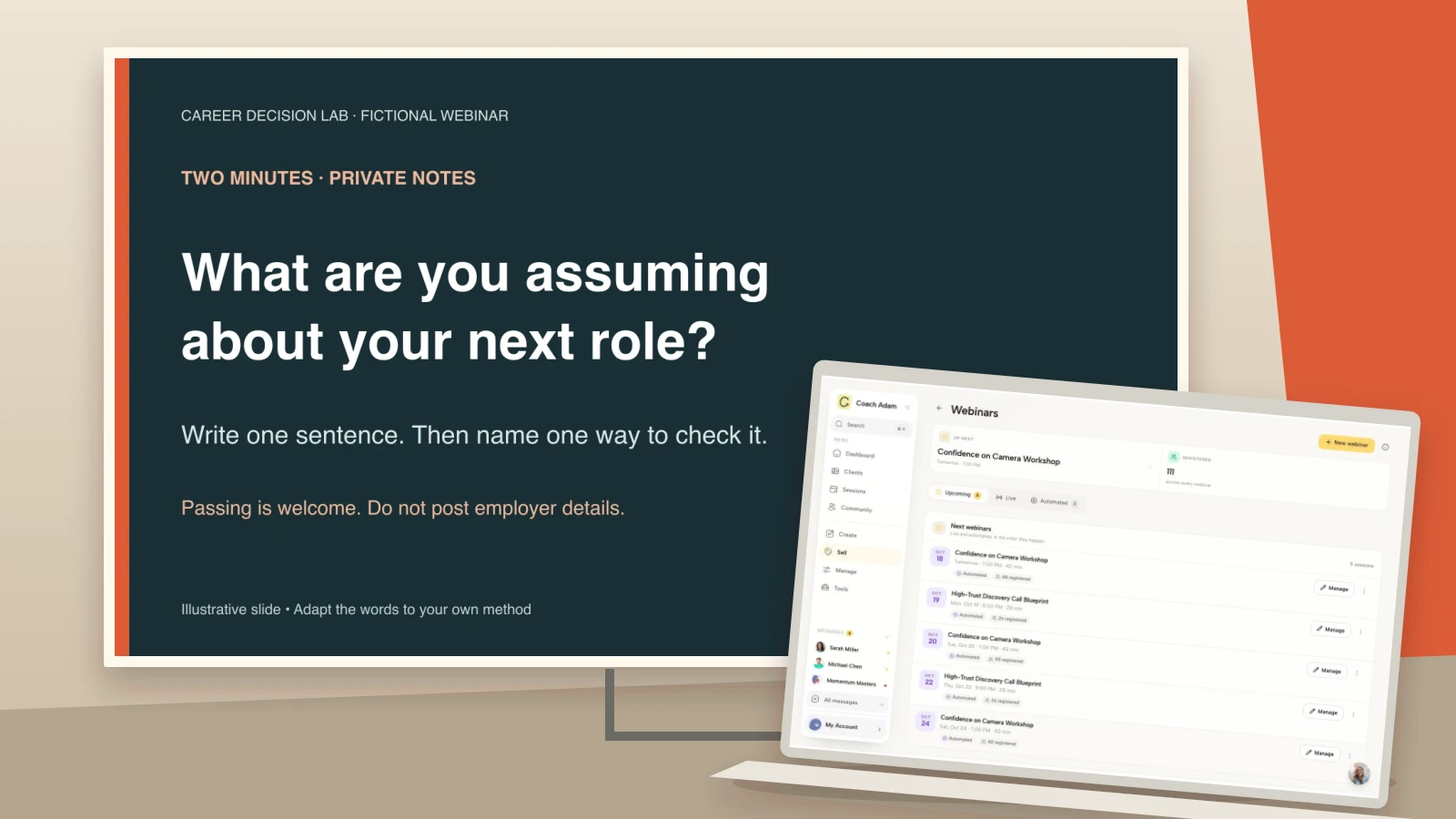
On the slide: “Two minutes: what are you assuming about your next role? Write one sentence. Then name one way to check it. Passing is welcome.” Keep this visible while people work instead of advancing to a distracting animated timer.
Say: “You do not need to share your answer. If this example does not fit, choose another everyday decision or simply observe.” Offer a spoken version of the prompt and a text version in chat. Do not use public participation as a test of commitment to coaching.

9. Debrief the process, not people's private lives
On the slide: “What became more specific?” Supporting prompts: “The assumption? The evidence? The next step?”
Say: “If you would like to contribute, share the type of question you clarified, without identifying details.” You can demonstrate with your fictional example if nobody volunteers. Avoid turning a participant's brief comment into an uncontracted live coaching session. That can expose more than they intended to share in front of strangers.
10. Recap and a usable independent action
On the slide: “Keep your sentence. Choose one evidence-gathering action. Decide when you will review what you learn.” Include a real resource link only if you have prepared the resource.
Say: “You can use this process on your own. Start with the question you wrote rather than rebuilding your whole career plan tonight.” The recap should close the teaching promise before any sales invitation. Do not withhold the useful worksheet until someone books a call.
11. Questions and scope
On the slide: “Questions about using the method?” Add: “Please leave out names and identifying workplace details.”
Say: “I can clarify the exercise here. I cannot responsibly tell you whether to accept or leave a particular job from a chat message.” Group similar questions and answer in general terms. For a fuller host script, see the separate coaching webinar Q&A guide.
12. One optional next step
On the slide: “Want support designing your next experiment? Use the booking link shared in chat.” Add a self-directed alternative: “Prefer to work alone? Start with the question you wrote.” Replace this wording if a booking is not your real next step.
Say: “A fit conversation is for people who want to explore coaching support around a role change. It is not a promise of a job or a decision made for you.” Explain what the conversation involves, whether it costs anything, and what happens after booking. Never invent a deadline or a limited number of places to make the closing slide feel stronger.

How long should this presentation take?
One possible rehearsal budget is 30 minutes before questions: two minutes for slides 1–3, three for slide 4, ten for slides 5–7, six for the exercise and debrief, three for the recap, and six for transitions and the invitation. Reserve another ten minutes for questions. Those allocations are a planning example, not an industry benchmark.
If the rehearsal overruns, cut explanation before cutting the attendee's thinking time. A slide count is not a duration: a title can take ten seconds while an exercise needs several minutes. Practice with the actual prompt, silence and transition included rather than mentally skipping them.
Keep a short fallback in your notes: “We are going to use one example and take the remaining questions afterward.” Only promise follow-up answers if you have a workable process for providing them. For technical rehearsal, use the webinar dry run checklist instead of expanding this deck into an equipment manual.
Design choices that make the slides usable
Use one obvious message per screen, a consistent heading position and enough whitespace for the message to survive screen sharing. Start with a widescreen layout if it suits your delivery setup, then test the actual shared view. There is no magic font size that compensates for a crowded slide or a small viewing window.
The W3C accessible presentation guidance recommends clear material, consistent design, an overview and a review, describing relevant visual information, and accessible supporting formats. Treat those as delivery decisions, not a decorative checklist.
- Use real slide titles: “A preference is not yet evidence,” not twelve slides all titled “Career coaching.”
- Make meaning independent of color: label steps and states instead of relying on red versus green.
- Read the exercise aloud: a prompt on screen is not enough for every participant.
- Keep meaningful text editable: do not export every slide as one flat image and assume that makes the handout accessible.
- Check the reading order: screen-reader order can differ from visual placement.
- Offer an adaptable summary: a well-structured text document or HTML page can be more useful than an image-only PDF.
PowerPoint users can follow Microsoft's accessibility instructions for unique titles, alt text, reading order and the Accessibility Checker. An automated check is a starting point, not proof that your whole webinar is accessible. Ask about access needs and test the actual materials.
Match the deck to a real event and destination
The opening slide should match the event people registered for. Check the title, audience and promised output against your event page. If the landing page promises a complete job-search plan but the deck teaches one assumption-testing exercise, fix that mismatch before inviting more people.

Coachful's real demo webinar workspace illustrates the event-management side of that check. It is not evidence that Coachful designs slides or that a webinar attracts a certain number of clients. Build the presentation in your chosen slide tool and keep the event information consistent.
Then test the final invitation from the attendee's perspective. A link to an application should open the correct form, explain its purpose and ask only what you need for that next decision. Do not ask people to describe sensitive workplace or health details simply because a text field is available.

If you invite people to a course instead, verify that the advertised material is actually available and that access works for the intended audience. The client course screen below shows a real possible learning destination, not an automatic webinar-to-course conversion or a guarantee about a particular account's setup.

Once the lesson is finished, this destination check is the useful next task: can someone understand the invitation and reach the right place without you explaining it live? Try the interactive Coachful demo to inspect the webinar, form and course surfaces before deciding whether they fit your own delivery. Keep the choice about your actual workflow, not about buying software before you have a useful class.
A final copy-and-rehearse checklist
- Copy the 12 slide jobs into your chosen tool.
- Replace the fictional career example with one relevant to your scope and audience.
- Write the exact prompt and one complete worked example before styling.
- Put explanations and transitions in presenter notes.
- Check every credential, quote, source and result claim.
- Remove client-identifying details and any unsupported scarcity.
- Test the slides, adaptable summary and invitation link on a second device.
- Rehearse once with the real exercise time and a quiet audience.
The test is simple: if an attendee declines the invitation, did the presentation still deliver the promised output? If yes, you have a useful teaching deck with an honest next step. If not, repair the lesson before polishing the pitch.
Frequently asked questions
How many slides should a coaching webinar have?
Use as many as the teaching task needs. Twelve is a reusable starting structure here, not a requirement. Add slides when they clarify an example; remove slides that merely repeat your spoken explanation. Rehearsal matters more than matching someone else's slide count.
Can I use this template for a paid workshop?
Yes, but change the balance toward participant practice and feedback. Replace the optional sales invitation if it does not belong, extend the exercise time and make sure the paid workshop delivers the outcome advertised. A teaching webinar and a facilitated coaching workshop are not identical products.
Should I include testimonials in my webinar slides?
Only when they are accurate, appropriately permitted and relevant. A testimonial is optional; it does not replace teaching. Do not present a fictional example as a client result or imply that one person's outcome is what every attendee should expect.
Is this a downloadable PowerPoint file?
No. This is a copyable slide-by-slide text template with original visual specimens. Paste the text into your own presentation tool and adapt the method, example, access information and destination. The images are supporting examples, not editable PowerPoint slides.