Coaching Booking Page: What to Put on It So People Book
A coaching booking page that converts does three things before the visitor scrolls: it says who the call is for, what will happen on it, and what it costs them in time and money. Then it shows real open times in their time zone and asks two or three short questions. Everything else on the page is there to answer the doubt that stops someone pressing "book".
Below is the page, top to bottom, with copy you can borrow, intake questions for six niches, examples taken from Coachful's designed templates, and the decision most coaches agonize over: free call or paid session.
If you would rather not build it yourself, you do not have to. On every Coachful plan our team builds your booking page, the website around it and the follow-up for free, usually within about 24 hours. We cover how that works near the end.
The anatomy of a coaching booking page that converts
In the order a visitor reads it:
- A label that names the call. "Free 30-minute call" or "Paid strategy session". People decide faster when they know what kind of thing this is.
- A headline about the outcome of the call, not about you. "Thirty minutes to work out which way is forward" beats "Book a call with Aisha".
- Two sentences on who it is for. Specific enough that the wrong people leave. That is a feature.
- The facts, in a small block: what it is, how long, where (video, phone, in person) and cost.
- What happens on the call, in three steps. This is the part most pages skip, and it is the one that calms nervous visitors.
- The calendar, showing real availability in the visitor's own time zone.
- Two or three intake questions. Past five, you are asking a stranger to do homework before they have met you; fewer than two and you walk in blind.
- A short policy line: how to reschedule and how much notice you need.
- A confirmation that sets up the call: what to prepare, the video link and a calendar invite.
A testimonial can sit between steps 5 and 6 if you have a real one. Do not invent one, and do not use a quote that is about a different service.
Copy you can borrow
Coachful's designed homepage templates each come with a booking page, written for fictional sample coaches. Their copy is a good pattern library because it is specific and calm. A few lines, lightly adapted:
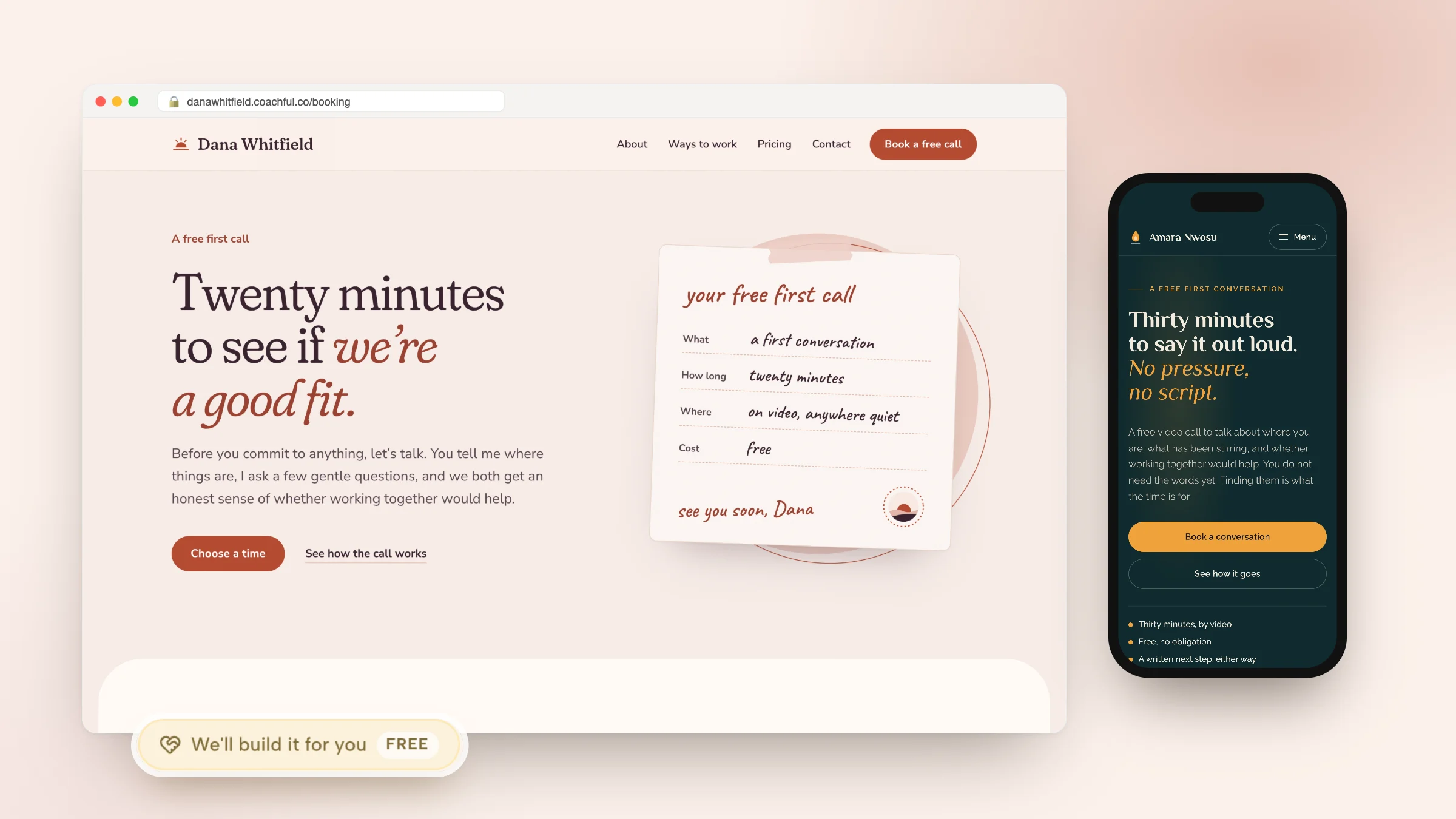
- Life coaching (Hearth): "Twenty minutes to see if we're a good fit. Before you commit to anything, let's talk." The facts card reads: What: a first conversation. How long: twenty minutes. Where: on video, anywhere quiet. Cost: free.
- Purpose coaching (Lantern): "Thirty minutes to say it out loud. No pressure, no script." Under the button: thirty minutes by video, free with no obligation, a written next step either way.
- Career coaching (Northstar): "Thirty minutes to work out which way is forward." Primary button "Book a free call", secondary link "How the call works".
- Strength coaching (Kinetic): "Twenty minutes. A straight answer." Then a checklist of what you will cover: your week and training history, what you want to lift, feel or fix, and which program fits, if any.
- Nutrition coaching (Orchard): "Twenty minutes to find the easiest place to start." With a tag that says "No preparation needed".
- Executive advisory (Atelier): "One hour, one decision." A paid-feeling first conversation for senior clients, with "Choose a time" and "How the hour runs".

Notice what the lines have in common. Each one names a length, promises something useful whether or not the person buys, and lowers the stakes. "A written next step, either way" is doing a lot of work: it tells the visitor the call is not a trap.
The "what happens on the call" block
Steal this structure and fill it in:
- You tell me where things are. Five or ten minutes on what is going on and what you have tried.
- I ask a few questions. About what you want to be different in three months.
- You leave with a next step. Whether that is working with me, someone else, or nobody.
Intake questions: ask three, use all three
Every question on a booking form should change how you run the call. If you would not read the answer beforehand, delete the question. Three that work, by niche:
| Niche | Question 1 | Question 2 | Question 3 |
|---|---|---|---|
| Life coaching | What made you book this call now? | What have you already tried? | What would be different in 90 days if this worked? |
| Career coaching | Current role and the role you want | Your timeline (exploring, applying, interviewing) | Link to your LinkedIn or CV, optional |
| Health coaching | Your main goal in one sentence | Anything your doctor has asked you to work on? | How many hours you sleep on a typical night |
| Fitness and training | Training history in a line | Any injuries I should know about? | Online, in person or both? |
| Executive coaching | Your role and organization | Is the company paying, or are you? | The one decision or situation on your mind |
| Business coaching | What you sell and to whom | Rough monthly revenue range | The bottleneck you want to fix first |
Make question 1 required and the rest optional. For more on what to ask once they become a client, see our guide to coaching intake forms.
Free call or paid session?
There is no universal answer, but there is a pattern. A free call suits offers that need a conversation to sell; a paid first session suits coaches with demand, a clear method or a high price. Our full comparison is in discovery session vs paid first session.
| Free discovery call | Paid consult or first session | |
|---|---|---|
| Typical length | 15 to 30 minutes | 45 to 90 minutes |
| Best when | Your offer needs a conversation to sell | You have more demand than time, or a high-ticket offer |
| Main risk | No-shows and tire-kickers | Fewer bookings |
| Page must show | What they get even if they do not buy | Exactly what the session delivers |
| Protect it with | Screening questions, a day's notice, reminders | Payment at booking, a clear reschedule rule |
Whichever you choose, put the price question to rest on the page. If you are unsure whether to show your package prices before the call, read should coaches show prices before the discovery call.
Four booking pages, taken apart

Northstar (career transition). The headline speaks to someone who has "outgrown the job you were good at". The free call is offered twice on the first screen, once in the header and once in the hero, and "How the call works" catches the visitor who is not ready to book yet.

Kinetic (strength coaching). Loud and direct, which suits the audience. The banner states the method in numbers: sessions a week, 45 minutes each, retested every 4 weeks. Specifics like that answer "what am I signing up for?" before anyone asks.

Meridian (executive coaching). No exclamation marks and no "free". The button says "Book a conversation", which reads right to a senior leader or their assistant.
Hearth (life coaching). Trust markers under the button: coaching since a given year, a previous profession, a number of clients and "sessions by video, any time zone". Each one removes a small doubt. In your version, use only facts that are true for you.
Where your booking page should live
- On your website, linked from every main button. One booking page per call type is easier to measure than one page with five options.
- On your link-in-bio page, ideally booking inside the page so a visitor from Instagram never bounces to a second site. Our guide to link in bio for coaches covers the rest of that page.
- At the end of a funnel, after a lead magnet or an application. See the discovery call funnel build.
- In your email signature and your welcome email, where warm people already are.

Mistakes that quietly cost bookings
- Showing a week with two slots. Scarcity is one thing; a calendar that looks empty of options is another. Open enough times that a busy person can find one.
- Times in your time zone only. A visitor in another country does the math, gets it wrong and misses the call.
- Eight required questions. You are booking a conversation, not processing a mortgage.
- No reminder. Our guide to preventing coaching no-shows has the timing that works.
- An open link with no screening. Spam bookings are a real problem for public links; safe discovery call bookings covers the fixes.
Building your booking page in Coachful
- Create a session type in Sessions, then Session Types: the name, the length, where it happens (built-in video, Zoom, Google Meet, Teams, phone or in person with an address) and whether clients pay for it.
- Set its availability. Use your normal hours or give the call its own, with buffers, minimum notice and an advance booking window.
- Add your questions. Attach intake questions, make one required, and add a consent notice or a worksheet if you need one. Answers land on the person's record.
- Set the booking URL. Public session types get their own link at /book/ and a name you choose in the Details editor.
- Put it everywhere. Add a booking section to your Coachful website, a session card to your link page or a booking funnel with pixels and UTM tracking.
- Watch the results in Intakes. Every booking shows as upcoming, completed, no-show, cancelled or converted, with a conversion rate at the top.

Calendar conflicts are checked live against Google, Outlook and Apple calendars and again when the visitor books, and reminders go out by email, plus text and WhatsApp once messaging is enabled. For paid sessions, payment runs in the same flow through your own Stripe or Razorpay account with a 0% Coachful platform fee. The booking software page lists every option.
Or have our team build it, free
Coachful's white-glove service is free on every plan, and a booking page is one of the most common requests. Here is how it works:
- Where to ask: Create, then "We'll build it for you · FREE", or the "Want us to build it for you?" card on Website and Funnels.
- What to send: which pages you want, what they should do (book calls, collect leads, sell an offer), what visitors should do after they land, sites you like, and up to 8 links and 10 files such as your logo, photos and copy.
- What happens: the team replies by email with next steps, usually within about 24 hours, and builds inside your own account so you can edit everything afterwards.
- What it does not include: recording your videos, designing a logo or running your ads. Nothing gets invented either: no fake testimonials, credentials or prices. Missing details are left for you to fill in.

Recent requests include a menopause and midlife health coach starting from nothing, whose five-page site now sends every button to a free 20-minute consultation booking, and a leadership coach whose Squarespace renewal was days away, who got one clean homepage with a repeated "talk with me" button. More examples in our white-glove service guide.
Frequently asked questions
What should a coaching booking page include?
A label for the call, an outcome-focused headline, two sentences on who it is for, the facts (length, format, cost), three steps for what happens on the call, a calendar in the visitor's time zone, two or three intake questions, a reschedule line and a confirmation that says what to prepare.
How many questions should I ask on my coaching booking form?
Two or three, with one required. Ask only what changes how you run the call, such as why they booked now and what they want to be different in 90 days. Save the longer intake for after they become a client.
Should my coaching discovery call be free or paid?
Free calls suit offers that need a conversation to sell; paid first sessions suit coaches with more demand than time or a high-ticket method. If you keep the call free, protect it with screening questions, a day's notice and reminders. Either way, say clearly on the page what the person gets.
How long should a coaching discovery call be?
Most coaching discovery calls run 15 to 30 minutes. Twenty minutes is enough to understand the situation and agree a next step without turning the call into free coaching. Paid consults and first sessions usually run 45 to 90 minutes.
Can I put a booking page on my link in bio?
Yes. In Coachful, a session card on your link page can book inside the page, so visitors from Instagram or TikTok pick a time without leaving your link. The same booking flow also works on your website and in funnels.
Can Coachful build my coaching booking page for free?
Yes. The white-glove service is free on every Coachful plan. Tell the team what the page should do and send your copy and photos, and they build it inside your account, usually within about 24 hours. You can edit everything afterwards with the normal editors.
Next: compare tools in our roundups of scheduling software for coaches and free booking software for coaches.