How to Make a Vision Board You Will Actually Use
How to make a vision board, in short: choose a time frame (90 days or a year works best), pick three to five areas of your life, write one sentence for what you want in each, find images and words that match those sentences, arrange them on a board, add the first step for each area, and put the board where you will see it every day. Then look at it on purpose, for two minutes, and picture the steps as well as the result. That last part is the difference between a board that changes your week and one that becomes wallpaper.
Most vision boards are made with real enthusiasm in January and invisible by March. This guide gives you a seven-step process, a template you can copy, a filled-in example, what the research says about picturing your goals (some of it will surprise you), and the mistakes to skip. If you are a coach, the last section shows how to run a vision board with clients and keep it alive between sessions.
How to make a vision board in seven steps
1. Pick a time frame
"My life" is too big to picture. Choose a window you can imagine in detail: the next 90 days, the next 12 months, or a specific season such as "my first year in the new city". A 90-day board is easier to act on. A one-year board is better for a big change that needs several stages. Write the end date in the corner of the board, because a date turns a wish into a plan.
2. Choose three to five life areas
Pick the areas that matter most right now, not every area you have. Common ones are work, money, health, relationships, home, learning, fun and inner life. If you are not sure where to start, score yourself on the free Wheel of Life assessment and pick the two lowest spokes plus one you want to grow. Our guide to the Wheel of Life explains how to read the result.
3. Write one sentence per area
Before you touch a single picture, write what you want in each area as a sentence in the present tense, as if it were already true on your end date. "I run three times a week and finished my first 10K" is better than "fitness". "We eat dinner together at the table four nights a week" is better than "family". Specific sentences make it easy to choose images later, and they show you whether the goal is really yours. If a sentence feels flat when you read it aloud, cross it out. If you want help sharpening one, the SMART goal worksheet turns a fuzzy wish into a measurable goal.
4. Collect images and words
Now look for pictures that match each sentence. Use your own photos, old magazines and free photo libraries. Choose images of the activity as well as the outcome: a person lacing up running shoes, not only a finish line. Add a few words of your own in your own handwriting or font: a short phrase, a name, a number, the end date. You want each image to make you feel something and to remind you what you will do.
5. Arrange the board
Group images by area so you can see each part of the plan. A simple layout is one column or one quadrant per area, with your theme word or year in the middle. Leave a little empty space; a crowded board becomes visual noise within days. On paper, use a cork board, a poster board or a large sheet of card. On screen, use a slide, a design app or a board inside your coaching app.
6. Add the first step for each area
Under each area, add one small action you will take this week: "book the first parent-teacher call", "sign up for the Saturday 5K training group", "move $50 into savings on Friday". This is the step most guides skip, and it is the one that makes a board practical. When you finish a step, write the next one.
7. Put it where you will look at it, and schedule a look
Hang the board where your eyes land daily: next to the mirror, above your desk, as your phone lock screen. Then put a two-minute "board check" in your calendar, ideally every morning, and a longer review once a week. A board you look at on purpose works harder than a board you walk past.

A vision board template you can copy
Fill this in before you start cutting or clicking. It takes about 20 minutes and makes the board itself quick to assemble. Copy the table into a document, or print it.
| Life area | By [end date], it is true that... | Images and words to find | First step this week | How I will know it is working |
|---|---|---|---|---|
| Area 1 | One sentence, present tense | Two or three pictures, one phrase | One action with a day | A number or a sign you can check |
| Area 2 | ||||
| Area 3 | ||||
| Area 4 (optional) | ||||
| Theme word or phrase | One word that sums up the season, for the center of the board |
A filled-in example: a 90-day board
Here is how the template looks for someone leaving a teaching job for instructional design, with a 90-day end date of 31 January.
| Life area | By 31 January, it is true that... | Images and words | First step this week | How I will know |
|---|---|---|---|---|
| Work | I have a portfolio with three course samples and I have applied for ten roles. | A laptop on a kitchen table, a printed portfolio, the word "shipped" | Outline sample one on Tuesday evening | Three samples online, ten applications logged |
| Money | I have two months of expenses saved for the switch. | A jar of coins, a calendar page with a circle | Set up an automatic transfer on payday | The balance on the first of each month |
| Health | I walk 30 minutes before school five days a week. | Trainers by the door, a frosty park path | Lay out shoes the night before | Ticks on the habit tracker |
| People | I have had coffee with four people who already do this job. | Two mugs on a café table | Message one former colleague on LinkedIn | Four conversations, notes kept |
| Theme | "Bridge" |
Notice that every area has a picture of doing, not only of having. That choice matters, as the research section explains.
Paper or digital: which vision board should you make?
Both work. Pick the one you will see most often.
| Format | Good for | Watch out for |
|---|---|---|
| Cork or poster board | A ritual afternoon, a wall you pass every day, family boards | Hard to update; easy to stop noticing |
| Slide or design app | Quick to edit, easy to print or set as a wallpaper | It lives in a folder unless you put it somewhere visible |
| Phone lock screen | Seeing it dozens of times a day | So familiar it fades; refresh it monthly |
| A board in your coach's client app | Linking the board to goals, habits and sessions with a coach | Only available if your coach uses one |
If you want the full comparison of apps and tools, our guide to the digital vision board covers six ways to make one. For pictures and words to put on it, see our list of vision board ideas.
How to use your vision board every day
A two-minute board check is enough. Try this sequence each morning:
- Look at one area, not the whole board. Rotate through them during the week.
- Picture the next step, in detail: where you will be, what time, what you will do first.
- Name the likely obstacle. "If I am tired after school, I will still walk for ten minutes." This is a simple if-then plan.
- Do or schedule one thing. Put the step in your calendar or do it now.
Once a week, take ten minutes to tick off what you did, write the next step under each area, and swap any image that no longer pulls at you. Recording progress is more than housekeeping: it is one of the best-supported parts of goal pursuit, as you will see below. A paper habit tracker or the goal-setting worksheet pairs well with the board, and a weekly entry from our journal prompts for self-reflection keeps the review honest.

Do vision boards work? What the research says
We could not find a controlled study that tested vision boards themselves. There is useful research on the mental habits a board can either support or undermine, though.
- Daydreaming about the outcome alone can backfire. In four experiments, people who were led to fantasize positively about an ideal future showed less energy, measured physiologically and in behavior, than people who imagined a more questioning, neutral or negative version (Kappes and Oettingen, 2011). A board covered only in dream outcomes risks the same effect: it feels good and asks nothing of you.
- Picturing the process helps. College students who spent five to seven days mentally rehearsing how they would study for a midterm studied more and got better grades than students who pictured the good grade, an effect explained by better planning and less anxiety (Pham and Taylor, 1999). Hence the images of doing.
- Wish, then obstacle, then plan. A meta-analysis of 21 studies with nearly 16,000 participants found that mental contrasting with implementation intentions (picture the wish, name the inner obstacle, make an if-then plan) improved goal attainment with a small to medium effect, g = 0.336, possibly smaller after allowing for publication bias (Wang, Wang and Gai, 2021). The daily board check above follows that order.
- Tracking progress helps, especially when you record it or share it. A meta-analysis of 138 randomized studies (19,951 people) found that prompting people to monitor their progress improved goal attainment (d = 0.40), with larger effects when progress was physically recorded or reported to others (Harkin and colleagues, 2016).
So the honest answer: a vision board on its own is a decoration. A vision board with specific sentences, images of action, a named obstacle, a first step and a weekly review is a reasonable way to keep goals in front of you. If you want to go deeper on turning the board into goals, read our guide to goal setting in coaching or use the SMART goals template.
Vision board mistakes to avoid
- Too many areas. Eight areas and 40 images is a mood board for a magazine. Three to five areas is a plan.
- Only outcomes. Beaches, cars and trophies, with no picture of what you do on a Tuesday.
- Someone else's goals. If you picked an image because it looked like a good life on social media, ask whether you want it or want to be seen with it. Our core values assessment helps you check.
- No end date. Without one, everything is "someday".
- Hiding it. A board in a drawer or a folder called "Vision 2026" does nothing.
- Never updating it. Your board should change as you do. Swap images, tick off steps, and start a new board when the time frame ends.

How coaches use vision boards with clients
For a coach, a vision board is a way to get a client talking about the future in concrete pictures, then turn those pictures into goals, habits and the next session's agenda. It works well at the start of an engagement, at the start of a year, and at a turning point such as a new job or the end of a relationship.
A 60-minute vision board session
| Time | What happens | Coaching question |
|---|---|---|
| 0 to 10 min | Choose the time frame and areas | "If the next 90 days went well, what would be different?" |
| 10 to 25 min | Write one sentence per area | "Read that aloud. Does it sound like you?" |
| 25 to 40 min | Find or place images | "What does doing this look like on an ordinary weekday?" |
| 40 to 50 min | Name obstacles and first steps | "What usually gets in the way, and what will you do when it shows up?" |
| 50 to 60 min | Agree the review rhythm | "When will you look at this, and how will I know how it went?" |
Clients can also make the board as homework and bring it to the session. Either way, end with one goal and one habit per area, and put the board review on the agenda of a session four to six weeks later.
Running vision boards in Coachful
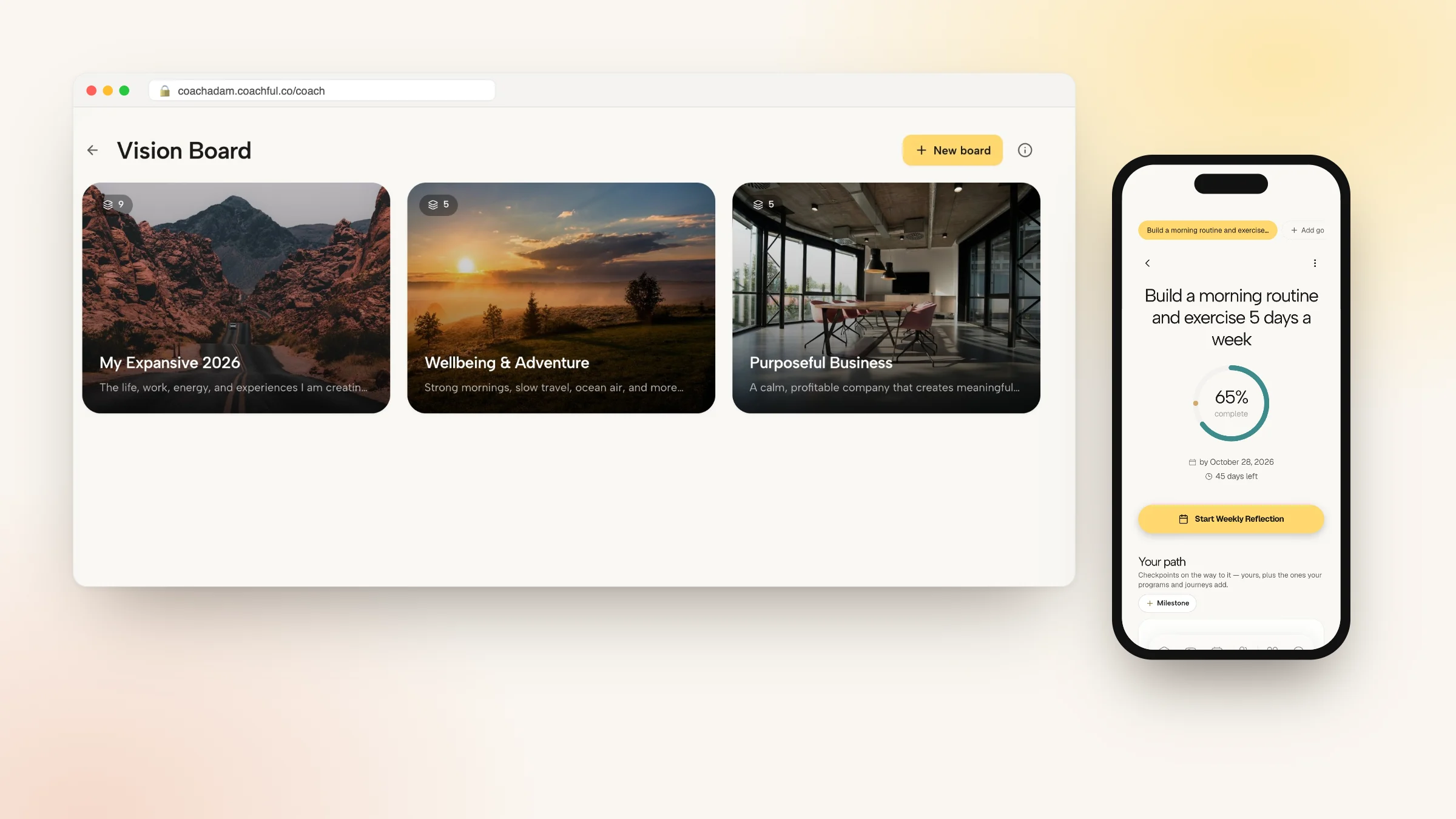
Coachful's client app has a vision board built in. A board is an open canvas where you can add images (upload one or paste an image link), videos (upload one or paste a YouTube link), text and colored cards, draw with a pen or highlighter, set a background color or image, and add background music from an uploaded song or a YouTube link. Items can be moved, resized, layered and duplicated, with undo and redo.
As a coach you create a board template in Create > Resources > Vision boards and send it to one client or many. Each client gets a private copy to edit, linked back to your template. That copy stays private: the coach side of the app does not read it, so clients can be honest with it, and they can share it in a session if they want to. Clients can also start boards of their own from My Content.

To keep the board in the work rather than in a drawer, you can:
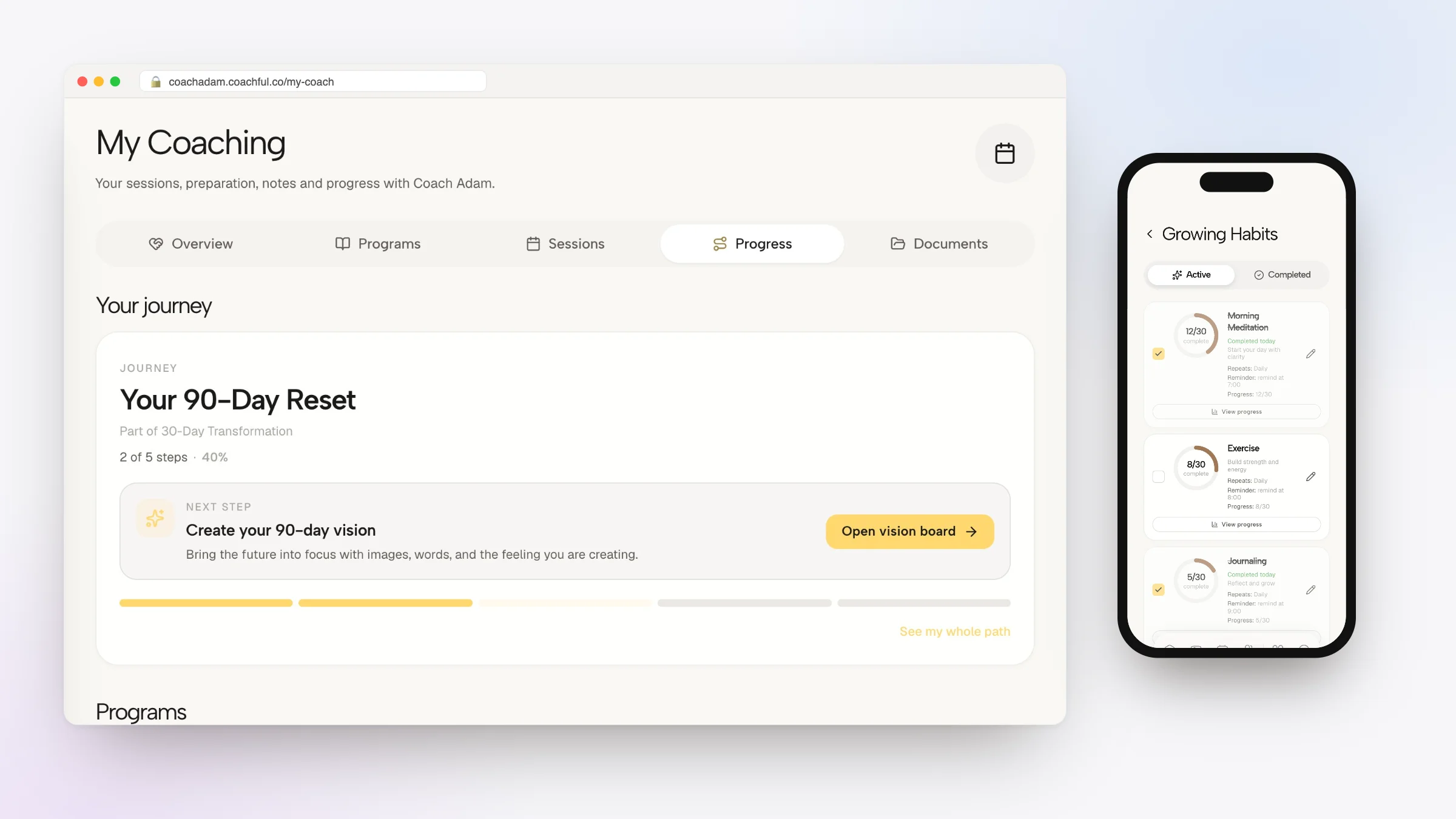
- Make it a step in a journey or a program week, so it appears as a task on the right day. In the demo account below, "Create your 90-day vision" is the current step of a journey, with an Open vision board button.
- Put a Vision board card on the client's home screen, showing a chosen board or the client's latest one.
- Add a vision board step to a check-in. A manifestation step shows the client their own board for a set number of seconds before Continue unlocks.
- Turn each area into a goal and a habit, so the board's sentences become progress the client can see between sessions.
- Price and sell a board template on its own, or include it in a program or offer.


If you coach in the life and mindset space, the Life & Mindset power-up adds a starter vision board template to your library (unless you switch starter content off), with six prompt cards such as "One year from now: What does a good year look like?" You edit it like any other board. In Tools > Explore, the catalogue also has a guided Vision board practice that walks a client through the future they want, what it means to them, the resources they already have and a first action. Coaches also get a private Vision Board workspace of their own, reached from Search, and a Vision board card for their Home dashboard. For more on the coaching side, see our page for life coaches and the Coachful client app.

Or have our team set it up
If you would rather not build the board, the program week or the journey yourself, the Coachful team will build it for you in your account at no extra cost through the free white-glove service. Pick We'll build it for you on the Create page, describe what you want (for example "a 90-day vision board journey for new clients, with a goal and a habit per area"), attach any files, and the team replies by email with next steps, usually within about 24 hours. You can edit everything afterwards. To run a group version, see our plan for a vision board workshop.

Frequently asked questions
How do I make a vision board step by step?
Choose a time frame, pick three to five life areas, write one present-tense sentence for each, collect images and words that match, arrange them by area, add the first step under each, and put the board where you see it daily. Then review it for two minutes each morning and ten minutes each week.
What should I put on my vision board?
Put images of the life you want and of the actions that get you there, a few words or numbers of your own, your end date and a theme word. Our list of vision board ideas has 80 suggestions by life area.
Do vision boards actually work?
We found no controlled study of vision boards themselves. Research suggests picturing only the outcome can sap energy, while picturing the process, naming obstacles with if-then plans, and recording progress all improve goal attainment. Build those into how you use the board.
Should I make a physical or a digital vision board?
Make the one you will look at most. Paper boards suit a wall you pass every day; digital boards are easier to update and can live on your phone. If you work with a coach who uses an app with vision boards, a board there can sit next to your goals and habits.
How many goals should be on a vision board?
Three to five life areas, with one main goal each, is plenty for a 90-day or one-year board. More than that tends to spread your attention thin and makes the board hard to read at a glance.
How often should I look at my vision board?
Look at it briefly every day, ideally at the same time, focusing on one area and the next step. Once a week, review progress, write the next steps and swap images that no longer fit. Start a new board when the time frame ends.
Can Coachful set up vision boards for my coaching clients?
Yes. Coachful's free white-glove service builds things like a vision board template, the journey or program week it sits in, and the goals and habits around it, inside your own account. Ask from We'll build it for you on the Create page; the team usually replies within about 24 hours.