Best Practice Management Software for Coaches (2026)
Most software roundups for coaches are written for the coach who has not started yet. This one is written for the coach who has forty clients, six years of session notes, a contract template in Google Docs, and a recurring 11pm question about who has actually paid for session four.
Practice management software for coaches covers the unglamorous half of the job. Intake, notes, agreements, invoicing, reschedules, records, and the moment a corporate client's legal team asks where your client data lives. None of it is why you became a coach. All of it decides whether the practice survives you taking two weeks off.
We checked pricing, ratings and feature claims for every tool below on 2 September 2026, against each vendor's own pricing page plus G2, Capterra and Trustpilot. Vendors change prices, and three of these changed materially in the last eighteen months, so confirm before you buy.
What practice management software actually has to do
The phrase gets used for three different products, which is why comparison shopping feels slippery. A booking link is not practice management. A course platform is not practice management. What you are buying is the connective tissue between a person's first enquiry and your accountant's year-end questions.
Nine jobs, in the order they usually bite:
- Enquiry capture. A form that turns "I saw your Instagram" into a record with an email, a source and a next step, without you retyping anything.
- Booking with rules. Availability, buffers, time zones, minimum notice, and a reschedule flow that does not require you to be awake.
- The agreement. A coaching contract, signed, timestamped, stored, and findable in two years when something goes sideways.
- Money in. Packages, payment plans, subscriptions, failed-card retries, refunds, and a receipt your client can forward to their finance team.
- Invoicing separate from checkout. Corporate clients do not buy from a checkout page. They ask for an invoice with a PO number on it.
- Session records. Date, duration, modality, attendance, and a note you can read back before the next call.
- Between-session delivery. Homework, worksheets, check-ins, whatever you actually do that makes the coaching work.
- Reporting. Revenue by client, sessions delivered, packages remaining, and who has gone quiet.
- Getting your data back out. Nobody evaluates this until a vendor emails to say it is winding down. Three did in 2025.
Almost every tool here does jobs one through five. The differences show up in six through nine, and those are the ones that cost you money later. For the same market seen from the delivery side, our roundup of the best all-in-one software for coaches covers it.
Pick your tool in 60 seconds: a decision framework
Answer five questions honestly and the shortlist collapses from ten to two. The trap is answering them the way you wish your practice worked instead of the way it works this month.
1. Are you priced per client, per coach, or flat?
This one variable moves your annual software bill by more than a thousand dollars, and coaches consistently get it wrong because they only read the entry price.
CoachAccountable charges by active client: $20/mo for 2 clients, $40 for 5, $70 for 10, $120 for 20, $200 for 35, $250 for 50, and the published ladder tops out at $4,000/mo for 1,000 clients. Excellent value at 8 clients, painful at 60. Simply.Coach and Delenta also cap clients per tier: Delenta's $29 Starter gives you 10 client portals, $49 Pro gives 40, and unlimited arrives at $79 Premium. Bonsai charges strictly per user seat, with a three-seat minimum on Elite. Paperbell, CoachVantage and Coachful charge per coach with no client ceiling above the entry plan.
If you run group programs or low-ticket cohorts, per-client pricing is the wrong shape for your business. It is the single most-cited complaint in CoachAccountable's Capterra reviews, and CoachAccountable is a very good product.
Price shape beats price tag. CoachAccountable's published ladder runs from $20/mo for 2 clients to $4,000/mo for 1,000, so the same product is a bargain at 8 clients and a budget line at 60.
2. Do you need coaching delivery, or only client admin?
HoneyBook, Dubsado and Bonsai are client-admin CRMs built for photographers, planners and consultants. They sign, schedule and bill better than most coaching tools. They have no concept of a multi-week program, a habit, a client goal or a cohort. If your coaching happens entirely on the call and the rest is documents, they are legitimate choices. If your clients are supposed to do something between Tuesday and the following Tuesday, you will be adding a second tool.
3. Does anyone in your buying chain say the word "compliance"?
Corporate sponsors, EAP contracts and anything adjacent to healthcare change the answer completely. Simply.Coach claims SOC 2, HIPAA and GDPR. Delenta announced HIPAA compliance in March 2026 with a public trust center. Paperbell's own FAQ states it is not HIPAA compliant. CoachAccountable states it is not HIPAA compliant even though its server environment is. That is a narrow field, and it narrows the moment a procurement form lands in your inbox.
4. Are you one coach, or three by next year?
Paperbell is one service provider per account, so a second coach means a second $97/mo subscription. CoachVantage has no multi-coach functionality at all, and reviewers have been told it is in development. CoachAccountable includes unlimited coach and admin accounts on every tier and bills only for clients, the most team-friendly model here. Dubsado includes three users, then charges $25/mo for users four to ten.
5. What happens to your notes if the vendor disappears?
Not hypothetical. Nudge Coach shut down on 30 April 2025. Practice.do went offline on 3 November 2025 with roughly two weeks of notice and no read-only mode. Profi ended access on 31 December 2025. Coaches lost session notes they had not exported. Before you commit six years of records to a platform, find the export button and click it once.
Three shutdowns in eight months. Nudge Coach closed on 30 April 2025, Practice.do went offline on 3 November 2025 with roughly two weeks of notice, and Profi ended access on 31 December 2025.
The ten tools at a glance
Every figure was verified on 2 September 2026 from the vendor's public pricing page. Monthly prices shown; most vendors discount 10 to 25 percent for annual billing. "Strongest public rating" means the review site where that tool has the most credible sample, not the most flattering one.
| Tool | Entry price (monthly) | Priced by | Contracts and e-signature | HIPAA position | Strongest public rating |
|---|---|---|---|---|---|
| Coachful | From $29 Lite (5 clients); $49 Solo (20 clients); $99 Pro, unlimited | Per coach, flat | Yes, sent before the first call | GDPR-ready, not HIPAA-certified | Trustpilot 4.5 from 21 reviews |
| CoachAccountable | $20 (2 clients), $70 at 10 clients | Per active client | Yes, with initials, timestamp and IP capture | States it is not HIPAA compliant | Capterra 5.0 from 67 reviews |
| Paperbell | Free trial, then $97 flat | Per coach | Yes, tied to package purchase | FAQ states it is not HIPAA compliant | Capterra 4.7 from 150 reviews |
| Simply.Coach | $9 (3 clients), $49 at 30 clients | Per coach with client caps | Yes, contract count capped on lower tiers | Claims SOC 2, HIPAA and GDPR | G2 4.8 from 146 reviews |
| CoachVantage | $39 Clarity, $59 Aha! | Per coach, unlimited clients | Yes, capped at 4 per month on Clarity | Not mentioned; we could not verify | Capterra 4.8 from 26 reviews |
| Delenta | $29 Starter (10 portals), $49 Pro | Per coach seat with portal caps | Yes, digital contracts on all tiers | GDPR, HIPAA announced March 2026 | Capterra 4.8 from 60 reviews |
| HoneyBook | $36 Starter (no scheduler), $59 Essentials | Per business account | Yes, plus combined proposal and invoice files | No HIPAA BAA offered | Capterra 4.7 from 687 reviews |
| Dubsado | $35 Starter (no scheduler), $55 Premier | Per account, 3 users included | Yes, plus public proposals on Premier | No HIPAA BAA advertised | G2 4.3 from 74 reviews |
| Bonsai | $15 Basic (no invoicing), $25 Essentials | Strictly per user seat | Yes, large template library on Essentials up | No HIPAA BAA advertised | Trustpilot 4.3 from 632 reviews |
| The Coaches Console | $197 Core, $297 Total | Per account, single coach | Yes, inside the enrollment flow | GDPR compliant; HIPAA not mentioned | Capterra 4.6 from 14 reviews |
Two things jump out. Rating samples vary from 14 reviews to 687, so a 4.8 does not always mean more than a 4.4. And the entry price is frequently not the usable price: HoneyBook's $36 Starter has no scheduler, Dubsado's $35 Starter has no scheduler and no automations, and Bonsai's $15 Basic has no invoicing.
Rating samples are not comparable. The public review counts here range from 14 to 687, so a 4.8 from a handful of coaches does not outrank a 4.7 from hundreds.
1. Coachful

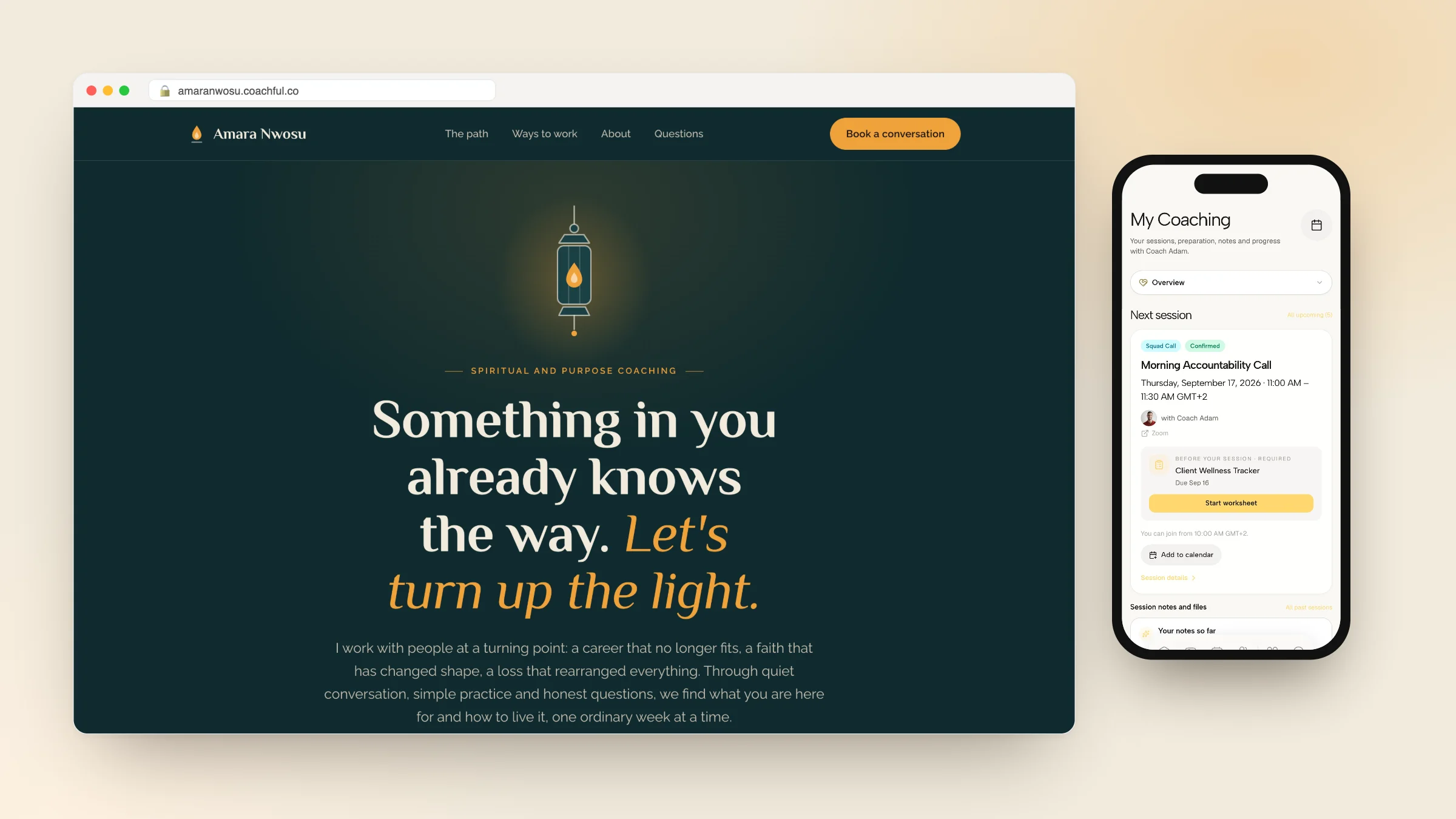
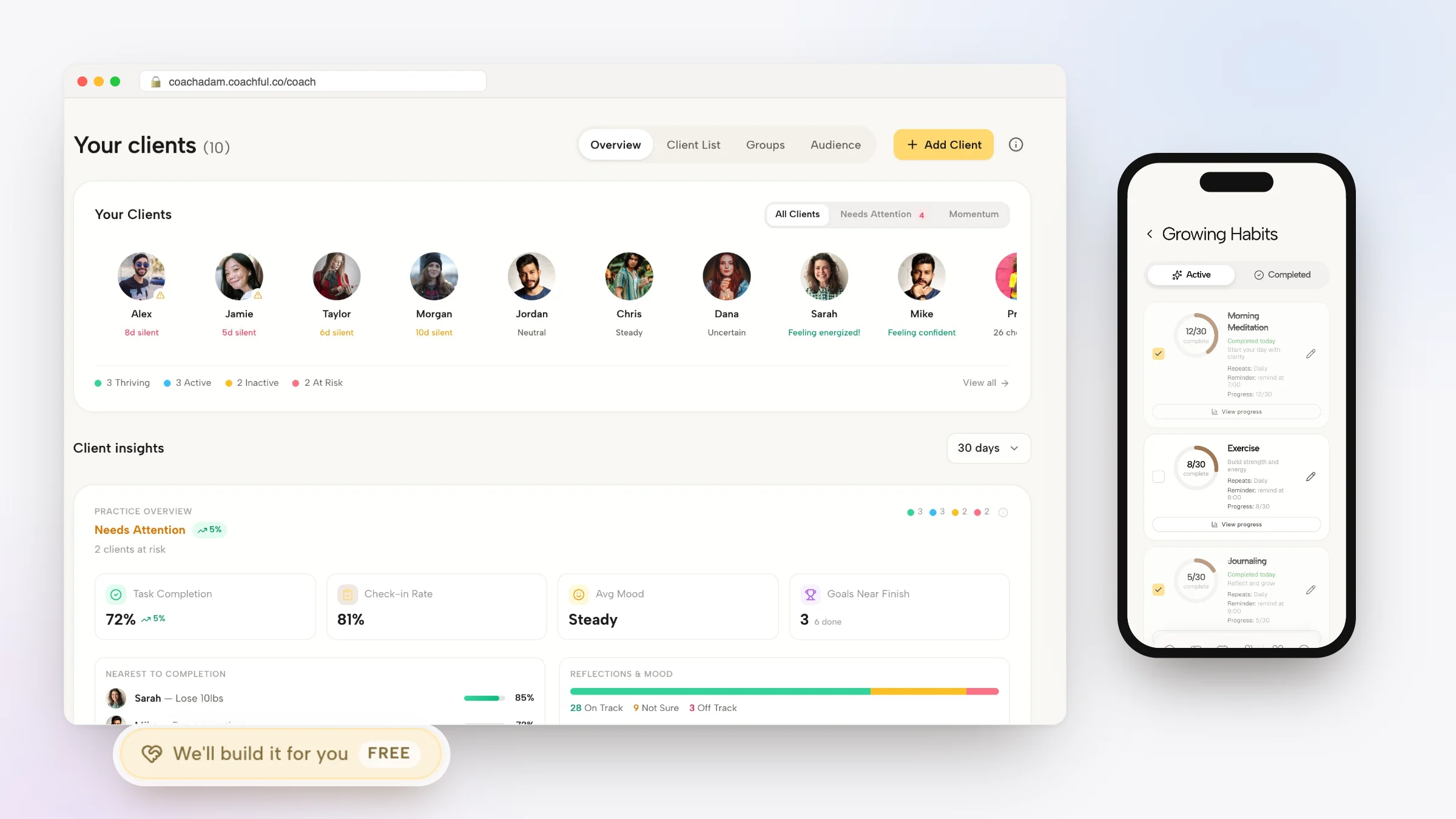
Coachful is a coaching platform rather than a client-admin CRM, which changes what practice management means inside it. The client record is not a project folder with documents attached. It is a person with a program, goals, habits, check-ins, sessions, payments and form responses hanging off it, and the admin surfaces sit around that record instead of standing in for it.
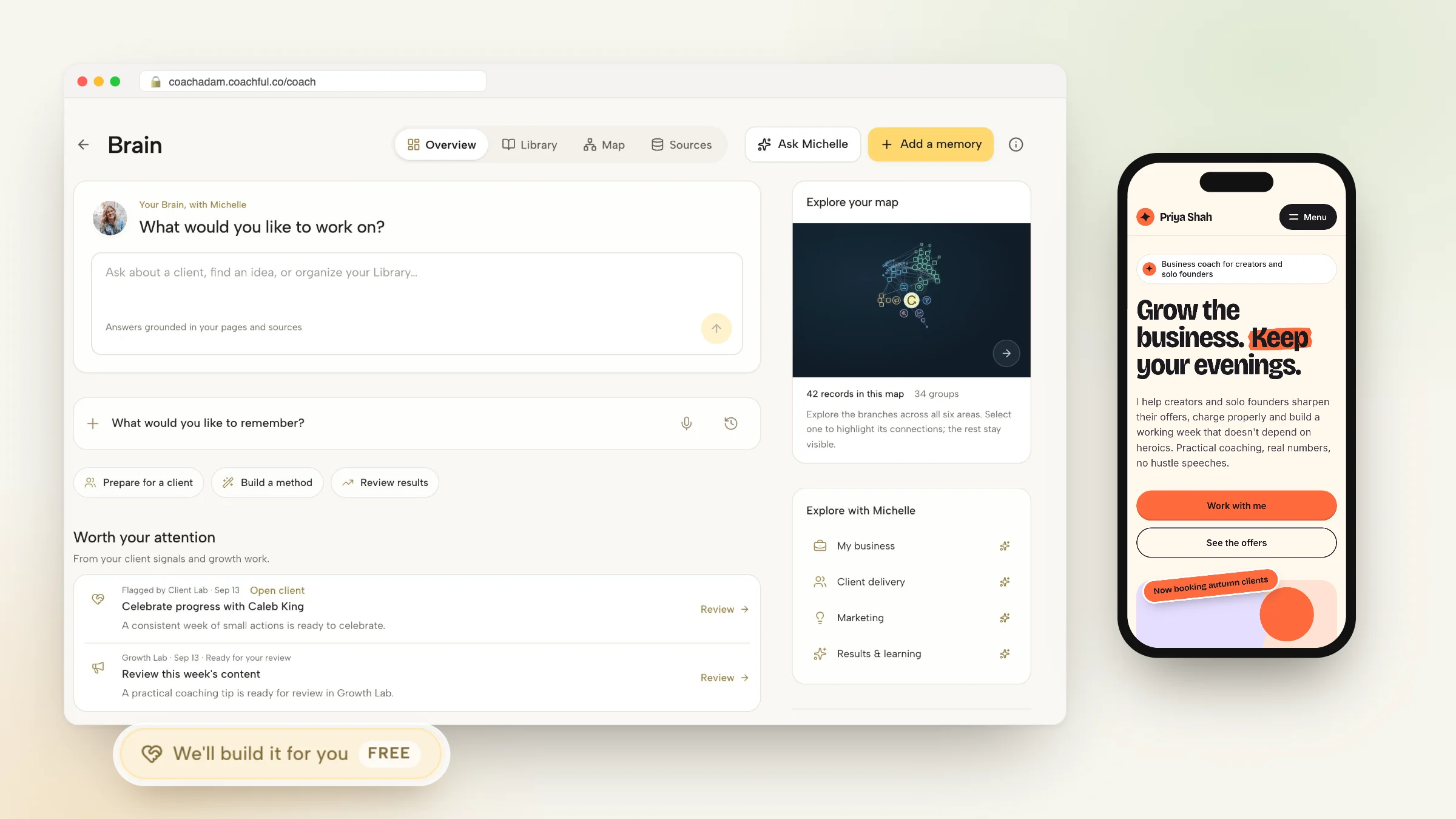
Why Coachful stands out: a free white-glove service. Every plan comes with a team that builds things for you. Send a short request from inside Coachful and they set up your website, a booking funnel, your first program and the welcome emails in your account, usually within about 24 hours, at no extra cost. It takes the slowest part of starting a coaching business, the setup, off your plate. See what the team will build for you.
Pricing, checked 2 September 2026: from $29/mo on Lite, capped at 5 clients with every feature included; $49/mo Solo for up to 20 clients; $99/mo Pro for unlimited clients, which adds Coachful Intelligence; $199/mo Studio for 3 coach seats; $299/mo Agency for 6. Annual billing brings Solo to $39/mo and Pro to $79/mo. The trial is 7 days, card required, no charge during the trial, cancel in one click. There is no platform fee on any plan, so after Stripe or Razorpay processing you keep the rest.
Why it works as practice management software
The admin chain runs end to end without a handoff. Intake questionnaires attach to the booking and land on the client record. Agreements with e-signature go out before the first call. Payments run through Stripe Connect or Razorpay with one-time charges, subscriptions, payment plans, order bumps, Apple Pay and Google Pay, coupons, refunds and Stripe Tax. Invoices generate per transaction, and you can raise manual invoices against catalog products, which is what you need when a corporate client wants a document rather than a checkout link.
Session logistics are handled rather than merely scheduled: booking pages with availability rules, buffers and time-zone detection, paid sessions and session credits, two-way calendar sync with Google Calendar and Outlook or Microsoft 365, built-in video or auto-created Zoom, Google Meet and Teams links, and reminders by email plus SMS at 24 hours and WhatsApp at one hour once messaging is enabled. Analytics cover revenue, funnel attribution, client activity and engagement.
One price, the whole chain. Intake, agreement, payment, session and program delivery run inside one subscription from $49/mo on Solo for up to 20 clients, and Coachful takes a 0% platform fee on what you sell.
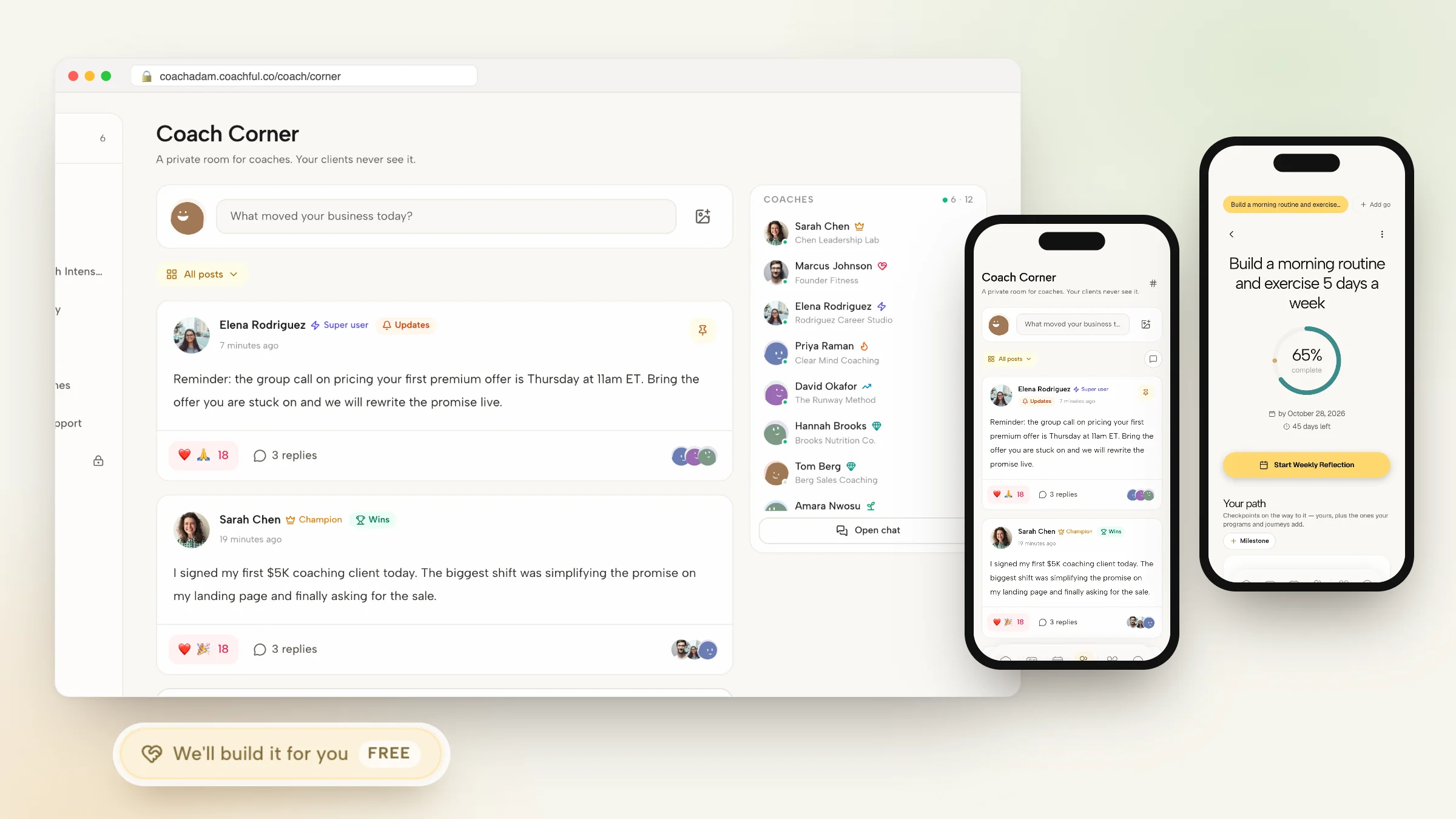
What separates it from the admin-only tools is what happens between calls: multi-week programs with weekly goals and daily tasks, habits with morning and evening check-ins and streaks, goals with progress bars, and cohort squads created automatically on enrollment. Michelle, the AI assistant, works from live practice context across clients, programs, sessions, calendar and payments, briefs you before a session, summarizes calls, and takes actions behind a confirmation step rather than silently.
Three of the ten tools on this page ship an app your client actually uses, and only Coachful and Delenta let you put your own branding on it. Booking is included at the entry tier, where HoneyBook, Dubsado and Bonsai all gate it behind an upgrade. The export is full rather than contacts-only: client records, notes, goals and history come out whole, on a page where two tools have no documented client-data export at all. Public sentiment sits at 4.5 on Trustpilot from 21 reviews, and the whole reviews wall is public if you want to read it unfiltered.
Practical tip: before you migrate anything, run one existing client through the full chain on a trial account. Booking, agreement, payment, first session note. The gaps in a tool show up in the handoffs between those four steps, never in the feature list.
Where it fits, and where it does not
Two things to know before you buy. Coachful is built around coaching relationships, so a pure course business with no client to coach is better served by a course platform. And it is GDPR-ready with full data export but not HIPAA-certified, so if a client's employer needs a signed business associate agreement today, Simply.Coach or Delenta is the honest answer.
Best for: coaches who deliver programs rather than only sessions, coaches replacing four to six logins with one, and solo coaches growing into a small team. Head-to-head detail sits at Coachful vs Paperbell and Coachful vs CoachAccountable, and the full feature list is at what Coachful includes.
2. CoachAccountable

CoachAccountable has shipped since 2012, founded by John Larson, who still turns up in support threads often enough that reviewers mention it by name. It is the most serious accountability engine in this category and makes almost no attempt to be a marketing tool.
Pricing, checked 2 September 2026, is per active client: Starter $20/mo for up to 2 clients, Level 1 $40 for 5, Level 2 $70 for 10, Level 3 $120 for 20, Level 3.5 $200 for 35, Level 4 $250 for 50. Coach and admin accounts are unlimited on every tier, and every tier is fully featured. The trial is 30 days with no card. No platform transaction fee is stated on the pricing page; Stripe, Square and PayPal processor fees apply.
Why it works as practice management software
The records side is genuinely deep. Digital agreements capture signature, initials, timestamp and IP address, which is the level of detail that matters if a dispute becomes formal. Invoicing includes an unpaid-invoice lockout, so a client who has not paid loses portal access automatically instead of you sending a fourth awkward email, plus company billing for corporate payers. Automated pre-session intake forms and fillable worksheets mean paperwork arrives without chasing.
Reporting is the quiet standout: invoicing, appointment, activity, form-answer and follow-through reports. Follow-through in particular is the number most coaches want and almost never have, which is what percentage of assigned actions a client actually completed. Groups share actions, metrics, files and projects, and the whole thing embeds into a website you already own.
For teams the pricing model is unusually generous. Unlimited coaches and admins on every plan with master-coach oversight means a five-coach practice with 20 shared clients pays $120/mo, not five subscriptions.
Potential limitations
Per-client pricing is the most-cited con on Capterra and it is structural, not a grumble. Run a 60-person group program and you are on a plan well north of $250/mo for clients who each consume a fraction of the tooling. The ladder reaching $4,000/mo for 1,000 clients tells you exactly who this is not built for.
The interface has been described as outdated or overwhelming by reviewers, and the learning curve is real because the depth is real. There is no native mobile app; the documented answer is an add-to-home-screen shortcut, and reviewers keep asking for a client app. There is no website builder, no landing pages and no marketing automation, so you keep your Squarespace or WordPress site and your email tool. And CoachAccountable states it is not HIPAA compliant even though its server environment is, an honest distinction that will still fail a procurement checklist.
One more thing worth knowing: the company explicitly refuses AI or ML processing of coaching content as a privacy stance. Depending on your clients, that is either the best line on their website or a dealbreaker.
Ratings: Capterra 5.0 from 67 reviews, Trustpilot 4.8 from 46, G2 4.7 from 11. Only 2 Trustpilot reviews landed in the last twelve months despite the perfect history, so sentiment is strong but not fresh.
Best for: established executive, business and accountability coaches running structured engagements with homework and metrics, and multi-coach firms with modest client counts. Skip it if: you run large groups, you want marketing tools in the same subscription, or your clients expect an app. See CoachAccountable alternatives or the CoachAccountable comparison.
3. Paperbell

Paperbell, founded in 2020 by Laura Roeder, made a decision most of this category refused to make: one paid tier, one price, no feature gates. That decision is why coaches like it and also why they outgrow it.
Pricing, checked 2 September 2026: a genuinely free plan with no time limit for your first client, though the public coaching site is live only for the first 7 days, then a single paid tier at $57/mo or $47.50/mo billed annually, which is $570 a year against a regular $684. Priced per coach. Zero platform fee on top of Stripe or PayPal processing.
Why it works as practice management software
Paperbell's real trick is the packaged checkout. Contract, payment, scheduling and intake happen in one flow, so the client signs, pays and books in a single sitting and you never stitch three tools together. One Capterra reviewer called it an admin assistant on steroids, which is a fair description of what it replaces. E-signature contracts are tied to the package purchase, removing the most common failure in coaching admin: the client who booked but never signed.
It also ships a branded coaching website with a custom URL and landing pages, a client portal with history, shared notes and messaging, intake forms, exit surveys and post-appointment surveys, group coaching for programs and workshops, and calendar sync with Google, iCal and Outlook. It earned Capterra's Best Value badge in 2025 and support is rated 4.8 out of 5 there, with reviewers noting that feature requests actually ship.
Potential limitations
Paperbell has no habit tracking, no daily check-ins and no client goal tracking, and reviewers say so directly. There are no structured multi-week programs with daily tasks; packages deliver content and worksheets. There is no full course platform, no community, no funnels. Coaches who need those add a second subscription, which is how a $97 tool becomes a $190 stack.
It is one service provider per account, so a second coach means a second account at full price. There is no native mobile app, only the mobile browser. Invoicing is package-checkout driven rather than a standalone module, so corporate invoicing is awkward. Branding customization is described by a Trustpilot reviewer as pretty limited. And Paperbell's FAQ states plainly that it is not HIPAA compliant.
The export question would give us pause. The client list and history are viewable in the Clients area, but we could not verify a documented CSV export in the help center. If you keep six years of session history somewhere, you want to know exactly how it comes out.
Ratings: Capterra 4.7 from 150 reviews, G2 4.7 from 63, Trustpilot 3.9 from 13. That Trustpilot score is the outlier in an otherwise strong record, with complaints about slow support and one cancellation dispute that Paperbell responded to publicly and refunded.
Best for: solo coaches selling 1:1 packages who want scheduling, payment, contract and website at one flat price, and new coaches validating an offer on the free trial. Skip it if: you need courses, community, programs or a second coach. More at Paperbell alternatives and Paperbell vs HoneyBook.
4. Simply.Coach

Simply.Coach, founded in 2020 and based in Pune, is the compliance answer in this group and the strongest fit for coaches whose invoices are paid by an HR department rather than by the person in the chair.
Pricing, checked 2 September 2026, is tiered by client cap: Starter $9/mo for 3 clients, 1 contract and 1 program; Essentials $29/mo for 7 clients, 3 contracts and 3 programs; Growth $49/mo for 30 clients with multiple calendars, recurring sessions and your logo; Leap $69/mo for unlimited clients with a white-labelled platform, your domain and 100GB. Business tiers price per active coach: CoCreate $79 per coach for 10 clients each, 2 admins and 5 sponsors; Surge $159 per coach for 25 clients each. The trial is 14 days with no card, capped at 3 clients and 10 sessions. Transaction fees are not stated on the pricing page, so we could not verify them.
Why it works as practice management software
Stakeholder reporting is the feature nobody else here ships properly. If you coach an executive whose development plan is sponsored by their employer, you need to report progress to a sponsor without exposing session content, and Simply.Coach has custom reports, scheduled stakeholder reports and NPS on higher tiers built for exactly that. Assessments including 360s sit alongside intake forms, and goals, development plans and reporting form a loop rather than three disconnected screens.
It claims SOC 2, HIPAA and GDPR compliance, unusual at a $9 entry price and the practical reason it wins corporate deals. There are native iOS and Android apps in English, Spanish and French, embedded video plus Zoom, Teams and Google Meet, and calendar sync with Google and Microsoft 365. Support is rated 4.9 out of 5 on Capterra.
Potential limitations
The caps are the catch. Contracts are capped on every solo tier below Leap, an odd thing to ration in a coaching tool, and client caps force upgrades at 3, 7 and 30 clients. The trial being limited to 3 clients and 10 sessions with unclear messaging is a recurring complaint, because you cannot properly test a client-cap product inside a client cap.
Reviewers consistently cite a steep initial setup and navigation curve, with feature overwhelm for small practices. Accounting integrations such as Xero and Wave are missing, as is Mailerlite. The French localisation is described as unpolished. There is no community feature, no funnels and no marketing automation. And there is no Trustpilot presence at all, so your only public sentiment sources are G2 and Capterra.
Ratings: G2 4.8 from 146 reviews, the highest G2 score with a serious sample in this article, and Capterra 4.6 from 41.
Best for: executive and leadership coaches serving corporate sponsors, and any practice that needs SOC 2, HIPAA or GDPR paperwork. Skip it if: you want a simple tool, you are above 30 clients on a lower tier, or you need community and marketing. Compare at Coachful vs Simply.Coach or read the Simply.Coach alternative breakdown. Executive coaches should also see our page for executive coaches.
5. CoachVantage

CoachVantage, founded in 2015 and based in Singapore, is the quiet ICF-track option. It is the only tool in this article that ships coaching logs in ICF format as a first-class feature, which is why credentialed coaches keep finding it.
Pricing, checked 2 September 2026: Clarity $39/mo, or $35/mo billed annually, with unlimited contacts and engagements but 2 group programs, 2 sales pages, 2 booking pages and 4 e-signatures per month. Aha! is $59/mo, or $53/mo annually, with unlimited group programs, sales pages, booking pages and e-signatures plus 5 courses and 1GB of storage. The trial is 14 days with no card. The vendor states there are no commissions on the revenue you earn.
Why it works as practice management software
Unlimited contacts and engagements on the cheapest tier is rare and genuinely useful: you are not punished for keeping a long tail of past clients in the system, which is where most coaches' referrals come from. Contracts with e-signature, invoicing, Stripe and PayPal, a forms builder, SMS reminders and a pipeline view cover the admin chain, and goal and progress tracking is rated 5.0 on GetApp. The Vanta AI assistant helps write program content.
The ICF coaching log is the differentiator. If you are logging hours toward ACC, PCC or MCC, having the log live next to the sessions it describes removes an entire spreadsheet from your life, and it exports to CSV when your application needs it.
Potential limitations
Clarity's caps bite quickly. Four e-signatures per month is enough for a coach signing one client a week and not a coach launching a cohort. Two booking pages and 500MB of storage on that tier are similarly tight, and most coaches who stay end up on Aha! at $59/mo.
There is no multi-coach team functionality. Reviewers report this directly, and the vendor has said it is in development. There is no native mobile app; the FAQ confirms it is a mobile-responsive web product. The built-in CVMeet video is described by reviewers as not good enough, so most buy Zoom anyway. Support is email only with a 24 to 48 hour response and no chat. Compliance is the weakest spot: HIPAA is not mentioned anywhere and we could not verify GDPR status, so ask directly before signing.
The review footprint is small: Capterra 4.8 from 26 reviews, G2 4.5 from a single review, zero Trustpilot reviews. Capterra sentiment is strong, with 5.0 customer service and 5.0 value for money on GetApp, but 26 reviews is a thin base to bet a practice on.
Best for: solo ICF-track coaches who need contracts, coaching logs and invoicing under $60/mo. Skip it if: you have or want a second coach, you need an app, or you need a compliance answer in writing. More at CoachVantage alternatives.
6. Delenta

Delenta, founded in 2018 in London by Sam Samarasinghe, is an ICF partner and one of only two tools here with a HIPAA claim. It sits between the admin CRMs and the full coaching platforms, and it is the most complete stack at its price point.
Pricing, checked 2 September 2026: Starter $29/mo or $19.08/mo annually at $229 a year, with 1 seat, 10 client portals, 1GB and no group coaching. Pro $49/mo or $39.08/mo annually at $469 a year, with 40 client portals, 5GB and group coaching. Premium $79/mo or $58.25/mo annually at $699 a year, with unlimited client portals, 100GB, the course creator and the mobile app. Teams and Enterprise are custom, priced per seat. The trial is 14 days with no card, and the vendor states there are no additional transaction fees on any plan.
Why it works as practice management software
The feature spread is unusually wide for the money: a branded landing page and booking calendar, a booking funnel running landing page to discovery call to purchase, digital contracts, automatic billing and invoicing, customizable intake forms, programs with drip content, quizzes and tasks, goals and notes, real-time dashboards, community feeds and group chat for cohorts, a course creator, and a white-labelled iOS and Android client app on Premium and above.
Delenta-i is the AI layer and it does something specific rather than generic: it takes session notes and produces summaries scored against ICF markers. For a coach working toward or maintaining a credential that is genuinely useful automation rather than a chatbot. Support is praised repeatedly on Capterra, where it scores 4.9, with reviewers calling it impeccable. The compliance position is the other reason it wins deals: GDPR plus HIPAA compliance announced in March 2026 with a public trust center, aimed at healthcare, finance and government buyers.
Potential limitations
The client portal caps shape the real price. Ten portals on Starter is a low ceiling, and group coaching is not available until Pro at $49/mo, so the advertised $29 entry is not the entry for most working coaches. The mobile app arrives only at Premium, $79/mo.
The learning curve is the most common Capterra con, a direct consequence of the breadth. The mobile experience is described as limited or clunky for scheduling. Calendar functionality is called somewhat limited compared with dedicated schedulers, and Google is the integration reviewers mention. Email-marketing integrations are few, which matters if you run sequences elsewhere.
On data we would want a clearer answer before committing. CSV and XLS contact import is documented, but a full client-data export was not verified in the help center and cancellation terms are not published. The Trustpilot sample is 5 reviews at 4.1, and the G2 seller page shows 28 reviews with a score we could not read.
Ratings: Capterra 4.8 from 60 reviews, Trustpilot 4.1 from 5.
Best for: coaches who want landing page, delivery, courses and a white-label client app in one tool, and health or corporate practices needing HIPAA and GDPR. Skip it if: you need group coaching on the cheapest tier or a heavy email-marketing workflow. See Coachful vs Delenta and Delenta alternatives.
7. HoneyBook

HoneyBook is a client CRM for small service businesses, founded in 2013 in San Francisco, claiming more than 100,000 businesses and over $12B in payments processed. Coaches use it. It was not built for coaches, and that shows up in specific, predictable places.
Pricing, checked 2 September 2026: Starter $36/mo or $29/mo annually, with unlimited clients and projects, up to 2 lead forms, no scheduler, no automations and no team members. Essentials $59/mo or $49/mo annually adds the scheduler, automations, up to 10 lead forms and up to 2 team members. Premium $129/mo or $109/mo annually adds unlimited lead forms, unlimited team members, multiple companies, advanced reports and priority support. The standard trial is 7 days; the pricing page currently advertises 30 days free as a promotion. No card required, and the trial does not auto-convert.
Why it works as practice management software
Smart files are the best idea in the product. A proposal, a contract and an invoice arrive as one branded document the client moves through in a single pass, and you stop maintaining three templates that have to agree with each other. Contracts are e-signed, invoices can recur, payment schedules and autopay work, and there is a HoneyBook Finance layer on top.
HoneyBook is its own payment processor, with card payments starting at 2.7% plus 10 cents and ACH at 1.5% with no international surcharges, which is genuinely competitive. AI drafts emails, recaps projects and takes meeting notes, included on every plan. It integrates with QuickBooks Online, Zoom, Calendly, Mailchimp, Flodesk, Gmail, Outlook and Google Calendar, and support is a consistent positive across all three review sites.
Potential limitations
There is no coaching delivery of any kind. No multi-week programs, no habits, no client-facing goal or progress tracking, no cohorts, no courses. The scheduler is 1:1 sessions. If your coaching is calls plus documents, fine. If it is a 12-week program, you will be buying a second platform and asking clients to hold two logins.
The pricing history is what existing users warn about. In February 2025 plans rose roughly 89 percent, from $19, $39 and $79 monthly to $36, $59 and $129, justified by the AI features, and Trustpilot reviewers cite jumps from $35 to $129 a month. Features have also been moved to legacy status without warning, forcing template rebuilds. The mobile app is reported as glitchy and needing frequent refreshes.
Price history is a feature. HoneyBook's plans rose roughly 89 percent in February 2025, from $19, $39 and $79 monthly to $36, $59 and $129.
Two structural issues for coaches specifically. The project-per-job data model is rigid and confuses repeat-client businesses, which describes every coaching practice with a renewing client. And you cannot bring your own Stripe account, because HoneyBook is a payment facilitator, so switching platforms later means moving live payment plans, not just exporting a CSV. On compliance, no HIPAA BAA is offered and we could not verify one on the site.
Ratings: Capterra 4.7 from 687 reviews, G2 4.4 from 194, Trustpilot 4.0 from 706. The largest and most credible sample in this article by a distance.
Best for: solo coaches whose delivery is calls and documents and who want inquiry to payment in one polished flow. Skip it if: you run programs or groups, or you are sensitive to price changes. See Coachful vs HoneyBook and HoneyBook alternatives for coaches.
8. Dubsado

Dubsado is the automation-first CRM in this group, bootstrapped and independent since 2015, with a claimed 120,000 customers. Dubsado 3.0 shipped in November 2025 as a full platform rebuild with a new scheduler, a new Flow builder, consolidated messaging and Kanban-style views.
Pricing, checked 2 September 2026: Starter $35/mo or $27.92/mo annually at $335 a year, with unlimited clients and projects, invoicing, client portals and one lead-capture form, but no scheduler and no automated workflows. Premier $55/mo or $43.75/mo annually at $525 a year adds the scheduler, Flows, unlimited lead forms, public proposals, Zapier and QuickBooks. Three users are included; users four to ten cost $25/mo extra, eleven to twenty $45/mo, twenty-one to thirty $60/mo. Additional brands are $10/mo each. The trial is 21 days with full Premier access and no card, the longest here.
Why it works as practice management software
Flows are the most flexible automation in this comparison. A signed contract triggers the invoice, the invoice triggers the intake form, the intake form triggers the welcome email, and none of it requires Zapier. Reviewers who get through setup say the workflows save real time, and they are not exaggerating.
Client portals are branded, password protected and can sit on your own custom domain on every plan, which is better than most tools charge for. Contracts include e-signature, with public proposals on Premier. Payments run through Dubsado Payments powered by Stripe, or Square, or PayPal, supporting cards, ACH, Klarna, Affirm and Tap to Pay. Calendar sync is two-way with Google and Microsoft 365, and the client receives a real calendar invite. Bookkeeping syncs to QuickBooks Online on Premier.
Practical tip: if you are choosing between Dubsado and HoneyBook, the deciding question is not features, it is whether you enjoy building systems. Dubsado rewards a weekend of setup with automation nobody else offers. HoneyBook works on day two and stops improving.
Potential limitations
The learning curve is the number one complaint on every review site, and Capterra's 4.2 reflects it. The interface has historically been called clunky, form design and scheduling called unintuitive, and setup is measured in days rather than hours.
The Starter plan omits scheduling and automations, the two features most coaches came for, so the real entry price is $55/mo monthly. Prices rose on 1 December 2025 for new subscribers: Starter up 75 percent from $20 to $35, Premier up 38 percent from $40 to $55. Existing customers were grandfathered indefinitely, which is a genuinely decent way to handle an increase.
On coaching itself there is nothing. No programs, no habits, no progress tracking, no groups, no courses, no community, no native SMS and no AI assistant. The review footprint is small for a company this size, with 74 reviews on G2, 61 on Capterra and a single Trustpilot review, so sentiment is hard to read. Compliance is GDPR-style data export with no HIPAA BAA advertised.
Ratings: G2 4.3 from 74 reviews, Capterra 4.2 from 61, Trustpilot 3.7 from 1.
Best for: systems-minded coaches and small teams who will invest setup time to automate onboarding, contracts and payment plans end to end. Skip it if: you want to be running this week, or you need program delivery. See Coachful vs Dubsado and Dubsado alternatives.
9. Bonsai

Bonsai started as a freelancer tool in 2016 and repositioned as a unified platform for service businesses. For a coach it is the cheapest credible way to sign and bill 1:1 clients, provided you read the fee structure carefully first.
Pricing, checked 2 September 2026, is per user on every tier: Basic $15/mo or $9/mo annually with time tracking, tasks, CRM, unlimited projects and clients and mobile apps, but no invoices and no payments. Essentials $25/mo or $19/mo annually adds invoices, payments, proposals, contracts, forms, scheduling, the client portal and expense tracking. Premium $39/mo or $29/mo annually adds Gantt charts, workload, a deals pipeline, custom fields, client messaging and profit reports. Elite $59/mo or $49/mo annually adds custom permissions, timesheet locking, expense markups, Xero and custom data import, with a three-seat minimum that puts the real floor at $147/mo billed annually. The trial is 7 days, the shortest here, and reviewers say so.
Why it works as practice management software
Setup is fast and the interface is clean; Capterra reviewers describe being up and running in no time, and it is rated 4.6 there. The contract and proposal template library is broad enough to save an afternoon of drafting. The client portal is white-labelled and clients access it by secure link without creating an account, which removes real friction with older or less technical clients. Automated reminders and workflow triggers handle the basics, such as sending an invoice when a contract is signed. At $19/mo billed annually for Essentials it is the lowest entry price here for a genuine CRM plus billing stack.
Potential limitations
The payment fees deserve a careful read. Bonsai Payments charges 2.9% plus 30 cents on cards, 3.25% plus 30 cents on Amex, 1.0% on ACH with a $1 minimum, and 1.5% extra for instant payout. If you would rather use your own Stripe account, Bonsai adds a 1% platform fee on top of Stripe's fees. Trustpilot and Reddit reviewers also report funds held for up to two weeks, and support tickets going unanswered for days while charges continue.
Read the fee line twice. Bring your own Stripe account to Bonsai and it adds a 1% platform fee on top of Stripe's own processing.
Per-seat pricing scales expensively, the Basic tier is close to useless without invoicing, and team permissions are weak below Elite. The mobile app lags behind the browser. Extra charges for things like tax tooling undercut the unified pitch. Trustpilot reviewers cite difficulty stopping auto-renewals and unexpected charges, worth knowing before you enter a card.
For coaching specifically: no programs, no habits, no progress tracking, no groups, no courses, no community, no digital product storefront, no native SMS. Scheduling is 1:1 only. Compliance is GDPR handling with no HIPAA BAA advertised.
Ratings: Trustpilot 4.3 from 632 reviews, Capterra 4.6 from 95, G2 4.3 from 102. A large Trustpilot sample with a good score alongside specific, repeated payment complaints is an unusual combination, and both halves are true.
Best for: coaches who bill hourly or per project and want contracts, invoices and light CRM cheaply. Skip it if: payment holds would hurt you, or you need anything on the delivery side.
10. The Coaches Console

The Coaches Console has run since 2004, co-founded by Melinda Cohan and Kate Steinbacher in Roanoke, Virginia. It is the oldest product here and the most expensive by a wide margin, sold as software plus business training rather than software alone.
Pricing, checked 2 September 2026: Core Console System at $197/mo or $1,997 a year, which works out to $166.42/mo, including CRM, calendar, website, client portal, email marketing, invoicing and reporting. Total Console System at $297/mo or $2,997 a year, which works out to $249.75/mo, adding a shopping cart, course and content delivery, sales reports, unlimited products and courses, and bonus training. There is no free trial. There is a 30-day money-back guarantee and a card is required at signup. Transaction fees are not stated; PayPal, Stripe and Authorize.net processor fees apply.
Why it works as practice management software
Capterra reviewers say it replaces at least five separate tools, and the module list backs that up: CRM, online calendar with time-zone conversion, public website, private client website, autoresponders with pre-built sequences, invoicing that can be manual or automatic, client agreements inside the enrollment flow, pre-built intake form templates, and a reporting module.
The templates are the underrated part. Intake forms, agreements and session recaps arrive written, which for a coach who has improvised documents in Google Docs for three years is worth real money. So is the training: a bootcamp, weekly Q and A calls, a video archive and a community. Support via live chat and tickets is rated 4.7 out of 5.
Potential limitations
Price is the headline objection and reviewers make it bluntly, with one saying $97 would be fair. At $197 to $297 a month you are paying three to five times the category rate, and paying it for the training as much as the software. If you do not attend the calls, the maths stops working.
You are buying the coaching, not the code. At $197 to $297 a month, The Coaches Console runs three to five times the category rate, and the training is the part you are paying for.
The interface is described as clunky and, in one review, like a Microsoft program from 2010. The learning curve is steep despite the training. There are no installment payments, no coupons, no email A/B testing and no audio or video in emails. There is no mobile app, no white label, no AI, no client community, no built-in video and no multi-coach support, so this is a single-coach product. Group scheduling is reported missing.
The review base is small and ageing: Capterra 4.6 from 14 reviews, G2 3.8 from 2, and no Trustpilot profile we could find. Compliance is GDPR with 256-bit encryption and daily backups; HIPAA is not mentioned.
Best for: established, non-technical coaches who want a business system with live training and templates and will use both. Skip it if: you are price sensitive, you want a modern interface, or you plan to add a coach.
All ten compared on one screen
Entry prices are the cheapest paid tier, checked 2 September 2026. The columns to read hardest are the last two, because scheduling is gated behind an upgrade in three of these and a documented export does not exist in two.
| Tool | From | Client app | E-sign contracts | Client goals and progress | Booking included at entry tier | Documented export |
|---|---|---|---|---|---|---|
| Coachful | $29/mo | Yes, your branding | Yes | Yes | Yes | Yes, full |
| CoachAccountable | $20/mo (2 clients) | No | Yes, with IP and timestamp | Yes, deepest | Yes | Yes, per client, complete history |
| Paperbell | Free trial, then $97/mo | No | Yes | No | Yes | Not verified |
| Simply.Coach | $9/mo (3 clients) | Yes | Yes, capped low tiers | Yes | Yes, recurring on Growth+ | Yes, to spreadsheets |
| CoachVantage | $39/mo | No | Yes, 4/mo on Clarity | Yes | Yes, 2 pages on Clarity | Yes, one-click CSV |
| Delenta | $29/mo | Yes, white-label on Premium | Yes | Yes | Yes | Not verified |
| HoneyBook | $36/mo | Owner app only | Yes, best in class | No | No, not on Starter | Contacts only |
| Dubsado | $35/mo | Owner app only | Yes | No | No, Premier only | Contacts and invoices |
| Bonsai | $15/mo | Owner app only | Yes, on Essentials+ | No | No, Essentials+ | Contacts and invoices |
| The Coaches Console | $197/mo | No | Yes | Partial | Yes | Yes, to Excel |
All ten have e-signature contracts, which is the honest dividing line between practice management software and general coaching software. What separates them is everything in the next five sections.
Session notes, and why they are the hardest thing to move
Every tool here stores notes. Almost none store them the same way, and the difference only becomes visible on the day you want to leave or the day a client asks what you agreed in March.
There are three models. Notes attached to a session is the common one: you open the appointment, you type, it saves there. It is fine until you want to read a client's whole arc, at which point you are clicking through fourteen appointments. Notes attached to a client record is better for coaching, because the arc is the point, and it is what CoachAccountable, Coachful and Simply.Coach do. Notes inside a project is what the admin tools do, and it is the model that fights coaching hardest, because Dubsado, HoneyBook and Bonsai all assume a job with a start and an end. A repeat client over three years becomes either one enormous project or twelve unrelated ones, and reviewers of all three name that rigidity.
Three practical questions to ask any vendor before you commit a year of notes.
- Can the client see them, and can you choose? Shared notes are a coaching feature and a liability at the same time. You want per-note control, not a global setting.
- Do notes carry a timestamp you did not type? If a dispute ever reaches a professional body, a system-generated timestamp is evidence and a typed date is not.
- Do notes come out in the export, or only the client list? This is the question almost nobody asks, and it is the one that costs the most. Several tools here export contacts happily and leave the notes behind.
Contracts and e-signature: what separates them
All ten include contracts, so the question is not whether but how well, and where the caps sit.
HoneyBook has the best-executed version, and it is not close. Its smart file combines the proposal, the contract and the invoice into one link a client opens once, reads, signs and pays from. For a coach whose sales process is a conversation followed by paperwork, that single artifact removes an entire round of email.
CoachAccountable has the most defensible version. Its agreements capture signature, initials, a timestamp and the signer's IP address. That is a materially stronger record than a typed name in a box, and if you coach in a regulated industry or your engagements are large enough to argue about, it matters more than the design.
Watch the caps, because two of these bite early. CoachVantage's Clarity plan allows four e-signatures a month, which is two new clients and a renewal in a decent month. Simply.Coach caps contract counts on its lower tiers. Bonsai requires Essentials at $25 before you get e-signature at all, so its $15 headline is not the plan you will be on.
Caps bite in month two. CoachVantage's Clarity plan allows four e-signatures a month, which is two new clients and a renewal in a decent month.
And watch what does not travel. Every tool here exports your client list. None of them exports your contract templates in a format another tool can read. HoneyBook's smart files, Dubsado's forms and flows, Bonsai's template library and Kartra-style builders are all proprietary. The hours you spend building templates are the real switching cost in this category, not the subscription. Build them in a document you own first, then paste them in.
Compliance: who actually needs HIPAA, and who has it
This section decides the purchase for a small number of coaches and is safely ignorable for everyone else, so let us be precise about which you are.
You need HIPAA if you are a covered entity or a business associate under United States law, which in practice means you are a licensed clinician, you are contracted by a healthcare provider or health plan, or a hospital's procurement team is reviewing your vendor. Health coaching alone does not automatically make you a covered entity. If a client's employer asks for a signed business associate agreement, you need a vendor who will sign one.
You need GDPR handled if you coach anyone in the European Union or the United Kingdom, which is most coaches reading this, and every tool here addresses it to some degree.
Where these ten actually stand, checked 2 September 2026:
- Simply.Coach claims SOC 2, HIPAA and GDPR compliance. If a corporate or clinical buyer is in your chain, start here.
- Delenta announced HIPAA compliance in March 2026 alongside a public trust centre, and is GDPR-aligned and an ICF partner.
- CoachAccountable is GDPR compliant with two-factor authentication, and states plainly that it is not HIPAA compliant even though its server environment is. That is an unusually honest disclosure and worth respecting.
- Paperbell states in its own FAQ that it is not HIPAA compliant.
- Coachful is GDPR-ready with full data export and is not HIPAA certified. If you need a signed business associate agreement today, we are not your tool.
- The Coaches Console is GDPR compliant with 256-bit encryption and daily backups. HIPAA is not mentioned.
- HoneyBook, Dubsado and Bonsai handle GDPR-style data requests and none advertises a business associate agreement.
- CoachVantage does not state a compliance posture on its site, so ask directly if it governs your work.
One caution about the word compliant. A vendor claiming HIPAA compliance is not the same as a vendor who will sign a business associate agreement for your account on your plan. Ask for the agreement, in writing, before you migrate. For the corporate side of this, Coachful for executive coaches covers what procurement teams typically ask for.
Your client records are not yours until you can export them
Three products in this category shut down between April 2025 and December 2025. Nudge Coach closed on 30 April 2025, Practice.do went offline on 3 November 2025, and Profi ended access on 31 December 2025, where coaches who had not exported lost session notes. All three were credible when coaches signed up.
So treat the export path as a feature you are buying. Ranked by what we could actually verify:
- CoachAccountable is the best in this set. Every client has an Export button on the Clients tab that pulls the complete coaching history with selectable item types, and bulk CSV import works the other way. It also built an automated importer for Practice.do refugees within days of that shutdown, which tells you something about the company.
- CoachVantage offers a one-click CSV export of your whole contact list plus coaching logs, which is remarkable on a $39 plan.
- Simply.Coach states that all data can be exported to spreadsheets, with custom scheduled reports, and its enterprise tier includes migration support.
- Coachful exports client records, notes, goals and history in full. We would rather you could leave easily than stay because you cannot.
- The Coaches Console confirms in its help centre that clients export to an Excel spreadsheet.
- Dubsado exports contacts to CSV with selectable fields, plus invoices and bookkeeping. Forms and templates do not travel.
- Bonsai exports clients, contacts and invoices to CSV, though custom data import is Elite only.
- HoneyBook exports contacts and clients to CSV. Smart files and templates are not portable.
- Delenta documents CSV and XLS contact import, and we could not verify a client-data export in its help centre.
- Paperbell shows full client history in the Clients area, and we could not verify a documented CSV export path.
Two of these ten have no export we could confirm. That is not an accusation, since a path may exist that is not documented, but it is a question to put to a salesperson before you move three years of notes. Do it on day one, while you still have leverage, and keep the file on your own disk. A vendor's retention window is not a backup.
Two of these ten could not be confirmed. Two tools on this page have no documented client-data export we could verify, which is a question to put to a salesperson before you move three years of notes.
ICF coaching logs and credential hours
If you are accumulating hours toward ACC, PCC or MCC, a session list is not a coaching log. The International Coaching Federation wants client names, dates, paid or pro bono status, and hour totals in a form you can submit, and reconstructing that from a calendar at renewal time is a genuinely miserable weekend.
Among these ten, CoachVantage exports coaching logs to CSV in a format built for ICF submissions, and The Coaches Console produces enrollment and participant activity reports. Delenta is an ICF partner. CoachAccountable gives you follow-through and engagement reports that contain the underlying data even though they are not shaped as an ICF log.
If credentialing is on your roadmap, ask each vendor to show you the export rather than the feature bullet. The gap between a report you can submit and a report you have to retype by hand is several hours per renewal cycle.
Where Coachful is the wrong choice
We build Coachful, so read this section twice. Two practices are genuinely better served by a tool above, and here is who should buy them. If Practice Better is on your shortlist, our Practice Better vs Coachful comparison runs a week with the same client in each.
- You need HIPAA or SOC 2 on paper today. Simply.Coach claims SOC 2, HIPAA and GDPR, and Delenta added HIPAA in March 2026. We are GDPR-ready with full export, and not HIPAA certified.
- Your bottleneck is proposals, contracts and invoices, and the coaching happens entirely in the session. HoneyBook's smart files are the best-executed version of that one flow on this page, and 4.7 across 687 Capterra reviews is earned. Dubsado and Bonsai are the cheaper versions of the same idea.
Where we think we earn the pick is specific: you run multi-week engagements, the outcome depends on what your client does between sessions, you want your branding on their phone, and you want the admin and the delivery in one flat price with a 0% platform fee.
Frequently asked questions
What is practice management software for coaches?
One system for the business side of a coaching practice: a client record, scheduling, contracts, invoicing and payments, session notes, and reporting on all of it. The distinction from general coaching software is that practice management is about running the practice, so contracts and billing are core rather than optional, while coaching software is about delivering the work. The best tools for a serious practice do both, and this page separates the ones that only do the first.
Will Coachful set it up for me?
Yes. Every Coachful plan includes a free white-glove service. Send a short request from inside the app describing what you want, such as your website, a booking funnel, your first program and the welcome emails, and the Coachful team builds it in your account, usually within about 24 hours, at no extra cost. You can edit everything they build, and they do not record videos for you.
How much should practice management software cost?
Most working solo coaches land between $29 and $59 a month for a tool with unlimited or generous client counts, contracts, booking and payments included. Below $20 you are usually on a client cap or missing e-signature. Above $100 you are buying either a multi-coach practice, a compliance posture, or done-with-you training, and The Coaches Console at $197 is explicitly the third of those. Watch the tier where scheduling appears, because Dubsado, HoneyBook and Bonsai all gate booking above their entry plan.
Do I need practice management software if I only have five clients?
You need contracts, a way to get paid, and somewhere your notes live that is not a notes app. That is all. At five clients, Simply.Coach at $9, Coachful's $29 five-client plan, CoachAccountable's $20 starter or Paperbell's $97 plan all cover it. Do not buy a multi-coach system for a solo practice, and do buy something before your third client, because retrofitting contracts onto an existing relationship is awkward and retrofitting notes is impossible. If you are a life coach, our ranking of practice management software for life coaches scores these tools on a solo practice's weekly jobs.
Which practice management tool is best for a multi-coach practice?
Simply.Coach and Coachful both handle multiple coach seats with client assignment and practice-level reporting, and The Coaches Console is built around a coaching business rather than a single coach. CoachAccountable supports multiple coaches with modest client counts per tier. Be aware of the tools that cannot: Paperbell is one service provider per account, so a two-coach practice buys two accounts, and CoachVantage has no team features at all. If you plan to hire within a year, check this before you build your templates.
Can practice management software handle HIPAA-protected information?
Only if the vendor will sign a business associate agreement for your account, and most here will not. Simply.Coach claims HIPAA compliance and Delenta announced it in March 2026. CoachAccountable and Paperbell both state plainly that they are not HIPAA compliant, and Coachful is not either. HoneyBook, Dubsado and Bonsai do not advertise a business associate agreement. A compliance badge on a marketing page is not an agreement, so ask for the document.
What happens to my client notes if the software shuts down?
Whatever you exported, and nothing more. Nudge Coach, Practice.do and Profi all closed between April 2025 and December 2025, and Profi's users lost session notes they had not pulled out. Export on the day you subscribe, keep the file on your own disk, and repeat quarterly. Then check what the export actually contains, because several tools here export a client list without the notes attached to it.
Does practice management software include a client mobile app?
Rarely, and it is the clearest split on this page. Coachful, Simply.Coach and Delenta ship a client app, and Coachful and Delenta let you put your own branding on it. HoneyBook, Dubsado and Bonsai have apps for you rather than your client. CoachAccountable, Paperbell, CoachVantage and The Coaches Console have none, and CoachAccountable documents an add-to-home-screen shortcut instead. If your clients need to do something on a Tuesday, that distinction is the whole decision.
Can I run a coaching practice on Dubsado, HoneyBook or Bonsai?
Yes, and thousands do, with one honest caveat. All three were built for project-based service businesses, so the data model assumes a job with a start and an end. Coaching is a long relationship, and reviewers of all three name that friction: a repeat client becomes either one sprawling project or a dozen disconnected ones. They are excellent at contracts, invoices and pipeline, and they have no client goal tracking, no check-ins and no programs. If the admin is your bottleneck they are a strong buy. If client follow-through is your bottleneck they will not touch it.
What is the difference between practice management and a coaching CRM?
Mostly marketing vocabulary, with one real distinction. A coaching CRM emphasises the client record and the pipeline of prospects. Practice management emphasises the operational chain: agreement, invoice, session, note, report. In practice the same products get sold under both labels, so ignore the category name and check the five things that actually differ, which are contracts, compliance, client app, goal tracking and export. Our coaching CRM roundup covers the same market from the client-record angle.
How to decide this week
Start with the question that eliminates the most options. Does your result depend on what your client does between sessions?
If no, buy the best admin tool you can afford and stop researching. HoneyBook if the client-facing polish matters most, Dubsado or Bonsai if price matters more, Paperbell if you want the smallest possible tool that still does contracts and booking properly.
If yes, you need goals, tasks and follow-through, which narrows this list to Coachful, CoachAccountable, Simply.Coach, CoachVantage and Delenta. Then let one factor decide: pick Simply.Coach or Delenta if compliance is in your buying chain, CoachAccountable if depth of accountability beats everything and your clients will use a browser, Coachful or Delenta if your clients need a branded app on their phone, and CoachVantage if you want contracts and goals at the lowest price and can live with its caps.
Then do the only test that settles it. Take one existing client, run them through booking, agreement, payment and a first session note inside a trial, and export the data at the end. The gaps in a tool show up in the handoffs between those four steps and in what the export leaves behind, never in the feature list.
Compare any two of these side by side in the comparison hub, read the best all-in-one software for coaches if you also want funnels and email in the same subscription, or see what Coachful includes.
Join Coachful now
If the result depends on what your client does between Tuesday and the following Tuesday, the admin and the delivery should not live in two subscriptions and two logins. Coachful gives you the contract, the payment, the booking and the program on one client record, with your branding on their phone and a 0% platform fee on what you sell.
Start the 7-day trial, run one existing client through booking, agreement, payment and a first session note, then export the data and see for yourself. That is the same test we told you to run on every tool on this page.