
Walk into every session knowing where they are.
Coachful is coaching client management software built around one page per client: the agreement, the package and what is paid, every session and note, intake answers, goals, habits and check-ins. Open it two minutes before the call and you already know how their week went.
7-day free trial. 0% platform fee on everything you sell.

Priya Shah
Career Pivot · 1:1 · London time
Latest from them
Feeling confident
“Sent the third application before lunch.”
Morning check-in · today
Land three interviews
2 / 3Next session
Thu 16 Oct · 10:00
Session 7 of 8 · video
Sessions left
2 of 8Briefing ready
Michelle · 3 things to raise
Prep worksheet answered
7 of 7, the night before
Five minutes before the call, you are still opening four apps.
The notes are in a doc, the intake answers in a form tool, the payment in Stripe, and what they did this week is somewhere in WhatsApp. None of them knows the others exist.
The old way
- Session notes in Google Docs, intake answers in Typeform, the payment in Stripe
- Scrolling back through messages to remember what they promised to try
- A client spreadsheet that was last accurate in March
- Finding out a client went quiet when the renewal never comes
 With Coachful
The new way
- One page per client with the agreement, package, sessions, notes and answers
- Their check-ins, habits and goal progress since the last session, on the overview
- A roster that sorts itself into thriving, active, quiet and at risk
- A private signal when a package is two thirds used, so the renewal talk happens on time
Everything about a client, on the page you already open.
One page per client, with everything on it
Every client gets one record, and it is the page you open before a call. Overview shows how they have been since the last session and what they did, newest first. Progress, Sessions, Reflections, Access, Notes, Documents and Billing each keep their own tab, so nothing about this person has to live in a second app.
One client record
8 tabs
Priya Shah
priya@example.com · client since 3 Mar
Overview
Check-in, briefing, timeline
Progress
Goals, habits, scorecards
Sessions
6 past · 1 upcoming
Reflections
Check-ins, worksheets
Access
1 program · 3 resources
Notes
4 private · 6 shared
Documents
Agreement, CV, intake
Billing
Invoices, credits, purchases
Two minutes on this page and you know how their week went.
A roster that tells you who needs you this week
Each client with an account carries a health status worked out from their tasks, habits, check-ins and reflections: thriving, active, quiet or at risk. Quiet and at-risk clients show how many days it has been. Filter by status or tag, put the people who need you at the top, and act on a row without opening the record.
Your clients
Who needs you first
Marcus Reid
11d silent

Lena Fischer
6d quiet

Daniel Okafor
Active

Priya Shah
12 active days

Sam Torres
Invited
Private notes for you, shared notes for them
Notes have two settings. A private note stays on your side of the record and is never shown to the client. A shared session note appears in their My Coaching hub. If your history lives in Word files or PDFs, import it: each file becomes a past session with its date, title and note, and the original file stays attached.
Two kinds of note
Notes · PriyaPrivate
Only you can view itGets defensive about money. Open with last week’s win before the salary talk.
Shared · session 6
In My CoachingThree applications out. Next: practise the salary conversation out loud, twice.
Import session notes
PDF · DOCX · TXT · MD3 past sessions created, originals attached
Money, agreements and documents on the same record
The Billing tab shows what a client bought, what they paid and what they still have: purchases, invoices, payment history and session credits. Documents holds the agreements they signed and any file you added, from an intake PDF to a CV. When a company pays for the coaching, add the sponsor and choose whether they receive the invoices or sign the agreement.
Billing and documents
Renewal windowCareer Pivot · 8 sessions
2 credits leftCoaching agreement
Signed 3 Mar
CV_v4.pdf
Added by you
Your whole roster, sorted by who needs you.
Health statuses across the top, then task completion, check-in rate, mood and the goals closest to done, for the period you pick.
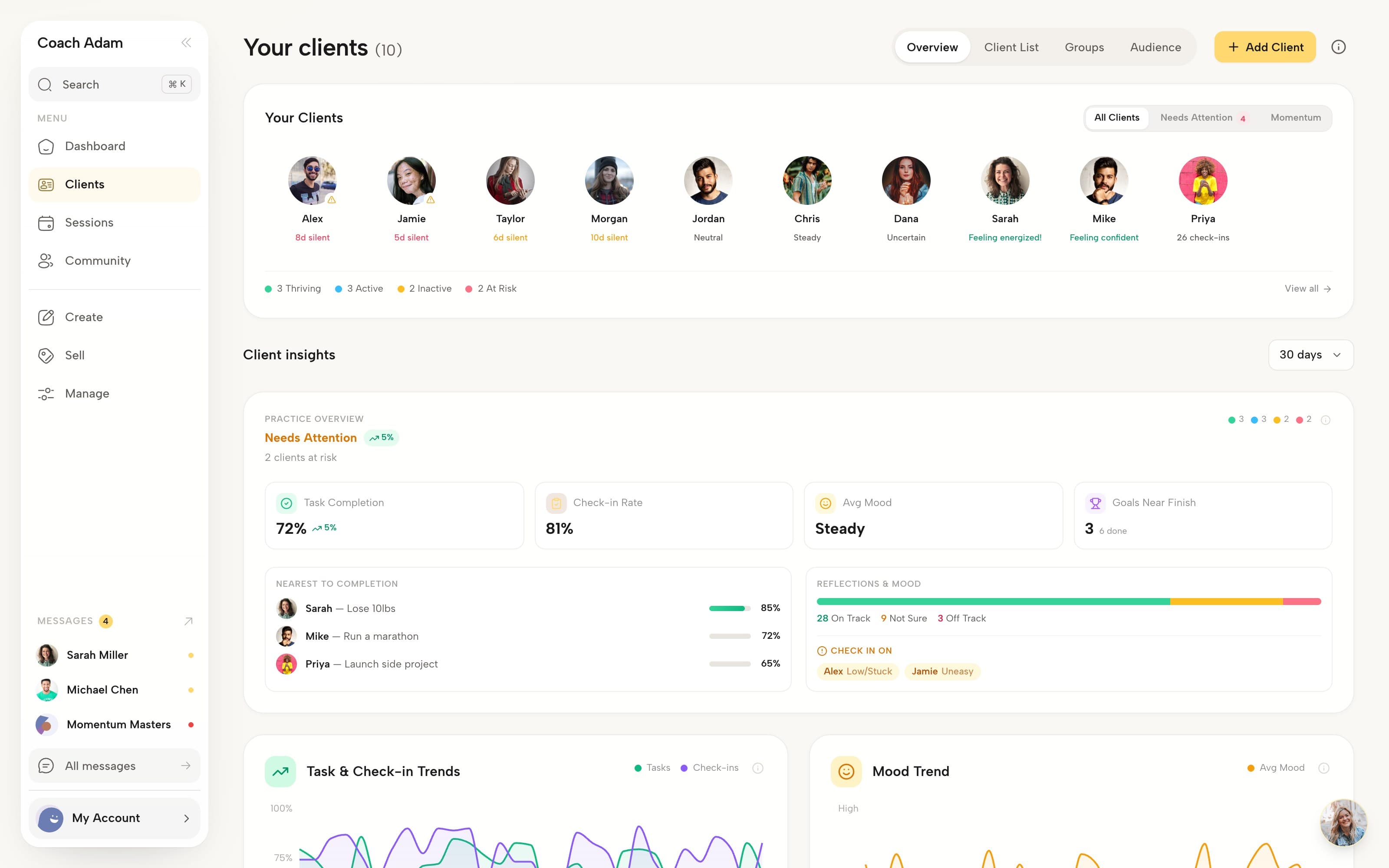
The Clients tab, captured from the live product.
One person, one history, from first enquiry to past client.
Leads, clients and past clients are stages of the same person, so nobody retypes anything when someone says yes.
Leads pipeline
Enquiries from forms, funnels, quizzes and bookings, with stages, the source attached and follow-up reminders.
Lead managementThe client record
Agreement, package, sessions, notes, progress and billing on one page, with a health status on the roster.
What this page is aboutArchived, with the history
Archive a client and everything stays. If they come back as a prospect, move them to Leads with the profile kept.
The coaching CRMPeople who only joined your community or bought a resource sit under Audience, apart from the clients you coach.
The small things that decide whether you actually open the record.
Built for the two minutes before a call, when you only need to know how they are doing.
Your roster,
between two calls.
The same clients and health statuses on your phone, so a quick check needs no laptop.
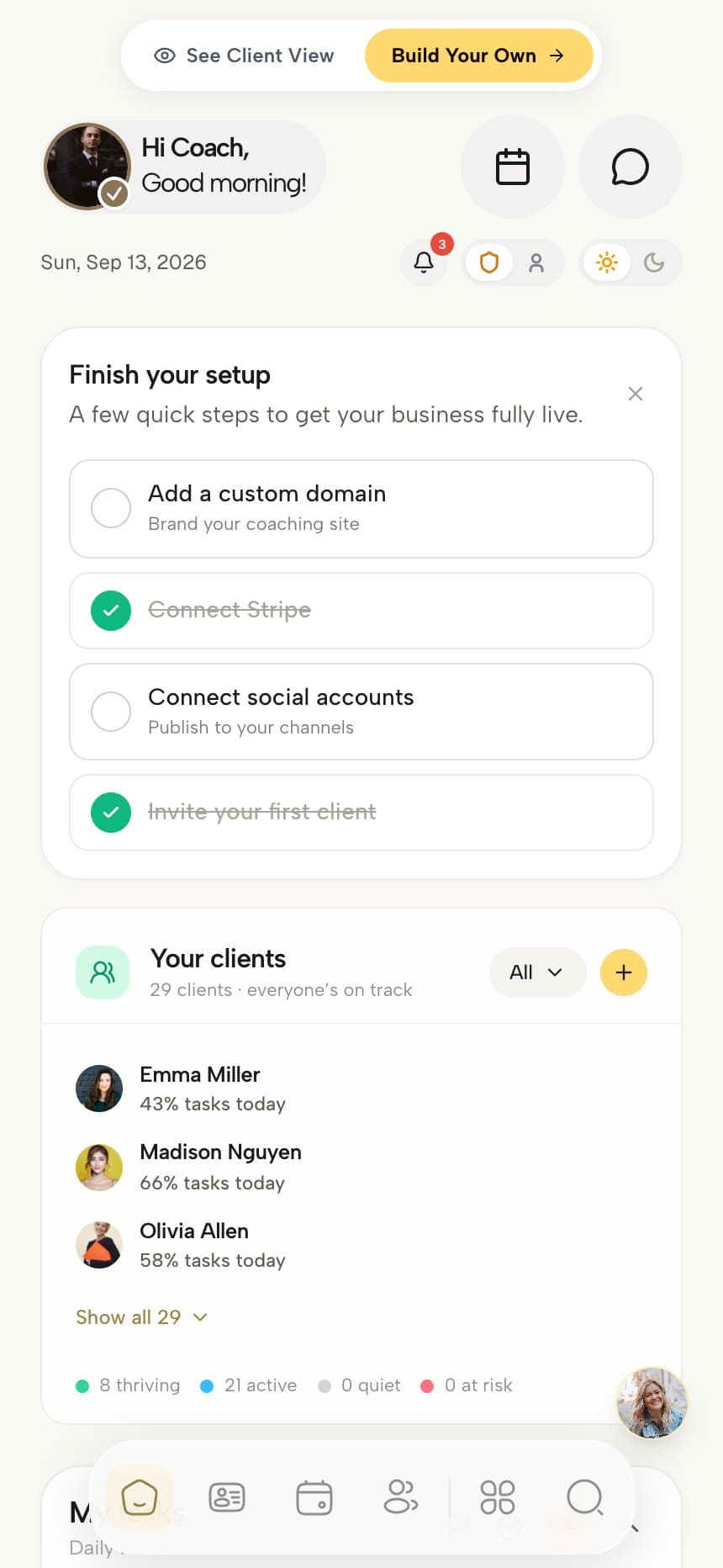

Three applications sent and her mood is up two weeks running. Ask about the salary conversation.
Walk in already briefed.
Michelle, the AI assistant, writes a short read on each client from their live data.
One menu on every row
Act on a client straight from the roster, without opening the record first.
Your assistant runs the diary, not the books.
Coach and virtual assistant roles with per-person permissions. A coach can be limited to the clients assigned to them.
Can be granted
Never for an assistant
Leave with everything
The roster as a CSV, or each client's notes, check-ins, goals, forms, sessions and chat as a ZIP.
A record before they join
Track an offline client in full, then invite them to the app when you choose.
Everything on the client record.
Every line below is in the product today. Team seats and roles come with the plans that include them.
One page per client, with everything on it
- Overview with their latest check-in, a briefing and an activity timeline
- Progress tab with goals, habits, tasks and outcome scorecards against a target
- Sessions tab with upcoming and past sessions and attendance
- Reflections tab with check-ins, journals and the worksheets they filled in
- Access tab listing the programs, courses and resources they have
- Contact details, timezone, alternate emails and tags on the profile
- An activity timeline you can filter by progress, coaching, resources and money
A roster that tells you who needs you this week
- Health statuses of thriving, active, quiet and at risk, with a days-silent signal
- Filters for invited, at risk, active, inactive and archived clients
- Tags you create, with a tag filter on the client list
- Client insights for task completion, check-in rate, average mood and goals near finish
- A Needs attention view that pulls out the clients at risk
- Row actions to add a note, assign a task, enrol, schedule or gift a session credit
- Bulk messaging, adding to a group and export for a selection of clients
Private notes for you, shared notes for them
- Private notes, visible only to you, for patterns and things to raise next time
- Shared session notes that appear in the client’s My Coaching hub
- Import past session notes from PDF, DOCX, TXT or Markdown, one session per file
- Original files kept as attachments on each imported session
- A per-client briefing from Michelle, the AI assistant, before you meet
- Intake and form answers stored on the record they came from
Money, agreements and documents on the same record
- Purchases: the programs, resources and bundles a client owns
- Invoices and payments, including manual payments you took off the platform
- Session credits remaining, with the option to gift a credit
- Signed agreements stored with the client, beside the files you uploaded
- Sponsors who receive the invoices or sign the agreement for a client
- A private renewal signal once a program or session package is two thirds used
Team access without handing over the business
On plans with team seats, add coaches and virtual assistants. Each role starts from defaults you set, and each person can have their own overrides. A coach can be limited to the clients assigned to them, and the money side of the practice can stay with the owner.
- Coach and virtual assistant roles, with per-person permission overrides
- Coaches limited to their assigned clients, or given the whole roster
- Revenue, payments, website and settings, which a virtual assistant can never be given
- An assigned coach shown on each client
- A team view of caseloads, programs and upcoming sessions per coach
- Clients without a team relationship flagged so nobody is left unassigned
Bring your clients in, and take everything out
Moving from a spreadsheet, CoachAccountable or Paperbell? Upload the contact export, map the columns and carry over remaining session credits with their expiry. Imported clients get a full record before they ever log in. When you need your data, export the roster as a CSV or every client’s history as a ZIP.
- Contact import from a spreadsheet, CoachAccountable or Paperbell export, with column mapping
- Remaining session credits imported with their expiry date
- Tracked clients: a full record for someone without an account, invited when you choose
- Roster export as a CSV with status, tags, programs and assigned coach
- Full data export as a ZIP: profile, programs, notes, check-ins, goals, forms, sessions and chat
- Archive a client and keep their history, or move them back to leads
- Help importing your clients, programs and content during onboarding
Loved by the coaches who actually use it.
“Coachful has everything a coach needs to manage their practice. It literally has everything I need to attract leads, convert those leads to clients, and deliver content with an incredible interface that has my branding on it.”

John Winders
Founder, SMPL
“Coachful brings scheduling, payments, client communication, programs, habit tracking and accountability together. Instead of managing several different apps, everything feels more organized and professional — for the coach and the client.”

Margie Wilson
Wounded to Warrior Recovery Coaching
“A really classy platform that is easy to navigate. I used to string together a website, funnel, CRM, course builder and scheduler. Coachful offers it all in one — and the AI assistant can design all of it. Made for coaches by coaches.”

Gilli Moon Aliotti
CEO, Hummm
Coachful is coaching client management software that keeps one record per client: contact details, the agreement, the package and its payments, every session, private and shared notes, intake answers, goals, habits, check-ins, tags and documents.
- This pageClients
- Sessions
- Payments
- Programs
- Habits
- Community
- Website
- AI assistant
Plans
7-day free trial · 0% platform fee
What it does
- Keeps one record per client with Overview, Progress, Sessions, Reflections, Access, Notes, Documents and Billing tabs.
- Shows an activity timeline of everything a client has done, filterable by progress, coaching, resources and money.
- Gives each client with an account a health status of thriving, active, quiet or at risk, with a days-silent signal.
- Filters the roster by status and by tags the coach creates, with bulk messaging, group assignment and export.
Good to know
- It does not integrate with Salesforce or HubSpot.
- Health statuses come from activity inside Coachful; work a client does in other tools is not counted.
- Team seats and staff permissions are only on plans that include team seats.

“Seriously. I have tried just about every coaching, booking, learning platform out there. I've tried developing my own.”
Client management software questions coaches ask
Open one page and know where every client is
Agreement, package, sessions, notes and progress on one record per client, and a roster that shows who needs you this week.



Built for coaches who take their clients seriously


